
A django-debug-toolbar panel that shows you template rendering times for Django

Project description

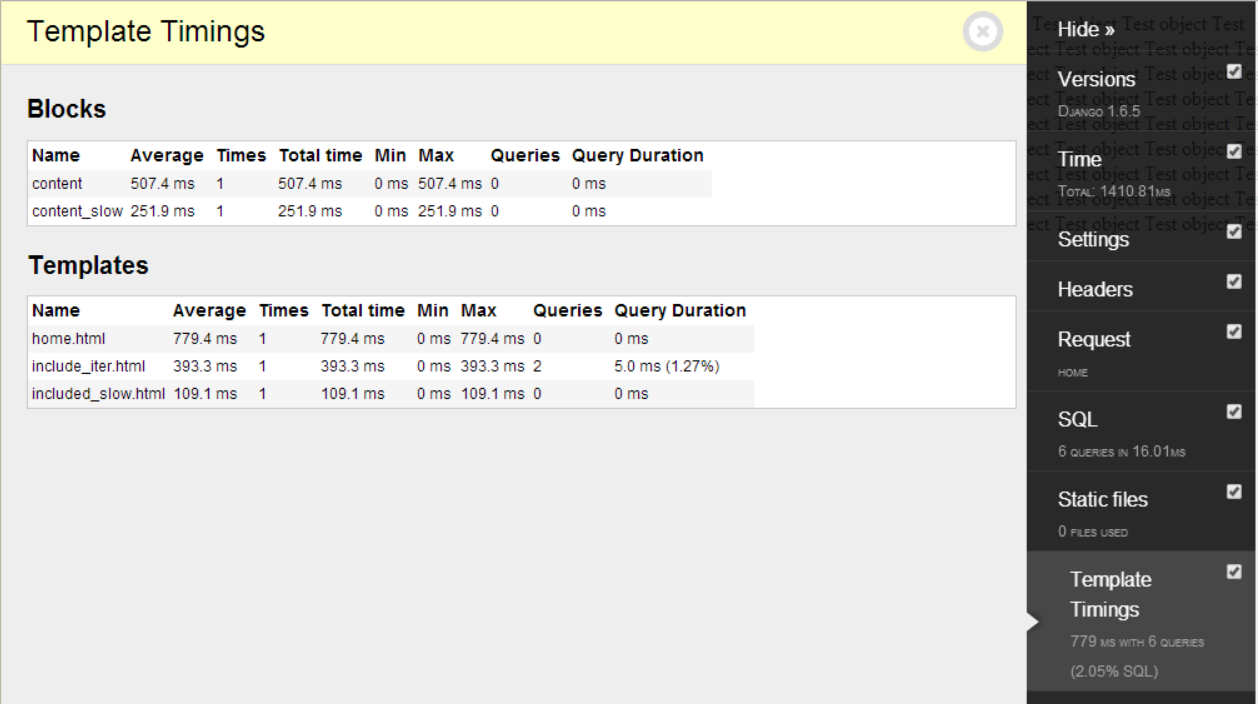
Template-timings is a panel for Django Debug Toolbar that gives an in-dept breakdown of the time it takes to render your Django templates (including templates included via {% extends %} and {% include %}).
Install
Install via pip (pip install django-debug-toolbar-template-timings) then add ‘template_timings_panel.panels.TemplateTimings.TemplateTimings’ to your DEBUG_TOOLBAR_PANELS setting, and add ‘template_timings_panel’ to your INSTALLED_APPS:
# http://django-debug-toolbar.readthedocs.org/en/latest/configuration.html#debug-toolbar-panels
DEBUG_TOOLBAR_PANELS = [
    ...
    'template_timings_panel.panels.TemplateTimings.TemplateTimings',
]

INSTALLED_APPS = [
    ...
    'template_timings_panel'
]
Screenshot
Frequently asked questions
How much overhead does this add?
In my experience this panel adds about 10% overhead. The panel uses the standard SQLPanel that ships with debug-toolbar to handle the SQL timings, so if you disable that the overhead will decrease and you can still see the render times.
The SQL count is different from the SQLPanel?
SQLPanel counts all queries that are executed, wherease this panel only counts queries that are executed while rendering a template.
Configuration
Configuration is optional. There is currently only one setting you can configure (the values below are the default):
IGNORED_TEMPLATES = ["debug_toolbar/*"] # Ignore these templates from the output
Release history Release notifications | RSS feed


Download files
Download the file for your platform. If you're not sure which to choose, learn more about installing packages.
Source Distribution
File details
Details for the file django-debug-toolbar-template-timings-0.6.5.tar.gz.
File metadata
- Download URL: django-debug-toolbar-template-timings-0.6.5.tar.gz
- Upload date:
- Size: 6.0 kB
- Tags: Source
- Uploaded using Trusted Publishing? No
File hashes
| Algorithm | Hash digest | |
|---|---|---|
| SHA256 |
142989c70173cf102fc575dc9fd17dd869405f3de0a86f0c3911f93f54bb9a3b
|
|
| MD5 |
a13c2ba80e8d6267de0d222287b5839c
|
|
| BLAKE2b-256 |
0ed2a0937b51811f4623ae0bc249ebdc5ec2e01a3381ae7eab7c28dff866c3c1
|






