
Django Explain Errors
Explains Django exceptions on the debug page, pointing at the real fix in your own source code.





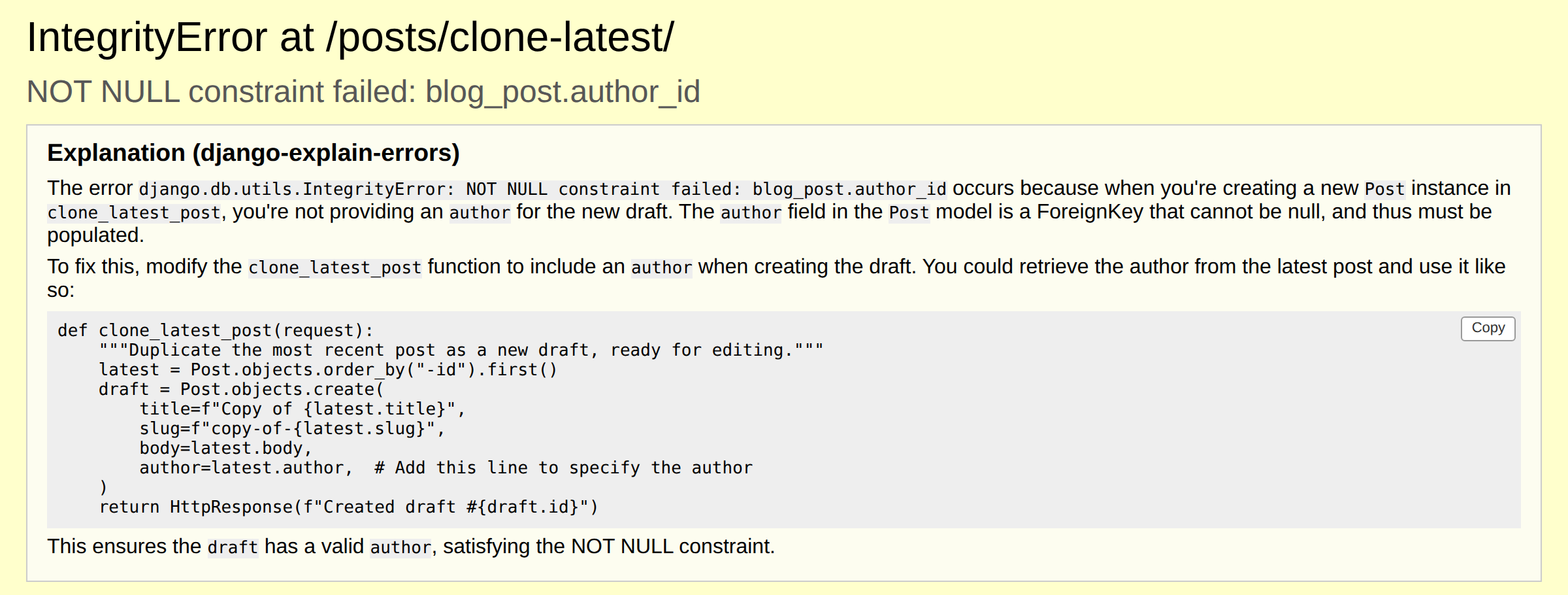
The traceback held only Django and SQLite internals. With RAG enabled, the explanation names the
failing function (clone_latest_post) and gives the one-line fix. Real gpt-4o-mini output from
the eval harness.
- Strongly recommended: enable RAG over your project, so explanations name the actual file and function instead of guessing (measured in the eval harness). It is off by default only because setup takes three steps.
- Works with OpenAI, Claude, or any OpenAI-compatible endpoint, including local models via Ollama
- Explanations in your language via
EXPLAIN_ERRORS_LANGUAGE, with code and identifiers kept in English - Sync and async views, traceback redaction, rate limiting
- Local development only: requires
DEBUG = True
Scope
This package explains errors for a person, not for a coding agent to consume programmatically. The explanation is written for a human reader, on Django's debug page in the browser or in a terminal, and the output format assumes that reader.
If a coding agent is doing the debugging, it does not need this. Agents read tracebacks directly,
and tools that expose live runtime state (debugger-over-MCP servers, mcp-django) serve that case
better. This package is not trying to compete there.
Features
- Captures Django errors and exceptions
- Shows the explanation on Django's debug page, directly under the
exception headline (
EXPLAIN_ERRORS_INJECT_DEBUG_PAGE, on by default) - Codebase-aware explanations via RAG over a local sqlite-vec index
(recommended; see "Codebase-aware explanations" below)
- Local embeddings via an optional extra: your codebase is indexed on your machine and never uploaded to an embeddings provider (only the traceback and a few relevant snippets reach your chat model; see Privacy)
- Separate embeddings provider config, so Anthropic users can use RAG
- Explains errors using OpenAI out of the box, Anthropic's Claude models, or any other
OpenAI-compatible endpoint (Ollama, LM Studio, Azure, gateways) via
OPENAI_BASE_URL, including fully local models, so no code has to leave your machine - Explanations in your language via
EXPLAIN_ERRORS_LANGUAGE, with exception names, identifiers, and code kept in English - Copy button on each code block in the explanation, so a suggested fix copies in one click
- Prints the explanation to stdout, for terminal workflows and logs
(
EXPLAIN_ERRORS_PRINT_STDOUT, on by default) - Optional JSON 500 response instead of the debug page
(
EXPLAIN_ERRORS_PRESERVE_DEBUG_PAGE = False) - Redacts common secret patterns, tokens, and emails (see Privacy)
- Rate limits API calls with a configurable sliding window
- Works with both sync (WSGI) and async (ASGI) views
- Manages the API key using environment variables
Installation
- Install django-explain-errors by running:
pip install django-explain-errors
-
Add the middleware to your Django project:
-
Open your
settings.pyfile and register the middleware only whenDEBUGis on (see Production Safety below for why):MIDDLEWARE = [ ... ] if DEBUG: MIDDLEWARE.append('explain_errors.middleware.ExplainErrorsMiddleware')
In the default preserve mode,
process_exceptionreturnsNone, so exception handling continues normally no matter where the middleware sits in the list — it no longer needs to be last to avoid pre-empting other packages' error handling. It still needs to sit close enough to the view that unhandled exceptions actually reach it, before any other middleware that might catch and handle them itself. If you setEXPLAIN_ERRORS_PRESERVE_DEBUG_PAGE=False, keep it last: returning a response there still ends exception handling early and pre-empts anything above it in the stack (Debug Toolbar, Sentry, Rollbar — see Compatibility below).
-
-
Set up environment variables:
-
Create a
.envfile in your project's root directory and add your API key. Alternatively, you can set it insettings.py:OPENAI_API_KEY=your_api_key_here
The API key is not required if you set
OPENAI_BASE_URLto a local server such as Ollama, which does not authenticate requests. -
Production Safety
This middleware is intended for local development only. When active, it sends exception tracebacks to the configured LLM provider, which include file paths, the source line of each frame, and the exception message (which can contain values). Local variables are not sent. Keep it out of production.
Primary safeguard: register the middleware only when DEBUG is on, or only in your
development settings module:
# settings.py
if DEBUG:
    MIDDLEWARE.append("explain_errors.middleware.ExplainErrorsMiddleware")
See Installation above for where the middleware can sit in MIDDLEWARE.
Secondary safeguard: run Django's deployment checks in CI against your production settings.
This fails the build if DEBUG = True (security.W018):
python manage.py check --deploy --fail-level WARNING
Usage
-
Ensure DEBUG is set to True:
Open your
settings.pyfile and set:DEBUG = True
-
Trigger an error in your Django application:
The middleware captures the error, sends it to the configured model for explanation, prints the explanation to stdout, and adds it as a banner on Django's debug page. By default (
EXPLAIN_ERRORS_PRESERVE_DEBUG_PAGE=True), exception handling then continues normally, so Django (or whatever else is watching, such asrunserver_plusor Sentry, see Compatibility below) renders its usual response. The only change is the banner on Django's own debug page. SetEXPLAIN_ERRORS_INJECT_DEBUG_PAGE = Falseto remove it, orEXPLAIN_ERRORS_PRESERVE_DEBUG_PAGE = Falseto instead get a JSON500response containing the error message and the explanation.In the terminal, the explanation is printed with the model that produced it:
Error explanation (gpt-4o-mini):
 The view raised a ValueError because ...
Debug page injection
When Django renders its debug page for a 500, explain_errors also inserts a banner
containing the explanation directly under the exception headline, in addition to printing
it to stdout.
Controlled by EXPLAIN_ERRORS_INJECT_DEBUG_PAGE, default True. Injection happens only
when all of the following hold:
DEBUGisTrueEXPLAIN_ERRORS_INJECT_DEBUG_PAGEisTrue(the default)EXPLAIN_ERRORS_PRESERVE_DEBUG_PAGEisTrue(the default). WithEXPLAIN_ERRORS_PRESERVE_DEBUG_PAGE=False, the JSON 500 path runs instead and there is no debug page to inject into.- an explanation was actually produced (not throttled, and the API call succeeded)
The banner appears only on the HTML debug page, styled inline (bordered box, light background) so it reads on Django's page. The explanation is HTML-escaped first, then a small Markdown subset (inline code, code blocks, bold, lists) is rendered as HTML. Nothing from the model is ever marked safe.
Each fenced code block gets a "Copy" button that copies the exact code (via
navigator.clipboard on secure contexts such as localhost, or a text-selection fallback
otherwise, for example when runserver is reached by IP over plain HTTP).
Fails open. Any problem building or inserting the banner (a missing request, an unexpected debug page layout, anything else) logs one warning and leaves Django's normal debug page untouched. This code can never turn a working debug page into a broken one.
Custom exception reporters. If your project already sets a custom
DEFAULT_EXCEPTION_REPORTER, or something earlier in the request sets
request.exception_reporter_class, explain_errors leaves it alone and skips injection
(logged at debug level) rather than overriding it.
Upgrading. Turning this on, or upgrading to a version where it defaults on, changes what Django's debug page looks like: a new section appears above the request metadata table. If you rely on the debug page's exact markup (a scraper, a screenshot test), account for this.
Async Support
The middleware exposes both sync_capable = True and async_capable = True. At initialization it inspects get_response to decide whether it is part of a sync or async chain:
- Under WSGI (for example
runserverwith sync views), requests flow through the synchronous handler. - Under ASGI (for example with async views), requests are awaited through the async handler. The blocking model API call is offloaded with
asgiref.sync.sync_to_asyncso the event loop is not blocked.
No additional settings are needed. See Installation above for where to place the middleware in MIDDLEWARE.
Compatibility
How this middleware interacts with other error-handling and debugging tools, in the default
preserve mode and with EXPLAIN_ERRORS_PRESERVE_DEBUG_PAGE=False:
| Package | Preserve mode (default) | EXPLAIN_ERRORS_PRESERVE_DEBUG_PAGE=False |
|---|---|---|
| Django Debug Toolbar | Works. Django renders its debug page (with the explanation banner, unless EXPLAIN_ERRORS_INJECT_DEBUG_PAGE = False), and Debug Toolbar injects into it. Verified with the banner present, with the toolbar middleware before or after this one, on WSGI and ASGI. |
Broken. The JSON 500 response has no HTML to inject into. |
| Sentry, Rollbar | Work — the exception propagates and Django re-raises it, so got_request_exception fires. |
Broken — returning a response ends exception handling before got_request_exception fires. |
| Django REST Framework | Partial — only exceptions DRF does not already handle itself reach this middleware. | Partial, same reason. |
| Silk and other profiling panels | Timings are inflated by the model API call, since process_exception blocks the request path. |
Same. |
| CORS, GZip, WhiteNoise | No interaction. | No interaction. |
runserver_plus / Werkzeug debugger |
Works — returning None re-raises the original exception, and django-extensions replaces Django's debug-page renderer with one that re-raises instead, so Werkzeug's WSGI wrapper catches it and shows the interactive debugger. |
Broken — the JSON 500 response ends exception handling before it reaches runserver_plus's exception hook, so the Werkzeug debugger never appears. |
Debug Toolbar, Sentry, and Werkzeug were verified empirically, on both Django 4.2 and Django 6.1, in both modes. The Debug Toolbar check was repeated with the explanation banner present (default preserve mode) on Django 4.2 and 6.1, under WSGI and ASGI, for sync and async views, with the toolbar middleware before and after this one. Both orderings work. Visual layout and toolbar JavaScript behavior were not checked. DRF, Silk, and CORS/GZip/WhiteNoise are reasoned from the mechanism rather than tested.
One additional behavior worth knowing, also verified on both Django versions: when the
explanation call itself fails (a bad key, a timeout, an unreachable endpoint), a
Sentry-instrumented project captures a separate event for that failure. explain_errors
catches the exception internally, so it never becomes an unhandled exception, but Sentry's
httpx integration captures it anyway by instrumenting inside the HTTP client library rather
than relying on got_request_exception. That event is unrelated to whatever error the
developer is actually investigating.
Configuration
| Setting / variable | Required | Description |
|---|---|---|
OPENAI_API_KEY (env or settings) |
Yes, unless OPENAI_BASE_URL points at an endpoint that does not authenticate |
API key used to authenticate with the configured endpoint. Read first from the environment, then from settings. |
DEBUG |
Yes | The middleware is only active when DEBUG=True. When False, requests pass through untouched. |
OPENAI_MODEL |
No | Model used for explanations. Defaults to gpt-4o-mini. |
OPENAI_MAX_TOKENS |
No | Ceiling on tokens generated for the explanation, not a target — the system prompt itself asks for a concise answer. Defaults to 1000; scales up automatically when EXPLAIN_ERRORS_LANGUAGE is set (see below), unless you set this explicitly, which always overrides the scaling. |
OPENAI_TIMEOUT |
No | Request timeout in seconds for model API calls. Defaults to 10. |
OPENAI_MAX_TRACEBACK_CHARS |
No | Total character budget for the traceback sent to the model. Application frames (your own code, as opposed to Django, the standard library, or installed packages) are always kept; library frames fill whatever budget remains, nearest the raise point first, with an ... N library frames omitted ... line where frames are dropped. If the application frames alone exceed the budget, falls back to keeping the last N characters of the raw traceback. Defaults to 3000. |
EXPLAIN_ERRORS_PRESERVE_DEBUG_PAGE |
No | When True (the default), the middleware returns None (after printing the explanation to stdout, unless EXPLAIN_ERRORS_PRINT_STDOUT = False), so exception handling continues normally and Django renders its debug page (with the explanation banner, controlled by EXPLAIN_ERRORS_INJECT_DEBUG_PAGE). Set to False to instead return a JSON 500 response, which ends exception handling early (see Compatibility above). |
EXPLAIN_ERRORS_INJECT_DEBUG_PAGE |
No | When True (the default), also injects the explanation as a banner into Django's debug page, in addition to stdout. Requires EXPLAIN_ERRORS_PRESERVE_DEBUG_PAGE=True (the default); see Debug Page Injection above. |
EXPLAIN_ERRORS_PRINT_STDOUT |
No | When True (the default), prints the explanation to stdout. Set to False to suppress it, for example when EXPLAIN_ERRORS_INJECT_DEBUG_PAGE already shows it in the browser. The failure message (when the model API call itself errors) always prints. For requests where nobody views the debug page (API clients, which get Django's plain-text error response, and fetch/HTMX requests, whose HTML response is never displayed), stdout is the only channel that shows the explanation, so turn this off only in browser-first workflows. |
OPENAI_BASE_URL (env or settings) |
No | Base URL for any OpenAI-compatible API (for example Ollama at http://localhost:11434/v1). When set, a missing API key is replaced with a placeholder since local servers do not require one. |
EXPLAIN_ERRORS_MAX_CALLS |
No | Together with EXPLAIN_ERRORS_WINDOW_SECONDS, caps API spend to at most this many explanations within a rolling window; once the cap is hit, further errors in that window are not sent for explanation until an earlier call ages out. Defaults to 5. |
EXPLAIN_ERRORS_WINDOW_SECONDS |
No | Length in seconds of the rolling window EXPLAIN_ERRORS_MAX_CALLS is measured against. Defaults to 60 (with the defaults, at most 5 explanations per 60-second window). |
EXPLAIN_ERRORS_REDACT_PATTERNS |
No | Extra regex pattern strings (each passed to re.compile) applied to the traceback, the RAG query, and indexed chunks (see Redaction), appended after the built-in secret/token/email patterns. An invalid pattern is skipped with a warning rather than raising. Defaults to []. |
EXPLAIN_ERRORS_REDACT_DISABLE_DEFAULTS |
No | When True, skips the built-in secret/token/email redaction patterns entirely and redacts only what EXPLAIN_ERRORS_REDACT_PATTERNS specifies. Turning this on removes the default protection against leaking secrets and PII in tracebacks, RAG queries, and indexed chunks (see Redaction). Defaults to False. |
EXPLAIN_ERRORS_REDACT_REPLACEMENT |
No | Replacement string substituted for anything matched by the redaction patterns. Defaults to "[REDACTED]". |
EXPLAIN_ERRORS_LANGUAGE |
No | Language the explanation prose is written in, as a plain name or code (for example "Spanish" or "es"). Defaults to None, meaning English. Exception names, identifiers, code, file paths, and tracebacks always stay in English regardless of this setting. |
EXPLAIN_ERRORS_DEDUP |
No | When True (the default), a repeat of an error already explained in this process replays the earlier explanation instead of calling the model or using a throttle slot. Two errors are identical when they have the same exception type, the same exception message, and the same innermost project line (file, line number, and that line's source text); editing the line makes it a new error. Keeps the last 128 distinct errors per worker (least recently used entries are evicted first) and entries never expire on a timer. Set to False to explain every error. |
Using local models (Ollama)
Point OPENAI_BASE_URL at any OpenAI-compatible server to run explanations
against a local model instead of the OpenAI API:
OPENAI_BASE_URL = "http://localhost:11434/v1"
OPENAI_MODEL = "llama3.1"
EXPLAIN_ERRORS_RAG_EMBED_MODEL = "nomic-embed-text"
With a local endpoint, no traceback or source code leaves your machine, which matters if you work somewhere that cannot send code to a third-party API.
If you use the RAG layer, rebuild the index after changing the embedding model or provider. Stored vectors are model-specific.
Using Anthropic (Claude) models
Anthropic's Claude models work today through Anthropic's OpenAI-compatible API, with no Anthropic-specific code required:
OPENAI_BASE_URL = "https://api.anthropic.com/v1/"
OPENAI_API_KEY = "your_anthropic_api_key_here"
OPENAI_MODEL = "..."  # see Anthropic's current model list below
OPENAI_MODEL is mandatory here: the default (gpt-4o-mini) doesn't exist on Anthropic's API
and will 404. Use one of the model names from
Anthropic's model overview;
model names are versioned and retired over time, so check that page rather than relying on a
name pinned here.
Anthropic documents this compatibility layer as intended primarily for testing and comparing model capabilities, not as a production integration path. That's an acceptable tradeoff for a development-only middleware, but worth knowing going in.
Reasoning models behind OPENAI_BASE_URL spend part of the token budget on internal reasoning
before producing visible output. At a low OPENAI_MAX_TOKENS, the budget can be used up by
reasoning alone, and the explanation comes back empty. Raise OPENAI_MAX_TOKENS if you see this.
RAG does not work with Anthropic alone
The RAG layer needs an embeddings endpoint, and
Anthropic's OpenAI-compatible API has none: POST /v1/embeddings returns HTTP 404
(not_found_error), and Anthropic does not offer its own embedding model. With only the
config above, build_error_index fails with an error saying so, and retrieval at request
time falls back to the traceback-only prompt.
To use RAG with Claude, keep Anthropic for chat and point embeddings at an OpenAI-compatible
provider with the EXPLAIN_ERRORS_RAG_EMBED_* settings:
# Chat: Anthropic
OPENAI_BASE_URL = "https://api.anthropic.com/v1/"
OPENAI_API_KEY = "your_anthropic_api_key_here"
OPENAI_MODEL = "..."

# Embeddings: any OpenAI-compatible embeddings provider (OpenAI shown)
EXPLAIN_ERRORS_RAG_ENABLED = True
EXPLAIN_ERRORS_RAG_EMBED_BASE_URL = "https://api.openai.com/v1/"
EXPLAIN_ERRORS_RAG_EMBED_API_KEY = "your_openai_api_key_here"
EXPLAIN_ERRORS_RAG_EMBED_MODEL = "text-embedding-3-small"
Each of the three settings falls back to the chat value when unset, with one exception for
safety: if EXPLAIN_ERRORS_RAG_EMBED_BASE_URL differs from the chat base URL,
EXPLAIN_ERRORS_RAG_EMBED_API_KEY is required, and ImproperlyConfigured is raised without
it. The chat key is never sent to a different provider. A local OpenAI-compatible
embeddings server that ignores keys still needs a dummy value, for example
"sk-no-key-required".
The embed settings are also read from environment variables of the same name, which take precedence over Django settings. Indexed source chunks are sent to the embeddings provider (after redaction), not to Anthropic.
No second key: local embeddings
If you would rather not use a second provider, run the embeddings on your own machine instead. Chat stays on Anthropic and no embeddings API key is needed:
# Chat: Anthropic
OPENAI_BASE_URL = "https://api.anthropic.com/v1/"
OPENAI_API_KEY = "your_anthropic_api_key_here"
OPENAI_MODEL = "..."

# Embeddings: on this machine
EXPLAIN_ERRORS_RAG_ENABLED = True
EXPLAIN_ERRORS_RAG_EMBED_BACKEND = "local"
See Local embeddings for the install command and what to expect.
A note on API keys and 401s
explain_errors reads OPENAI_API_KEY (see Configuration above); it does not read
provider-specific variables such as ANTHROPIC_API_KEY. If no key is found and
OPENAI_BASE_URL is set, the client substitutes a placeholder key rather than raising an
error — a convenience for local servers like Ollama or LM Studio, which ignore the key
entirely. Against a real remote endpoint such as Anthropic's, that placeholder is sent as-is
and rejected, so a missing OPENAI_API_KEY shows up as an opaque 401 Unauthorized rather
than a clear configuration error. If you see a 401 with OPENAI_BASE_URL pointed at a remote
provider, check that OPENAI_API_KEY — not a provider-specific variable — is actually set.
Privacy
This section describes what leaves your machine, when, and to which endpoint. It describes this package's behavior only. It makes no claims about what a provider does with data after receiving it; check your provider's own terms.
What is sent to the chat provider
On each error that triggers an explanation, one request goes to the endpoint set by
OPENAI_BASE_URL (OpenAI by default). Its contents:
- A fixed system prompt, plus the language name if
EXPLAIN_ERRORS_LANGUAGEis set. - The traceback: exception type and message, and for each frame the file path, line number,
and source line. Library frames are condensed to fit
OPENAI_MAX_TRACEBACK_CHARS(default 3000), and the result is redacted. Local variable values are not included, but the exception message can contain values. - With RAG enabled, up to
EXPLAIN_ERRORS_RAG_TOP_K(default 4) retrieved code chunks, each under a header with its file path and line range. The traceback and chunks together are capped atEXPLAIN_ERRORS_RAG_MAX_PROMPT_CHARS(default 6000). - The model name and token limit as request parameters, and your API key as the credential.
Nothing else is added: not the request path, headers, body, session, or user, and not your Django settings. The request object is never passed to the prompt builder.
Not every error causes a request. A repeat of an already explained error replays the cached
explanation (EXPLAIN_ERRORS_DEDUP, on by default), and calls are limited per worker process
to 5 per 60 seconds by default.
What is sent to the embeddings provider
Only when RAG is enabled and the embeddings backend is not local:
- When you run
build_error_index: every chunk of every.py,.html, and.txtfile underEXPLAIN_ERRORS_RAG_INCLUDE(default:BASE_DIR), after redaction. Directories named inEXPLAIN_ERRORS_RAG_EXCLUDEare skipped. The default ismigrations,venv,.venv,env,node_modules,static,media, and.git. Setting it replaces that list rather than extending it, and it matches directory names only, not individual files. File paths are not part of the embedded text. - On each error (RAG enabled): a query made of the exception type and message plus about five lines of source on each side of the innermost project frame, after redaction.
The index file itself stays on disk. It holds the redacted chunk text.
Summary by setup
| Setup | Indexing (your codebase) | Each error (traceback + snippets) |
|---|---|---|
| OpenAI chat + OpenAI embeddings | Redacted chunks go to OpenAI embeddings | Query goes to OpenAI embeddings; redacted traceback and retrieved snippets go to OpenAI chat |
| Anthropic chat + separate embeddings provider | Redacted chunks go to the embeddings provider only, not to Anthropic | Query goes to the embeddings provider; redacted traceback and retrieved snippets go to Anthropic |
| Any chat + local embeddings | Stays on your machine | Query is embedded locally; redacted traceback and retrieved snippets go to your chat provider |
| Local chat (e.g. Ollama) + local embeddings | Nothing leaves the machine* | Nothing leaves the machine* |
| No RAG | Not applicable, no index is built | Redacted traceback goes to your chat provider |
* Assumes the chat endpoint is genuinely local; the package sends to whatever
OPENAI_BASE_URL points at. The local embedding model is downloaded on first use (see
Local embeddings), which transfers the model to you and none of your code.
Redaction
Before any text is sent or stored, it passes through a regex-based redactor. By default it
replaces the following with [REDACTED] (EXPLAIN_ERRORS_REDACT_REPLACEMENT):
- Secret-like assignments. A name that starts with
secret,password,passwd,token,api_key(orapikey), orauth, followed by=or:, together with its value. The name may continue after the keyword with_or-and more word characters, or with a capitalized suffix, soSECRET_KEY,AWS_SECRET_ACCESS_KEY,secret-key, andapiKeyIdall match. A quote after the name is allowed, so dict keys such as'PASSWORD': 'x'match. A quoted value is redacted whole, spaces included. Text before the keyword stays:AWS_SECRET_ACCESS_KEY = "x"becomesAWS_[REDACTED]. - Credentials in URLs. In
scheme://user:pw@host, theuser:pwpart. The scheme and host stay. - Known key shapes, whatever the variable is called:
sk-(OpenAI, and Anthropic'ssk-ant-), Stripesk_live_andsk_test_, GitHubghp_,gho_,ghu_,ghs_,ghr_, andgithub_pat_, Slackxoxb-,xoxa-,xoxp-,xoxr-, andxoxs-, AWSAKIA, and GoogleAIza. Each needs a minimum run of characters after the prefix (for example 20 aftersk-), so short strings do not match. Authorizationheader values andBearertokens.- Email addresses.
Five Django settings start with a keyword but hold no secret, so they are never redacted:
AUTH_USER_MODEL, AUTHENTICATION_BACKENDS, AUTH_PASSWORD_VALIDATORS, PASSWORD_HASHERS,
and PASSWORD_RESET_TIMEOUT. The match is on the exact name.
It is applied to the traceback (after truncation), to the RAG query text, and to every chunk at index time, before the chunk is embedded or written to the index. It is not applied to file paths, which appear in tracebacks and in chunk headers.
Add your own regexes with EXPLAIN_ERRORS_REDACT_PATTERNS. They run after the defaults.
EXPLAIN_ERRORS_REDACT_DISABLE_DEFAULTS = True turns the defaults off.
Limits. This is pattern matching, not a secret scanner. Treat it as a safety net.
- A secret is only caught if its name contains one of the keywords above or its value has a
known shape. A bare
key,private_key, orcredentialsis not redacted, soprivate_key = "abc123"passes through. A barekeyis left alone on purpose, because redacting it would also hide ordinary code such as dict keys and cache keys. - Keys with an unknown prefix, or shorter than the length each shape requires, are not caught unless the name matches.
- An unquoted value with spaces is redacted up to the first space only, and a value that spans lines (a triple-quoted string, a PEM block) is not redacted past its first line.
- Some harmless names are redacted too. Any name that starts with a keyword followed by
_,-, or a capital letter matches, sotoken_countandPASSWORD_FIELDlose their values even though they are not secrets. Names that only begin with the same letters, such asauthor,authors, andtokenizer, are left alone. - Names, IP addresses, phone numbers, other personal data, and file paths (which can contain your username) are not redacted. Neither are values inside exception messages unless a pattern happens to match them.
settings.pynormally sits underBASE_DIR, so it is indexed by default. ItsSECRET_KEYandDATABASESpassword are caught, but a secret stored under a name with no keyword may not be. Add a pattern for your own naming, for exampleEXPLAIN_ERRORS_REDACT_PATTERNS = [r"(?i)(?:private_key|credentials)\w*\s*=\s*\S+"], leave the settings directory out ofEXPLAIN_ERRORS_RAG_INCLUDE, or use local embeddings.
DEBUG only
The middleware does nothing when DEBUG is False: no client is created and no request is
made. One thing is not tied to DEBUG: manage.py build_error_index is a command, so it
sends chunks to a non-local embeddings provider whenever you run it. For keeping the
middleware out of production, see Production Safety.
Telemetry
This package's own code contains no telemetry or analytics and makes no network requests
other than to the chat and embeddings endpoints you configure. Nothing is sent to the
maintainer. Its dependencies (openai, and optionally sqlite-vec and
sentence-transformers) are separate projects and are not covered by this statement.
Explanation language
By default, explanations are written in English. Set EXPLAIN_ERRORS_LANGUAGE to
read them in another language instead:
EXPLAIN_ERRORS_LANGUAGE = "Spanish" # or the code form, "es"
There is no fixed list of supported languages. EXPLAIN_ERRORS_LANGUAGE accepts
any language the configured model can write, because the setting adds one clause
to the system prompt (see LANGUAGE_CLAUSE_TEMPLATE in
explain_errors/middleware.py), not a translation catalog with its own
maintained language list. How well it works varies by model; see the known
limitation below.
This is independent of Django's own LANGUAGE_CODE, which controls the language your
site serves to its users, not the language you read explanations in. Regardless of
EXPLAIN_ERRORS_LANGUAGE, exception type names, Django and Python identifiers, code,
file paths, and tracebacks are always kept in English, so they stay greppable and
matchable against documentation and search results. Only the explanatory prose is
translated.
Known limitation: small local models behind OPENAI_BASE_URL (see "Using local
models" above) tend to degrade sharply outside English. Output quality with
EXPLAIN_ERRORS_LANGUAGE set does not transfer uniformly across providers — it is
generally solid against OpenAI and Anthropic's APIs, but a small local model that
writes fluent English explanations may produce broken or mixed-language output once
asked to switch languages.
When a language is configured and OPENAI_MAX_TOKENS isn't set explicitly, the
token ceiling defaults to 3,000 instead of 1,000, a flat 3x multiplier applied the
same way regardless of how well or poorly a given language is known to tokenize, so
explanations in languages that use more tokens per word than English aren't cut off
mid-sentence. This is a ceiling, not a target: billing follows tokens actually
generated, so the extra headroom costs nothing if unused. Setting OPENAI_MAX_TOKENS
explicitly always overrides this scaling, at any value, including one lower than the
unscaled 1,000 default. The multiplier itself is deliberately generous rather than
precise: the underlying tokens-per-word figures are estimates, not direct
measurements, and the default model (gpt-4o-mini) uses the o200k_base tokenizer,
which handles non-Latin scripts considerably better than the cl100k_base-era ratios
these estimates lean on.
Codebase-aware explanations (RAG)
By default, explanations are generated from the traceback alone. With the optional RAG (retrieval-augmented generation) layer enabled, the middleware also retrieves the most relevant chunks of your own project's source code from a local vector index and includes them in the prompt, so explanations can reference your actual functions and classes instead of guessing at them.
RAG needs a provider with an embeddings endpoint. Anthropic's OpenAI-compatible API has none, so Claude users must configure a separate embeddings provider or use local embeddings; see RAG does not work with Anthropic alone.
Recommended for most projects. It is opt-in only because setup takes three steps (install the extra, build the index, enable it), and it adds no dependencies or behavior until you do.
Install the extra
pip install django-explain-errors[rag]
This pulls in sqlite-vec, a single-file, no-server vector store. The core package stays dependency-light if you don't need RAG.
Build the index
Add explain_errors to INSTALLED_APPS (needed for Django to discover the
management command), then run:
python manage.py build_error_index
This walks your project, chunks Python files by top-level function/class (and other text files by fixed-size line windows), embeds each chunk through the configured embeddings provider (or on this machine with the local backend), and writes them to a local index file. Re-run it whenever your source changes meaningfully. Indexing is not automatic. Rebuilding is idempotent: it builds into a temp file and atomically replaces the previous index.
Enable it
# settings.py

EXPLAIN_ERRORS_RAG_ENABLED = True
Settings
| Setting | Default | Description |
|---|---|---|
EXPLAIN_ERRORS_RAG_ENABLED |
False |
Master switch for the RAG layer. |
EXPLAIN_ERRORS_RAG_INDEX_PATH |
<BASE_DIR>/.explain_errors_index.db |
Path to the local vector index file. |
EXPLAIN_ERRORS_RAG_TOP_K |
4 |
Number of chunks retrieved and injected into the prompt. |
EXPLAIN_ERRORS_RAG_EMBED_BACKEND |
"openai" |
"openai" embeds through an OpenAI-compatible endpoint. "local" embeds on this machine with sentence-transformers and needs no API key (see Local embeddings). Also read from the environment, which takes precedence. |
EXPLAIN_ERRORS_RAG_EMBED_MODEL |
"text-embedding-3-small" ("all-MiniLM-L6-v2" with the local backend) |
Embedding model used for indexing and retrieval. Must exist on the configured endpoint, or be a sentence-transformers model name for the local backend. |
EXPLAIN_ERRORS_RAG_EMBED_BASE_URL |
chat OPENAI_BASE_URL |
Base URL of the embeddings provider. Ignored by the local backend. Also read from the environment. Set it when chat and embeddings use different providers (see the Anthropic section). |
EXPLAIN_ERRORS_RAG_EMBED_API_KEY |
chat OPENAI_API_KEY |
Key for the embeddings provider. Ignored by the local backend. Also read from the environment. Required when the embed base URL differs from the chat one. |
EXPLAIN_ERRORS_RAG_INCLUDE |
None (defaults to BASE_DIR) |
List of directories to index. |
EXPLAIN_ERRORS_RAG_EXCLUDE |
migrations, venvs, node_modules, static, media, .git |
Directory names to skip while indexing. |
EXPLAIN_ERRORS_RAG_MAX_PROMPT_CHARS |
6000 |
Combined character budget for the traceback + retrieved source sections of the prompt. |
Chunks and queries are redacted before they are sent or written to the index; see Privacy for what is and isn't caught.
If RAG is enabled but the index is missing, sqlite-vec isn't installed, or
retrieval fails for any reason, the middleware logs a warning and falls back
to the traceback-only prompt. It never breaks error reporting.
RAG-grounded explanations tend to be longer than traceback-only ones. The default OPENAI_MAX_TOKENS already leaves generous headroom for this, but if you've lowered it, raise it back up when RAG is enabled so explanations are not truncated.
Local embeddings
Embeddings can run on your own machine, with no embeddings provider and no second API key. This also works with Anthropic for chat (see Using Anthropic).
Install the extra alongside rag:
pip install django-explain-errors[rag,local-embeddings]
Then set one setting:
EXPLAIN_ERRORS_RAG_ENABLED = True
EXPLAIN_ERRORS_RAG_EMBED_BACKEND = "local"
Then build the index as usual with python manage.py build_error_index.
What to expect:
- Install size. The extra pulls in
sentence-transformersand PyTorch. With the default PyTorch wheels on Linux that is roughly 1 to 2 GB; a CPU-only PyTorch build is much smaller. The core install and theragextra are unchanged. - First index build. The default model,
all-MiniLM-L6-v2, is downloaded the first time it is used (about 90 MB), then cached bysentence-transformers. SetEXPLAIN_ERRORS_RAG_EMBED_MODELto use a different sentence-transformers model. - First explanation after server start. The model is loaded once per process, so the first explanation that uses RAG after the dev server starts pays a one-time load. Later ones do not.
- Rebuild the index when you switch. Vectors from different models are not comparable. The
index records its backend, model, and vector size. If the current settings do not match, the
middleware logs one warning per process telling you to rerun
build_error_indexand falls back to the traceback-only prompt. It never queries a mismatched index. An index built before this feature existed counts as anopenaiindex. - A leftover OpenAI model name. If
EXPLAIN_ERRORS_RAG_EMBED_MODELis still set to an OpenAI model such astext-embedding-3-small, thelocalbackend raisesImproperlyConfigured. Unset it, or name a local model. EXPLAIN_ERRORS_RAG_EMBED_BASE_URLandEXPLAIN_ERRORS_RAG_EMBED_API_KEYare ignored by the local backend.
Privacy. Local embeddings keep your source off any embeddings API, but the traceback and retrieved snippets still go to your chat provider; see Privacy.
.gitignore
The index file is a local build artifact, not something to commit. Add it
to your project's .gitignore:
.explain_errors_index.db
(Adjust the path if you set EXPLAIN_ERRORS_RAG_INDEX_PATH to something
else.)
Before / after
A real result from the eval harness (missing_fk, one of the fixtures in
evals/fixtures.py): a view creates a new Post without setting the
required author foreign key. The traceback the model actually received
was already truncated to OPENAI_MAX_TRACEBACK_CHARS, so it contains no
application code at all, only Django/SQLite internals:
This example was recorded before 0.7.0, when tracebacks were trimmed to
their last N characters. Since 0.7.0 your application's frames are always
kept, so a traceback-only explanation would now see clone_latest_post
too. The measured results in "Does RAG actually help?" below were run
after that change.
...(truncated)...
  File ".../django/db/models/base.py", line 904, in save
    self.save_base(
  ...
  File ".../django/db/backends/utils.py", line 105, in _execute
    return self.cursor.execute(sql, params)
           ^^^^^^^^^^^^^^^^^^^^^^^^^^^^^^^^
  File ".../django/db/backends/sqlite3/base.py", line 359, in execute
    return super().execute(query, params)
           ^^^^^^^^^^^^^^^^^^^^^^^^^^^^^^
django.db.utils.IntegrityError: NOT NULL constraint failed: blog_post.author_id
Without RAG, traceback only:
The error "django.db.utils.IntegrityError: NOT NULL constraint failed: blog_post.author_id" occurs when you attempt to save a model instance but the
author_idfield does not receive a value, even though it requires one (is defined asNOT NULL).This typically indicates that the
authorfield in yourPostmodel (or similar) is mandatory, but you did not provide anauthorwhen creating or updating the post.To fix this:
Ensure that you are assigning a valid user or author instance to the
authorfield before saving thePostmodel. For example:post.author = some_user_instanceIf you intended for
author_idto be optional, adjust the model definition to allow null values by modifying the field:author = models.ForeignKey(User, on_delete=models.CASCADE, null=True)If the migration is necessary (if you did change the model), run:
python manage.py makemigrations
python manage.py migrate
Make sure that every time you save a
Post, it has a valid author assigned.
With RAG, grounded in the actual function:
The error
django.db.utils.IntegrityError: NOT NULL constraint failed: blog_post.author_idoccurs because when you're creating a newPostinstance inclone_latest_post, you're not providing anauthorfor the new draft. Theauthorfield in thePostmodel is a ForeignKey that cannot be null, and thus must be populated.To fix this, modify the
clone_latest_postfunction to include anauthorwhen creating the draft. You could retrieve the author from the latest post and use it like so:def clone_latest_post(request): """Duplicate the most recent post as a new draft, ready for editing.""" latest = Post.objects.order_by("-id").first() draft = Post.objects.create( title=f"Copy of {latest.title}", slug=f"copy-of-{latest.slug}", body=latest.body, author=latest.author, # Add this line to specify the author ) return HttpResponse(f"Created draft #{draft.id}")This ensures the
drafthas a validauthor, satisfying the NOT NULL constraint.
Does RAG actually help?
The package can explain an error in two ways:
- RAG-off (default): the model sees only the Django traceback.
- RAG-on: the model also sees relevant source code from your project, retrieved from a local index.
The eval harness in evals/ tests whether RAG-on explanations are more accurate, not just longer. It triggers 15 deliberately broken Django views, explains each one both ways, and has a separate judge model compare the two against the error's known cause and fix location. The judge doesn't know which explanation used RAG, and their order is randomized.
Results (3 runs, 43 scored comparisons): RAG-on won 35, RAG-off won 5, and 3 tied.
Most of the gap comes from two checks, measured on the 10 fixtures whose cause is in the app's own code (30 comparisons):
- Points to the right file and function: RAG-on 26, RAG-off 13
- Avoids invented details: RAG-on 26, RAG-off 17
Without your source, gpt-4o-mini tends to invent a plausible function name or parameter rather than admit it doesn't know. With the real code in front of it, it mostly doesn't.
Limitations:
- RAG can retrieve the wrong code. In one fixture (
missing_post_key), it pointed the fix at a template instead of the view. - The judge checks claims against the same source RAG-on retrieves from, which may inflate RAG-on's score for avoiding invented details.
- Claims are spot-checked, not fully audited. All 14 claims flagged on one run held up on manual review, but that is a sample, not proof.
Full results, methodology, and how to reproduce (about $1.37 per --runs 3 pass) are in evals/README.md.
License
This project is licensed under the MIT License. See the LICENSE file for details.
Contributing
Contributions are welcome! Please open an issue or submit a pull request for any improvements or bug fixes.
Acknowledgements
1 maintainer

Metadata
1 maintainer
Release files for django-explain-errors 0.11.0
For a detailed explanation of source distributions (sdists) and built distributions (wheels), please see the package formats documentation.
Source distribution (sdist)
| File | Size | Uploaded | |
|---|---|---|---|
| django_explain_errors-0.11.0.tar.gz | 101.0 kB | Details |
Built distribution (wheel)
| File | Interpreter | ABI | Platform | Reset |
|---|---|---|---|---|
| django_explain_errors-0.11.0-py3-none-any.whl | Python 3 | none | any | Details |
Total release size: 142.4 kB
Release files / django_explain_errors-0.11.0.tar.gz
| Download URL | django_explain_errors-0.11.0.tar.gz |
|---|---|
| Size | 101.0 kB |
| Tags | Source |
|
SHA-256 checksum How to use checksums |
72115124b7c85220c57feb8cf87c27db07bce65fedf17345a4afae6c463af185
|
|
BLAKE2b-256 checksum How to use checksums |
722943294548ae5e6e75def2cb3ac04ba9eeb602adde595ea9866ce3e3ea8f96
|
| Upload date | |
|
Uploaded using Trusted Publishing? What is trusted publishing? |
Yes |
| Uploaded via |
twine/7.0.0 CPython/3.13.14
|
Provenance
Provenance describes where a file came from. On PyPI, provenance is shared via attestations, which provide a verifiable record of the build or publishing details. View details, limitations and caveats.


PyPI Publish Attestation
PyPI verified that this artifact, at this checksum, originated from the publisher listed below.
Signed by GitHub Actions, verified by PyPI on Oct 11, 2026.
Transparency logRelease files / django_explain_errors-0.11.0-py3-none-any.whl
| Download URL | django_explain_errors-0.11.0-py3-none-any.whl |
|---|---|
| Size | 41.4 kB |
| Tags | Python 3 |
|
SHA-256 checksum How to use checksums |
c1da4e9f9e474bffacc7821d07f93893a44b31361c50027414d81191b869d4c3
|
|
BLAKE2b-256 checksum How to use checksums |
cba50d4d9e2e9e7346ece806f9df97ff80cd9669797fc509ff2b461bd031aec6
|
| Upload date | |
|
Uploaded using Trusted Publishing? What is trusted publishing? |
Yes |
| Uploaded via |
twine/7.0.0 CPython/3.13.14
|
Provenance
Provenance describes where a file came from. On PyPI, provenance is shared via attestations, which provide a verifiable record of the build or publishing details. View details, limitations and caveats.
PyPI Publish Attestation
PyPI verified that this artifact, at this checksum, originated from the publisher listed below.
Signed by GitHub Actions, verified by PyPI on Oct 11, 2026.
Transparency log













