
🩻 🗺️ django-large-image





django-large-image is an abstraction of large-image
for use with django-rest-framework providing viewset mixins for endpoints to
work with large images (Cloud Optimized GeoTiffs or medical image formats) in
Django. The dynamic tile server provided here prevents the need for
preprocessing large images into tile sets for viewing interactively on
slippy-maps. Under the hood, large-image applies operations (rescaling,
reprojection, image encoding) to create image tiles on-the-fly.
| Lightning Talk for 2022 Cloud-Native Geospatial Outreach Event |
|---|
 |
| View slides here |
Table of Contents
ℹ️ Overview
This package brings Kitware's large-image to Django by providing a set of abstract, mixin API viewset classes that will handle tile serving, fetching metadata from images, and extracting regions of interest.
django-large-image is an installable Django app with
a few classes that can be mixed into a Django project (or application)'s
drf-based viewsets to provide tile serving endpoints out of the box. Notably,
django-large-image is designed to work specifically with FileField
interfaces with development being tailored to Kitware's
S3FileField. GeoDjango's GDALRaster
can also be used by returning GDALRaster.name in the get_path() override.
This package ships with pre-made HTML templates for rendering geospatial image tiles with CesiumJS and non-geospatial image tiles with GeoJS.
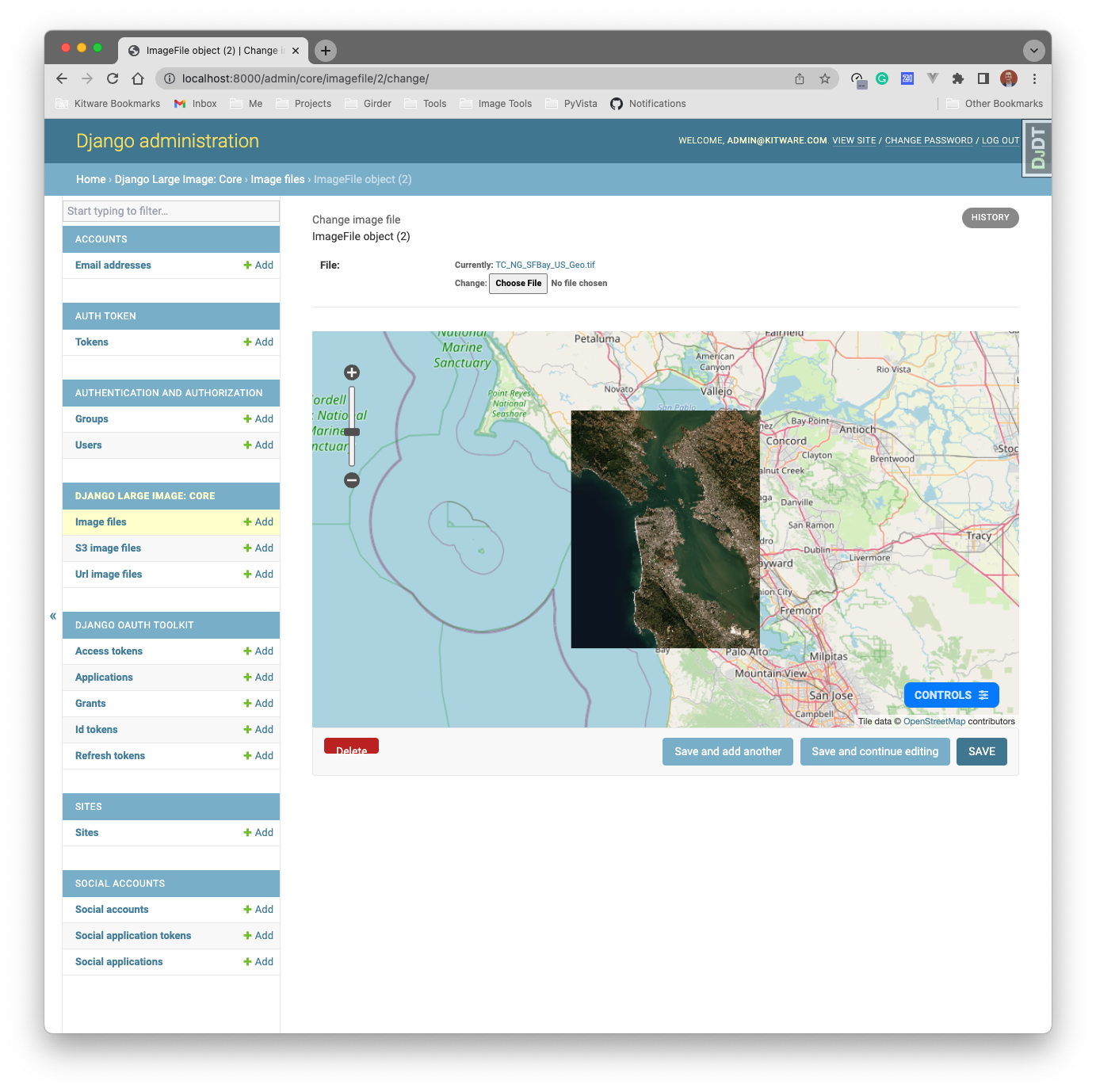
Dynamic tile server in Django built on top of large-image (and GDAL)
🤝 Support
django-large-image and the supporting large-image
library are developed and maintained by the Data & Analytics group at
Kitware, Inc.
We work with large image data in both the geospatial and medical capacities.
If you have questions about these technologies, or you would like to discuss
your own geospatial and medical image problems and learn how we can help,
please reach out at kitware@kitware.com. We look forward to the conversation!
🌟 Features
Rich set of RESTful endpoints to extract information from large image formats:
- Image metadata (
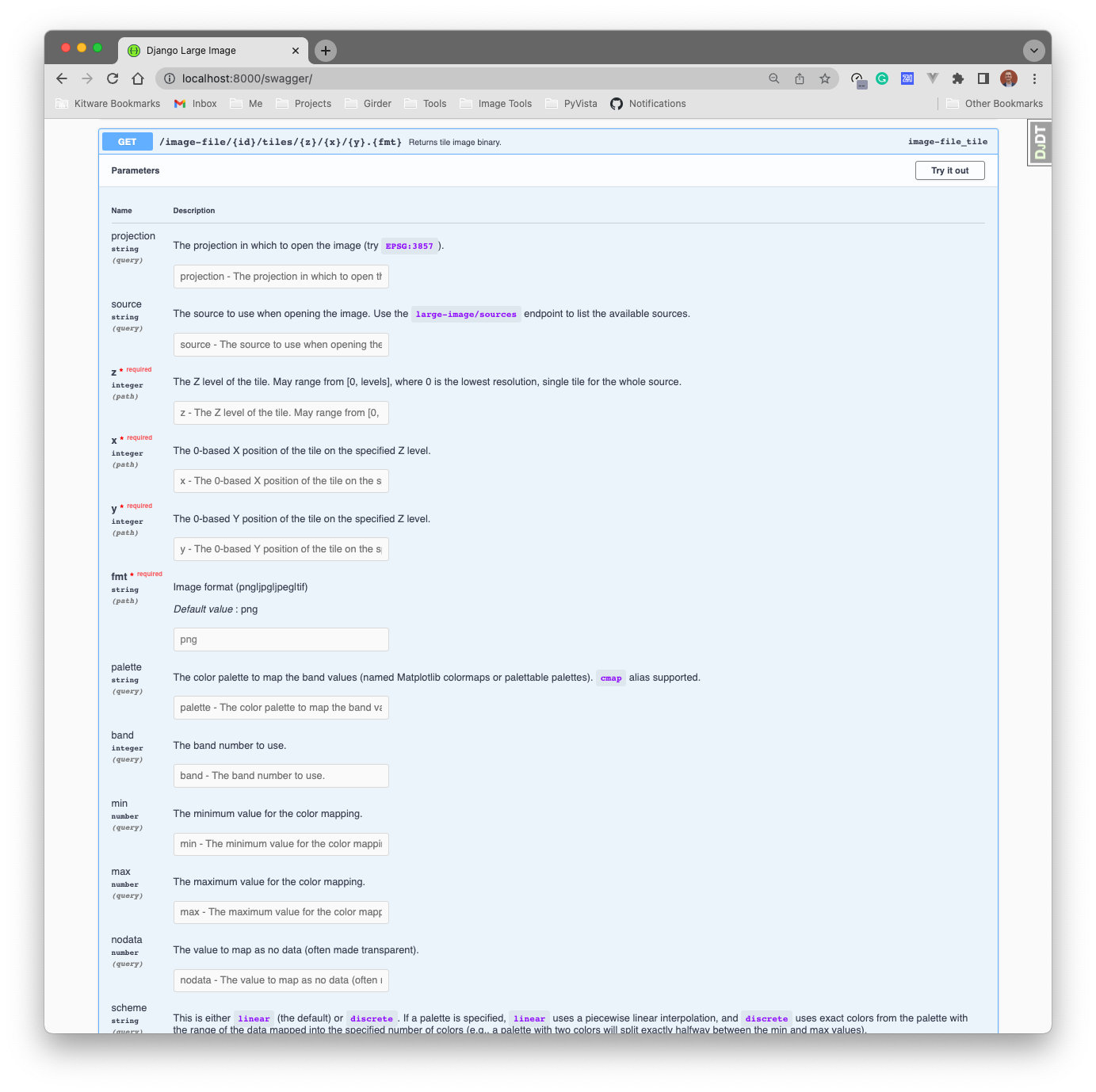
/info/metadata,/info/metadata_internal) - Tile serving (
/tiles/{z}/{x}/{y}.png?projection=EPSG:3857) - Region extraction (
/data/region.tif?left=v&right=v&top=v&bottom=v) - Image thumbnails (
/data/thumbnail.png) - Individual pixels (
/data/pixel?left=v&top=v) - Band histograms (
/data/histogram)
Support for any storage backend:
- Supports Django's
FileField - Supports
S3FileField - Customizable method for handling data access (
get_pathoverride) - Supports GDAL's Virtual File System for
s3://,ftp://, etc. URLs
Miscellaneous:
- Admin interface widget for viewing image tiles.
- Caching
- image tiles and thumbnails are cached to prevent recreating these data on multiple requests
- utilizes the Django cache framework. Specify a named cache to use with the
LARGE_IMAGE_CACHE_NAMEsetting.
- Easily extensible SSR templates for tile viewing with CesiumJS and GeoJS
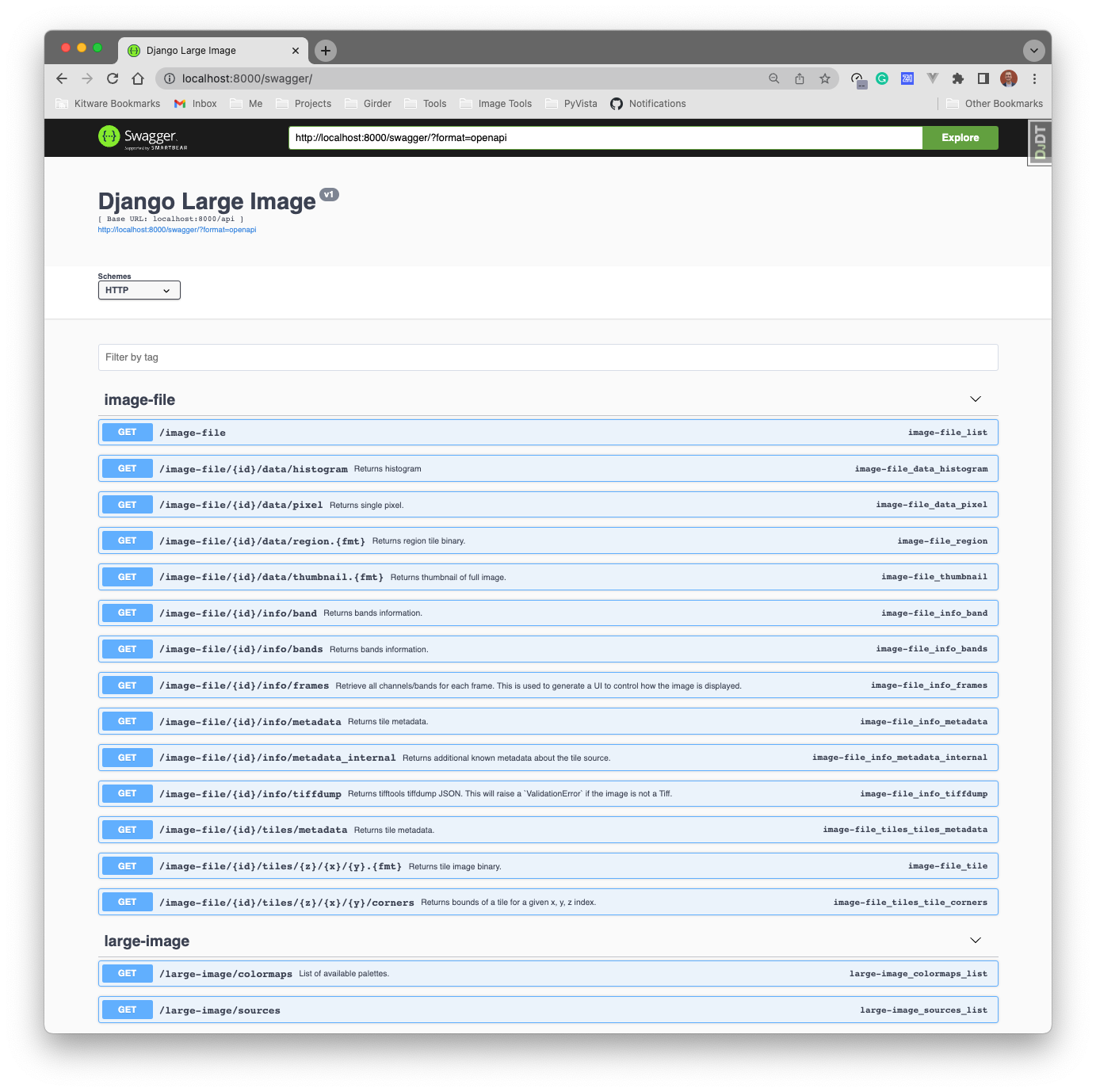
- OpenAPI specification
| OpenAPI Documentation | Tiles Endpoint |
|---|---|
 |
 |
⬇️ Installation
Out of the box, django-large-image only depends on the core large-image
module, but you will need a large-image-source-* module in order for this
to work. Most of our users probably want to work with geospatial images so we
will focus on the large-image-source-gdal and ``large-image-source-rasteriocases, but it is worth noting thatlarge-image` has source modules for a wide
variety of image formats (e.g., medical image formats for microscopy).
See large-image's
installation instructions for more details.
🎡 pip
Rasterio
pip install \
  django-large-image \
  'large-image[rasterio,pil]>=1.35.4'
GDAL
Tip: installing GDAL is notoriously difficult, so at Kitware we provide
pre-built Python wheels with the GDAL binary bundled for easily installation in
production linux environments. To install our GDAL wheel, use:
pip install --find-links https://girder.github.io/large_image_wheels GDAL
pip install \
  --find-links https://girder.github.io/large_image_wheels \
  django-large-image \
  'large-image[gdal,pil]>=1.35.4'
🐍 Conda
Or install with conda:
conda install -c conda-forge django-large-image large-image-source-rasterio
conda install -c conda-forge django-large-image large-image-source-gdal
🚀 Usage
Simply install the app and mixin one of the mixing classes to your
existing django-rest-framework viewset.
# settings.py
INSTALLED_APPS = [
    ...,
    'django_large_image',
]
The following are the provided mixin classes and their use case:
LargeImageMixin: for use with a standard, non-detailViewSet. Users must implementget_path()LargeImageDetailMixin: for use with a detail viewset likeGenericViewSet. Users must implementget_path()LargeImageFileDetailMixin: (most commonly used) for use with a detail viewset likeGenericViewSetwhere the associated model has aFileFieldstoring the image data.LargeImageVSIFileDetailMixin: (geospatial) for use with a detail viewset likeGenericViewSetwhere the associated model has aFileFieldstoring the image data that is intended to be read with GDAL/rasterio. This will access the data over GDAL's Virtual File System interface (a VSI path) instead of downloading the file to local disk. Useful for S3 or MinIO storage of images. See GDAL Virtual File System (VSI) for configuration details.
Most users will want to use LargeImageFileDetailMixin and so the following
example demonstrate how to use it:
Specify the FILE_FIELD_NAME as the string name of the FileField in which
your image data are saved on the associated model.
# viewsets.py
from rest_framework import viewsets
from django_large_image.rest import LargeImageFileDetailMixin

class MyModelViewSet(viewsets.GenericViewSet, LargeImageFileDetailMixin):
  ...  # configuration for your model's viewset
  FILE_FIELD_NAME = 'field_name'
# urls.py
from django.urls import include, path
from rest_framework.routers import SimpleRouter

from myapp.viewsets import MyModelViewSet

router = SimpleRouter(trailing_slash=False)
router.register(r'api/my-model', MyModelViewSet)

urlpatterns = [
  # Additional, standalone URLs from django-large-image
  path('', include('django_large_image.urls')),
] + router.urls
Optional Cache Configuration
Large Image leverages a cache to optimize performance (see Large Image caching docs). By default, django-large-image will use a Django-based cache. You may also use certain settings to customize the caching behavior and/or use a different cache backend.
The Large Image configuration options specify several cache options, all prefixed with cache_. To set any of these options, specify them in the settings of your Django app as all-caps attributes prefixed with LARGE_IMAGE_. For example, to set Redis as your cache backend, you may specify the following settings:
LARGE_IMAGE_CACHE_BACKEND = "redis"
LARGE_IMAGE_CACHE_REDIS_URL = [redis_url]
LARGE_IMAGE_CACHE_REDIS_USERNAME = [redis_username]
LARGE_IMAGE_CACHE_REDIS_PASSWORD = [redis_password]
In addition to the configuration options listed in the docs linked above, one additional configuration option exists to set the name of the cache. You may set LARGE_IMAGE_CACHE_NAME as any string value. Otherwise, the name will simply be "default".
And that's it!
📝 Example Code
To use the mixin classes provided here, add django_large_image to the
INSTALLED_APPS of your Django project, then create a model, serializer,
and viewset in your Django project like so:
# models.py
from django.db import models
from rest_framework import serializers


class ImageFile(models.Model):
    name = models.TextField()
    file = models.FileField()


class ImageFileSerializer(serializers.ModelSerializer):
    class Meta:
        model = ImageFile
        fields = '__all__'
# admin.py
from django.contrib import admin
from example.core.models import ImageFile


@admin.register(ImageFile)
class ImageFileAdmin(admin.ModelAdmin):
    list_display = ('pk', 'name')
Then create the viewset, mixing in the django-large-image viewset class:
# viewsets.py
from example.core import models
from rest_framework import mixins, viewsets

from django_large_image.rest import LargeImageFileDetailMixin


class ImageFileDetailViewSet(
    mixins.ListModelMixin,
    viewsets.GenericViewSet,
    LargeImageFileDetailMixin,
):
    queryset = models.ImageFile.objects.all()
    serializer_class = models.ImageFileSerializer

    # for `django-large-image`: the name of the image FileField on your model
    FILE_FIELD_NAME = 'file'
Then register the URLs:
# urls.py
from django.urls import include, path
from example.core.viewsets import ImageFileDetailViewSet
from rest_framework.routers import SimpleRouter

router = SimpleRouter(trailing_slash=False)
router.register(r'api/image-file', ImageFileDetailViewSet)

urlpatterns = [
  # Additional, standalone URLs from django-large-image
  path('', include('django_large_image.urls')),
] + router.urls
(Optional) You can also use an admin widget for your model:
<!-- templates/admin/myapp/imagefile/change_form.html -->
{% extends "admin/change_form.html" %}

{% block after_field_sets %}

<script>
  var baseEndpoint = 'api/image-file';
</script>

{% include 'admin/django_large_image/_include/geojs.html' %}

{% endblock %}
Please note the example Django project in the project/ directory of this
repository that shows how to use django-large-image in a girder-4 project.
GDAL Virtual File System (VSI)
For geospatial images stored remotely (S3, MinIO, or HTTP URLs), you can avoid downloading entire files by reading them through GDAL's Virtual File System.
LargeImageVSIFileDetailMixin
Use LargeImageVSIFileDetailMixin instead of LargeImageFileDetailMixin when
your FileField is backed by remote storage (for example,
S3FileField or MinIO) and
you want GDAL or rasterio to read the image in place.
# viewsets.py
from rest_framework import viewsets

from django_large_image.rest import LargeImageVSIFileDetailMixin


class MyRemoteImageViewSet(viewsets.GenericViewSet, LargeImageVSIFileDetailMixin):
    FILE_FIELD_NAME = 'file'
    # Optional: skip presigned URLs and open via /vsis3/bucket/key
    # USE_PRESIGNED_URLS = False
This mixin:
- By default (
USE_PRESIGNED_URLS = True), reads the file URL from the model'sFileField(often a presigned URL), converts it withmake_vsi, and passes that path tolarge-image - With
USE_PRESIGNED_URLS = False, builds ans3://bucket/keyURL from the storage backend (MinIO or django-storages S3) somake_vsialways yields a/vsis3/path — preferred when GDAL AWS credentials/endpoint are configured
make_vsi
Use large_image.tilesource.geo.make_vsi
to convert a URL into a GDAL-compatible VSI path:
s3://bucket/key.tifto/vsis3/bucket/key.tifhttps://...orhttp://...to/vsicurl?...by default, or/vsis3/...whenforce_gdal_vsis3is enabled (see MinIO below)
GDAL environment variables
GDAL reads configuration from environment variables (or GDAL config options). The following are commonly needed when using VSI paths.
AWS_ACCESS_KEY_ID - S3 or S3-compatible credentials
AWS_SECRET_ACCESS_KEY - S3 or S3-compatible credentials
AWS_S3_ENDPOINT - Non-AWS S3 (MinIO, etc.) - Host and port, e.g. localhost:9000. GDAL 3.11+ also accepts http:// or https:// URLs.
AWS_VIRTUAL_HOSTING - MinIO and path-style buckets - Set to FALSE for MinIO
AWS_HTTPS - Local HTTP MinIO - Set to NO when MinIO is not using TLS
AWS_REGION - Optional - Defaults to us-east-1
LARGE_IMAGE_FORCE_GDAL_VSIS3 - MinIO and other S3-compatible storage - When true, make_vsi maps http/https URLs to /vsis3/ instead of /vsicurl/. Set as a Django setting or environment variable.
See the GDAL /vsis3/ documentation for the full list of supported options.
Using MinIO
When using MinIO (or another S3-compatible store) with LargeImageVSIFileDetailMixin,
prefer USE_PRESIGNED_URLS = False on the viewset so the mixin builds
s3://bucket/key → /vsis3/bucket/key from storage metadata. Configure GDAL's
AWS variables so /vsis3/ can reach MinIO. GDAL reads those from the process
environment, so set them in settings.py (including for Celery workers that
load the same settings module):
# viewsets.py
class MyMinioImageViewSet(viewsets.GenericViewSet, LargeImageVSIFileDetailMixin):
    FILE_FIELD_NAME = 'file'
    USE_PRESIGNED_URLS = False
# settings.py when using MinIO with /vsis3/
import os

# Only needed if you keep USE_PRESIGNED_URLS=True and pass http/https URLs
# through make_vsi instead of bucket/key:
# LARGE_IMAGE_FORCE_GDAL_VSIS3 = True

# GDAL /vsis3/ access for MinIO. Use the same values as your MinIO storage config.
os.environ.setdefault('AWS_ACCESS_KEY_ID', MINIO_STORAGE_ACCESS_KEY)
os.environ.setdefault('AWS_SECRET_ACCESS_KEY', MINIO_STORAGE_SECRET_KEY)
os.environ.setdefault('AWS_S3_ENDPOINT', MINIO_STORAGE_ENDPOINT)
os.environ.setdefault('AWS_VIRTUAL_HOSTING', 'FALSE')
os.environ.setdefault('AWS_HTTPS', 'NO')
🛠️ Customization
The mixin classes are modularly designed and able to be subclassed
for your project's needs. While the provided LargeImageFileDetailMixin handles
FileField-interfaces, you can easily extend its base class,
LargeImageDetailMixin, to handle any mechanism of data storage in your
detail-oriented viewset.
In the following example, we demonstrate how to use GDAL compatible VSI paths
from a model that stores s3:// or https:// URLs.
# models.py
from django.db import models
from rest_framework import serializers


class URLImageFile(models.Model):
    name = models.TextField()
    url = models.TextField()


class URLImageFileSerializer(serializers.ModelSerializer):
    class Meta:
        model = URLImageFile
        fields = '__all__'
# admin.py
from django.contrib import admin
from example.core.models import URLImageFile


@admin.register(URLImageFile)
class URLImageFileAdmin(admin.ModelAdmin):
    list_display = ('pk', 'name')
# viewsets.py
from example.core import models
from rest_framework import mixins, viewsets

from large_image.tilesource.geo import make_vsi

from django_large_image.rest import LargeImageDetailMixin


class URLLargeImageMixin(LargeImageDetailMixin):
    def get_path(self, request, pk=None):
        object = self.get_object()
        return make_vsi(object.url)


class URLImageFileDetailViewSet(
    mixins.ListModelMixin,
    viewsets.GenericViewSet,
    URLLargeImageMixin,
):
    queryset = models.URLImageFile.objects.all()
    serializer_class = models.URLImageFileSerializer
Here is a good test image: https://oin-hotosm.s3.amazonaws.com/59c66c5223c8440011d7b1e4/0/7ad397c0-bba2-4f98-a08a-931ec3a6e943.tif
🥸 Non-Detail ViewSets
The LargeImageMixin provides a mixin interface for non-detail viewsets (no
associated model or primary key required). This can be particularly useful if
your viewset has custom logic to retrieve the desired data.
For example, you may want a viewset that gets the data path as a URL embedded
in the request's query parameters. To do this, you can make a standard ViewSet
with the LargeImageMixin like so:
# viewsets.py
from rest_framework import viewsets
from rest_framework.exceptions import ValidationError

from large_image.tilesource.geo import make_vsi

from django_large_image.rest import LargeImageMixin


class URLLargeImageViewSet(viewsets.ViewSet, LargeImageMixin):
    def get_path(self, request, pk=None):
        try:
            url = request.query_params.get('url')
        except KeyError:
            raise ValidationError('url must be defined as a query parameter.')
        return make_vsi(url)
🪄 Styling
django-large-image's dynamic tile serving supports band styling and making
composite images from multiple frames and/or bands of your images. This means
that you can easily create a false color image from multispectral imagery.
django-large-image has two styling modes:
- A simple interface to colormap a single channel using multiple query parameters. These are the documented OpenAPI query parameters.
View a single band with a Matplotlib colormap:
var thumbnailUrl = `http://localhost:8000/api/image-file/${imageId}/data/thumbnail.png?band=3&palette=viridis&min=50&max=250`;
- A complex specification for styling across frames and bands to create composite images using a JSON specification defined by
large-image.
Create a false color image from multiple bands in the source image:
// See https://girder.github.io/large_image/tilesource_options.html#style
var style = {
  bands: [
    {band: 5, palette: ['#000', '#f00']},  // red
    {band: 3, palette: ['#000', '#0f0']},  // green
    {band: 2, palette: ['#000', '#00f']}   // blue
  ]
};
var styleEncoded = encodeURIComponent(JSON.stringify(style))
var thumbnailUrl = `http://localhost:8000/api/image-file/${imageId}/data/thumbnail.png?style=${styleEncoded}`;
☁️ Converting Images to Pyramidal Tiffs (COGs)
Install large_image_converter and run the following:
import large_image_converter
large_image_converter.convert(input_path, output_path)
It's that easy! The default parameters for that function will convert geospatial rasters to Cloud Optimized GeoTiffs (COGs) and non-geospatial images to a pyramidal tiff format.
It's quite common to have a celery task that converts an image from a model in your application. Here is a starting point:
import os
from example.core import models
from celery import shared_task
import large_image_converter  # requires large-image-source-gdal


@shared_task
def task_convert_cog(my_model_pk):
    image_file = models.ImageFile.objects.get(pk=my_model_pk)
    input_path = image_file.file.name  # TODO: get full path to file on disk

    with tempfile.TemporaryDirectory() as tmpdir:
        output_path = os.path.join(tmpdir, 'converted.tiff')
        large_image_converter.convert(input_path, output_path)

        # Do something with converted tiff file at `output_path`
        ...
If using the rasterio-based source module, we recommend using
rio-cogeo
over large_image_converter.
Using with django-raster
django-raster is a popular
choice for storing geospatial raster data in Django. django-large-image works
well with django-raster to provide additional endpoints for dynamic tile
serving and more.
Please take a look at the demo project here: https://github.com/ResonantGeoData/django-raster-demo
and raise any questions about usage with django-raster there.
Demo App
There is a vanilla Django project in the demo/ directory and this app
is published as a standalone Docker image that anyone can try out:
docker run -it -p 8000:8000 -v dli_demo_data:/opt/django-project/data ghcr.io/girder/django-large-image-demo:latest
4 maintainers


Metadata
4 maintainers
Release files for django-large-image 0.10.5
For a detailed explanation of source distributions (sdists) and built distributions (wheels), please see the package formats documentation.
Source distribution (sdist)
| File | Size | Uploaded | |
|---|---|---|---|
| django_large_image-0.10.5.tar.gz | 943.8 kB | Details |
Built distribution (wheel)
| File | Interpreter | ABI | Platform | Reset |
|---|---|---|---|---|
| django_large_image-0.10.5-py3-none-any.whl | Python 3 | none | any | Details |
Total release size: 1.9 MB
Release files / django_large_image-0.10.5.tar.gz
| Download URL | django_large_image-0.10.5.tar.gz |
|---|---|
| Size | 943.8 kB |
| Tags | Source |
|
SHA-256 checksum How to use checksums |
cf7fcdc427833367f3b51443a2ee03737dce2dae7bb16ccea1eb168265f9c1ab
|
|
BLAKE2b-256 checksum How to use checksums |
6544c44f24e3234d144f26a8f37a951898582cd42d16c22545d0d53e8b061c0d
|
| Upload date | |
|
Uploaded using Trusted Publishing? What is trusted publishing? |
Yes |
| Uploaded via |
twine/7.0.0 CPython/3.13.14
|
Provenance
Provenance describes where a file came from. On PyPI, provenance is shared via attestations, which provide a verifiable record of the build or publishing details. View details, limitations and caveats.


PyPI Publish Attestation
PyPI verified that this artifact, at this checksum, originated from the publisher listed below.
Signed by GitHub Actions, verified by PyPI on Sep 21, 2026.
Transparency logRelease files / django_large_image-0.10.5-py3-none-any.whl
| Download URL | django_large_image-0.10.5-py3-none-any.whl |
|---|---|
| Size | 958.9 kB |
| Tags | Python 3 |
|
SHA-256 checksum How to use checksums |
0ed135ee42015012d3d5740ad592dc80a1f3efc7ac7559b7936c55c55b155dbe
|
|
BLAKE2b-256 checksum How to use checksums |
c90782688fda58e00080f4401593cd25e36ea4540e54e3b255eda9392e424547
|
| Upload date | |
|
Uploaded using Trusted Publishing? What is trusted publishing? |
Yes |
| Uploaded via |
twine/7.0.0 CPython/3.13.14
|
Provenance
Provenance describes where a file came from. On PyPI, provenance is shared via attestations, which provide a verifiable record of the build or publishing details. View details, limitations and caveats.
PyPI Publish Attestation
PyPI verified that this artifact, at this checksum, originated from the publisher listed below.
Signed by GitHub Actions, verified by PyPI on Sep 21, 2026.
Transparency log













