

django-modal-2fa
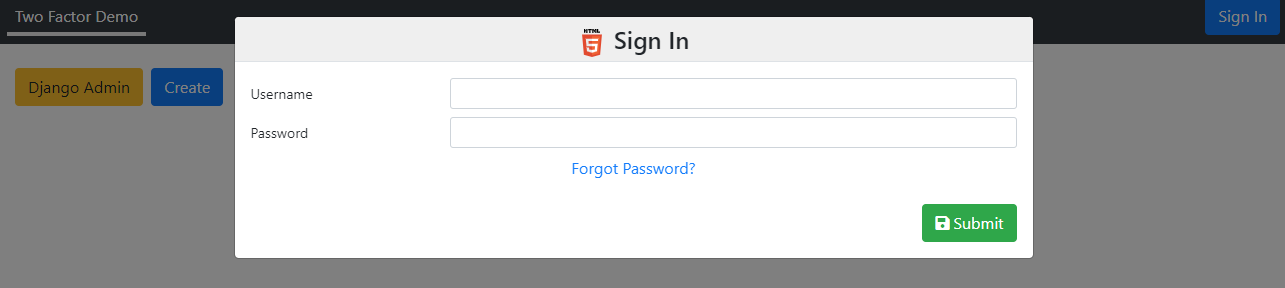
Drop-in two-factor authentication for Django, presented through Bootstrap modals (via django-nested-modals). It replaces the default admin login and adds passkeys, TOTP, trusted devices, brute-force lockout, email invites, and optional "Sign in with Microsoft".
- Passkeys (WebAuthn / FIDO2) – Windows Hello, Face ID / Touch ID, YubiKeys; a passkey alone satisfies the second factor — no authenticator app required. Users can name, rename and remove their passkeys.
- TOTP – authenticator apps (Google Authenticator, Authy, etc.) with an on-screen QR code
- Trusted devices – an optional cookie to skip 2FA on a named device (the key rotates on each use, so a copied cookie stops working)
- Lockout – throttle repeated failures by username and by IP (proxy-aware)
- Microsoft / Entra sign-in – optional single-tenant SSO, off unless configured
- User onboarding – email invitations to set a password, plus a forgotten-password reset flow
- Customisable – restyle every modal and override behaviour from one class
Requirements
- Python ≥ 3.8
- Django ≥ 4.2
- Installed automatically:
django-nested-modals,django-otp,qrcode,webauthn
Installation
pip install django-modal-2fa
For the optional Microsoft sign-in, install the extra (pulls in msal):
pip install "django-modal-2fa[microsoft]"
Settings
from modal_2fa.settings_helper import modal_2fa_apps_admin

INSTALLED_APPS += [
    *modal_2fa_apps_admin,      # adds django_otp + plugins, modal_2fa, and the 2FA admin
]

OTP_TOTP_ISSUER = 'My App'                                   # label shown in authenticator apps
AUTHENTICATION_BACKENDS = ['modal_2fa.auth.CookieBackend']
LOGIN_URL = '/auth/login/'
LOGOUT_REDIRECT_URL = '/auth/login/'

WEBAUTHN_RP_ID = 'example.com'    # your domain; use 'localhost' for development
WEBAUTHN_RP_NAME = 'My App'       # optional; shown by the authenticator
Remove
'django.contrib.admin'fromINSTALLED_APPS.modal_2fa_apps_adminswaps in a 2FA-protected admin site in its place. (If you don't use the Django admin, usemodal_2fa_appsinstead, which omits the admin replacement.)
WebAuthn requires a secure context, so register/authenticate over HTTPS in
production (localhost is exempt for development).
URLs
from modal_2fa.utils import get_custom_auth

urlpatterns += [
    path('', include(get_custom_auth().paths(include_admin=True))),
]
All routes mount under auth/ with the auth namespace — reverse them as
'auth:login', 'auth:auth_2fa', 'auth:user_devices', etc. Pass
include_admin=False to leave out the bundled user-admin and security-admin
modals.
Authentication flow
- The user submits credentials to
ModalLoginView, verified byCookieBackend. - If a valid trusted-device cookie is present → log in directly.
- Else if the user has no second factor (neither passkey nor TOTP) and 2FA is optional for them → log in directly.
- Otherwise the username is parked in the session and the 2FA modal opens.
Modal2FAverifies a passkey or a TOTP code, then completes login. A user with no factor yet gets a setup choice screen — set up a passkey (recommended, one click into the browser/OS dialog) or an authenticator app (QR code); either alone completes the login and satisfies 2FA from then on.- The user may optionally name and trust the device to skip 2FA next time.
A passkey registered on a phone still works on another machine: browsers offer cross-device sign-in (a QR code confirmed on the phone), and stored transport hints steer them to the right prompt. Passkey-only users can also add an authenticator app later ("Set up authenticator app" in the user menu) as a device-independent backup.
Lockout settings (optional)
Repeated failures are throttled per username and per IP. Defaults shown:
| Setting | Default | Meaning |
|---|---|---|
AUTHENTICATION_USER_FAILED_ATTEMPTS |
10 |
Failures before a username is locked |
AUTHENTICATION_IP_FAILED_ATTEMPTS |
20 |
Failures before an IP is locked |
AUTHENTICATION_LOCKOUT_SECONDS |
30 |
Lockout duration once the threshold is hit |
Clear expired rows periodically with the bundled command:
python manage.py clear_failed_logins
Behind a reverse proxy
IP-based lockout needs the real client IP. Behind a proxy, Django's REMOTE_ADDR
is the proxy's address, so set the number of trusted proxy hops and the client IP
is read (spoof-safely) from X-Forwarded-For:
AUTHENTICATION_TRUSTED_PROXY_COUNT = 1   # single edge proxy, e.g. Traefik / nginx
# AUTHENTICATION_TRUSTED_PROXY_COUNT = 2 # a CDN/LB in front of the proxy, e.g. Cloudflare → Traefik
Default is 0 (no proxy — REMOTE_ADDR is used and X-Forwarded-For is ignored,
since it would otherwise be client-spoofable). BEHIND_REVERSE_PROXY = True is
accepted as a legacy alias for a count of 1.
Security admin (superusers)
With include_admin=True, a Security Admin modal is added at
auth:security_admin_modal and linked from the user dropdown for superusers only.
It gives an in-app alternative to the clear_failed_logins command and the Django
admin for two operational tasks:
- Failed login attempts — lists every
FailedLoginAttempt(by username and by IP) with its attempt count and lock status; currently-locked rows are highlighted. Clear removes a row, which both lifts the lockout and resets the counter — use it to free a legitimate user who has locked themselves out. - Active sessions — lists signed-in users decoded from their sessions, with the authentication method and expiry. Sign out deletes the session, ending it immediately — useful for revoking a session you believe is compromised.
Access is gated on the can_manage_security hook, which defaults to
is_superuser — override it if superuser status in your project comes from group
or role membership rather than the flag (see Customisation below). The
active-sessions list reads server-side session rows, so it requires the database
session backend (Django's default); with a cache-only SESSION_ENGINE the list
will be empty.
Optional: Sign in with Microsoft / Entra
Add the routes and login button automatically by configuring an Entra (Azure AD)
app registration. The feature stays dormant until all three values are present,
and msal is only imported when used.
MS_CLIENT_ID = '...'          # Application (client) ID
MS_TENANT_ID = '...'          # Directory (tenant) ID — single-tenant gate
MS_CLIENT_SECRET = '...'      # a client secret value — keep this out of source control
# MS_REDIRECT_URI = 'https://example.com/auth/microsoft/redirect'  # optional; built from the request if omitted
Sign-in is restricted to the configured tenant; by default only tenant members
are admitted (B2B guests are turned away). A Microsoft sign-in counts as the second
factor only when the ID token proves recent MFA (amr + fresh auth_time);
otherwise the user still completes the normal TOTP/WebAuthn step. All of this is
overridable — see MicrosoftCustomiseMixin (microsoft_allowed, microsoft_user,
microsoft_satisfies_2fa, …).
To make certain users Entra-only (no password login at all), override
password_login_allowed(user) to return False for them. Their password is
rejected at the backend and the login modal shows a message plus the Microsoft
button. The rule is yours to define — e.g. by group:
class MyCustomise(CustomiseAuth):

    @staticmethod
    def password_login_allowed(user):
        return not user.groups.filter(name='sso-only').exists()
Optional: Wagtail
Wagtail ships its own login, logout and password-reset views under its admin
prefix, and has no equivalent of the Django admin's 2FA gate. Its login form does
reach this package's backend, but it skips the lockout accounting and the 2FA
step. Setting wagtail_admin_prefix makes paths() emit patterns that shadow
those URLs, and enables a middleware that requires a second factor across the
whole CMS. Wagtail itself is never imported — nothing here runs until the prefix
is set.
# myapp/auth.py
class MyCustomise(CustomiseAuth):
    wagtail_admin_prefix = 'cms/'       # the prefix wagtailadmin_urls is mounted at

# settings.py
MIDDLEWARE += ['modal_2fa.wagtail_auth.Wagtail2FAMiddleware']   # after AuthenticationMiddleware
WAGTAILADMIN_LOGIN_URL = 'auth:login'       # where Wagtail sends anonymous users
WAGTAIL_PASSWORD_RESET_ENABLED = False      # hide the now-dead links in Wagtail's own UI
WAGTAIL_PASSWORD_MANAGEMENT_ENABLED = False
Django matches the first pattern that fits, so the include must come above Wagtail's:
urlpatterns = [
    path('', include(MyCustomise.paths(include_admin=True))),
    path('cms/', include(wagtailadmin_urls)),
]
Misconfiguration fails loudly rather than silently weakening the gate: the
middleware raises ImproperlyConfigured at startup if Wagtail's own login would
win the URL resolution (includes in the wrong order, or paths() not mounted),
and on the first gated request if it is installed before
AuthenticationMiddleware (no request.user).
wagtail_2fa_methods controls what the middleware accepts, defaulting to
('2fa', 'microsoft'). A trusted-device cookie is deliberately not enough for
the CMS, matching how the Django admin is gated; a user with no second factor is
sent to the 2FA modal and enrols there via the setup choice screen (passkey or
authenticator app).
Customisation
Point AUTHENTICATION_CUSTOMISATION at a subclass of CustomiseAuth:
# settings.py
AUTHENTICATION_CUSTOMISATION = 'myapp.auth.MyCustomise'

# myapp/auth.py
from modal_2fa.customise import CustomiseAuth

class MyCustomise(CustomiseAuth):

    @staticmethod
    def user_2fa_optional(user):
        return not user.is_staff          # force 2FA for staff

    @staticmethod
    def allowed_remember(user):
        return True                       # offer "remember this device"?

    @staticmethod
    def max_cookies(user):
        return 2                          # trusted devices per user

    @staticmethod
    def customise_view(view):
        view.size = 'md'                  # restyle any auth modal
Common hooks: user_2fa_optional, password_login_allowed, allow_passkeys /
allow_totp (which second factors are offered — disable one and the setup screen
offers only the other), passkey_user_verification / passkey_resident_key
(both default 'discouraged' so hardware keys such as YubiKeys stay touch-only —
stronger values make browsers demand or force a PIN on the key; raise them only
for a future passwordless flow), allowed_remember, max_cookies,
can_manage_users, can_manage_security, customise_view, override_views
(swap any URL→view mapping), and the email template attributes for invitations
and password resets.
Protecting only part of a site
user_2fa_optional asks whether 2FA is optional for a user. When the auth views
cover only part of a larger project — a control panel on one host, or one schema of
a multi-tenant app — the other question is whether a given request is even in the
area 2FA protects. two_factor_enabled(request) answers that:
class MyCustomise(CustomiseAuth):

    @staticmethod
    def two_factor_enabled(request):
        return request.get_host() == 'admin.example.com'
Returning False makes CookieBackend behave as a plain ModelBackend for that
request — no trusted-device or device lookup, and no part-login parked in the
session for auth views that aren't routed there to consume. Without it such a
project has to leave ModelBackend behind CookieBackend as a fall-through, and
then defend against that fall-through wherever 2FA is required.
Who may manage users and security
Two hooks gate the admin surfaces. Unlike the hooks above they take
(user, request=None) — request is passed whenever the caller has one, for
permission systems that depend on session or site state:
can_manage_users(user, request=None)— user create/edit/view, the user admin table, and email invites. Defaults to thechangepermission on your own user model, derived fromget_user_model()— so it is correct under a swappedAUTH_USER_MODEL(e.g.myapp.change_usermodel, notauth.change_user).can_manage_security(user, request=None)— the Security Admin modal. Defaults tois_superuser.
The defaults rely on has_perm(), which resolves group permissions through
Django's built-in user.groups M2M. If your project uses its own membership
model, override both:
class MyCustomise(CustomiseAuth):

    @staticmethod
    def can_manage_users(user, request=None):
        if request is None:
            return False              # no session context — fail closed
        return user_in_group(request, 'user-admins')

    @staticmethod
    def can_manage_security(user, request=None):
        return MyCustomise.can_manage_users(user, request)
Adding the user menu
Inject the signed-in-user dropdown (2FA management, passkeys & trusted devices, logout) into any view's menu:
from modal_2fa.menus import add_auth_menu

def setup_menu(self):
    super().setup_menu()
    add_auth_menu(self)
Development
A Dockerised demo project lives in django_examples/:
docker-compose up                                              # Django on :8010 + Redis + Celery
docker-compose exec django_2fa python manage.py migrate
docker-compose exec django_2fa python manage.py test
For HTTPS (needed to exercise WebAuthn locally), uncomment the runserver_plus
line in docker-compose.yaml and supply cert.pem / key.pem.
License
MIT — see LICENSE.
1 maintainer

Metadata
1 maintainer
Release files for django-modal-2fa 0.1.0
For a detailed explanation of source distributions (sdists) and built distributions (wheels), please see the package formats documentation.
Source distribution (sdist)
| File | Size | Uploaded | Provenance | Actions |
|---|---|---|---|---|
| django_modal_2fa-0.1.0.tar.gz | 52.5 kB | With provenance | Details for django_modal_2fa-0.1.0.tar.gz |
Built distribution (wheel)
| File | Interpreter | ABI | Platform | Actions Reset |
|---|---|---|---|---|
| django_modal_2fa-0.1.0-py3-none-any.whl | Python 3 | none | any | Details for django_modal_2fa-0.1.0-py3-none-any.whl |
Total release size: 112.6 kB
Release files / django_modal_2fa-0.1.0.tar.gz
| Download URL | django_modal_2fa-0.1.0.tar.gz |
|---|---|
| Size | 52.5 kB |
| Tags | Source |
|
SHA-256 checksum How to use checksums |
f43e779c6b563761f3013b147d1a2c3ea3343f9ac3040ef1a58a7728cbc6b48c
|
|
BLAKE2b-256 checksum How to use checksums |
d3b41a63e82dafccd69abd5a355926d5d5d0c6111b8964e242c3c0c5464b58fd
|
| Upload date | |
|
Uploaded using Trusted Publishing? What is trusted publishing? |
Yes |
| Uploaded via |
twine/7.0.0 CPython/3.13.16
|
Provenance
Provenance describes where a file came from. On PyPI, provenance is shared via attestations, which provide a verifiable record of the build or publishing details. View details, limitations and caveats.


PyPI Publish Attestation
PyPI verified that this artifact, at this checksum, originated from the publisher listed below.
Signed by GitHub Actions, verified by PyPI on Oct 26, 2026.
Transparency logRelease files / django_modal_2fa-0.1.0-py3-none-any.whl
| Download URL | django_modal_2fa-0.1.0-py3-none-any.whl |
|---|---|
| Size | 60.1 kB |
| Tags | Python 3 |
|
SHA-256 checksum How to use checksums |
8df2abfd44f32ebf0e271a65e4c916d3152a28f3d1215f7f491ea91c6a4a8f6e
|
|
BLAKE2b-256 checksum How to use checksums |
e13d636af2eca08be4ebcb4d2c069ea4da64dc83b93398d109c4cfa8db0597e6
|
| Upload date | |
|
Uploaded using Trusted Publishing? What is trusted publishing? |
Yes |
| Uploaded via |
twine/7.0.0 CPython/3.13.16
|
Provenance
Provenance describes where a file came from. On PyPI, provenance is shared via attestations, which provide a verifiable record of the build or publishing details. View details, limitations and caveats.
PyPI Publish Attestation
PyPI verified that this artifact, at this checksum, originated from the publisher listed below.
Signed by GitHub Actions, verified by PyPI on Oct 26, 2026.
Transparency logSecurity for django-modal-2fa 0.1.0
Provenance
Provenance describes where a file came from. On PyPI, provenance is shared via attestations, which provide a verifiable record of the build or publishing details. View details, limitations and caveats.
Full provenance
Both files in this release have been uploaded with provenance metadata.
Attestation for django_modal_2fa-0.1.0.tar.gz
PyPI Publish Attestation
PyPI verified that this artifact, at this checksum, originated from the publisher listed below.
Signed by GitHub Actions, verified by PyPI on Oct 26, 2026.
Transparency logA note on package security
PyPI is a repository for distributing packages, not a service for auditing them. While third-party security researchers and our staff do their best to detect and remove malicious packages, PyPI cannot guarantee the quality, security or suitability of any given package.
To learn more about protecting yourself from malicious actors, visit our package security documentation.














