
Satellite Observability for Django - A modern debugging and observability tool

Project description
🛰️ Django Orbit
Satellite Observability for Django
A debugging and observability dashboard that orbits your app without touching it.
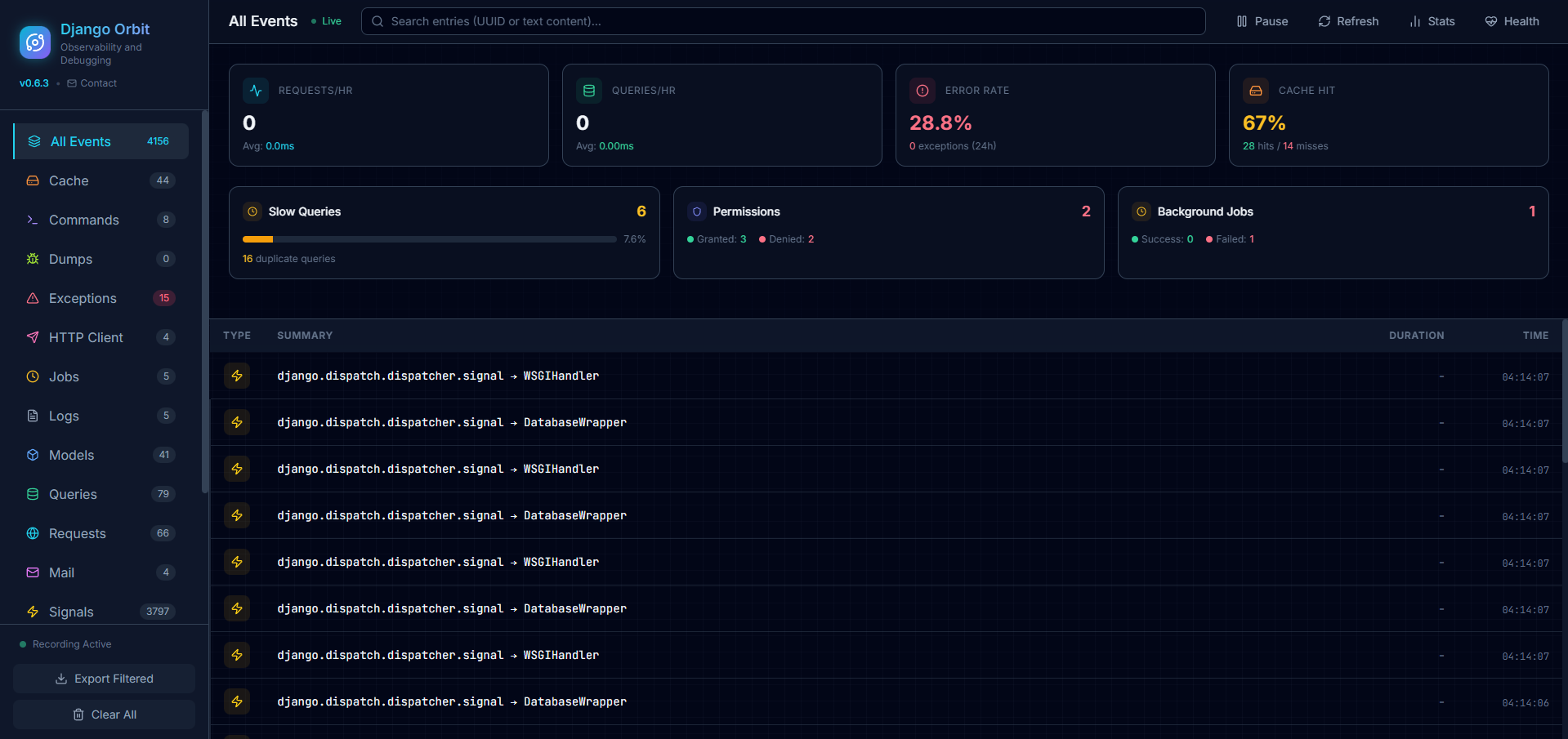





Table of Contents
- Why Orbit?
- What Orbit tracks
- Installation
- Quick Start
- Try the Demo
- Configuration
- Dashboards
- MCP Server — AI Assistant Integration
- Background Job Integrations
- Health & Plug-and-Play
- Storage Backends
- Security
- Roadmap
- Contributing
🎯 Why Orbit?
Unlike Django Debug Toolbar — which injects HTML into your templates — Django Orbit lives at its own isolated URL (/orbit/). It observes your application from a distance, like a satellite, without interfering with it.
| Django Debug Toolbar | Django Orbit | |
|---|---|---|
| Template injection | ✅ Yes | ❌ No |
| Works with APIs / SPAs | ❌ No | ✅ Yes |
| SQL + logs + exceptions | Partial | ✅ All in one |
| Background jobs | ❌ | ✅ Celery, RQ, Django-Q |
| AI assistant integration | ❌ | ✅ MCP Server |
| Health / module status | ❌ | ✅ |
Inspired by Laravel Telescope.
📡 What Orbit tracks
| Category | Events |
|---|---|
| HTTP | Requests, responses, headers, body, status codes |
| Database | SQL queries, slow queries, N+1 detection |
| Logging | All Python logging output, any level |
| Exceptions | Full traceback, request context |
| Cache | GET hits/misses, SET, DELETE (any backend) |
| Models | ORM create, update, delete events |
| Commands | manage.py executions with exit code |
| HTTP Client | Outgoing requests via requests / httpx |
| Sent emails with headers and body | |
| Signals | Django signal dispatches |
| Background Jobs | Celery, Django-Q, RQ, APScheduler |
| Redis | GET, SET, DEL, HGET, LPUSH, and more |
| Permissions | Authorization checks, granted/denied |
| Transactions | atomic() blocks, commits, rollbacks |
| Storage | File save/open/delete (local + S3) |
All events are linked by family_hash, so you can see every query, log, and exception that occurred within a single request.
📦 Installation
pip install django-orbit

# With MCP support (AI assistant integration — Claude, Cursor, Copilot)
pip install django-orbit[mcp]
🚀 Quick Start
1. Add to INSTALLED_APPS:
INSTALLED_APPS = [
    # ...
    'orbit',
]
2. Add middleware (early in the list):
MIDDLEWARE = [
    'orbit.middleware.OrbitMiddleware',
    # ...
]
3. Include URLs:
from django.urls import path, include

urlpatterns = [
    path('orbit/', include('orbit.urls')),
    # ...
]
4. Migrate and run:
python manage.py migrate orbit
python manage.py runserver
Visit http://localhost:8000/orbit/ 🚀
🎮 Try the Demo
git clone https://github.com/astro-stack/django-orbit.git
cd django-orbit
pip install -e .
python demo.py setup
python manage.py runserver
| URL | |
|---|---|
http://localhost:8000/ |
Demo app |
http://localhost:8000/orbit/ |
Orbit Dashboard |
http://localhost:8000/orbit/stats/ |
Stats Dashboard |
http://localhost:8000/orbit/health/ |
Health Dashboard |
⚙️ Configuration
All settings go in ORBIT_CONFIG (or ORBIT) in your settings.py. Everything has a sensible default — you only need to set what you want to change.
ORBIT_CONFIG = {
    'ENABLED': True,                      # set to DEBUG to auto-disable in production
    'SLOW_QUERY_THRESHOLD_MS': 500,
    'STORAGE_LIMIT': 1000,                # max entries to keep

    # Watchers — all enabled by default
    'RECORD_REQUESTS': True,
    'RECORD_QUERIES': True,
    'RECORD_LOGS': True,
    'RECORD_EXCEPTIONS': True,
    'RECORD_COMMANDS': True,
    'RECORD_CACHE': True,
    'RECORD_MODELS': True,
    'RECORD_HTTP_CLIENT': True,
    'RECORD_MAIL': True,
    'RECORD_SIGNALS': True,
    'RECORD_JOBS': True,
    'RECORD_REDIS': True,
    'RECORD_GATES': True,
    'RECORD_TRANSACTIONS': True,
    'RECORD_STORAGE': True,

    # Security
    'AUTH_CHECK': lambda request: request.user.is_staff,
    'IGNORE_PATHS': ['/orbit/', '/static/', '/media/'],

    # Resilience
    'WATCHER_FAIL_SILENTLY': True,        # failed watchers log errors but don't crash the app
}
📊 Dashboards
Main Dashboard — /orbit/
HTMX-powered live feed with 3-second polling. Filter by event type, search by keyword, export to JSON, and click any entry to see its full detail in a slide-over panel.
Stats Dashboard — /orbit/stats/
| Metric | |
|---|---|
| Apdex Score | User satisfaction index (0–1) |
| Percentiles | P50, P75, P95, P99 response times |
| Error Rate | Failure percentage with trend |
| Throughput | Requests per minute / hour |
| Slow Queries | Count and top offenders |
| Cache Hit Rate | Sparkline chart |
| Job Success Rate | Per-backend breakdown |
| Top Denied Permissions | Authorization audit |
Time range filters: 1h · 6h · 24h · 7d
Health Dashboard — /orbit/health/
Shows the status of every Orbit module:
- 🟢 Healthy — working normally
- 🔴 Failed — initialization error (click for full traceback)
- 🟡 Disabled — turned off via config
🤖 MCP Server — AI Assistant Integration
Django Orbit exposes your telemetry as an MCP (Model Context Protocol) server. Connect Claude, Cursor, Windsurf, or any MCP-compatible AI assistant and ask questions directly against your app's live data.
Examples:
- "Why is
/api/orders/slow?" - "What exceptions occurred in the last hour?"
- "Find all N+1 patterns in the app"
- "Show me everything that happened during this request"
Setup
pip install django-orbit[mcp]
// Claude Desktop → claude_desktop_config.json
// Cursor → .cursor/mcp.json
// Windsurf → .windsurfrc
{
  "mcpServers": {
    "django-orbit": {
      "command": "python",
      "args": ["manage.py", "orbit_mcp"],
      "cwd": "/path/to/your/django/project"
    }
  }
}
The MCP server launches on-demand when your AI assistant needs it. No extra process to manage.
Available tools
| Tool | What it returns |
|---|---|
get_recent_requests |
Last N requests with status, path, duration |
get_slow_queries |
SQL queries above threshold, sorted by duration |
get_exceptions |
Exceptions in a time window with full traceback |
get_n1_patterns |
Requests where N+1 duplicate queries were detected |
get_request_detail |
Every event for one request via family_hash |
search_entries |
Keyword search across all event types |
get_stats_summary |
Error rate, avg response time, cache hit rate |
🔧 Background Job Integrations
| Backend | How |
|---|---|
| Celery | Via signals (automatic) |
| Django-Q | Via signals (automatic) |
| RQ | Worker monkey-patching (automatic) |
| APScheduler | register_apscheduler(scheduler) |
| django-celery-beat | Via model signals (automatic) |
💚 Health & Plug-and-Play
Each watcher initializes independently. If Celery isn't installed, only the Celery watcher fails — everything else keeps working.
from orbit import get_watcher_status, get_failed_watchers

get_watcher_status()
# {'cache': {'installed': True, 'error': None, 'disabled': False}, ...}

get_failed_watchers()
# {'celery': 'ModuleNotFoundError: No module named celery'}
🗄️ Storage Backends
By default Orbit stores events in your project's default database. For production you can route all Orbit writes to a dedicated database so telemetry doesn't compete with application traffic.
# settings.py
DATABASES = {
    "default": { ... },
    "orbit": {
        "ENGINE": "django.db.backends.sqlite3",
        "NAME": BASE_DIR / "orbit.sqlite3",
    },
}

ORBIT_CONFIG = {
    "STORAGE_BACKEND": "orbit.backends.django_db.DjangoDBBackend",
    "STORAGE_DB_ALIAS": "orbit",
}
python manage.py migrate orbit --database=orbit
| Backend | Description |
|---|---|
orbit.backends.database.DatabaseBackend |
Default — uses default DB, no config needed |
orbit.backends.django_db.DjangoDBBackend |
Dedicated Django database alias |
🛡️ Security
Restrict access using any callable:
ORBIT_CONFIG = {
    # Staff only
    'AUTH_CHECK': lambda request: request.user.is_staff,

    # Disable entirely in production
    'ENABLED': DEBUG,
}
Orbit automatically redacts sensitive fields (passwords, tokens, API keys) from request bodies and headers.
🗺️ Roadmap
What's next
- AI Insights engine — automatic pattern detection and plain-English summaries powered by LLMs
- VS Code / Cursor extension — surface Orbit data in your editor sidebar while you code
- Alerting — Slack, email, and webhook notifications for exceptions and slow requests
- Orbit Cloud — shared team dashboards with historical data retention
🤝 Contributing
Contributions are welcome! See CONTRIBUTING.md for guidelines.
📄 License
MIT — see LICENSE.
Inspired by Laravel Telescope, Spatie Ray, and Django Debug Toolbar.
Release history Release notifications | RSS feed


Download files
Download the file for your platform. If you're not sure which to choose, learn more about installing packages.
Source Distribution
Built Distribution
Filter files by name, interpreter, ABI, and platform.
If you're not sure about the file name format, learn more about wheel file names.
Copy a direct link to the current filters
File details
Details for the file django_orbit-0.8.1.tar.gz.
File metadata
- Download URL: django_orbit-0.8.1.tar.gz
- Upload date:
- Size: 106.2 kB
- Tags: Source
- Uploaded using Trusted Publishing? No
- Uploaded via: twine/6.2.0 CPython/3.13.12
File hashes
| Algorithm | Hash digest | |
|---|---|---|
| SHA256 |
581f792ef3f577e84c12741becb8bd654a8436fd21d4d499d79b7de81b968ee3
|
|
| MD5 |
ce64c4fd4513a180f4c13a9dd0d4e244
|
|
| BLAKE2b-256 |
17768609c4a85da7c4efc7c9f9c3f2a2a50cba74e9d17999fec758e894a6d341
|
File details
Details for the file django_orbit-0.8.1-py3-none-any.whl.
File metadata
- Download URL: django_orbit-0.8.1-py3-none-any.whl
- Upload date:
- Size: 89.2 kB
- Tags: Python 3
- Uploaded using Trusted Publishing? No
- Uploaded via: twine/6.2.0 CPython/3.13.12
File hashes
| Algorithm | Hash digest | |
|---|---|---|
| SHA256 |
bbf97d56b882c1db082fb932e5624471703b99a85e7ceb190cb0c7e1a50c11b1
|
|
| MD5 |
124d7ede95da306bc0b1836204da186c
|
|
| BLAKE2b-256 |
509e3374abded638ea2a4d418d86e7bd22844214443262165f24f3f37227316d
|






