
django-osm-widgets
Improved widgets for Django's PointField.
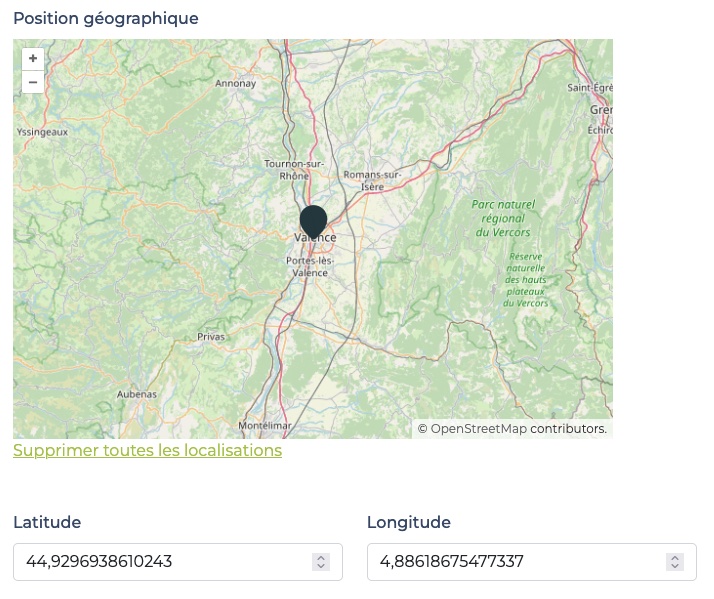
LatLonOpenlayersOSMWidget handles latitude and longitude inputs synced with the point on the map.
Requirements
- Python 3.10+
- Django >=3.0, <5.2
Installation
- run
pip install django-osm-widgets - add
django_osm_widgetsto yourINSTALLED_APPS
Usage
In your forms, use the widget like this:
from django.contrib.gis.forms.fields import PointField
from django_osm_widgets.widgets import LatLonOpenlayersOSMWidget


class MyForm(forms.Form):
  location = PointField(widget=LatLonOpenlayersOSMWidget)
The latitute and longitude fields will be automatically added in your page.
Currently django-osm-widgets supports only a unique instance of the LatLonOpenlayersOSMWidget in a page.
Customizations
You can define some options as in the example below.
When using "must_display_latlon_fields": False, your are responsible for providing two input fields in your page. These fields must have ids corresponding to latitude_field_id and longitude_field_id values (defaults to id_osm_widget_latitude and id_osm_widget_longitude) and must appear in the DOM before the LatLonOpenlayersOSMWidget.```
When using "must_display_geocoder_button": False, you are responsible for providing a button with an id corresponding to geocoder_button_id value (defaults to id_geocoder_button).
You can override some attributes when instantiating the widget class in your form. Below are all the attributes and their default values.
from django.contrib.gis.forms.fields import PointField
from django_osm_widgets.widgets import LatLonOpenlayersOSMWidget


class MyForm(forms.Form):
  location = PointField(
    widget=LatLonOpenlayersOSMWidget(
      attrs={
        "must_display_latlon_fields": True,
        "must_display_geocoder_button": True,
        "map_width": "auto",
        "map_height": "auto",
        "default_lat": 45,
        "default_lon": 5,
        "default_zoom": 8,
        "latitude_field_id": "id_osm_widget_latitude",
        "longitude_field_id": "id_osm_widget_longitude",
        "listened_events": "input",
        "marker_options": {
          "src": "https://cdn.jsdelivr.net/npm/leaflet@1.9.4/dist/images/marker-icon.png",
          "scale": 1,
          "anchor": [0.5, 1],
        },
        "precision": 4,
        "geocoder_address_field_ids": ["id_adresse", "id_code_postal", "id_localite", "id_pays"],
        "geocoder_provider": "nominatim",
        "geocoder_button_id": "id_geocoder_button",
        "geocoder_message_container_id": "id_geocoder_message",
        "clear_features_label": "Delete all Features",
        "geocoder_button_label": "Geolocate from address",
        "geocoder_message_timeout": 5000,
      }
    )
  )
Projects can override button labels and the status message timeout:
- Via widget attrs: Pass
clear_features_label,geocoder_button_label,geocoder_message_timeoutwhen instantiating the widget. - Via template blocks: Extend
latlon-openlayers-osm.htmland override{% block clear_features_label %}or{% block geocoder_button_label %}for full control.
Labels support translation when using Django's i18n. The status message (e.g. "Coordinates updated.") disappears automatically after geocoder_message_timeout milliseconds (default 5 seconds).
Geocoding from address
When geocoder_address_field_ids is provided, a "Geocode from address" button appears next to the map. When clicked, the widget fetches coordinates of the address formed by concatenating values of the geocoder_address_fields_ids (keeping the order) and updates the map.
The geocoding provider is configurable via geocoder_provider:
nominatim(default): OpenStreetMap Nominatim. Works worldwide with international addresses.ign: IGN Géoplateforme. Optimized for French addresses (BAN, BD TOPO®, Parcellaire Express). 50 requests/second limit per IP.
Example for French addresses:
"geocoder_provider": "ign",
You can omit any of the four address keys; at least one address field must be filled.
1 maintainer

Metadata
1 maintainer
Release files for django-osm-widgets 0.2.2
For a detailed explanation of source distributions (sdists) and built distributions (wheels), please see the package formats documentation.
Source distribution (sdist)
| File | Size | Uploaded | |
|---|---|---|---|
| django_osm_widgets-0.2.2.tar.gz | 11.0 kB | Details |
Built distribution (wheel)
| File | Interpreter | ABI | Platform | Reset |
|---|---|---|---|---|
| django_osm_widgets-0.2.2-py3-none-any.whl | Python 3 | none | any | Details |
Total release size: 23.5 kB
Release files / django_osm_widgets-0.2.2.tar.gz
| Download URL | django_osm_widgets-0.2.2.tar.gz |
|---|---|
| Size | 11.0 kB |
| Tags | Source |
|
SHA-256 checksum How to use checksums |
0d93cc925cb46c3c093758d0b89eea376ac65feb6e34d41824d7783cb9a2c314
|
|
BLAKE2b-256 checksum How to use checksums |
930925625220af7bce6b856d98f0426d2c9bb2a2440bb252213cbcfc854f7094
|
| Upload date | |
|
Uploaded using Trusted Publishing? What is trusted publishing? |
No |
| Uploaded via |
poetry/2.3.2 CPython/3.12.1 Linux/6.12.72-linuxkit
|
Release files / django_osm_widgets-0.2.2-py3-none-any.whl
| Download URL | django_osm_widgets-0.2.2-py3-none-any.whl |
|---|---|
| Size | 12.4 kB |
| Tags | Python 3 |
|
SHA-256 checksum How to use checksums |
6c235a793e9884f2173af903abbeeec5205aeeb7bf6f546469263ed774606091
|
|
BLAKE2b-256 checksum How to use checksums |
629184f0423205014974efb25e9e7d5886173ef8d5e1b7a9ce0271196cf50375
|
| Upload date | |
|
Uploaded using Trusted Publishing? What is trusted publishing? |
No |
| Uploaded via |
poetry/2.3.2 CPython/3.12.1 Linux/6.12.72-linuxkit
|














