
Improved widgets for Django's PointField

Project description
django-osm-widgets
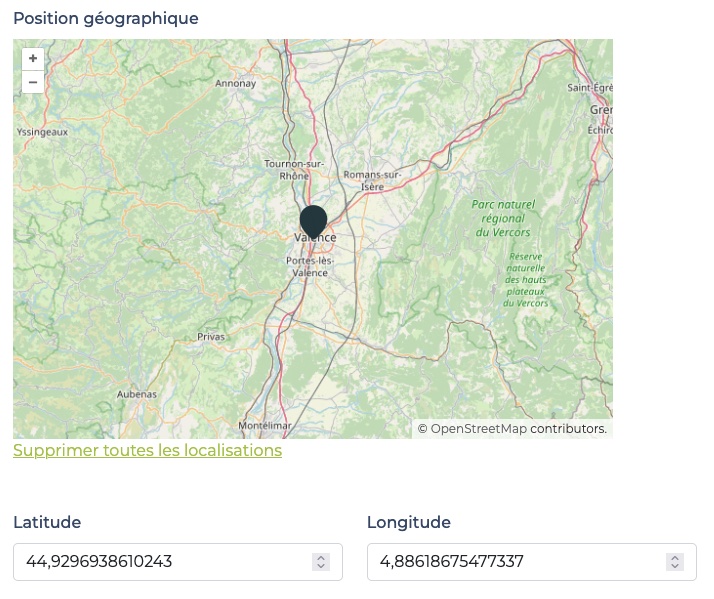
Improved widgets for Django's PointField.
LatLonOpenlayersOSMWidget handles latitude and longitude inputs synced with the point on the map.
Requirements
- Python 3.10+
- Django >=3.0, <5.2
Installation
- run
pip install django-osm-widgets - add
django_osm_widgetsto yourINSTALLED_APPS
Usage
In your forms, use the widget like this:
from django.contrib.gis.forms.fields import PointField
from django_osm_widgets.widgets import LatLonOpenlayersOSMWidget


class MyForm(forms.Form):
  location = PointField(widget=LatLonOpenlayersOSMWidget)
The latitute and longitude fields will be automatically added in your page.
Currently django-osm-widgets supports only a unique instance of the LatLonOpenlayersOSMWidget in a page.
Customizations
You can define some options as in the example below.
When using "must_display_latlon_fields": False, your are responsible for providing two input fields in your page. These fields must have ids corresponding to latitude_field_id and longitude_field_id values (defaults to id_osm_widget_latitude and id_osm_widget_longitude) and must appear in the DOM before the LatLonOpenlayersOSMWidget. To achieve that, you may find useful to override the latlon-openlayers-osm.html template as follow:
{% extends "django_osm_widgets/latlon-openlayers-osm.html" %}

{% block map_wrapper %}
  {{ block.super }}
  <label for="{{ latitude_field_id }}" class="form-label">Latitude</label>
  <input type="number" step="0.0001" min="-90" max="90" name="latitude" id="{{ latitude_field_id }}" placeholder="for example: 45.123456" class="form-control">
  <label for="{{ longitude_field_id }}" class="form-label">Longitude</label>
  <input type="number" step="0.0001" min="-180" max="180" name="longitude" id="{{ longitude_field_id }}" placeholder="for example: 2.123456" class="form-control">
{% endblock map_wrapper %}
You can override some attributes when instantiating the widget class in your form. Below are all the attributes and their default values.
from django.contrib.gis.forms.fields import PointField
from django_osm_widgets.widgets import LatLonOpenlayersOSMWidget


class MyForm(forms.Form):
  location = PointField(
    widget=LatLonOpenlayersOSMWidget(
      attrs={
        "must_display_latlon_fields": True,
        "map_width": "auto",
        "map_height": "auto",
        "default_lat": 45,
        "default_lon": 5,
        "default_zoom": 8,
        "latitude_field_id": "id_osm_widget_latitude",
        "longitude_field_id": "id_osm_widget_longitude",
        "listened_events": "input",
        "marker_options": {
          "src": "https://cdn.jsdelivr.net/npm/leaflet@1.9.4/dist/images/marker-icon.png",
          "scale": 1,
          "anchor": [0.5, 1],
        }
        "precision": 4,
      }
    )
  )


Download files
Download the file for your platform. If you're not sure which to choose, learn more about installing packages.
Source Distribution
Built Distribution
Filter files by name, interpreter, ABI, and platform.
If you're not sure about the file name format, learn more about wheel file names.
Copy a direct link to the current filters
File details
Details for the file django_osm_widgets-0.0.4.tar.gz.
File metadata
- Download URL: django_osm_widgets-0.0.4.tar.gz
- Upload date:
- Size: 6.3 kB
- Tags: Source
- Uploaded using Trusted Publishing? No
- Uploaded via: twine/4.0.2 CPython/3.10.8
File hashes
| Algorithm | Hash digest | |
|---|---|---|
| SHA256 |
e69a5476c5fa68e9e6855eaa2160e2b2958fb1f43fbc91a5c638d3e6b90f0096
|
|
| MD5 |
ba073de81ac895173fffe54de0f002f4
|
|
| BLAKE2b-256 |
84159e59fbba3eae1cb726606dbef7c0bacde230c892bb32ffdd01e2f5ca57ba
|
File details
Details for the file django_osm_widgets-0.0.4-py3-none-any.whl.
File metadata
- Download URL: django_osm_widgets-0.0.4-py3-none-any.whl
- Upload date:
- Size: 8.2 kB
- Tags: Python 3
- Uploaded using Trusted Publishing? No
- Uploaded via: twine/4.0.2 CPython/3.10.8
File hashes
| Algorithm | Hash digest | |
|---|---|---|
| SHA256 |
a9a3af6f1643aae141967313f0b33a94d15c7d751fec0c78b9a2b55b01c2e765
|
|
| MD5 |
e57505501c6aae8e38e3908cce50a718
|
|
| BLAKE2b-256 |
6036ec9771c2118487eb89e9ee477b3b59cf1511ab3f5cef2d7958dc36226f50
|






