
This release is a pre-release and may not be stable for production use.
django-prometheus
Export Django monitoring metrics for Prometheus.io





Features
This library provides Prometheus metrics for Django related operations:
- Requests & Responses
- Database access done via Django ORM
- Cache access done via Django Cache framework
Metrics Reference
For a detailed list and explanation of all metrics exported by this library, see documentation/metrics.md.
Usage
Requirements
- Django >= 4.2
- Python 3.10 and above.
Installation
Install with:
pip install django-prometheus
Or, if you're using a development version cloned from this repository:
python path-to-where-you-cloned-django-prometheus/setup.py install
This will install prometheus_client as a dependency.
Quickstart
In your settings.py:
INSTALLED_APPS = [
   ...
   'django_prometheus',
   ...
]

MIDDLEWARE = [
    'django_prometheus.middleware.PrometheusBeforeMiddleware',
    # All your other middlewares go here, including the default
    # middlewares like SessionMiddleware, CommonMiddleware,
    # CsrfViewmiddleware, SecurityMiddleware, etc.
    'django_prometheus.middleware.PrometheusAfterMiddleware',
]
In your urls.py:
urlpatterns = [
    ...
    path('', include('django_prometheus.urls')),
]
Configuration
Prometheus uses Histogram based grouping for monitoring latencies. The default buckets are:
PROMETHEUS_LATENCY_BUCKETS = (0.01, 0.025, 0.05, 0.075, 0.1, 0.25, 0.5, 0.75, 1.0, 2.5, 5.0, 7.5, 10.0, 25.0, 50.0, 75.0, float("inf"),)
You can define custom buckets for latency, adding more buckets decreases performance but increases accuracy: https://prometheus.io/docs/practices/histograms/
PROMETHEUS_LATENCY_BUCKETS = (.1, .2, .5, .6, .8, 1.0, 2.0, 3.0, 4.0, 5.0, 6.0, 7.5, 9.0, 12.0, 15.0, 20.0, 30.0, float("inf"))
You can have a custom namespace for your metrics:
PROMETHEUS_METRIC_NAMESPACE = "project"
This will prefix all metrics with project_ word like this:
project_django_http_requests_total_by_method_total{method="GET"} 1.0
Monitoring your databases
SQLite, MySQL, and PostgreSQL databases can be monitored. Just
replace the ENGINE property of your database, replacing
django.db.backends with django_prometheus.db.backends.
DATABASES = {
    'default': {
        'ENGINE': 'django_prometheus.db.backends.sqlite3',
        'NAME': os.path.join(BASE_DIR, 'db.sqlite3'),
    },
}
Monitoring your caches
Filebased, memcached, redis caches can be monitored. Just replace
the cache backend to use the one provided by django_prometheus
django.core.cache.backends with django_prometheus.cache.backends.
CACHES = {
    'default': {
        'BACKEND': 'django_prometheus.cache.backends.filebased.FileBasedCache',
        'LOCATION': '/var/tmp/django_cache',
    }
}
Monitoring your models
You may want to monitor the creation/deletion/update rate for your model. This can be done by adding a mixin to them. This is safe to do on existing models (it does not require a migration).
If your model is:
class Dog(models.Model):
    name = models.CharField(max_length=100, unique=True)
    breed = models.CharField(max_length=100, blank=True, null=True)
    age = models.PositiveIntegerField(blank=True, null=True)
Just add the ExportModelOperationsMixin as such:
from django_prometheus.models import ExportModelOperationsMixin

class Dog(ExportModelOperationsMixin('dog'), models.Model):
    name = models.CharField(max_length=100, unique=True)
    breed = models.CharField(max_length=100, blank=True, null=True)
    age = models.PositiveIntegerField(blank=True, null=True)
This will export 3 metrics, django_model_inserts_total{model="dog"},
django_model_updates_total{model="dog"} and
django_model_deletes_total{model="dog"}.
Note that the exported metrics are counters of creations, modifications and deletions done in the current process. They are not gauges of the number of objects in the model.
Starting with Django 1.7, migrations are also monitored. Two gauges
are exported, django_migrations_applied_by_connection and
django_migrations_unapplied_by_connection. You may want to alert if
there are unapplied migrations.
If you want to disable the Django migration metrics, set the
PROMETHEUS_EXPORT_MIGRATIONS setting to False.
Monitoring and aggregating the metrics
Prometheus is quite easy to set up. An example prometheus.conf to
scrape 127.0.0.1:8001 can be found in examples/prometheus.
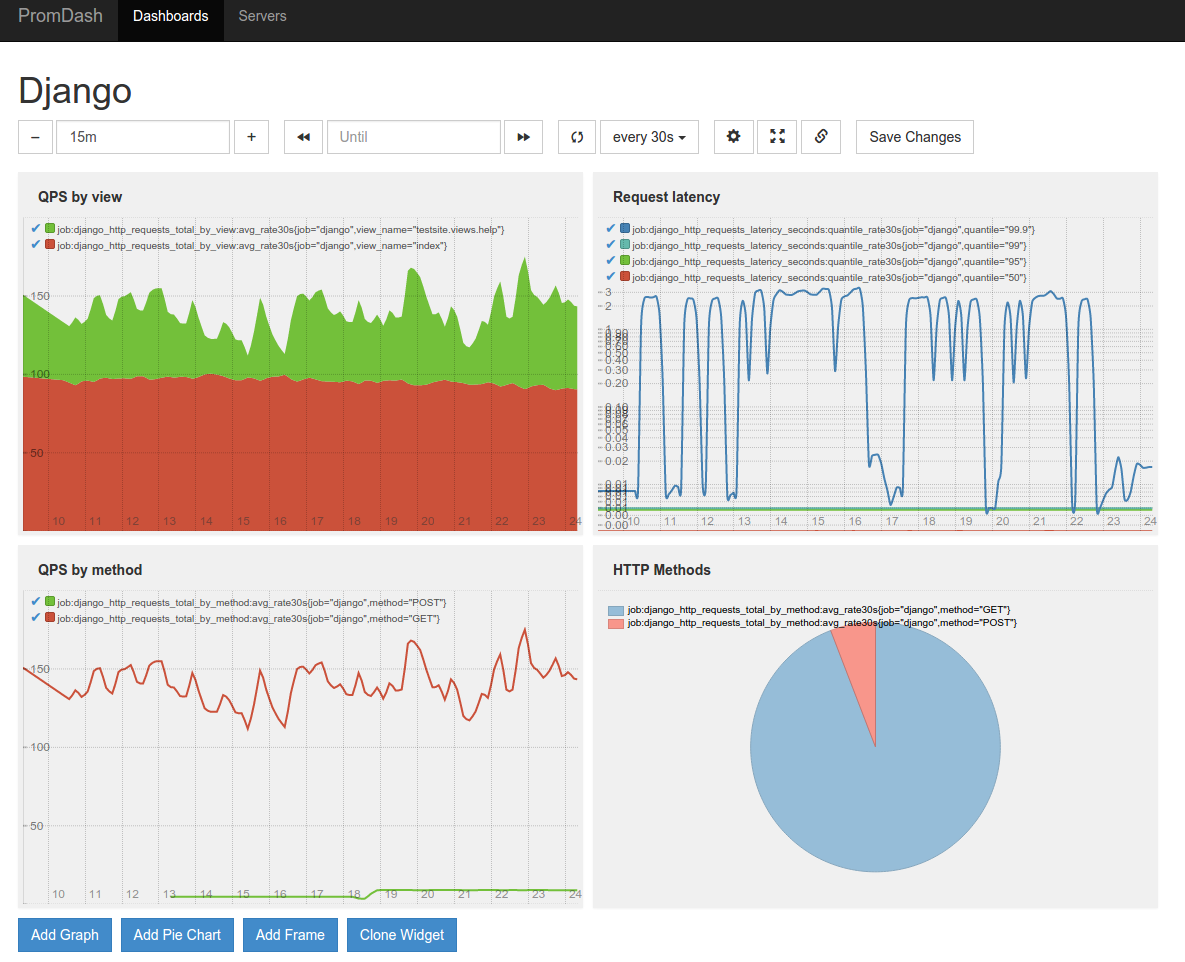
Here's an example of a PromDash displaying some of the metrics collected by django-prometheus:
Adding your own metrics
You can add application-level metrics in your code by using prometheus_client directly. The exporter is global and will pick up your metrics.
To add metrics to the Django internals, the easiest way is to extend django-prometheus' classes. Please consider contributing your metrics, pull requests are welcome. Make sure to read the Prometheus best practices on instrumentation and naming.
Importing Django Prometheus using only local settings
If you wish to use Django Prometheus but are not able to change the code base, it's possible to have all the default metrics by modifying only the settings.
First step is to inject prometheus' middlewares and to add django_prometheus in INSTALLED_APPS
MIDDLEWARE = \
    ['django_prometheus.middleware.PrometheusBeforeMiddleware'] + \
    MIDDLEWARE + \
    ['django_prometheus.middleware.PrometheusAfterMiddleware']

INSTALLED_APPS += ['django_prometheus']
Second step is to create the /metrics end point, for that we need another file (called urls_prometheus_wrapper.py in this example) that will wraps the apps URLs and add one on top:
from django.urls import include, path


urlpatterns = []

urlpatterns.append(path('prometheus/', include('django_prometheus.urls')))
urlpatterns.append(path('', include('myapp.urls')))
This file will add a "/prometheus/metrics" end point to the URLs of django that will export the metrics (replace myapp by your project name).
Then we inject the wrapper in settings:
ROOT_URLCONF = "graphite.urls_prometheus_wrapper"
Adding custom labels to middleware (request/response) metrics
You can add application specific labels to metrics reported by the django-prometheus middleware. This involves extending the classes defined in middleware.py.
- Extend the Metrics class and override the
register_metricmethod to add the application specific labels. - Extend middleware classes, set the metrics_cls class attribute to the the extended metric class and override the label_metric method to attach custom metrics.
See implementation example in the test app
1 maintainer

Metadata
1 maintainer
Release files for django-prometheus 2.6.0.dev7
For a detailed explanation of source distributions (sdists) and built distributions (wheels), please see the package formats documentation.
Source distribution (sdist)
| File | Size | Uploaded | Provenance | Actions |
|---|---|---|---|---|
| django_prometheus-2.6.0.dev7.tar.gz | 27.1 kB | With provenance | Details for django_prometheus-2.6.0.dev7.tar.gz |
Built distribution (wheel)
| File | Interpreter | ABI | Platform | Actions Reset |
|---|---|---|---|---|
| django_prometheus-2.6.0.dev7-py2.py3-none-any.whl | Python 2, Python 3 | none | any | Details for django_prometheus-2.6.0.dev7-py2.py3-none-any.whl |
Total release size: 59.8 kB
Release files / django_prometheus-2.6.0.dev7.tar.gz
| Download URL | django_prometheus-2.6.0.dev7.tar.gz |
|---|---|
| Size | 27.1 kB |
| Tags | Source |
|
SHA-256 checksum How to use checksums |
1442e42aad019d6f8b30cca72ae62f40a1e81170b8241044f3f2f21b4942937b
|
|
BLAKE2b-256 checksum How to use checksums |
1a1e23b12f131b95a714644f0f4afeec3fc95ca36c4a2ce0b11625c7ee80a945
|
| Upload date | |
|
Uploaded using Trusted Publishing? What is trusted publishing? |
Yes |
| Uploaded via |
twine/6.1.0 CPython/3.13.7
|
Provenance
Provenance describes where a file came from. On PyPI, provenance is shared via attestations, which provide a verifiable record of the build or publishing details. View details, limitations and caveats.


PyPI Publish Attestation
PyPI verified that this artifact, at this checksum, originated from the publisher listed below.
Signed by GitHub Actions, verified by PyPI on Sep 19, 2026.
Transparency logRelease files / django_prometheus-2.6.0.dev7-py2.py3-none-any.whl
| Download URL | django_prometheus-2.6.0.dev7-py2.py3-none-any.whl |
|---|---|
| Size | 32.7 kB |
| Tags | Python 2 Python 3 |
|
SHA-256 checksum How to use checksums |
0089dfbeffef0f6940c1dba68597968d534e20d348cfa6b0e77fff13a8006317
|
|
BLAKE2b-256 checksum How to use checksums |
93197dff5b547ea06e95cd99c8d35ef2d9c500c9a4859086fb5f3f9beb033ace
|
| Upload date | |
|
Uploaded using Trusted Publishing? What is trusted publishing? |
Yes |
| Uploaded via |
twine/6.1.0 CPython/3.13.7
|
Provenance
Provenance describes where a file came from. On PyPI, provenance is shared via attestations, which provide a verifiable record of the build or publishing details. View details, limitations and caveats.
PyPI Publish Attestation
PyPI verified that this artifact, at this checksum, originated from the publisher listed below.
Signed by GitHub Actions, verified by PyPI on Sep 19, 2026.
Transparency logSecurity for django-prometheus 2.6.0.dev7
Provenance
Provenance describes where a file came from. On PyPI, provenance is shared via attestations, which provide a verifiable record of the build or publishing details. View details, limitations and caveats.
Full provenance
All 2 files in this release have been uploaded with provenance metadata.
Attestation for django_prometheus-2.6.0.dev7.tar.gz
PyPI Publish Attestation
PyPI verified that this artifact, at this checksum, originated from the publisher listed below.
Signed by GitHub Actions, verified by PyPI on Sep 19, 2026.
Transparency logA note on package security
PyPI is a repository for distributing packages, not a service for auditing them. While third-party security researchers and our staff do their best to detect and remove malicious packages, PyPI cannot guarantee the quality, security or suitability of any given package.
To learn more about protecting yourself from malicious actors, visit our package security documentation.














