

django-ray
A Ray-based backend for Django Tasks that enables distributed task execution with database-backed reliability.




Why django-ray?
Django projects often need background task execution. While Celery has been the go-to solution for years, Ray offers a more powerful and flexible approach to distributed computing:
- True distributed computing: Ray was built for distributed workloads from the ground up, not just task queues
- Horizontal scaling: Scale from a single machine to thousands of nodes without changing your code
- Resource-aware scheduling: Request specific CPU, GPU, or memory for tasks
- Actor model support: Maintain stateful workers when needed
- Explicit Ray ecosystem boundary: Run Ray Data, Train, Tune, or RLlib in application-owned code after installing its component extra; keep online serving on Ray Serve's separate lifecycle. These are not first-class adapters in django-ray.
Despite Ray's capabilities, there was no straightforward way to use it with Django's built-in Tasks framework. django-ray bridges this gap, letting you leverage Ray's distributed computing power while keeping Django's familiar patterns and database-backed reliability.
Moving an existing workload? Use Migrating from Celery to classify semantic gaps, run both backends during adoption, and prove the old queue is drained.
Overview
django-ray bridges Django's built-in Tasks framework with Ray's distributed computing capabilities, providing:
- Durable visibility and recovery: Task state remains in your Django database so workers and operators can reconcile lost or stuck execution; queued work can expire or be cancelled before it starts, while work that does start may be replayed after uncertain completion, so side effects must be idempotent
- Multiple execution modes: Sync, local Ray, Ray cluster, or Ray Job API
- Coroutine tasks: Await Django async task functions consistently in every mode
- Automatic retries: Failed tasks are retried with exponential backoff
- Admin visibility: Monitor and manage tasks through Django admin
- Worker lifecycle controls: Signal handling and database-backed lease coordination
- Django-durable workflows on Ray Core: Chain, group, and dynamically fan out
low-overhead internal steps behind one durable Django task; this is unrelated to the
former, removed
ray.workflowpackage - RuntimeEnv profiles: Run versioned or lightweight Python environments on a generic Ray cluster, with immutable environment identity per durable task
- Observable workflow graphs: Track dependency edges, node progress, Ray execution identifiers, and correlated logs for custom monitoring UIs
- Operational observability: Use versioned task services, bounded-cardinality Prometheus metrics, and authenticated live updates in Django admin
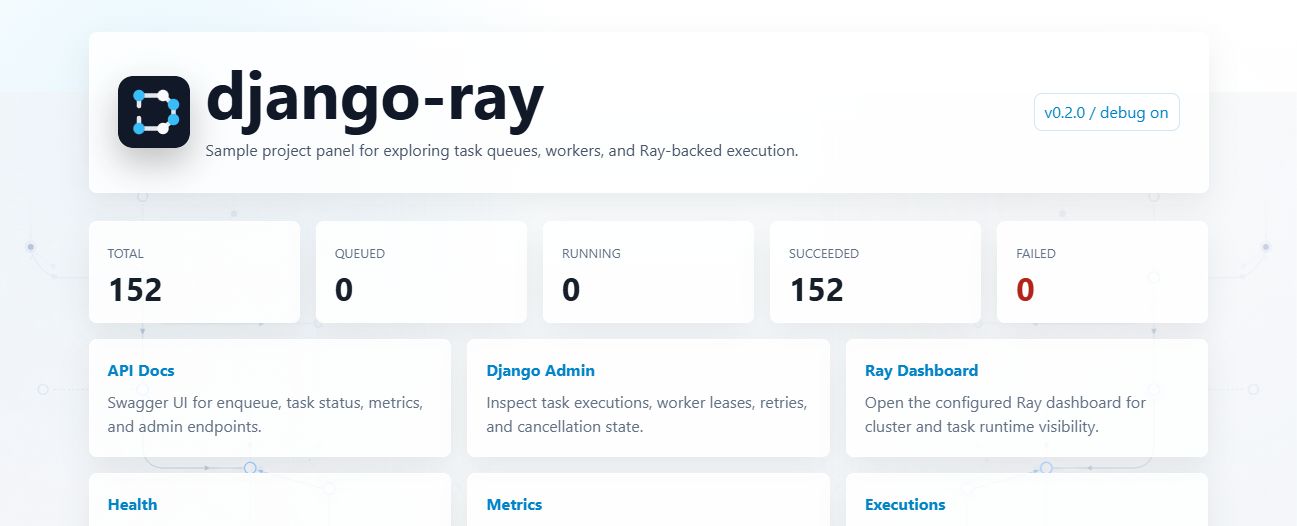
The repository includes a sample testproject/ with a small landing page for exploring the bundled API,
task stats, project links, and smoke-task trigger:
Requirements
- Python 3.12, 3.13, or 3.14
- Django 6.0.8+
- Ray 2.58.0+
Python 3.15 has a preparatory compatibility check without Ray Core. Full runtime support remains blocked by upstream Ray wheels; use Python 3.12–3.14 for installation and execution. See the Python 3.15 policy.
Upgrading to 0.7.0
django-ray 0.7.0 remains Beta. Follow the coordinated 0.6 to 0.7 upgrade guide before upgrading an existing deployment. Stop producers and cleanup, drain or reconcile old work, and stop every old manager before migration. Back up the database, referenced artifacts, and retained encryption keys, and verify an independent restore. Mixed-version rolling execution is unsupported.
Migration 0028 seeds one shared worker lease authority at 60 seconds. Deployments with
a custom duration must reconcile the authority and every process's WORKER_LEASE_SECONDS
while stopped, before restarting; use the revision-checked
django_ray_lease_policy command.
Once 0.7.0 writes new rq2ref:v1: request references, rollback to 0.6.0 requires a matching
pre-upgrade database and artifact restore; reconcile later writes and external effects.
The release also adds bounded RuntimeEnv rewrite/rewrap and opt-in required encryption.
The default remains plaintext. Follow the
retained-snapshot maintenance procedure
before selecting RUNTIME_ENV_STORAGE_MODE="required", which refuses plaintext execution
and retry. Current-table verification never authorizes destroying keys needed by backups.
Review the changelog for finite purge
continuation, monitoring upgrade boundaries, and the remaining Beta limitations.
Installation
pip install django-ray
Or with uv:
uv add django-ray
The base package installs ray[default] for Ray Core, Ray Client, Ray Jobs, and live
Dashboard/State diagnostics. It does not install usable Ray Data, Train, Tune, RLlib,
Serve, Serve LLM, or native Compiled Graph dependencies. Review the
Ray Ecosystem Support and Install Matrix
before adding one of those components to a task image or RuntimeEnv.
Quick Start
- Add
django_rayto yourINSTALLED_APPS:
INSTALLED_APPS = [
    # ...
    "django_ray",
]
- Configure Django Tasks and django-ray:
TASKS = {
    "default": {
        "BACKEND": "django_ray.backends.RayTaskBackend",
        "QUEUES": ["default"],
    },
}

DJANGO_RAY = {
    "RAY_ADDRESS": "auto",  # Use "ray://host:port" for bounded remote Ray Core work
    "RUNNER": "ray_core",
    "DEFAULT_CONCURRENCY": 10,
    "MAX_TASK_ATTEMPTS": 3,
}
- Run migrations:
python manage.py migrate django_ray
- Define a task in
myapp/tasks.py:
from django.tasks import task


@task(queue_name="default")
def add_numbers(left: int, right: int) -> int:
    return left + right
- In a separate terminal, start the worker:
# Local Ray (recommended for development)
python manage.py django_ray_worker --queue=default --local

# Connect through Ray Client for bounded, low-latency work
python manage.py django_ray_worker --queue=default --cluster=ray://localhost:10001

# Sync mode (no Ray, for testing)
python manage.py django_ray_worker --queue=default --sync
- Enqueue the task from
python manage.py shell:
from myapp.tasks import add_numbers

enqueued = add_numbers.enqueue(20, 22)
print(enqueued.id)
After the worker reports completion, refresh the durable result in the same shell:
from django.tasks import TaskResultStatus, task_backends

current = task_backends["default"].get_result(enqueued.id)
if current.status == TaskResultStatus.SUCCESSFUL:
    print(current.return_value)  # 42
The object returned by enqueue() is a snapshot; call get_result() again when you need current
state. Continue with
Getting Started for the complete
walkthrough and its before-production checklist.
Worker Execution Modes
| Mode | Flag | Description |
|---|---|---|
| sync | --sync |
Direct execution, no Ray (testing) |
| local | --local |
Local Ray cluster, tasks via @ray.remote |
| cluster | --cluster=<addr> |
Bounded low-latency work through Ray Client |
| ray-job | No mode flag; RUNNER="ray_job" |
Ray Job Submission API (process isolation) |
Without a mode flag, the worker uses DJANGO_RAY["RUNNER"], whose package default is
"ray_job". The quick-start configuration above selects "ray_core" with address "auto",
so its unqualified worker starts local Ray. Ray Job mode requires a retrievable
INPUT_STORAGE_BACKEND, including its filesystem root or object-store namespace:
new rq2 submissions always externalize the canonical execution request. See
durable input storage.
Cluster mode is tied to the task manager's Ray Client connection. If that connection is lost beyond Ray's reconnect grace period, Ray terminates its in-flight workload; django-ray can reconcile and retry the outer task, but it does not resume completed workflow leaves or roll back side effects. Use idempotent work and prefer Ray Job mode for long or coarse execution that must continue independently of the submitting connection. See Ray's Ray Client lifetime guidance.
Configuration
| Setting | Default | Description |
|---|---|---|
RAY_ADDRESS |
None |
Must be set at runtime; use "auto" locally or "ray://host:port" for a cluster |
RUNNER |
"ray_job" |
Worker mode when no explicit mode flag is supplied; "ray_core" uses the configured Ray address |
DEFAULT_CONCURRENCY |
10 |
Max concurrent tasks per worker |
MAX_TASK_ATTEMPTS |
3 |
Max retry attempts |
RETRY_BACKOFF_SECONDS |
60 |
Base backoff for retries |
RETRY_EXCEPTION_DENYLIST |
[] |
Exception types that skip auto-retry |
STUCK_TASK_TIMEOUT_SECONDS |
300 |
Timeout before marking tasks as LOST |
TASK_MONITOR_HEARTBEAT_SECONDS |
15 |
Database heartbeat interval for in-flight Ray Core tasks |
RUNTIME_ENV_PROFILES |
{} |
Named Ray environments for code and dependencies |
DEFAULT_RUNTIME_ENV_PROFILE |
None |
Default named environment |
MAX_INLINE_INPUT_SIZE_BYTES |
None |
Opt-in durable input spillover threshold |
See Ray-Native Workflows for low-latency chain, group,
and map_step execution.
See Django Gateway to Private Ray Serve
for bounded authenticated online inference without writing a FastAPI ingress or adding
package-owned Serve orchestration.
See Runtime Environments for per-task profiles,
workflow overrides, and generic KubeRay images.
See Performance for choosing durable task boundaries,
execution modes, and useful fan-out granularity.
See Durable Input Storage for oversized JSON
arguments, storage backends, rollout, and retention.
See Defining Tasks for async task and ORM safety
guidance.
For bounded read-only Linux diagnosis, use
django_ray_doctor.
Its report cannot yet confirm remote readiness, capacity, or artifact availability;
exit status 2 means incomplete evidence, even when available observations are clear.
It does not authorize cleanup, replay, or other maintenance.
Development Setup
Prerequisites
- Python 3.12, 3.13, or 3.14
- uv package manager
Installation
git clone https://github.com/dariuszpanas/django-ray.git
cd django-ray
make install
Development Commands
Run development targets through uv run unless the virtual environment is already active. Targets
named lint, check, and ci are non-mutating; use format or fix when files should change.
make install          # Install locked Python and commit-policy dependencies
uv run make format    # Format code with Ruff
uv run make fix       # Format and apply safe Ruff lint fixes
uv run make lint      # Check lint without modifying files
uv run make typecheck # Type check with ty
uv run make test      # Run tests
uv run make test-xdist # Run the default-resource subset with four xdist workers
uv run make test-cov  # Run tests with CI coverage floors
uv run make check     # Check formatting, lint, and types without changes
uv run make ci        # Check coverage, docs, and package build for this interpreter
uv run make docs-build       # Build docs (Zensical)
uv run make docs-build-strict # Build docs in strict mode
uv run make docs-serve       # Serve docs locally
Django Commands
uv run make migrate          # Run migrations
uv run make runserver        # Start dev server
uv run make shell            # Django shell
uv run make createsuperuser  # Create admin user
Worker Commands
uv run make worker           # Ray Job API mode
uv run make worker-local     # Native local Ray for single-host development
uv run make worker-sync      # Sync mode (no Ray)
uv run make worker-all       # All django-ray backend queues, local Ray
uv run make worker-cluster   # Connect to cluster
Linux is the supported execution target. Use an explicitly bounded Linux environment for execution and full-suite validation. Windows compatibility is best effort through advisory GitHub Actions checks; do not run native Ray validation on a Windows workstation. See the platform compatibility boundary for host-side development options.
Quick Start (End-to-End Testing)
Generate a disposable bearer token in the shell that will start Django, then migrate the database. On POSIX:
export DJANGO_API_TOKEN="$(
  uv run python -c 'import secrets; print(secrets.token_urlsafe(32))'
)"
uv run make migrate
On PowerShell:
$env:DJANGO_API_TOKEN = uv run python -c "import secrets; print(secrets.token_urlsafe(32))"
uv run make migrate
Start the web process and worker in separate terminals that share the same project checkout and database:
uv run make runserver
uv run make worker-all
Browser - Test via API:
- Open http://127.0.0.1:8000/api/docs (Swagger UI)
- Select Authorize and paste the generated token value
- Try
POST /api/enqueue/add/100/200 - Refresh
GET /api/tasks/{task_id}, then checkGET /api/executions - View in Admin: http://127.0.0.1:8000/admin/django_ray/raytaskexecution/
The tracked Docker Compose path below is the reproducible bundled-application smoke, including PostgreSQL and migration ordering.
Queue Configuration
With the bundled testproject's default settings, the commands below select Ray Job mode.
Configure a retrievable
INPUT_STORAGE_BACKEND (including its filesystem root or object-store namespace) before
starting them; new rq2 submissions always externalize the canonical execution request.
For source-checkout development without shared request storage, add --local or use
uv run make worker-local/worker-all instead.
# Single queue
uv run python testproject/manage.py django_ray_worker --queue=default

# Multiple queues
uv run python testproject/manage.py django_ray_worker --queue=default,high-priority,low-priority

# All queues configured on django-ray backend aliases
uv run python testproject/manage.py django_ray_worker --all-queues
Docker
The canonical local evaluation path is the tracked Compose application. Generate the required disposable credentials, start the web and worker services, then run the bounded end-to-end smoke:
export DJANGO_API_TOKEN="$(
  uv run python -c 'import secrets; print(secrets.token_urlsafe(32))'
)"
export POSTGRES_PASSWORD="$(
  uv run python -c 'import secrets; print(secrets.token_urlsafe(32))'
)"

docker compose up --build --detach web worker
docker compose --profile smoke run --rm --no-deps smoke
PowerShell, authenticated request, result-refresh, admin, and cleanup commands are in the bundled testproject quickstart. The local Compose topology and its generated credentials are not production hardening.
Kubernetes Deployment
Evaluate the bundled Kustomize manifests in k8s/ only on a trusted, disposable local
environment. They are maintainer-validation assets, not a production-ready deployment, and
replacing their placeholder values does not make the sample topology production-ready.
# Build images
make k8s-build

# Deploy
make k8s-deploy

# Check status
make k8s-status

# With TLS enabled
make k8s-gen-tls-certs
make k8s-deploy-tls
See k8s/README.md for detailed deployment documentation.
Project Structure
django-ray/
├── src/django_ray/          # Library source code
│   ├── models.py            # RayTaskExecution, TaskWorkerLease
│   ├── admin.py             # Admin interface
│   ├── backends.py          # Django Task Backend
│   ├── conf/                # Settings
│   ├── runner/              # Task runners
│   │   ├── ray_job.py       # Ray Job Submission API
│   │   ├── ray_core.py      # Ray Core (@ray.remote)
│   │   ├── leasing.py       # Worker coordination
│   │   └── retry.py         # Retry logic
│   ├── runtime/             # Task execution
│   │   ├── entrypoint.py    # Execution entry point
│   │   ├── distributed.py   # parallel_map, scatter_gather
│   │   └── serialization.py
│   └── management/commands/
│       └── django_ray_worker.py
│
├── testproject/             # Example project (development only)
│   ├── api.py               # Example REST API
│   ├── tasks.py             # Example tasks
│   └── apps/                # Example apps
│
├── tests/                   # Test suite
├── docs/                    # Documentation
└── k8s/                     # Kubernetes manifests
Documentation
Published docs are served with Zensical at:
Agents and documentation tools can start with
llms.txt. The published
documentation also serves /llms.txt.
Read the Docs builds are configured in .readthedocs.yaml. The build installs uv, runs the
strict Zensical build, and copies the generated site/ output into Read the Docs' HTML output
directory.
Source docs remain in the docs/ directory:
- Getting Started - Installation and basic setup
- Configuration - All configuration options
- Worker Modes - Execution modes explained
- Ray Ecosystem Support - Component installs, durable exchange, lifecycle ownership, and evidence
- Tasks - Defining and enqueueing tasks
- Queues - Working with task queues
- Retry & Error Handling - Configuring retries
- Migrating from Celery - Classifying workloads, running both backends, and draining Celery safely
Deployment
- Kubernetes - Deploy to Kubernetes
- Docker - Running with Docker
- TLS - Securing Ray communication
Reference
- CLI Reference - Command-line options
- Settings Reference - All settings
- API Reference - REST API endpoints
Contributing
See CONTRIBUTING.md for
branch, commit, pull request, staging, and validation conventions. Automated contributors must also
follow AGENTS.md.
Security
Report suspected vulnerabilities through the private channel in the security policy. Do not put vulnerability details, exploit instructions, credentials, or secrets in a public issue.
License
This project is licensed under the BSD 3-Clause License - see the LICENSE file for details.
1 maintainer

Metadata
1 maintainer
Release files for django-ray 0.7.0
For a detailed explanation of source distributions (sdists) and built distributions (wheels), please see the package formats documentation.
Source distribution (sdist)
| File | Size | Uploaded | Provenance | Actions |
|---|---|---|---|---|
| django_ray-0.7.0.tar.gz | 4.1 MB | With provenance | Details for django_ray-0.7.0.tar.gz |
Built distribution (wheel)
| File | Interpreter | ABI | Platform | Actions Reset |
|---|---|---|---|---|
| django_ray-0.7.0-py3-none-any.whl | Python 3 | none | any | Details for django_ray-0.7.0-py3-none-any.whl |
Total release size: 4.8 MB
Release files / django_ray-0.7.0.tar.gz
| Download URL | django_ray-0.7.0.tar.gz |
|---|---|
| Size | 4.1 MB |
| Tags | Source |
|
SHA-256 checksum How to use checksums |
6ee001ef0a30f356f45bc1ddb640123dda7813befbdb5014485e6872e82c0499
|
|
BLAKE2b-256 checksum How to use checksums |
44755afe8770bef3b44dd11ab2cf264718e81dacff9a5275a2dcfc14813fdc3f
|
| Upload date | |
|
Uploaded using Trusted Publishing? What is trusted publishing? |
Yes |
| Uploaded via |
twine/7.0.0 CPython/3.13.14
|
Provenance
Provenance describes where a file came from. On PyPI, provenance is shared via attestations, which provide a verifiable record of the build or publishing details. View details, limitations and caveats.


PyPI Publish Attestation
PyPI verified that this artifact, at this checksum, originated from the publisher listed below.
Signed by GitHub Actions, verified by PyPI on Oct 18, 2026.
Transparency logRelease files / django_ray-0.7.0-py3-none-any.whl
| Download URL | django_ray-0.7.0-py3-none-any.whl |
|---|---|
| Size | 657.0 kB |
| Tags | Python 3 |
|
SHA-256 checksum How to use checksums |
15237203886bad355e631d0607be6fee8afe1ae78046def1f055b7aea850af9f
|
|
BLAKE2b-256 checksum How to use checksums |
5ff85a5fa71b876479efc982b13b46a01b42d52679ddbc0496d7647899432da3
|
| Upload date | |
|
Uploaded using Trusted Publishing? What is trusted publishing? |
Yes |
| Uploaded via |
twine/7.0.0 CPython/3.13.14
|
Provenance
Provenance describes where a file came from. On PyPI, provenance is shared via attestations, which provide a verifiable record of the build or publishing details. View details, limitations and caveats.
PyPI Publish Attestation
PyPI verified that this artifact, at this checksum, originated from the publisher listed below.
Signed by GitHub Actions, verified by PyPI on Oct 18, 2026.
Transparency logSecurity for django-ray 0.7.0
Provenance
Provenance describes where a file came from. On PyPI, provenance is shared via attestations, which provide a verifiable record of the build or publishing details. View details, limitations and caveats.
Full provenance
All 2 files in this release have been uploaded with provenance metadata.
Attestation for django_ray-0.7.0.tar.gz
PyPI Publish Attestation
PyPI verified that this artifact, at this checksum, originated from the publisher listed below.
Signed by GitHub Actions, verified by PyPI on Oct 18, 2026.
Transparency logA note on package security
PyPI is a repository for distributing packages, not a service for auditing them. While third-party security researchers and our staff do their best to detect and remove malicious packages, PyPI cannot guarantee the quality, security or suitability of any given package.
To learn more about protecting yourself from malicious actors, visit our package security documentation.














