
Add compare view to django-reversion for comparing two versions of a reversion model.

Project description
django-reversion-compare





django-reversion-compare is an extension to django-reversion that provides a history compare view to compare two versions of a model which is under reversion.
Comparing model versions is not a easy task. Maybe there are different view how this should looks like. This project will gives you a generic way to see whats has been changed.
Many parts are customizable by overwrite methods or subclassing, see above.
Installation
Just use:
pip install django-reversion-compare
Setup
Add reversion_compare to INSTALLED_APPS in your settings.py, e.g.:
INSTALLED_APPS = (
    'django...',
    ...
    'reversion', # https://github.com/etianen/django-reversion
    'reversion_compare', # https://github.com/jedie/django-reversion-compare
    ...
)

# Add reversion models to admin interface:
ADD_REVERSION_ADMIN=True
# optional settings:
REVERSION_COMPARE_FOREIGN_OBJECTS_AS_ID=False
REVERSION_COMPARE_IGNORE_NOT_REGISTERED=False
Usage
Inherit from CompareVersionAdmin instead of VersionAdmin to get the comparison feature.
admin.py e.g.:
from django.contrib import admin
from reversion_compare.admin import CompareVersionAdmin

from my_app.models import ExampleModel

@admin.register(ExampleModel)
class ExampleModelAdmin(CompareVersionAdmin):
    pass
If you're using an existing third party app, then you can add patch django-reversion-compare into its admin class by using the reversion_compare.helpers.patch_admin() method. For example, to add version control to the built-in User model:
from reversion_compare.helpers import patch_admin

patch_admin(User)
e.g.: Add django-cms Page model:
from cms.models.pagemodel import Page
from reversion_compare.helpers import patch_admin


# Patch django-cms Page Model to add reversion-compare functionality:
patch_admin(Page)
Customize
It's possible to change the look for every field or for a entire field type. You must only define a methods to your admin class with this name scheme:
"compare_%s" % field_name"compare_%s" % field.get_internal_type()
If there is no method with this name scheme, the fallback_compare() method will be used.
An example for specifying a compare method for a model field by name:
class YourAdmin(CompareVersionAdmin):
    def compare_foo_bar(self, obj_compare):
        """ compare the foo_bar model field """
        return "%r <-> %r" % (obj_compare.value1, obj_compare.value2)
and example using patch_admin with custom version admin class:
patch_admin(User, AdminClass=YourAdmin)
Class Based View
Beyond the Admin views, you can also create a Class Based View for displaying and comparing version differences. This is a single class-based-view that either displays the list of versions to select for an object or displays both the versions and their differences (if the versions to be compared have been selected). This class can be used just like a normal DetailView:
More information about this can be found in DocString of:
The make run-test-server test project contains a Demo, use the links under:
HistoryCompareDetailView Examples:
Screenshots
Here some screenshots of django-reversion-compare:
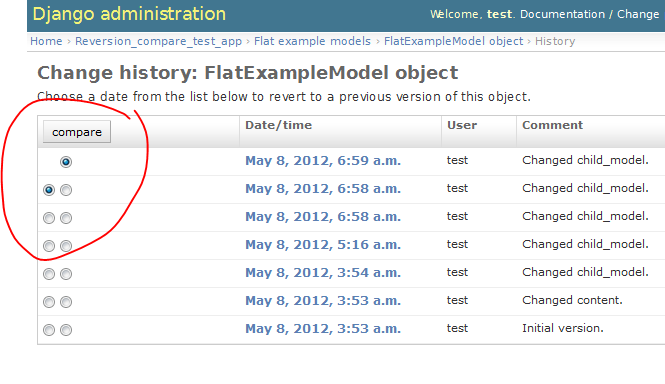
How to select the versions to compare:
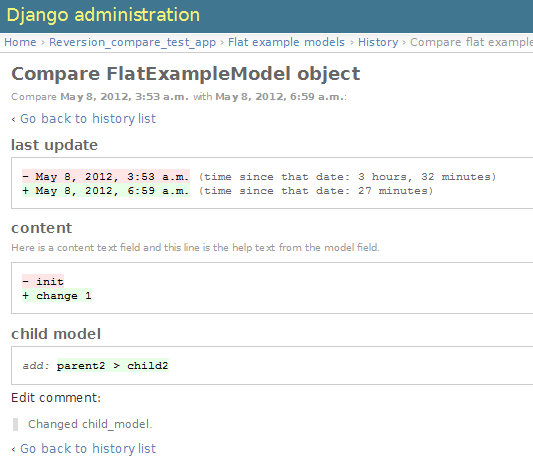
from v0.1.0: DateTimeField compare (last update), TextField compare (content) with small changes and a ForeignKey compare (child model instance was added):
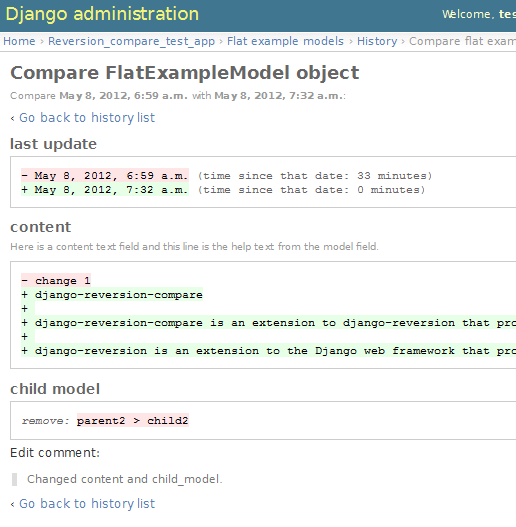
from v0.1.0: Same as above, but the are more lines changed in TextField and the ForeignKey relation was removed:
Example screenshot from v0.3.0: a many-to-many field compare (friends, hobbies):
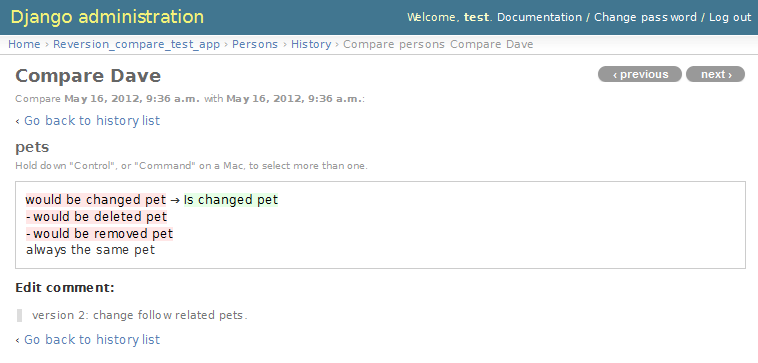
- In the first line, the m2m object has been changed.
- line 2: A m2m object was deleted
- line 3: A m2m object was removed from this entry (but not deleted)
- line 4: This m2m object has not changed
create developer environment
We use manage_django_project, so you just need to clone the sources and call manage.py to start hacking.
e.g.:
~$ git clone https://github.com/jedie/django-reversion-compare.git
~$ cd django-reversion-compare

# Just call manage.py and the magic happen:
~/django-reversion-compare$ ./manage.py

# start local dev. web server:
~/django-reversion-compare$ ./manage.py run_dev_server

# run tests:
~/django-reversion-compare$ ./manage.py test
# or with coverage
~/django-reversion-compare$ ./manage.py coverage
# or via tox:
~/django-reversion-compare$ ./manage.py tox
Backwards-incompatible changes
v0.16.0
We use https://github.com/jedie/manage_django_project You must reinit your dev setup.
v0.12.0
Google "diff-match-patch" is now mandatory and not optional.
Version compatibility
| Reversion-Compare | django-reversion | Django | Python |
|---|---|---|---|
| >=v0.16.0 | v3.0 | v3.2, v4.0, v4.1 | v3.9, v3.10, v3.11 |
| >=v0.15.0 | v3.0 | v2.2, v3.2, v4.0 | v3.7, v3.8, v3.9 |
| >=v0.13.0 | v3.0 | v2.2, v3.0, v3.1 | v3.7, v3.8, v3.9 |
| >=v0.10.0 | v3.0 | v2.2, v3.0 | v3.6, v3.7, v3.8, pypy3 |
| >=v0.9.0 | v2.0 | v2.2, v3.0 | v3.6, v3.7, v3.8, pypy3 |
| >=v0.8.6 | v2.0 | v1.11, v2.0 | v3.5, v3.6, v3.7, pypy3 |
| >=v0.8.4 | v2.0 | v1.8, v1.11, v2.0 | v3.5, v3.6, pypy3 |
| >=v0.8.3 | v2.0 | v1.8, v1.11 | v3.5, v3.6, pypy3 |
| v0.8.x | v2.0 | v1.8, v1.10, v1.11 | v2.7, v3.4, v3.5, v3.6 (only with Django 1.11) |
| >=v0.7.2 | v2.0 | v1.8, v1.9, v1.10 | v2.7, v3.4, v3.5 |
| v0.7.x | v2.0 | v1.8, v1.9 | v2.7, v3.4, v3.5 |
| v0.6.x | v1.9, v1.10 | v1.8, v1.9 | v2.7, v3.4, v3.5 |
| >=v0.5.2 | v1.9 | v1.7, v1.8 | v2.7, v3.4 |
| >=v0.4 | v1.8 | v1.7 | v2.7, v3.4 |
| <v0.4 | v1.6 | v1.4 | v2.7 |
These are the unittests variants. See also: /pyproject.toml Maybe other versions are compatible, too.
Changelog
- dev compare v0.15.0...master
- Refactor project setup and use https://github.com/jedie/manage_django_project
- Remove support for Django v2.2 -> Test only with Django v3.2, v4.0 and v4.1
- Remove support for Python v3.7 and 3.9 -> Test only with Python v3.9, v3.10 and v3.11
- TBC
- v0.15.0 - 27.01.2022 compare v0.14.1...v0.15.0
- Bugfix model choice fields (e.g.: django-countries fields)
- Update project and run tests with Django v2.2, v3.2 and v4.0
- Remove temp file usage in test project
- v0.14.1 - 19.07.2021 compare v0.14.0...v0.14.1
- Enable Diff-Match-Patch "checklines" mode for better diffs
- Speed up Revision/Version admin
- v0.14.0 - 24.02.2021 compare v0.13.1...v0.14.0
- Add work-a-round for django-reversion #859 incompatible version data by fallback to a ndiff JSON compare pull #149
- Fix translations
- v0.13.1 - 04.02.2021 compare v0.13.0...v0.13.1
- Multiline diff formatting improvements contributed by dbader
- Fix django.conf.urls.url() is deprecated contributed by GeyseR
- Add demo links to
HistoryCompareDetailViewin test project - update github actions
- v0.13.0 - 23.12.2020 compare v0.12.2...v0.13.0
- Support Django v3.1
- Stop running test with Python 3.6 and pypy3
- Activate django-debug-toolbar in test project
- code style (e.g.: f-strings) and remove some warnings in test project
- some project setup updates (e.g.: fix Python and Django version restrictions)
- v0.12.2 - 24.03.2020 compare v0.12.1...v0.12.2
- Added revert button on compare view, contributed by jjarthur
- v0.12.1 - 20.03.2020 compare v0.12.0...v0.12.1
- Bugfix: Django 3.0 compatibility by change project dependencies, contributed by maxocub
- Test project used a "auto login test user" middleware
- Test project rename django admin title and branding
- v0.12.0 - 12.03.2020 compare v0.11.0...v0.12.0
- google-diff-match-patch is now mandatory!
- Diff html code are now unified to
<pre class="highlight">...</pre> - Bugfix
make run-test-server - Switch between Google "diff-match-patch" and
difflib.ndiff()by size: ndiff makes more human readable diffs with small values.
- v0.11.0 - 12.03.2020 compare v0.10.0...v0.11.0
- CHANGE output of diff generated with "diff-match-patch":
- cleanup html by implement a own html pretty function instead of
diff_match_patch.diff_prettyHtmlusage - The html is now simmilar to the difflib usage output and doesn't contain inline styles
- cleanup html by implement a own html pretty function instead of
- Add "diff-match-patch" as optional dependencies in poetry config
- Bugfix Django requirements
- code cleanup and update tests
- CHANGE output of diff generated with "diff-match-patch":
- v0.10.0 - 19.02.2020 compare v0.9.1...v0.10.0
- less restricted dependency specification see: issues #120
- run tests with latest django-reversion version (currently v3.x)
- v0.9.1 - 16.02.2020 compare v0.9.0...v0.9.1
- Modernize project setup and use poetry
- Apply pyupgrade and fix/update some f-strings
- Update test project
- v0.9.0 - 19.01.2020 compare v0.8.7...v0.9.0
- Test with Python 3.8 and Django 3.0, too.
- Run tests via github actions, too.
- Remove support for Python 3.5 and Django v1.11
- actually check if model is registered #115 contributed by willtho89
- Remove python2 compatibility decorators #113 contributed by jeremy-engel
- Show username and full name from custom user model #112 contributed by berekuk
- Fix django-suit NoneType is not iterable #111 contributed by creativequality
- convert old format to f-strings via flynt
- Code style:
- sort imports with isort
- apply autopep8
- lint code in CI with flake8, isort and flynt
- v0.8.7 - 06.01.2020 compare v0.8.6...v0.8.7
- Add new optional settings
REVERSION_COMPARE_IGNORE_NOT_REGISTERED, see: issues #103 - reformat code with 'black'
- some code cleanup
- Add new optional settings
- v0.8.6 - 04.01.2019 compare v0.8.5...v0.8.6
- Bugfix: Use ".pk" instead of ".id" when referring to related object. contributed by Peter Lisák
- Run tests: Skip Django v1.8 and add Python v3.7
- v0.8.5 - 13.09.2018 compare v0.8.4...v0.8.5
- speed up delete checking contributed by LegoStormtroopr
- v0.8.4 - 15.03.2018 compare v0.8.3...v0.8.4
- Add Django 2.0 compatibility contributed by samifahed
- v0.8.3 - 21.12.2017 compare v0.8.2...v0.8.3
- refactor travis/tox/pytest/coverage stuff
- Tests can be run via
python3 setup.py toxand/orpython3 setup.py test - Test also with pypy3 on Travis CI.
- v0.8.2 - 06.12.2017:
- Change ForeignKey relation compare contributed by alaruss
- Work around a type error triggered by taggit contributed by Athemis
- minor code changes
- v0.8.1 - 02.10.2017:
- Add added polish translation contributed by w4rri0r3k
- Bugfix "Django>=1.11" in setup.py
- v0.8.0 - 17.08.2017:
- Run tests with Django v1.11 and drop tests with Django v1.9
- v0.7.5 - 24.04.2017:
- v0.7.4 - 10.04.2017:
- Bugfix for Python 2: compare unicode instead of bytes contributed by Maksim Iakovlev
- remove 'Django20Warning' contributed by Hugo Tácito
- Add 'Finnish' localisations contributed by Olli-Pekka Puolitaival
- v0.7.3 - 08.02.2017:
- v0.7.2 - 20.10.2016:
- Add Django v1.10 support
- v0.7.1 - 29.08.2016:
- v0.7.0 - 25.08.2016:
- support only django-reversion >= 2.0 based on a contribution by mshannon1123
- remove internal reversion_api
- Use tox
- v0.6.3 - 14.06.2016:
- Remove unused and deprecated patters contributed by codingjoe
- Fix django 1.10 warning #66 contributed by pypetey
- v0.6.2 - 27.04.2016:
- Added choices field representation #63 contributed by amureki
- Check if related model has an integer as pk for ManyToMany fields. #64 contributed by logaritmisk
- v0.6.1 - 16.02.2016:
- pull #61: Fix error when ManyToMany relations didn't exist contributed by Diederik van der Boor
- v0.6.0 - 03.02.2016:
- Added Dutch translation contributed by Sae X
- Add support for Django 1.9
- Nicer boolean compare: #57
- Fix #58 compare followed reverse foreign relation fields that are on a non-abstract parent class contributed by LegoStormtroopr
- v0.5.6 - 23.09.2015:
- NEW: Class-Based-View to create non-admin views and greek translation contributed by Serafeim Papastefanos.
- v0.5.5 - 24.07.2015:
- UnboundLocalError ('version') when creating deleted list in get_many_to_something() #41
- v0.5.4 - 22.07.2015:
- One to one field custom related name fix #42 (contributed by frwickst and aemdy)
- v0.5.3 - 13.07.2015:
- Update admin.py to avoid RemovedInDjango19Warning (contributed by luzfcb)
- v0.5.2 - 14.04.2015:
- contributed by Samuel Spencer:
- Added Django 1.8 support: pull #35
- list of changes for reverse fields incorrectly includes a "deletion" for the item that was added in: issues #34
- contributed by Samuel Spencer:
- v0.5.1 - 28.02.2015:
- activate previous/next links and add unitests for them
- v0.5.0 - 27.02.2015:
- refactory unittests, test with Django v1.7 and Python 2.7 & 3.4
- v0.4.0 - 02.02.2015:
- Updates for django 1.7 support
- Add
settings.ADD_REVERSION_ADMIN
- v0.3.5 - 03.01.2013:
- Remove date from version string. issues 9
- v0.3.4 - 20.06.2012:
- Use VersionAdmin.revision_manager rather than default_revision_manager, contributed by Mark Lavin - see: pull request 7
- Use logging for all debug prints, contributed by Bojan Mihelac - see: pull request 8
- v0.3.3 - 11.06.2012:
- Bugfix "ValueError: zero length field name in format" with Python 2.6 issues 5
- v0.3.2 - 04.06.2012:
- Bugfix for Python 2.6 in unified_diff(), see: AttributeError: 'module' object has no attribute '_format_range_unified'
- v0.3.1 - 01.06.2012:
- Bugfix: force unicode in html diff
- Bugfix in unittests
- v0.3.0 - 16.05.2012:
- Enhanced handling of m2m changes with follow and non-follow relations.
- v0.2.2 - 15.05.2012:
- Compare many-to-many in the right way.
- v0.2.1 - 10.05.2012:
- Bugfix for models which has no m2m field: https://github.com/jedie/django-reversion-compare/commit/c8e042945a6e78e5540b6ae27666f9b0cfc94880
- v0.2.0 - 09.05.2012:
- many-to-many compare works, too.
- v0.1.0 - 08.05.2012:
- First release
- v0.0.1 - 08.05.2012:
- collect all compare stuff from old "diff" branch
- see also: https://github.com/etianen/django-reversion/issues/147
Links
| Github | https://github.com/jedie/django-reversion-compare | | Python Packages | https://pypi.org/project/django-reversion-compare/ |
Donation
Release history Release notifications | RSS feed


Download files
Download the file for your platform. If you're not sure which to choose, learn more about installing packages.
Source Distribution
Built Distribution
Filter files by name, interpreter, ABI, and platform.
If you're not sure about the file name format, learn more about wheel file names.
Copy a direct link to the current filters
File details
Details for the file django-reversion-compare-0.16.0rc0.tar.gz.
File metadata
- Download URL: django-reversion-compare-0.16.0rc0.tar.gz
- Upload date:
- Size: 90.3 kB
- Tags: Source
- Uploaded using Trusted Publishing? No
- Uploaded via: twine/4.0.2 CPython/3.10.6
File hashes
| Algorithm | Hash digest | |
|---|---|---|
| SHA256 |
ac8b35a06837649f713c268997fcd564955b0aebd6370b4687effc260d73aec0
|
|
| MD5 |
b30379862f3fc01b3cb7311dd123107a
|
|
| BLAKE2b-256 |
c286c77b80d24db19bcba301192092019f4e346d8371f6a171e30c6f2ef5d407
|
File details
Details for the file django_reversion_compare-0.16.0rc0-py3-none-any.whl.
File metadata
- Download URL: django_reversion_compare-0.16.0rc0-py3-none-any.whl
- Upload date:
- Size: 95.5 kB
- Tags: Python 3
- Uploaded using Trusted Publishing? No
- Uploaded via: twine/4.0.2 CPython/3.10.6
File hashes
| Algorithm | Hash digest | |
|---|---|---|
| SHA256 |
50057f04ac589285efc22b7cdbf9bd60fe70bfd9e43a6d09f2c4cab4b64d5932
|
|
| MD5 |
f38e6e699a18fae10cf435d0845849e2
|
|
| BLAKE2b-256 |
736debb05bd7e8281900a9cebbfa670f5de145df29cec5f70f96cc52f0465ce0
|






