
django-silky







django-silky is a modernized-UI fork of django-silk — a live profiling and inspection tool for the Django framework.
It keeps 100 % of the original functionality (request/response recording, SQL inspection, code profiling, dynamic profiling) while shipping a fully redesigned interface built on CSS custom properties (light and dark mode), Lucide icons, an inline filter bar, multi-column sort chips, and proper pagination.
What's different from django-silk?
| Feature | django-silk | django-silky |
|---|---|---|
| Theme | Fixed dark nav, light body | Full light/dark toggle, persisted in localStorage |
| Filter UI | 300 px slide-out drawer | Inline collapsible filter bar |
| Filter selectors | Single-value dropdowns | Multi-select for method, status code, and path (with search) |
| Sort | Single column, GET param | Multi-column sort chips (session-persisted) |
| Pagination | Query-slice (LIMIT N) |
Real Django Paginator with prev/next/page numbers |
| Detail pages | Plain tables | Hero bar + metric pills + section cards |
| Icons | Font Awesome (CDN) | Lucide (self-hosted, no external requests) |
| URL sharing | State lost on reload | Sort + per-page encoded in URL; filter bar state in localStorage |
Screenshots
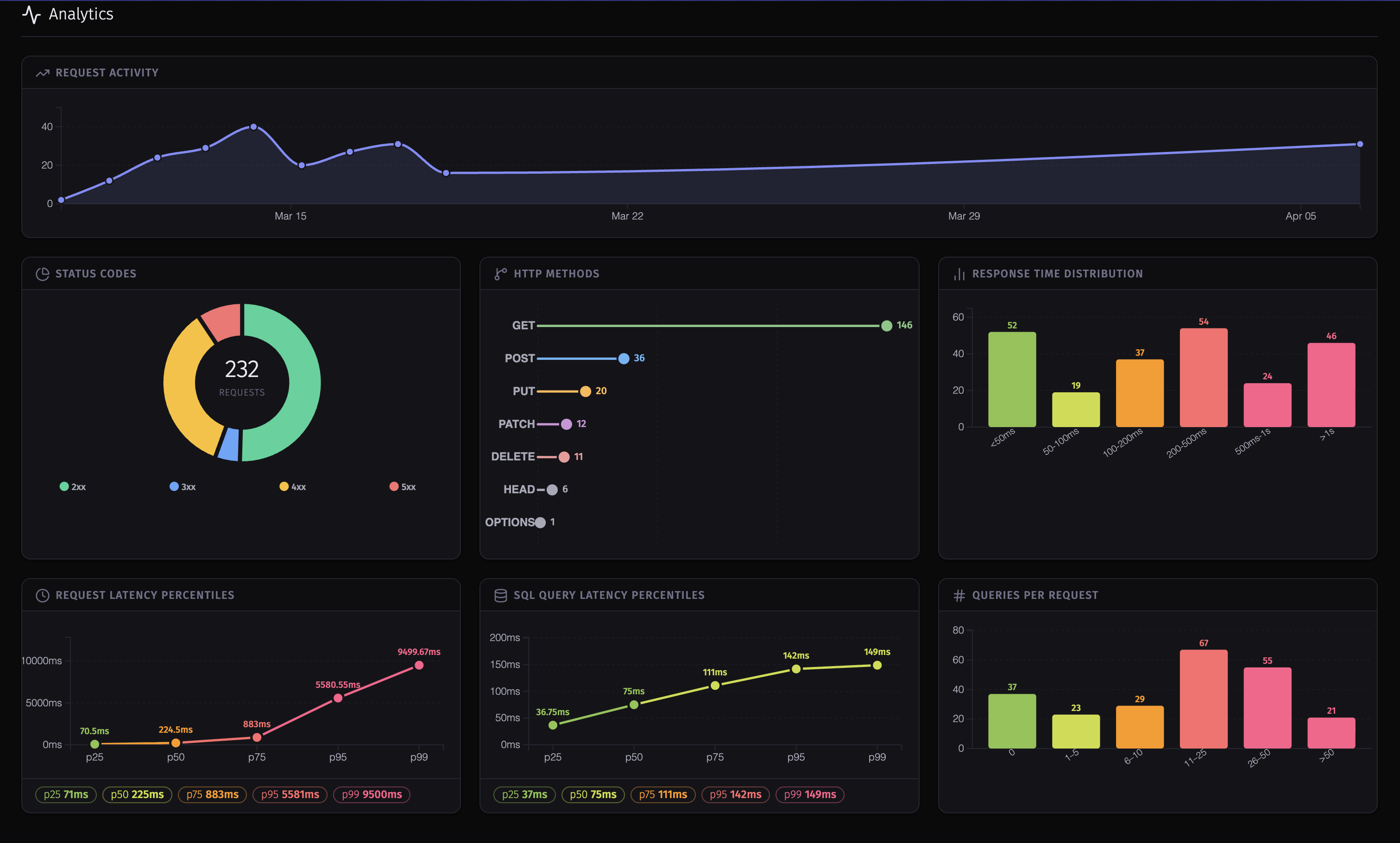 Analytics dashboard — activity timeline, status donut, method bars, RT histogram, latency percentiles, queries-per-request histogram |
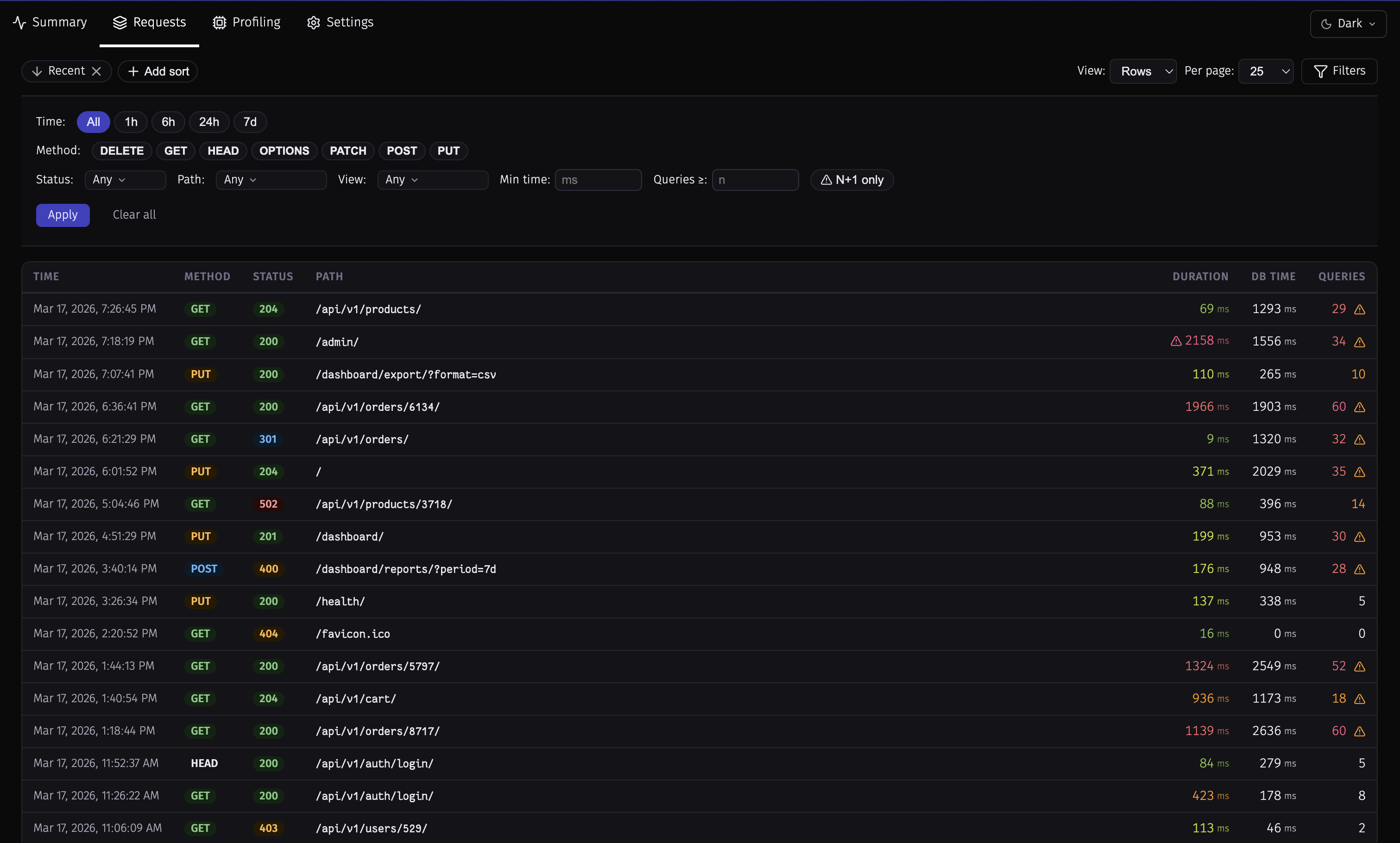 Requests list — inline filter bar with multi-select method, status, path, and view filters; multi-column sort chips |
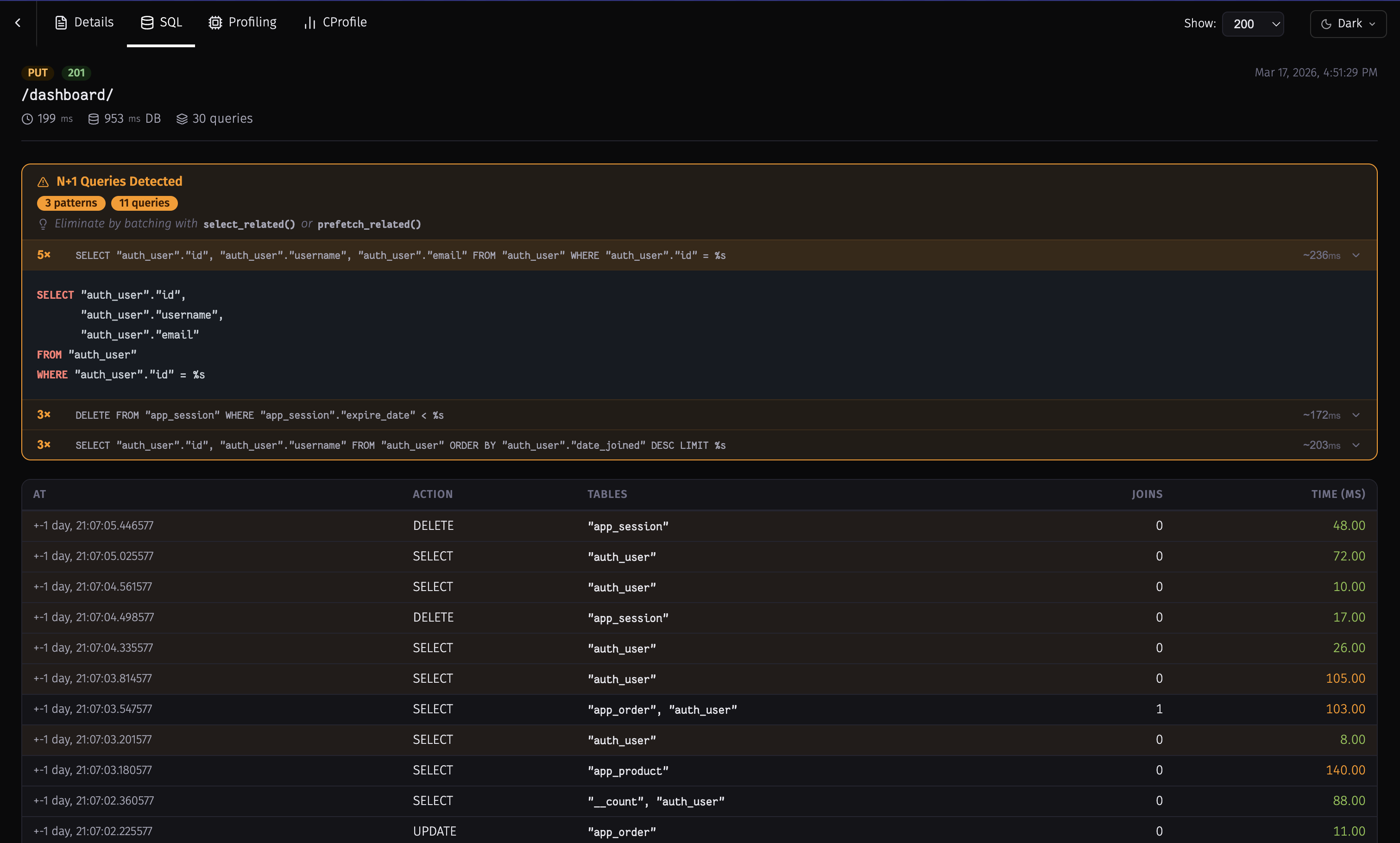 N+1 detection — banner with detected pattern, query count badge, and per-query cost; offending rows highlighted |
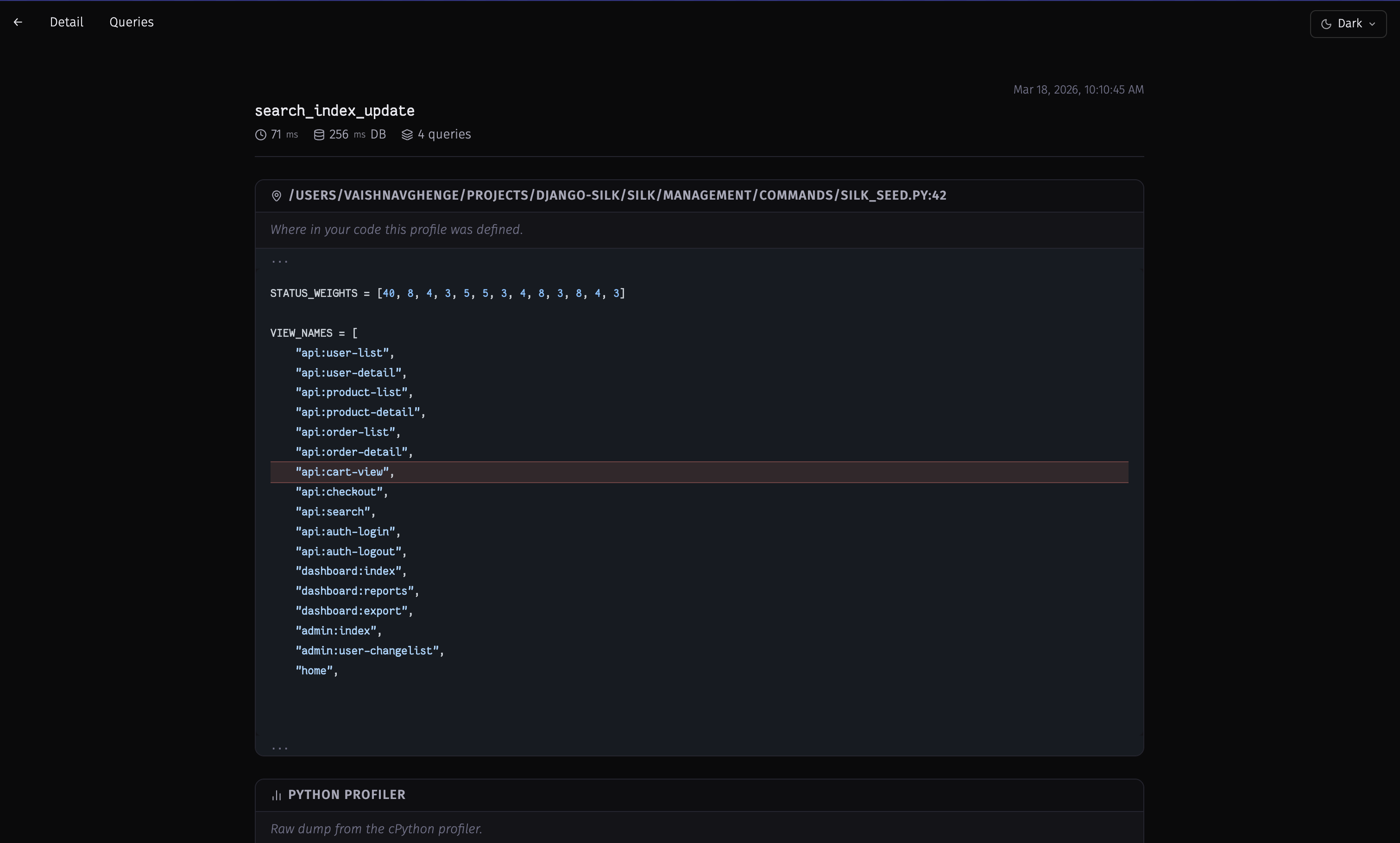 Profile detail — source file, function code highlighted, and associated SQL queries |
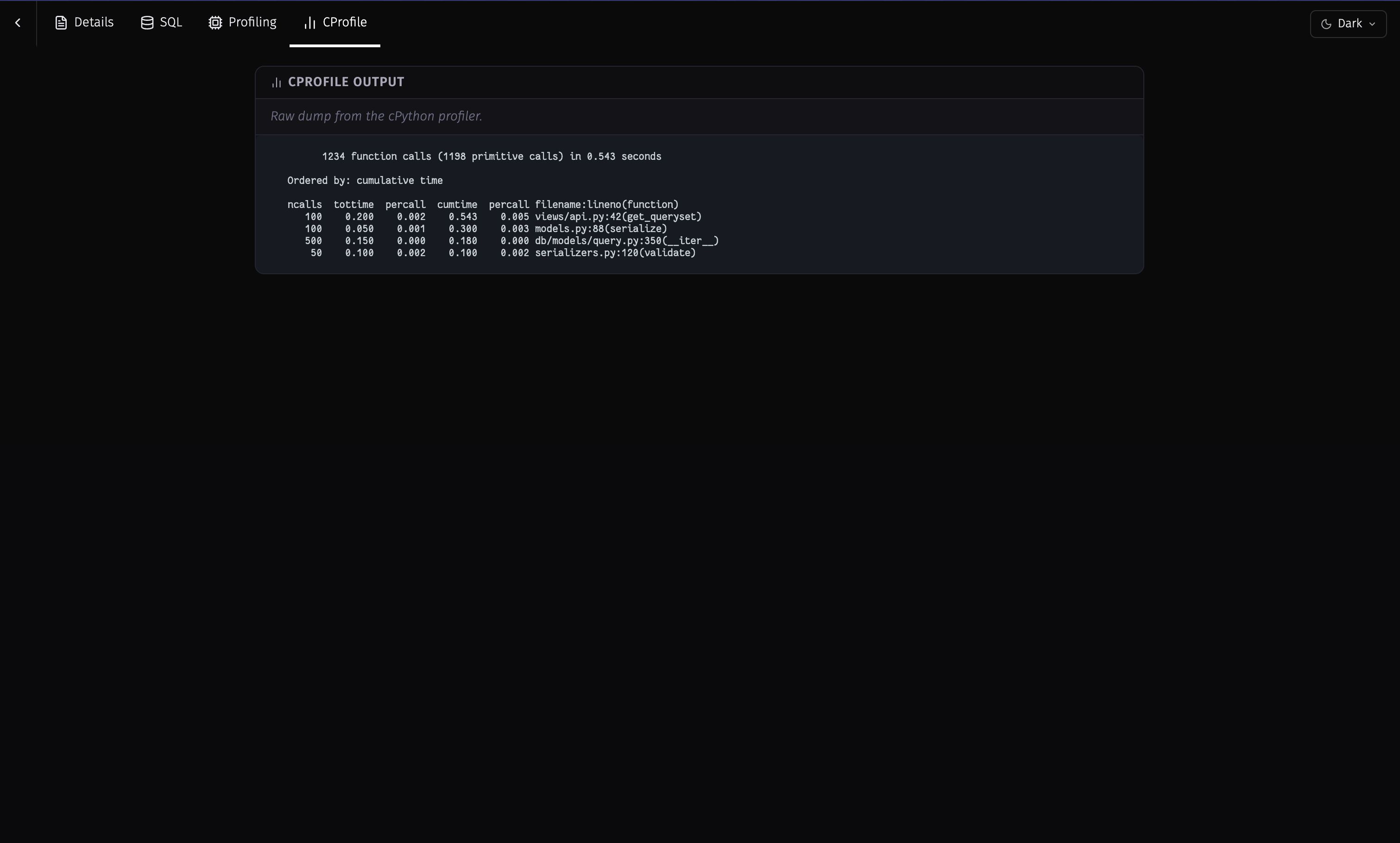 cProfile output — raw cProfile dump with ncalls, tottime, cumtime, and filename:function |
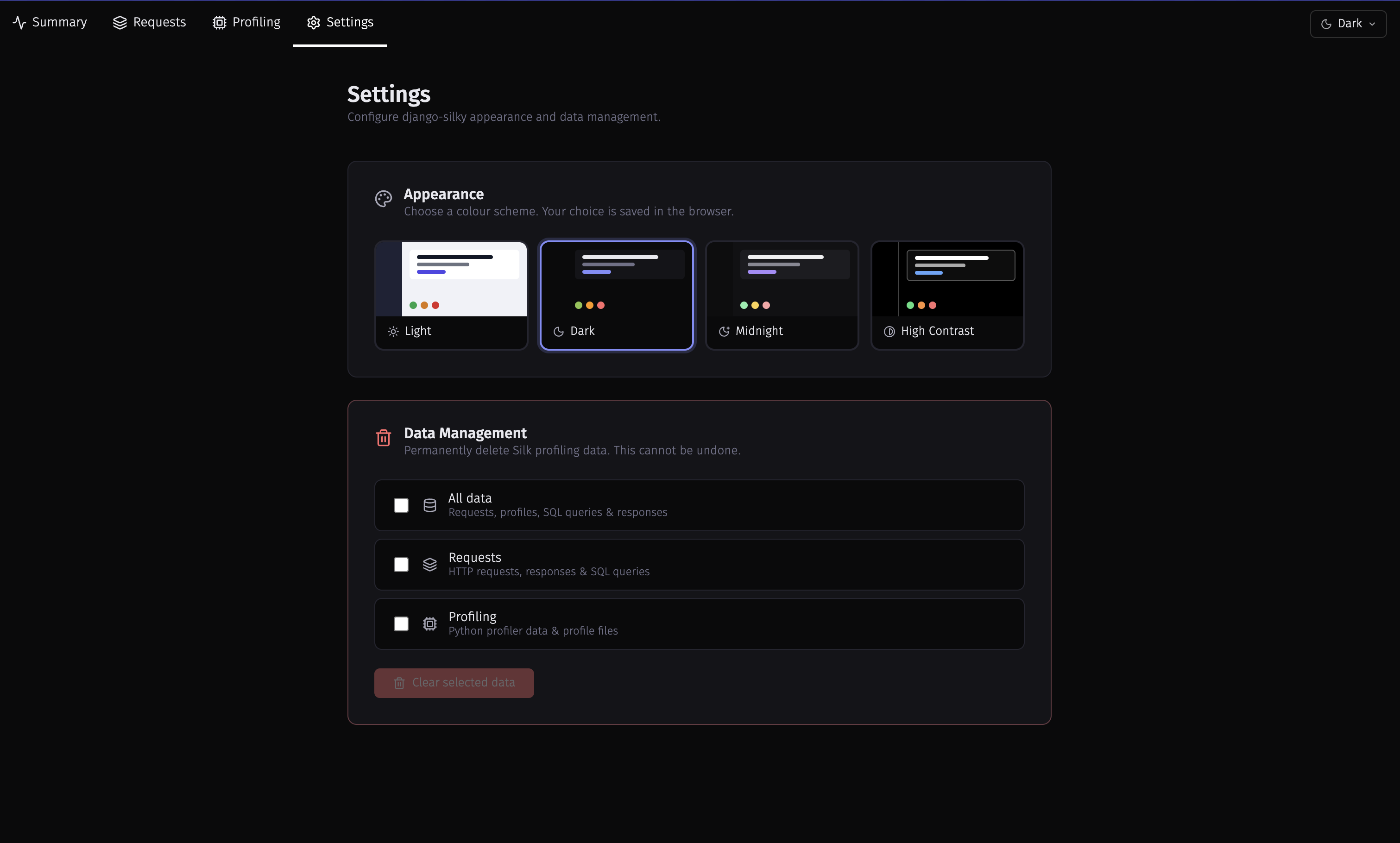 Settings — colour scheme picker (Light / Dark / Midnight / High Contrast) and selective data-clear controls |
Migrating from django-silk
django-silky is a drop-in replacement — same app label (silk), same
database schema (migrations 0001 – 0008), all your existing data is retained.
pip uninstall django-silk
pip install django-silky
# No manage.py migrate needed — schema is identical
For full instructions, version compatibility details, and rollback steps see MIGRATING.md.
Requirements
- Django 5.2, 6.0, 6.1
- Python 3.10, 3.11, 3.12, 3.13, 3.14, 3.15
Installation
pip install django-silky
With optional request body formatting:
pip install django-silky[formatting]
settings.py
MIDDLEWARE = [
    ...
    'silk.middleware.SilkyMiddleware',
    ...
]

TEMPLATES = [{
    ...
    'OPTIONS': {
        'context_processors': [
            ...
            'django.template.context_processors.request',
        ],
    },
}]

INSTALLED_APPS = [
    ...
    'silk',
]
Middleware order: Any middleware placed before
SilkyMiddlewarethat returns a response without callingget_responsewill prevent Silk from running. If you usedjango.middleware.gzip.GZipMiddleware, place it beforeSilkyMiddleware.
urls.py
from django.urls import include, path

urlpatterns += [
    path('silk/', include('silk.urls', namespace='silk')),
]
Migrate and collect static
python manage.py migrate
python manage.py collectstatic
The UI is now available at /silk/.
Features
Request Inspection
Silk's middleware records every HTTP request and response — method, status code, path, timing, SQL query count, and headers/bodies — and presents them in a filterable, sortable, paginated table.
SQL Inspection
Every SQL query executed during a request is captured with its execution time, tables involved, number of joins, and a full stack trace so you can see exactly where in your code it was triggered.
Code Profiling
Decorator / context manager
from silk.profiling.profiler import silk_profile

@silk_profile(name='View Blog Post')
def post(request, post_id):
    p = Post.objects.get(pk=post_id)
    return render(request, 'post.html', {'post': p})
def post(request, post_id):
    with silk_profile(name='View Blog Post #%d' % post_id):
        p = Post.objects.get(pk=post_id)
        return render(request, 'post.html', {'post': p})
cProfile integration
SILKY_PYTHON_PROFILER = True
SILKY_PYTHON_PROFILER_BINARY = True  # also save .prof files
When enabled, a call-graph coloured by time is shown on the profile detail page.
Dynamic profiling
Profile third-party code without touching its source:
SILKY_DYNAMIC_PROFILING = [{
    'module': 'path.to.module',
    'function': 'MyClass.bar',
}]
Code Generation
Silk generates a curl command and a Django test-client snippet for every request, making it easy to replay a captured request from the terminal or a unit test.
Configuration
Authentication
Silk is locked down by default. Unauthenticated or non-staff requests to /silk/ return 404 Not Found — as if the app weren't mounted — so an accidental production deployment can't leak profiling data.
# To expose the UI publicly (internal dev-only, not recommended):
SILKY_AUTHENTICATION = False
SILKY_AUTHORISATION = False

# To change who is allowed in (default: user.is_staff):
SILKY_PERMISSIONS = lambda user: user.is_superuser
Request / response body limits
SILKY_MAX_REQUEST_BODY_SIZE = -1    # -1 = no limit
SILKY_MAX_RESPONSE_BODY_SIZE = 1024 # bytes; larger bodies are discarded
Sampling (high-traffic sites)
SILKY_INTERCEPT_PERCENT = 50  # record only 50 % of requests
# or
SILKY_INTERCEPT_FUNC = lambda request: 'profile' in request.session
To keep only requests whose response matched given status codes (for example, server errors only):
SILKY_INTERCEPT_STATUS_CODES = {500, 501} # default None records every status
The status code is only known once the response is ready, so Silk still records each request and then discards it if the status code is not in the set.
To stop recording particular paths entirely:
SILKY_IGNORE_PATHS = ['/healthz', '/readyz']
Entries are matched exactly against request.path_info, i.e. without any SCRIPT_NAME prefix.
Silk's own views are always ignored.
Garbage collection
SILKY_MAX_RECORDED_REQUESTS = 10_000
SILKY_MAX_RECORDED_REQUESTS_CHECK_PERCENT = 10  # GC runs on 10 % of requests
Retention mode
By default Silk keeps the newest SILKY_MAX_RECORDED_REQUESTS rows (count-based).
To keep a rolling time window instead — useful for spotting patterns across days —
switch the mode and set a maximum age in minutes:
SILKY_GARBAGE_COLLECT_MODE = 'time'      # 'count' (default) | 'time' | 'both'
SILKY_MAX_RECORDED_TIME = 60 * 24 * 7    # minutes; keep the last 7 days
'both' applies the count cap and the age window together (whichever trims more).
The count default is unchanged, so existing setups keep their current behaviour.
Trigger manually (e.g. from a cron job):
python manage.py silk_request_garbage_collect
# override per run:
python manage.py silk_request_garbage_collect --mode time --max-time 10080
Clear all data immediately:
python manage.py silk_clear_request_log
Query analysis
SILKY_ANALYZE_QUERIES = True
SILKY_EXPLAIN_FLAGS = {'format': 'JSON', 'costs': True}
Warning:
EXPLAIN ANALYZEon PostgreSQL actually executes the query, which may cause unintended side effects. Use with caution.
Meta-profiling
SILKY_META = True # shows how long Silk itself takes per request
Sensitive data masking
# Default set — case insensitive
SILKY_SENSITIVE_KEYS = {'username', 'api', 'token', 'key', 'secret', 'password', 'signature'}
Custom profiler storage
# Django >= 4.2
STORAGES = {
    'SILKY_STORAGE': {
        'BACKEND': 'path.to.StorageClass',
    },
}

SILKY_PYTHON_PROFILER_RESULT_PATH = '/path/to/profiles/'
Development
git clone https://github.com/VaishnavGhenge/django-silky.git
cd django-silky
python -m venv .venv && source .venv/bin/activate
pip install -e ".[formatting]"
pip install --group test  # pip >= 25.1

# Run the example project
DB_ENGINE=sqlite3 python project/manage.py migrate
DB_ENGINE=sqlite3 python project/manage.py runserver
# Visit http://127.0.0.1:8000/silk/  (login: admin / admin)

# Watch SCSS while editing UI (Node Version 24.15)
pnpm install || npm install
npm run watch

# For CSS Build
npm run build

# Run tests
DB_ENGINE=sqlite3 python -m pytest project/tests/ -q
Credits
django-silky is a fork of django-silk, originally created by Michael Ford and maintained by Jazzband. All core profiling functionality comes from the upstream project; this fork focuses solely on UI improvements.
License
MIT — same as the upstream django-silk.
1 maintainer

Metadata
1 maintainer
Release files for django-silky 1.6.0
For a detailed explanation of source distributions (sdists) and built distributions (wheels), please see the package formats documentation.
Source distribution (sdist)
| File | Size | Uploaded | Provenance | |
|---|---|---|---|---|
| django_silky-1.6.0.tar.gz | 8.1 MB | With provenance | Details |
Built distribution (wheel)
| File | Interpreter | ABI | Platform | Reset |
|---|---|---|---|---|
| django_silky-1.6.0-py3-none-any.whl | Python 3 | none | any | Details |
Total release size: 10.3 MB
Release files / django_silky-1.6.0.tar.gz
| Download URL | django_silky-1.6.0.tar.gz |
|---|---|
| Size | 8.1 MB |
| Tags | Source |
|
SHA-256 checksum How to use checksums |
3057c11464d096639df047003cca704363206272e8c6902e2bd124f1b1319638
|
|
BLAKE2b-256 checksum How to use checksums |
da05b4b639ec8b55c993861f40d087079059ccf94389dae361a1ebfbf0764af0
|
| Upload date | |
|
Uploaded using Trusted Publishing? What is trusted publishing? |
Yes |
| Uploaded via |
twine/7.0.0 CPython/3.13.16
|
Provenance
Provenance describes where a file came from. On PyPI, provenance is shared via attestations, which provide a verifiable record of the build or publishing details. View details, limitations and caveats.


PyPI Publish Attestation
PyPI verified that this artifact, at this checksum, originated from the publisher listed below.
Signed by GitHub Actions, verified by PyPI on Oct 25, 2026.
Transparency logRelease files / django_silky-1.6.0-py3-none-any.whl
| Download URL | django_silky-1.6.0-py3-none-any.whl |
|---|---|
| Size | 2.2 MB |
| Tags | Python 3 |
|
SHA-256 checksum How to use checksums |
7288b4106bb441c24115add3cfd8b4848d5b932db36a48d1fb5d1920ed2ffeca
|
|
BLAKE2b-256 checksum How to use checksums |
7314e94dd75c1c7595d94b6fe3e9c8af7c627574b9317957dc9ea0fc64b8ee51
|
| Upload date | |
|
Uploaded using Trusted Publishing? What is trusted publishing? |
Yes |
| Uploaded via |
twine/7.0.0 CPython/3.13.16
|
Provenance
Provenance describes where a file came from. On PyPI, provenance is shared via attestations, which provide a verifiable record of the build or publishing details. View details, limitations and caveats.
PyPI Publish Attestation
PyPI verified that this artifact, at this checksum, originated from the publisher listed below.
Signed by GitHub Actions, verified by PyPI on Oct 25, 2026.
Transparency logSecurity for django-silky 1.6.0
Provenance
Provenance describes where a file came from. On PyPI, provenance is shared via attestations, which provide a verifiable record of the build or publishing details. View details, limitations and caveats.
Full provenance
All 2 files in this release have been uploaded with provenance metadata.
Attestation for django_silky-1.6.0.tar.gz
PyPI Publish Attestation
PyPI verified that this artifact, at this checksum, originated from the publisher listed below.
Signed by GitHub Actions, verified by PyPI on Oct 25, 2026.
Transparency logA note on package security
PyPI is a repository for distributing packages, not a service for auditing them. While third-party security researchers and our staff do their best to detect and remove malicious packages, PyPI cannot guarantee the quality, security or suitability of any given package.
To learn more about protecting yourself from malicious actors, visit our package security documentation.














