
Dynamic site settings for Django with caching
Verified details
These details have been verified by PyPIProject links
GitHub Statistics
Maintainers

Project description
Django Site Settings



Django Site Settings is a reusable Django application designed to manage dynamic, type-safe global configurations directly from the Django Admin panel. Built on top of django-solo, it guarantees a singleton pattern for your core settings while offering an advanced, customizable caching layer.
Features
- Singleton Architecture: Ensures only one global configuration instance exists.
- Strict Type Validation: Supports String, Integer, Float, and Boolean data types with strict validation on save.
- High-Performance Caching: Automatically caches values to minimize database hits.
- Multi-Cache Support: Seamlessly integrates with your existing cache infrastructure (Redis, Memcached, etc.).
- Smart Cache Invalidation: Uses Django signals to instantly purge modified or deleted keys.
- Template Tag Ready: Built-in template tags to fetch settings directly inside your HTML layouts.
Requirements
- Python: 3.10, 3.11, 3.12+
- Django: 5.0, 6.0+
- django-solo: 2.3.0+
Installation
Via pip
pip install django-site-settings
Via Poetry
To add the package as a dependency using Poetry, run the following command:
poetry add django-site-settings
Configuration
- Add solo and django_site_settings to your project's INSTALLED_APPS inside settings.py:
INSTALLED_APPS = [
    # ... Django core apps

    "solo",
    "django_site_settings",

    # ... Your local apps
]
- Run the database migrations:
python manage.py migrate
Advanced Customization (Optional)
You can customize the caching behavior by adding the following variables to your main Django settings.py:
# Cache TTL in seconds (Default is 7 days)
SITE_SETTINGS_CACHE_TIMEOUT = 86400  # 24 hours

# Specify which cache backend configuration from your CACHES setting to use (Default is "default")
SITE_SETTINGS_CACHE_ALIAS = "fast_redis"
Usage
Admin Panel Interface
Once installed and configured, a new section called Site Settings Engine will automatically appear in your main Django administration index:
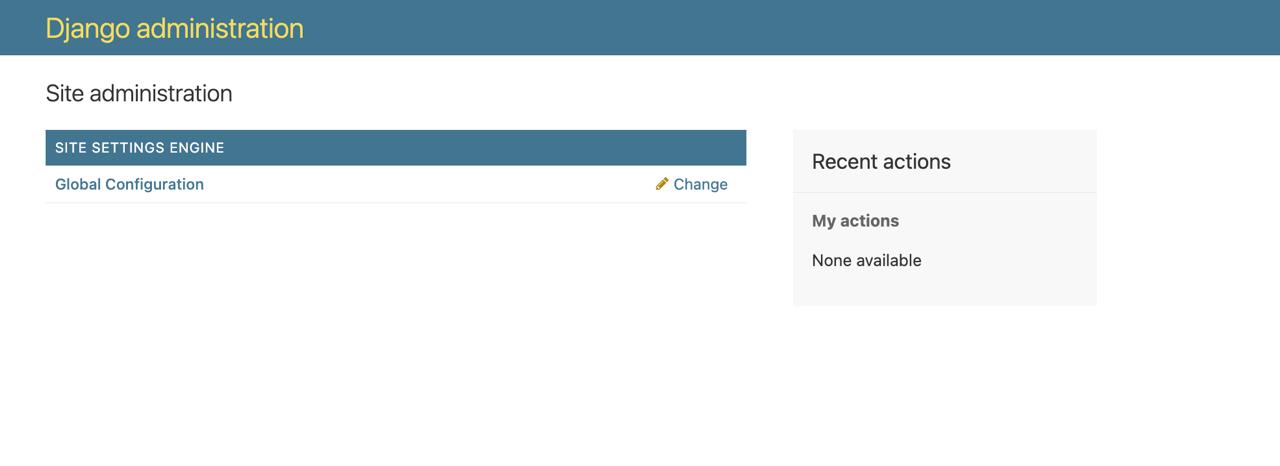
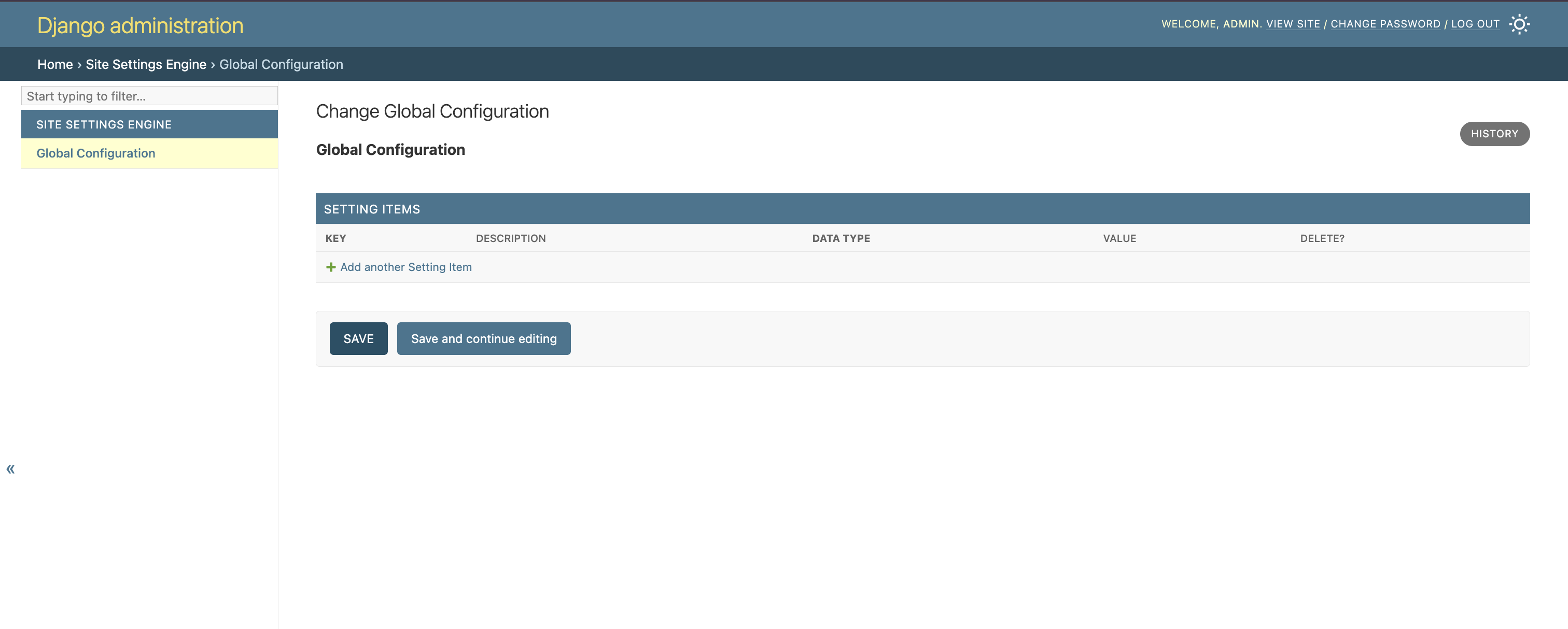
Global Configuration Management Clicking on Global Configuration provides a clean, unified dashboard where you can manage all custom variables as transactional setting items.
Empty State: Upon initialization, the dashboard presents a clean tabular inline structure layout, ready for keys assignment:
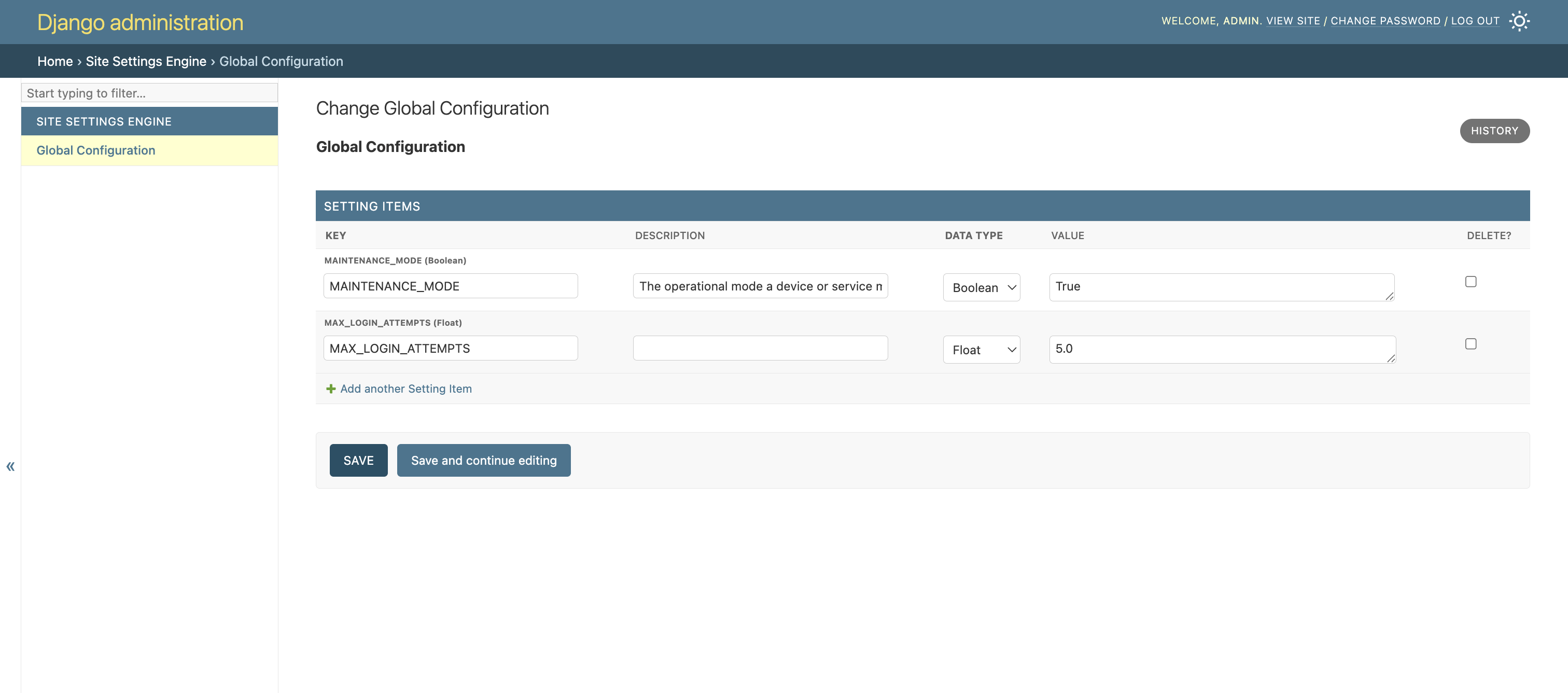
Populated State with Validation: You can dynamically add keys, provide descriptive notes for your team, select strict target data types (e.g., Boolean, Float), and input their corresponding values natively:
Fetching Settings in Python Code
Use the get_setting utility function anywhere in your Python business logic (services, models, tasks, or utilities) with automatic type conversion:
from django_site_settings.utils import get_setting

# Safely pulls from cache with strict type conversion
max_attempts = get_setting("MAX_LOGIN_ATTEMPTS", default=3)
is_maintenance = get_setting("MAINTENANCE_MODE", default=False)
api_timeout = get_setting("EXTERNAL_API_TIMEOUT", default=5.0)

if is_maintenance:
    # Handle maintenance logic directly
    pass
Fetching Settings inside Django Templates
Load the custom template tags to output values natively inside your HTML files:
{% load site_settings_tags %}

<footer>
    <p>Contact Support: {% site_setting "SUPPORT_EMAIL" default="support@example.com" %}</p>

    {% site_setting "SHOW_PROMO_BANNER" default=False as show_banner %}
    {% if show_banner %}
        <div class="banner">Big sale active!</div>
    {% endif %}
</footer>
Advanced Features: Global Site Announcements
The django-site-settings package includes a built-in notification engine powered by the SiteAnnouncement model. This feature allows administrators to broadcast multiple urgent alerts, maintenance windows, or marketing banners across the platform simultaneously, mimicking enterprise-tier SaaS announcement architectures.
Key Highlights
- Stacked Alerts Support: Display multiple active notifications at once.
- Smart Priority Sorting: Announcements are automatically arranged based on a customizable
priorityscale (e.g., criticaldangeralerts float to the top). - Automated Lifecycles: Schedule banners to activate (
start_at) and expire (end_at) autonomously. - Data-Level Caching: Active records are evaluated into a memory-efficient Python list layer and cached (
cache.get/cache.set), reducing database serialization overhead down to zero under high concurrent traffic. - Instant Cache Invalidation: Overridden
save()anddelete()model hooks flush the cache immediately when an administrator updates or removes a record. - Hybrid Frontend Integration: Choose between native Django Template Tags or a lightweight REST API endpoint.
- Independent Client-side Dismissal: Users can close individual banners. Closure states are safely tracked in browser
localStorageusing individual record IDs and atomic version timestamps (updated_at) to avoid redundant database or session overhead.
Implementation Guide
1. Integration via REST API (SPA / Headless Architecture)
Step A: Include Routing
Register the library's URL patterns inside your root Django urls.py configuration:
from django.urls import path, include

urlpatterns = [
    # ... your core project routes
    path("site-settings/", include("django_site_settings.urls")),
]
Step B: Consume the Endpoint
Your frontend application can fetch or poll from the following cache-backed public URI: GET /site-settings/api/announcements/
Example JSON Response Payload:
{
  "announcements": [
    {
      "id": 4,
      "text": "<strong>Urgent:</strong> Scheduled system upgrade on June 8th at 03:00 UTC.",
      "level": "danger",
      "updated_at": 1780920000.0
    },
    {
      "id": 2,
      "text": "Check out our new metrics dashboard module!",
      "level": "info",
      "updated_at": 1780845200.0
    }
  ]
}
Project details
Verified details
These details have been verified by PyPIProject links
GitHub Statistics
Maintainers


Download files
Download the file for your platform. If you're not sure which to choose, learn more about installing packages.
Source Distribution
Built Distribution
Filter files by name, interpreter, ABI, and platform.
If you're not sure about the file name format, learn more about wheel file names.
Copy a direct link to the current filters
File details
Details for the file django_site_settings-0.2.0.tar.gz.
File metadata
- Download URL: django_site_settings-0.2.0.tar.gz
- Upload date:
- Size: 8.0 kB
- Tags: Source
- Uploaded using Trusted Publishing? Yes
- Uploaded via: twine/6.1.0 CPython/3.13.12
File hashes
| Algorithm | Hash digest | |
|---|---|---|
| SHA256 |
856b667e4683b68fa3856e9351e36c9255f3c467054e7571f616c3586f2421e7
|
|
| MD5 |
7f2b6bf27c9c84db06f0e2b4c3a7f3a6
|
|
| BLAKE2b-256 |
877985d3ada81f380a6dd0f7821903e28a111b5d4f65ec91879ebd1f1cd83928
|
Provenance
The following attestation bundles were made for django_site_settings-0.2.0.tar.gz:
Publisher:
python-publish.yml on G4braG4br/django-site-settings
-
Statement:
-
Statement type:
https://in-toto.io/Statement/v1 -
Predicate type:
https://docs.pypi.org/attestations/publish/v1 -
Subject name:
django_site_settings-0.2.0.tar.gz -
Subject digest:
856b667e4683b68fa3856e9351e36c9255f3c467054e7571f616c3586f2421e7 - Sigstore transparency entry: 1719988072
- Sigstore integration time:
-
Permalink:
G4braG4br/django-site-settings@41349fdb332e8484fe1f4829658fe19c10675265 -
Branch / Tag:
refs/tags/v0.2.0 - Owner: https://github.com/G4braG4br
-
Access:
public
-
Token Issuer:
https://token.actions.githubusercontent.com -
Runner Environment:
github-hosted -
Publication workflow:
python-publish.yml@41349fdb332e8484fe1f4829658fe19c10675265 -
Trigger Event:
release
-
Statement type:
File details
Details for the file django_site_settings-0.2.0-py3-none-any.whl.
File metadata
- Download URL: django_site_settings-0.2.0-py3-none-any.whl
- Upload date:
- Size: 12.3 kB
- Tags: Python 3
- Uploaded using Trusted Publishing? Yes
- Uploaded via: twine/6.1.0 CPython/3.13.12
File hashes
| Algorithm | Hash digest | |
|---|---|---|
| SHA256 |
a02f17caebac3955acbda7daced33e6b3be362199e958ce11cb1ef4d45de4b11
|
|
| MD5 |
e5878233555f4a5ce35abaf262a80858
|
|
| BLAKE2b-256 |
f7b22e8e3048d5de0d99ddf264f75b519422a09e070917ae4a4a6772787562bf
|
Provenance
The following attestation bundles were made for django_site_settings-0.2.0-py3-none-any.whl:
Publisher:
python-publish.yml on G4braG4br/django-site-settings
-
Statement:
-
Statement type:
https://in-toto.io/Statement/v1 -
Predicate type:
https://docs.pypi.org/attestations/publish/v1 -
Subject name:
django_site_settings-0.2.0-py3-none-any.whl -
Subject digest:
a02f17caebac3955acbda7daced33e6b3be362199e958ce11cb1ef4d45de4b11 - Sigstore transparency entry: 1719988175
- Sigstore integration time:
-
Permalink:
G4braG4br/django-site-settings@41349fdb332e8484fe1f4829658fe19c10675265 -
Branch / Tag:
refs/tags/v0.2.0 - Owner: https://github.com/G4braG4br
-
Access:
public
-
Token Issuer:
https://token.actions.githubusercontent.com -
Runner Environment:
github-hosted -
Publication workflow:
python-publish.yml@41349fdb332e8484fe1f4829658fe19c10675265 -
Trigger Event:
release
-
Statement type:






