
django-table-widgets
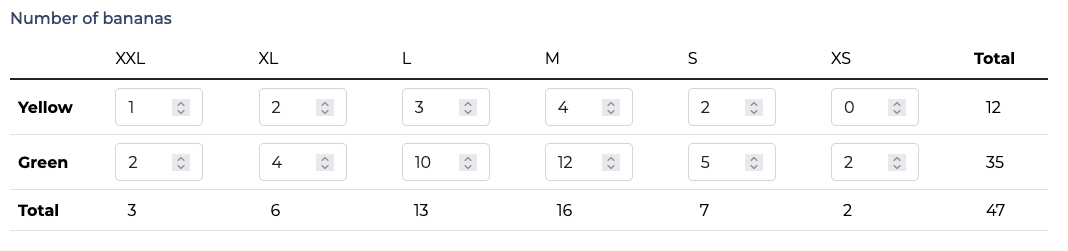
Widgets to display and edit two-dimensionals ArrayFields, based on django's SplitArrayField.
On numbers array, you can also display a sum of rows, a sum of columns and a grand total.
Requirements
- Python 3.10+
- Django 3.0+
Installation
- run
pip install django-table-widgets - add
django_table_widgetsto yourINSTALLED_APPS
Usage
In your forms, use the field like this:
from django_table_widgets.fields import TableField

number_of_bananas = TableField(
   forms.IntegerField(  # required, it is the field used in every cell of the table
     required=False,
     widget=forms.NumberInput(attrs={"min": 0})
   ),
   rows_headers=[  # required
     "Yellow",
     "Green"
   ],
   columns_headers=[  # required
       "XXL",
       "XL",
       "L",
       "M",
       "S",
       "XS"
   ],
   show_row_sum=True,  # optional, defaults to False
   show_column_sum=True,  # optional, defaults to False
   show_table_sum=True,  # optional, defaults to False
   widget=MyCustomWidget  # optional
   remove_trailing_nulls=False,  # optional, default to False
   required=False,
)
Do not forget to include {{ form.media.js }} in your template if you want the sums to be processed after each input event.
Customize template
You may want to customize the widget's template (to add CSS classes) by subclassing widgets.TableWidget and extending templates/django_table_widgets/table.html:
from django_table_widgets.widgets import TableWidget


class MyCustomWidget(TableWidget):
    template_name = (
        "my/custom/widget/template.html"
    )
Customize javascript
In your custom template, override the block table-widgets-js and instantiate the TableFieldSumWidget class like this:
{% extends "django_table_widgets/table.html" %}

{% block table-widget-js %}
  {% if show_row_sum or show_column_sum or show_table_sum %}
    <script>
      tableFieldSumWidget{{ widget.name }} = new TableFieldSumWidget({
        tableId: "id_table_{{ widget.name }}",
        rowsCount: {{ rows_count }},
        columnsCount: {{ columns_count }},
        showRowSum: {{ show_row_sum|yesno:"true,false" }},
        showColumnSum: {{ show_column_sum|yesno:"true,false" }},
        showTableSum: {{ show_table_sum|yesno:"true,false" }},
        listenedEvent: "input"
      });
    </script>
  {% endif %}
{% endblock table-widget-js %}
1 maintainer

Metadata
1 maintainer
Release files for django-table-widgets 0.0.2
For a detailed explanation of source distributions (sdists) and built distributions (wheels), please see the package formats documentation.
Source distribution (sdist)
| File | Size | Uploaded | |
|---|---|---|---|
| django_table_widgets-0.0.2.tar.gz | 5.3 kB | Details |
Built distribution (wheel)
| File | Interpreter | ABI | Platform | Reset |
|---|---|---|---|---|
| django_table_widgets-0.0.2-py3-none-any.whl | Python 3 | none | any | Details |
Total release size: 12.7 kB
Release files / django_table_widgets-0.0.2.tar.gz
| Download URL | django_table_widgets-0.0.2.tar.gz |
|---|---|
| Size | 5.3 kB |
| Tags | Source |
|
SHA-256 checksum How to use checksums |
aa7b9ef274426ef67b7b5f206efde914d63b8c49e85bcbc29a8360af1250d61a
|
|
BLAKE2b-256 checksum How to use checksums |
fb6b21d7efbdde5665756c3cabd3450af5f976e2719d29f62a1bbf98113ca142
|
| Upload date | |
|
Uploaded using Trusted Publishing? What is trusted publishing? |
No |
| Uploaded via |
twine/4.0.2 CPython/3.10.8
|
Release files / django_table_widgets-0.0.2-py3-none-any.whl
| Download URL | django_table_widgets-0.0.2-py3-none-any.whl |
|---|---|
| Size | 7.4 kB |
| Tags | Python 3 |
|
SHA-256 checksum How to use checksums |
863b95248f24f81187902ca2e0f46f4171852d85e8c722d0b28817a2469edd9b
|
|
BLAKE2b-256 checksum How to use checksums |
086c5b2a72345fecbc4a8670996cd709308605da149ff290c42f87b498e10a23
|
| Upload date | |
|
Uploaded using Trusted Publishing? What is trusted publishing? |
No |
| Uploaded via |
twine/4.0.2 CPython/3.10.8
|














