
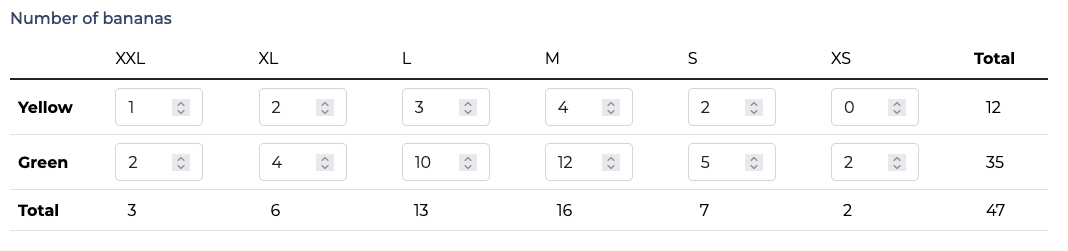
Widgets to display and edit two-dimensionals ArrayFields, based on django's `SplitArrayField`.

Project description
django-table-widgets
Widgets to display and edit two-dimensionals ArrayFields, based on django's SplitArrayField.
On numbers array, you can also display a sum of rows, a sum of columns and a grand total.
Requirements
- Python 3.10+
- Django 3.0+
Installation
- run
pip install django-table-widgets - add
django_table_widgetsto yourINSTALLED_APPS
Usage
In your forms, use the field like this:
number_of_bananas = TableField(
   forms.IntegerField(required=False, widget=forms.NumberInput(attrs={"min": 0})),  # required, it is the field used in every cell of the table
   rows_headers=[  # required
     "Yellow",
     "Green"
   ],
   columns_headers=[  # required
       "XXL",
       "XL",
       "L",
       "M",
       "S",
       "XS"
   ],
   show_row_sum=True,  # optional, defaults to False
   show_column_sum=True,  # optional, defaults to False
   show_table_sum=True,  # optional, defaults to False
   widget=MyCustomWidget  # optional
   remove_trailing_nulls=False,  # optional, default to False
   required=False,
)
Do not forget to include {{ form.media.js }} in your template if you want the sums to be processed after each input event.
Customize template
You may want to customize the widget's template (to add CSS classes) by subclassing widgets.TableWidget and extending templates/djang_table_widgets/table.html:
from django_table_widgets.widgets import TableWidget


class MyCustomWidget(TableWidget):
    template_name = (
        "my/custom/widget/template.html"
    )
Customize javascript
In your custom template, override the block table-widgets-js and instantiate the TableFieldSumWidget class like this:
{% block table-widget-js %}
  {% if show_row_sum or show_column_sum or show_table_sum %}
    <script>
      tableFieldSumWidget{{ widget.name }} = new TableFieldSumWidget({
        tableId: "id_table_{{ widget.name }}",
        rowsCount: {{ rows_count }},
        columnsCount: {{ columns_count }},
        showRowSum: {{ show_row_sum|yesno:"true,false" }},
        showColumnSum: {{ show_column_sum|yesno:"true,false" }},
        showTableSum: {{ show_table_sum|yesno:"true,false" }},
        listenedEvent: "input"
      });
    </script>
  {% endif %}
{% endblock table-widget-js %}
Release history Release notifications | RSS feed


Download files
Download the file for your platform. If you're not sure which to choose, learn more about installing packages.
Source Distribution
Built Distribution
Filter files by name, interpreter, ABI, and platform.
If you're not sure about the file name format, learn more about wheel file names.
Copy a direct link to the current filters
File details
Details for the file django_table_widgets-0.0.1.tar.gz.
File metadata
- Download URL: django_table_widgets-0.0.1.tar.gz
- Upload date:
- Size: 5.2 kB
- Tags: Source
- Uploaded using Trusted Publishing? No
- Uploaded via: twine/4.0.2 CPython/3.10.8
File hashes
| Algorithm | Hash digest | |
|---|---|---|
| SHA256 |
ddae51d253451619aa369db4c5f5d466edbcd41267681d02810138c660733425
|
|
| MD5 |
f470503b7f4c699a9e417581cc462a36
|
|
| BLAKE2b-256 |
b41678c4849ab7385847680d2dd2d52749cc424b374ed8ee6251b10947cba0b6
|
File details
Details for the file django_table_widgets-0.0.1-py3-none-any.whl.
File metadata
- Download URL: django_table_widgets-0.0.1-py3-none-any.whl
- Upload date:
- Size: 7.2 kB
- Tags: Python 3
- Uploaded using Trusted Publishing? No
- Uploaded via: twine/4.0.2 CPython/3.10.8
File hashes
| Algorithm | Hash digest | |
|---|---|---|
| SHA256 |
9193a6d9cecd10d75f9bad2caaf00536141624975011a5c005a7dbdfa7cd6598
|
|
| MD5 |
4990596ab31a4076f2f8af2b852f376e
|
|
| BLAKE2b-256 |
bfb07165ba2b281db929dd0801244c5bc39899d0d1804d5923f252e58f6829e7
|






