
django-vditor-v3

django-vditor-v3 是一个基于 vditor 的 django Markdown编辑器插件应用。
django-vditor-v3 是 django-vditor 的分支版本,增加了对Django 5.0+的支持。











特性
- 几乎包含所有Vditor功能
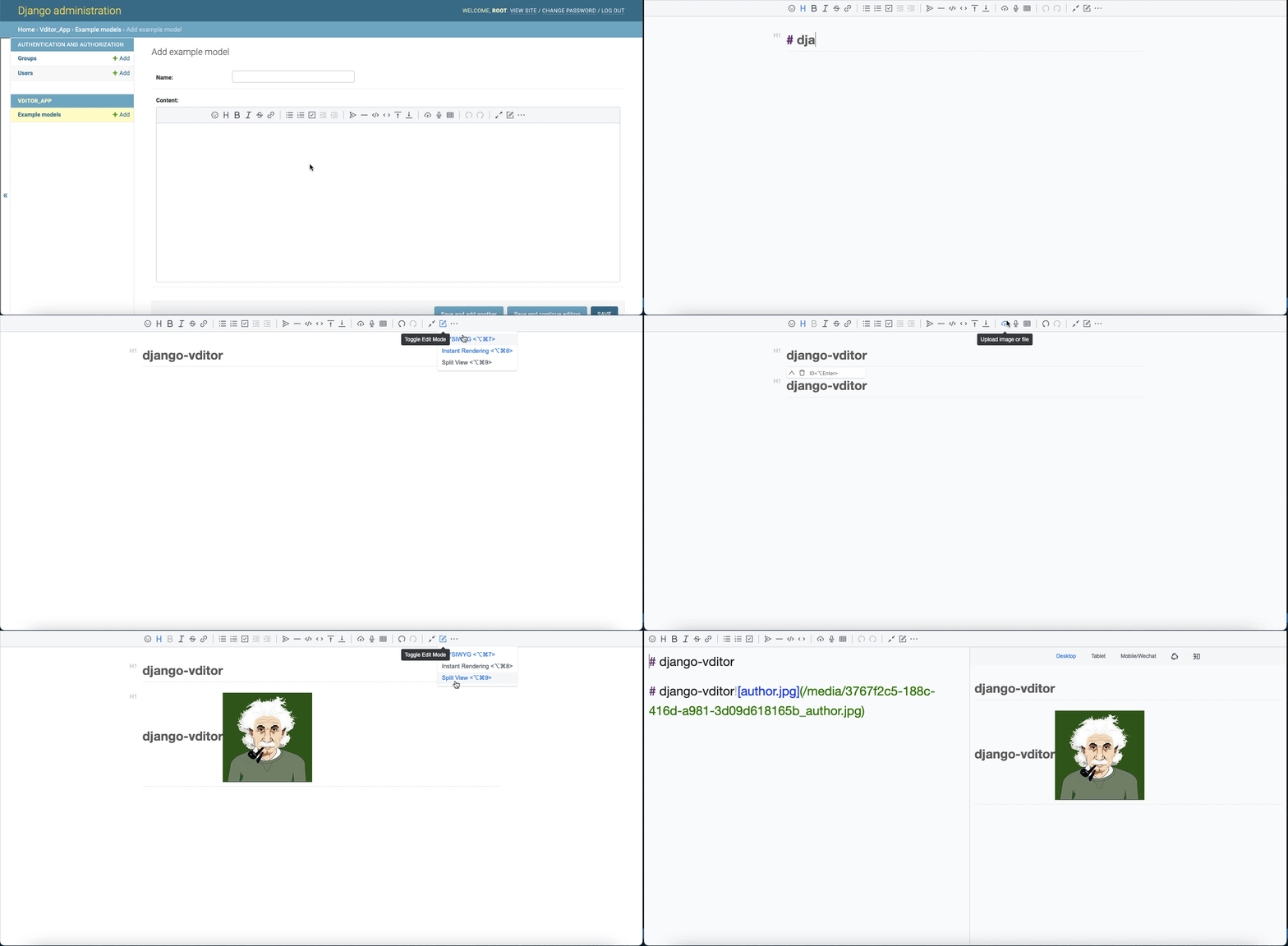
- 支持三种编辑模式:所见即所得(wysiwyg)、即时渲染(ir)、分屏预览(sv)
- 支持大纲、数学公式、脑图、图表、流程图、甘特图、时序图、五线谱、多媒体、语音阅读、标题锚点、代码高亮和复制、graphviz渲染
- 内置安全过滤、导出、任务列表、多平台预览、多主题切换、复制到微信公众号/知乎功能
- 实现CommonMark和GFM规范,格式化Markdown并查看语法树,支持10+种配置
- 工具栏包含36+种操作。除了支持扩展外,还可以自定义每个项目的快捷键、提示、提示位置、图标、点击事件、类名和子工具栏
- 可以使用拖放、剪贴板粘贴上传,显示实时上传进度,并支持CORS跨域上传
- 粘贴的HTML会自动转换为Markdown。如果粘贴内容包含外部链接图片,可以通过指定接口上传到服务器
- 支持主窗口大小拖放、字符计数
- 多主题支持,内置三套黑白主题
- 多语言支持,内置中文、英文和韩文本地化
- 支持主流浏览器,对移动设备友好
- 为模型提供VditorTextField字段,可以直接在django admin中显示
- 为Form和ModelForm提供VditorTextFormField
- 为Admin自定义小部件提供VditorWidget
快速开始
- 安装
    # pip (从PyPI安装)
    pip install django-vditor-v3
    # pipenv
    pipenv install django-vditor-v3
    # poetry
    poetry add django-vditor-v3
    # pdm
    pdm add django-vditor-v3
- 从TestPyPI安装(用于测试最新开发版本):
    # 从TestPyPI安装
    pip install --index-url https://test.pypi.org/simple/ --extra-index-url https://pypi.org/simple/ django-vditor-v3
- 将
vditor添加到你的INSTALLED_APPS设置中,如下所示:
    INSTALLED_APPS = [
        ...
        'vditor',
    ]

    # 对于Django 3.2+,指定DEFAULT_AUTO_FIELD以避免警告
    DEFAULT_AUTO_FIELD = 'django.db.models.AutoField'  # 或 'django.db.models.BigAutoField'
- 为django3.0+添加框架设置,如下所示:
X_FRAME_OPTIONS = 'SAMEORIGIN'
- 在你的设置中添加'media'url,如下所示:
MEDIA_ROOT = os.path.join(BASE_DIR, 'uploads')
MEDIA_URL = '/media/'
- 在你的urls.py中添加url,如下所示:
from django.urls import path, include
from django.conf.urls.static import static
from django.conf import settings
...

urlpatterns = [
    ...
    path('vditor/', include('vditor.urls'))
]

if settings.DEBUG:
    urlpatterns += static(settings.MEDIA_URL, document_root=settings.MEDIA_ROOT)
- 编写你的模型,如下所示:
from django.db import models
from vditor.fields import VditorTextField

class ExampleModel(models.Model):
    name = models.CharField(max_length=10)
    content = VditorTextField()
- 在
admin.py中注册你的模型 - 运行
python manage.py makemigrations和python manage.py migrate来创建你的模型 - 登录Admin,你可以看到一个如下所示的markdown编辑器文本字段:
使用方法
在模型中使用Markdown编辑字段
使用Markdown编辑模型中的字段,我们只需将模型的TextField替换为VditorTextField。
from django.db import models
from vditor.fields import VditorTextField

class ExampleModel(models.Model):
    name = models.CharField(max_length = 10)
    content = VditorTextField()
在后台Admin中,将自动显示markdown编辑富文本。
在前端模板中使用时,可以像这样使用:
{% load static %}
<! DOCTYPE html>
<html lang = "en">
    <head>
        <meta http-equiv = "Content-Type" content = "text/html; charset = utf-8" />
    </head>
    <body>
        <form method = "post" action = "./">
            {% csrf_token %}
            {{ form.media }}
            <ul style="display: flex">
                {{ form.as_p }}
            </ul>
            <p> <input type = "submit" value = "post"> </p>
        </form>
    </body>
</html>
在Form中使用markdown编辑字段
在Form中使用markdown编辑字段,使用VditorTextFormField代替forms.CharField,如下所示:
from vditor.fields import VditorTextFormField

class VditorForm(forms.Form):
    name = forms.CharField()
    content = VditorTextFormField()
ModelForm可以自动将相应的模型字段转换为表单字段,可以正常使用:
class VditorModleForm(forms.ModelForm):

    class Meta:
        model = ExampleModel
        fields = '__all__'
在admin中使用markdown小部件
在admin中使用markdown小部件,如下所示:
from django.contrib import admin
from django.db import models

# Register your models here.
from. import models as demo_models
from vditor.widgets import VditorWidget


class ExampleModelAdmin(admin.ModelAdmin):
    formfield_overrides = {
        models.TextField: {'widget': VditorWidget}
    }


admin.site.register(demo_models.ExampleModel, ExampleModelAdmin)
自定义工具栏
在settings中添加以下配置:
VDITOR_CONFIGS = { # 记得写"' '"
  'default':{
      "width": "%90", # 使用数字或百分比
      "height": 360, # 使用数字
      "preview_theme": "light", # 可以填写dark, light, wechat
      "typewriterMode": "True", # 是否启用打字机模式
      "mode": "ir", # 可选模式:sv, ir, wysiwyg
      "debugger": "false", # 是否显示日志
      "value": "", # 编辑器初始化值
      "theme": "classic", # 可以填写classic, dark
      "icon": "ant", # 可以填写ant, material
      "outline": "false", # 显示大纲
  }
}
参考
1 maintainer

Metadata
1 maintainer
Release files for django-vditor-v3 2.0.3
For a detailed explanation of source distributions (sdists) and built distributions (wheels), please see the package formats documentation.
Source distribution (sdist)
| File | Size | Uploaded | |
|---|---|---|---|
| django-vditor-v3-2.0.3.tar.gz | 5.6 MB | Details |
Built distribution (wheel)
| File | Interpreter | ABI | Platform | Reset |
|---|---|---|---|---|
| django_vditor_v3-2.0.3-py3-none-any.whl | Python 3 | none | any | Details |
Total release size: 11.6 MB
Release files / django-vditor-v3-2.0.3.tar.gz
| Download URL | django-vditor-v3-2.0.3.tar.gz |
|---|---|
| Size | 5.6 MB |
| Tags | Source |
|
SHA-256 checksum How to use checksums |
485c8d81d4f0d8ed7f13bf0992c809e108418120890dd23450eda120e1bb26dc
|
|
BLAKE2b-256 checksum How to use checksums |
3f1877f1d3ee8d93f41b9918e24751b23dbf8cff3fad1d956fc9f87619a3cced
|
| Upload date | |
|
Uploaded using Trusted Publishing? What is trusted publishing? |
Yes |
| Uploaded via |
twine/6.1.0 CPython/3.12.9
|
Provenance
Provenance describes where a file came from. On PyPI, provenance is shared via attestations, which provide a verifiable record of the build or publishing details. View details, limitations and caveats.


PyPI Publish Attestation
PyPI verified that this artifact, at this checksum, originated from the publisher listed below.
Signed by GitHub Actions, verified by PyPI on Apr 23, 2025.
Transparency logRelease files / django_vditor_v3-2.0.3-py3-none-any.whl
| Download URL | django_vditor_v3-2.0.3-py3-none-any.whl |
|---|---|
| Size | 5.9 MB |
| Tags | Python 3 |
|
SHA-256 checksum How to use checksums |
ec929396b1f05981592efbdabc80d4199aa1202857ecb445cae5b86f71786da8
|
|
BLAKE2b-256 checksum How to use checksums |
60d887b36a8bb6d4a2f06b9fbf303d0da570d38cb80da0fe0edd4097206b189b
|
| Upload date | |
|
Uploaded using Trusted Publishing? What is trusted publishing? |
Yes |
| Uploaded via |
twine/6.1.0 CPython/3.12.9
|
Provenance
Provenance describes where a file came from. On PyPI, provenance is shared via attestations, which provide a verifiable record of the build or publishing details. View details, limitations and caveats.
PyPI Publish Attestation
PyPI verified that this artifact, at this checksum, originated from the publisher listed below.
Signed by GitHub Actions, verified by PyPI on Apr 23, 2025.
Transparency log













