
A WYSIWYG editor plugin made by vditor for django
Verified details
These details have been verified by PyPIProject links
GitHub Statistics
Maintainers

Project description
django-vditor-v3

django-vditor-v3 是一个基于 vditor 的 django Markdown编辑器插件应用。
django-vditor-v3 是 django-vditor 的分支版本,增加了对Django 5.0+的支持。











特性
- 几乎包含所有Vditor功能
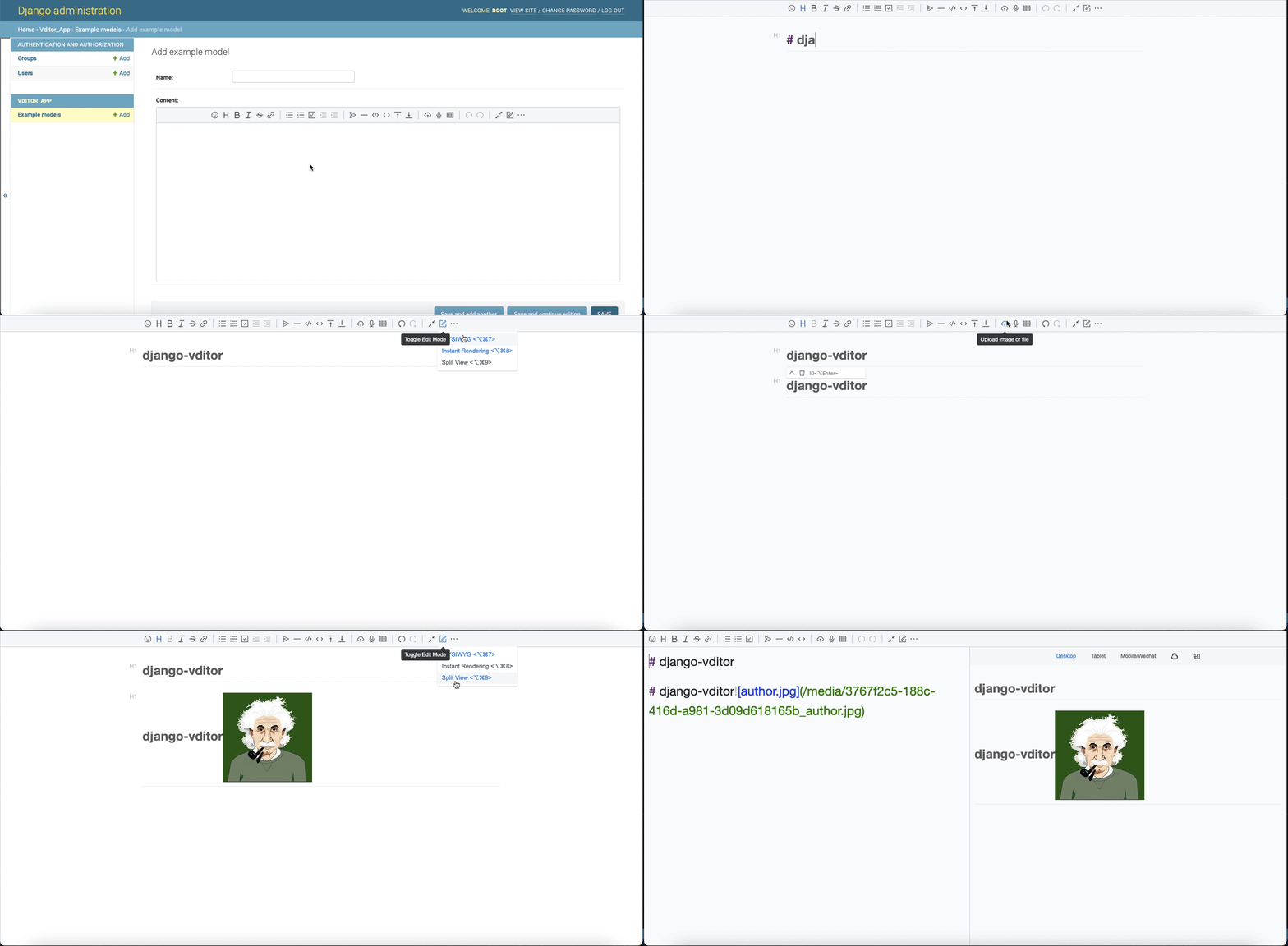
- 支持三种编辑模式:所见即所得(wysiwyg)、即时渲染(ir)、分屏预览(sv)
- 支持大纲、数学公式、脑图、图表、流程图、甘特图、时序图、五线谱、多媒体、语音阅读、标题锚点、代码高亮和复制、graphviz渲染
- 内置安全过滤、导出、任务列表、多平台预览、多主题切换、复制到微信公众号/知乎功能
- 实现CommonMark和GFM规范,格式化Markdown并查看语法树,支持10+种配置
- 工具栏包含36+种操作。除了支持扩展外,还可以自定义每个项目的快捷键、提示、提示位置、图标、点击事件、类名和子工具栏
- 可以使用拖放、剪贴板粘贴上传,显示实时上传进度,并支持CORS跨域上传
- 粘贴的HTML会自动转换为Markdown。如果粘贴内容包含外部链接图片,可以通过指定接口上传到服务器
- 支持主窗口大小拖放、字符计数
- 多主题支持,内置三套黑白主题
- 多语言支持,内置中文、英文和韩文本地化
- 支持主流浏览器,对移动设备友好
- 为模型提供VditorTextField字段,可以直接在django admin中显示
- 为Form和ModelForm提供VditorTextFormField
- 为Admin自定义小部件提供VditorWidget
快速开始
- 安装
    # pip (从PyPI安装)
    pip install django-vditor-v3
    # pipenv
    pipenv install django-vditor-v3
    # poetry
    poetry add django-vditor-v3
    # pdm
    pdm add django-vditor-v3
- 从TestPyPI安装(用于测试最新开发版本):
    # 从TestPyPI安装
    pip install --index-url https://test.pypi.org/simple/ --extra-index-url https://pypi.org/simple/ django-vditor-v3
- 将
vditor添加到你的INSTALLED_APPS设置中,如下所示:
    INSTALLED_APPS = [
        ...
        'vditor',
    ]

    # 对于Django 3.2+,指定DEFAULT_AUTO_FIELD以避免警告
    DEFAULT_AUTO_FIELD = 'django.db.models.AutoField'  # 或 'django.db.models.BigAutoField'
- 为django3.0+添加框架设置,如下所示:
X_FRAME_OPTIONS = 'SAMEORIGIN'
- 在你的设置中添加'media'url,如下所示:
MEDIA_ROOT = os.path.join(BASE_DIR, 'uploads')
MEDIA_URL = '/media/'
- 在你的urls.py中添加url,如下所示:
from django.conf.urls import url, include
from django.conf.urls.static import static
from django.conf import settings
...

urlpatterns = [
    ...
    path('vditor/', include('vditor.urls'))
]

if settings.DEBUG:
    urlpatterns += static(settings.MEDIA_URL, document_root=settings.MEDIA_ROOT)
- 编写你的模型,如下所示:
from django.db import models
from vditor.fields import VditorTextField

class ExampleModel(models.Model):
    name = models.CharField(max_length=10)
    content = VditorTextField()
- 在
admin.py中注册你的模型 - 运行
python manage.py makemigrations和python manage.py migrate来创建你的模型 - 登录Admin,你可以看到一个如下所示的markdown编辑器文本字段:
使用方法
在模型中使用Markdown编辑字段
使用Markdown编辑模型中的字段,我们只需将模型的TextField替换为VditorTextField。
from django.db import models
from vditor.fields import VditorTextField

class ExampleModel(models.Model):
    name = models.CharField(max_length = 10)
    content = VditorTextField()
在后台Admin中,将自动显示markdown编辑富文本。
在前端模板中使用时,可以像这样使用:
{% load static %}
<! DOCTYPE html>
<html lang = "en">
    <head>
        <meta http-equiv = "Content-Type" content = "text/html; charset = utf-8" />
    </head>
    <body>
        <form method = "post" action = "./">
            {% csrf_token %}
            {{ form.media }}
            <ul style="display: flex">
                {{ form.as_p }}
            </ul>
            <p> <input type = "submit" value = "post"> </p>
        </form>
    </body>
</html>
在Form中使用markdown编辑字段
在Form中使用markdown编辑字段,使用VditorTextFormField代替forms.CharField,如下所示:
from vditor.fields import VditorTextFormField

class VditorForm(forms.Form):
    name = forms.CharField()
    content = VditorTextFormField()
ModelForm可以自动将相应的模型字段转换为表单字段,可以正常使用:
class VditorModleForm(forms.ModelForm):

    class Meta:
        model = ExampleModel
        fields = '__all__'
在admin中使用markdown小部件
在admin中使用markdown小部件,如下所示:
from django.contrib import admin
from django.db import models

# Register your models here.
from. import models as demo_models
from vditor.widgets import VditorWidget


class ExampleModelAdmin(admin.ModelAdmin):
    formfield_overrides = {
        models.TextField: {'widget': VditorWidget}
    }


admin.site.register(demo_models.ExampleModel, ExampleModelAdmin)
自定义工具栏
在settings中添加以下配置:
VDITOR_CONFIGS = { # 记得写"' '"
  'default':{
      "width": "%90", # 使用数字或百分比
      "height": 360, # 使用数字
      "preview_theme": "light", # 可以填写dark, light, wechat
      "typewriterMode": "True", # 是否启用打字机模式
      "mode": "ir", # 可选模式:sv, ir, wysiwyg
      "debugger": "false", # 是否显示日志
      "value": "", # 编辑器初始化值
      "theme": "classic", # 可以填写classic, dark
      "icon": "ant", # 可以填写ant, material
      "outline": "false", # 显示大纲
  }
}
参考
Project details
Verified details
These details have been verified by PyPIProject links
GitHub Statistics
Maintainers
Release history Release notifications | RSS feed


Download files
Download the file for your platform. If you're not sure which to choose, learn more about installing packages.
Source Distribution
Built Distribution
Filter files by name, interpreter, ABI, and platform.
If you're not sure about the file name format, learn more about wheel file names.
Copy a direct link to the current filters
File details
Details for the file django-vditor-v3-2.0.0.tar.gz.
File metadata
- Download URL: django-vditor-v3-2.0.0.tar.gz
- Upload date:
- Size: 5.6 MB
- Tags: Source
- Uploaded using Trusted Publishing? Yes
- Uploaded via: twine/6.1.0 CPython/3.12.9
File hashes
| Algorithm | Hash digest | |
|---|---|---|
| SHA256 |
3a8dba1cf6e5488244367ca8b0955d521eb07884865097ff54e995a4b4ca5f3f
|
|
| MD5 |
126473a6e1d4aaaa7c2808795f9bd62d
|
|
| BLAKE2b-256 |
8b2431845ed8fec29338650533e264b46a289acaa278724901808ac999e9d628
|
Provenance
The following attestation bundles were made for django-vditor-v3-2.0.0.tar.gz:
Publisher:
python-publish.yml on mircool/django-vditor-v3
-
Statement:
-
Statement type:
https://in-toto.io/Statement/v1 -
Predicate type:
https://docs.pypi.org/attestations/publish/v1 -
Subject name:
django_vditor_v3-2.0.0.tar.gz -
Subject digest:
3a8dba1cf6e5488244367ca8b0955d521eb07884865097ff54e995a4b4ca5f3f - Sigstore transparency entry: 201503400
- Sigstore integration time:
-
Permalink:
mircool/django-vditor-v3@d3d6ba3b6c0525b15153b0674bf47df5692bd964 -
Branch / Tag:
refs/heads/main - Owner: https://github.com/mircool
-
Access:
public
-
Token Issuer:
https://token.actions.githubusercontent.com -
Runner Environment:
github-hosted -
Publication workflow:
python-publish.yml@d3d6ba3b6c0525b15153b0674bf47df5692bd964 -
Trigger Event:
push
-
Statement type:
File details
Details for the file django_vditor_v3-2.0.0-py3-none-any.whl.
File metadata
- Download URL: django_vditor_v3-2.0.0-py3-none-any.whl
- Upload date:
- Size: 5.9 MB
- Tags: Python 3
- Uploaded using Trusted Publishing? Yes
- Uploaded via: twine/6.1.0 CPython/3.12.9
File hashes
| Algorithm | Hash digest | |
|---|---|---|
| SHA256 |
65343aa73129151964b293917edb79221e0a3afa3b4b3a315a6579a4f56114af
|
|
| MD5 |
843cfebe451af61dfce21f471375cfea
|
|
| BLAKE2b-256 |
a9d230dd64a8597f7080141e41bdd4de6c5c292379a168ef1352ab551a1c9e04
|
Provenance
The following attestation bundles were made for django_vditor_v3-2.0.0-py3-none-any.whl:
Publisher:
python-publish.yml on mircool/django-vditor-v3
-
Statement:
-
Statement type:
https://in-toto.io/Statement/v1 -
Predicate type:
https://docs.pypi.org/attestations/publish/v1 -
Subject name:
django_vditor_v3-2.0.0-py3-none-any.whl -
Subject digest:
65343aa73129151964b293917edb79221e0a3afa3b4b3a315a6579a4f56114af - Sigstore transparency entry: 201503407
- Sigstore integration time:
-
Permalink:
mircool/django-vditor-v3@d3d6ba3b6c0525b15153b0674bf47df5692bd964 -
Branch / Tag:
refs/heads/main - Owner: https://github.com/mircool
-
Access:
public
-
Token Issuer:
https://token.actions.githubusercontent.com -
Runner Environment:
github-hosted -
Publication workflow:
python-publish.yml@d3d6ba3b6c0525b15153b0674bf47df5692bd964 -
Trigger Event:
push
-
Statement type:






