
django-w-blog







Overview
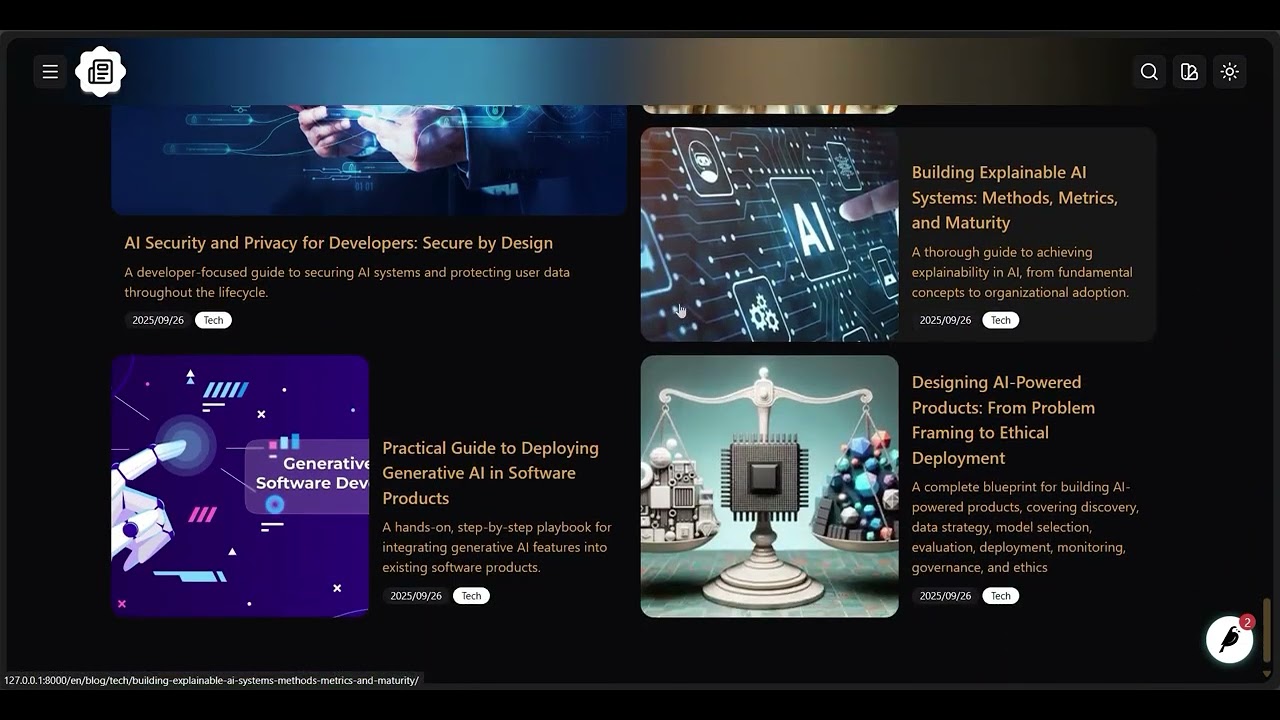
A reusable, production-ready blog application built with Python, Django, Django REST Framework, and Wagtail CMS, styled with Tailwind CSS and daisyUI. It ships with sane defaults, modern theming, and clean APIs to help you launch quickly and scale confidently.
Demo
Key features
- Full CMS: Wagtail-powered editorial experience with pages, media, search, and governance.
- Modern UI: Tailwind CSS for utility-first styling and responsive layouts.
- Theming: All daisyUI themes supported, plus the ability to define custom themes.
- API ready: Optional REST API endpoints for content delivery and integrations.
- CI/CD: GitHub Actions pipelines for consistent, automated testing and deployment.
- Dependencies: Managed with Poetry for reproducibility and clarity.
- Formatting: Black for automatic, consistent code formatting.
- Linting: Ruff for fast, comprehensive linting.
- Testing: Django test runner for unit and integration tests.
- Configs included:
.gitignore,pyproject.toml, and other boilerplate to streamline setup.
Installation
pip install django-w-blog
Configuration
Add installed apps
# project/settings.py

INSTALLED_APPS = [
    "blog",
    "blog.api",  # Optional if you don't need the API
    "blog.apps.articles",
    "blog.apps.categories",
    "blog.apps.home",      # Optional if your project includes a Home model ('home.Home')
    "blog.apps.indexes",
    "blog.apps.tags",
    "blog.cms",
    "blog.ui",

    # Dependencies
    "rest_wind",           # Optional if you don't need the API
    "rest_framework",      # Optional if you don't need the API
    "wagtail_blocks",
    "wagtail.contrib.search_promotions",
    "wagtail.contrib.forms",
    "wagtail.contrib.redirects",
    "wagtail.embeds",
    "wagtail.sites",
    "wagtail.users",
    "wagtail.snippets",
    "wagtail.documents",
    "wagtail.images",
    "wagtail.search",
    "wagtail.admin",
    "wagtail",
    "modelcluster",
    "taggit",
    # ...
]
Run migrations
# In your project root
python manage.py migrate
Update URL configuration
# project/urls.py

from django.urls import include, path
from wagtail import urls as wagtail_urls
from wagtail.admin import urls as wagtailadmin_urls
from wagtail.documents import urls as wagtaildocs_urls

urlpatterns = [
    path("", include("blog.ui.urls")),
    path("api/", include("blog.api.urls")),           # Optional if you don't need the API
    path("api/", include("rest_framework.urls")),     # Optional if you don't need the API
    # ...
    path("documents/", include(wagtaildocs_urls)),
    path("dashboard/", include(wagtailadmin_urls)),
    path("", include(wagtail_urls)),                  # Keep this as the last pattern
]
Theming and templates
Each template in django-w-blog extends blog/base.html. Start by creating this base template in your project and customize it to match your brand.
Create the blog template directory
mkdir -p your_app/templates/blog
Create the base template
touch your_app/templates/blog/base.html
You can extend blog/base.html in your own templates or override any provided template for full control.
Available blocks and context
-
blog/base.html- Blocks:
- theme: Default daisyUI theme
- toggle_theme: Secondary daisyUI theme
- head: HTML head content
- title: Page title
- styles: CSS styles links
- navbar: Navigation bar
- branding: Branding in navbar
- navbar_center: Centered navbar links
- navbar_end: Right-aligned navbar links
- content: Main content
- footer: Page footer
- drawer_branding: Sidebar branding
- drawer_content: Sidebar content
- Context:
- home: Site root page
- Blocks:
-
blog/index.html- Blocks: All blocks from
blog/base.html - Context:
- index: Blog index page
- articles: Latest blog articles
- Blocks: All blocks from
-
blog/category.html- Blocks: All blocks from
blog/base.html - Context:
- category: Category instance
- Blocks: All blocks from
-
blog/article.html- Blocks: All blocks from
blog/base.html - Context:
- article: Article instance
- Blocks: All blocks from
-
blog/search.html- Blocks: All blocks from
blog/base.html - Context:
- search_results: Results as a
PageQuerySet
- search_results: Results as a
- Blocks: All blocks from
Contributing
We welcome contributions. Please review the CONTRIBUTING guide for setup, coding standards, and workflow. Opening an issue before major changes helps align on scope and direction.
Support
For questions, bug reports, or feature requests, open an issue or start a thread in GitHub Discussions.
License
This project is available under the MIT License. See the LICENSE file for details.
1 maintainer

Metadata
1 maintainer
Release files for django-w-blog 0.3.0
For a detailed explanation of source distributions (sdists) and built distributions (wheels), please see the package formats documentation.
Source distribution (sdist)
| File | Size | Uploaded | |
|---|---|---|---|
| django_w_blog-0.3.0.tar.gz | 72.4 kB | Details |
Built distribution (wheel)
| File | Interpreter | ABI | Platform | Reset |
|---|---|---|---|---|
| django_w_blog-0.3.0-py3-none-any.whl | Python 3 | none | any | Details |
Total release size: 187.0 kB
Release files / django_w_blog-0.3.0.tar.gz
| Download URL | django_w_blog-0.3.0.tar.gz |
|---|---|
| Size | 72.4 kB |
| Tags | Source |
|
SHA-256 checksum How to use checksums |
7c4d572de32eb1a02963cd0d281a579bcbe2c04db48e26ec5a19525e35c33aef
|
|
BLAKE2b-256 checksum How to use checksums |
d9b6e54769d7d3b4d26072843fb5ecd2bae6949ff18467c61263f5ccae229353
|
| Upload date | |
|
Uploaded using Trusted Publishing? What is trusted publishing? |
No |
| Uploaded via |
poetry/2.2.1 CPython/3.12.3 Linux/6.11.0-1018-azure
|
Release files / django_w_blog-0.3.0-py3-none-any.whl
| Download URL | django_w_blog-0.3.0-py3-none-any.whl |
|---|---|
| Size | 114.6 kB |
| Tags | Python 3 |
|
SHA-256 checksum How to use checksums |
aa8e7ae29b758ebf98c8834033fae3ae06b3f8b0cc0acdd6d0b1eebd8b806f3c
|
|
BLAKE2b-256 checksum How to use checksums |
475859a042b4b7bb31ee6c1cd8a828bc89e7aafdeecc6d548f20184f4c7724fc
|
| Upload date | |
|
Uploaded using Trusted Publishing? What is trusted publishing? |
No |
| Uploaded via |
poetry/2.2.1 CPython/3.12.3 Linux/6.11.0-1018-azure
|














