
A reusable blog app powered by Python, Django, DRF, Wagtail CMS, TailwindCSS and DaisyUI.

Project description
django-w-blog









Overview
A reusable, production-ready blog application built with Python, Django, Django REST Framework, and Wagtail CMS, styled with Tailwind CSS and daisyUI. It ships with sane defaults, modern theming, and clean APIs to help you launch quickly and scale confidently.
Demo
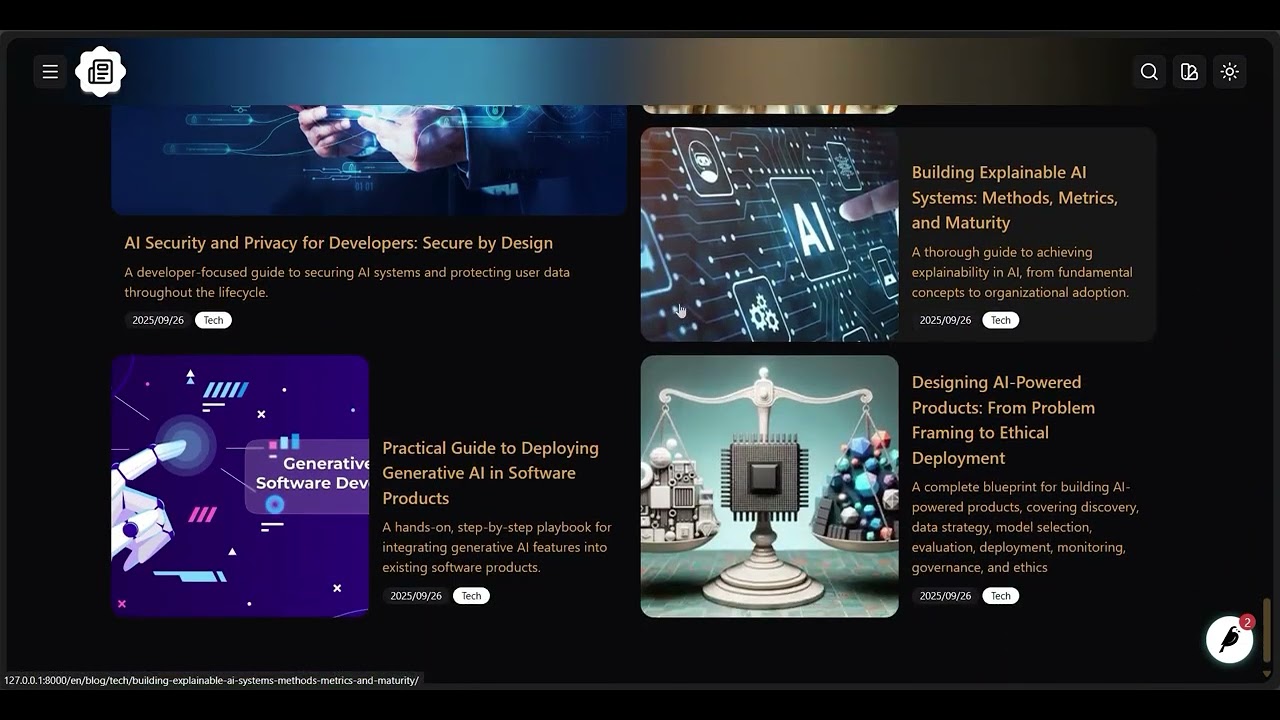
Key features
- Full CMS: Wagtail-powered editorial experience with pages, media, search, and governance.
- Modern UI: Tailwind CSS for utility-first styling and responsive layouts.
- Theming: All daisyUI themes supported, plus the ability to define custom themes.
- API ready: Optional REST API endpoints for content delivery and integrations.
- CI/CD: GitHub Actions pipelines for consistent, automated testing and deployment.
- Dependencies: Managed with Poetry for reproducibility and clarity.
- Formatting: Black for automatic, consistent code formatting.
- Linting: Ruff for fast, comprehensive linting.
- Testing: Django test runner for unit and integration tests.
- Configs included:
.gitignore,pyproject.toml, and other boilerplate to streamline setup.
Installation
pip install django-w-blog
Configuration
Add installed apps
# project/settings.py

INSTALLED_APPS = [
    "blog",
    "blog.api",  # Optional if you don't need the API
    "blog.apps.articles",
    "blog.apps.categories",
    "blog.apps.home",      # Optional if your project includes a Home model ('home.Home')
    "blog.apps.indexes",
    "blog.apps.tags",
    "blog.cms",
    "blog.ui",

    # Dependencies
    "rest_wind",           # Optional if you don't need the API
    "rest_framework",      # Optional if you don't need the API
    "wagtail_blocks",
    "wagtail.contrib.search_promotions",
    "wagtail.contrib.forms",
    "wagtail.contrib.redirects",
    "wagtail.embeds",
    "wagtail.sites",
    "wagtail.users",
    "wagtail.snippets",
    "wagtail.documents",
    "wagtail.images",
    "wagtail.search",
    "wagtail.admin",
    "wagtail",
    "modelcluster",
    "taggit",
    # ...
]
Run migrations
# In your project root
python manage.py migrate
Update URL configuration
# project/urls.py

from django.urls import include, path
from wagtail import urls as wagtail_urls
from wagtail.admin import urls as wagtailadmin_urls
from wagtail.documents import urls as wagtaildocs_urls

urlpatterns = [
    path("", include("blog.ui.urls")),
    path("api/", include("blog.api.urls")),           # Optional if you don't need the API
    path("api/", include("rest_framework.urls")),     # Optional if you don't need the API
    # ...
    path("documents/", include(wagtaildocs_urls)),
    path("dashboard/", include(wagtailadmin_urls)),
    path("", include(wagtail_urls)),                  # Keep this as the last pattern
]
Theming and templates
Each template in django-w-blog extends blog/base.html. Start by creating this base template in your project and customize it to match your brand.
Create the blog template directory
mkdir -p your_app/templates/blog
Create the base template
touch your_app/templates/blog/base.html
You can extend blog/base.html in your own templates or override any provided template for full control.
Available blocks and context
-
blog/base.html- Blocks:
- theme: Default daisyUI theme
- toggle_theme: Secondary daisyUI theme
- head: HTML head content
- title: Page title
- styles: CSS styles links
- navbar: Navigation bar
- branding: Branding in navbar
- navbar_center: Centered navbar links
- navbar_end: Right-aligned navbar links
- content: Main content
- footer: Page footer
- drawer_branding: Sidebar branding
- drawer_content: Sidebar content
- Context:
- home: Site root page
- Blocks:
-
blog/index.html- Blocks: All blocks from
blog/base.html - Context:
- index: Blog index page
- articles: Latest blog articles
- Blocks: All blocks from
-
blog/category.html- Blocks: All blocks from
blog/base.html - Context:
- category: Category instance
- Blocks: All blocks from
-
blog/article.html- Blocks: All blocks from
blog/base.html - Context:
- article: Article instance
- Blocks: All blocks from
-
blog/search.html- Blocks: All blocks from
blog/base.html - Context:
- search_results: Results as a
PageQuerySet
- search_results: Results as a
- Blocks: All blocks from
Contributing
We welcome contributions. Please review the CONTRIBUTING guide for setup, coding standards, and workflow. Opening an issue before major changes helps align on scope and direction.
Support
For questions, bug reports, or feature requests, open an issue or start a thread in GitHub Discussions.
License
This project is available under the MIT License. See the LICENSE file for details.
Release history Release notifications | RSS feed


Download files
Download the file for your platform. If you're not sure which to choose, learn more about installing packages.
Source Distribution
Built Distribution
Filter files by name, interpreter, ABI, and platform.
If you're not sure about the file name format, learn more about wheel file names.
Copy a direct link to the current filters
File details
Details for the file django_w_blog-0.2.0.tar.gz.
File metadata
- Download URL: django_w_blog-0.2.0.tar.gz
- Upload date:
- Size: 58.2 kB
- Tags: Source
- Uploaded using Trusted Publishing? No
- Uploaded via: poetry/2.2.1 CPython/3.12.3 Linux/6.11.0-1018-azure
File hashes
| Algorithm | Hash digest | |
|---|---|---|
| SHA256 |
4530f333956e2a7a72250068461c9cd86d02189cac159dad9d46350d23a6a7da
|
|
| MD5 |
4995622acc69eefaa1fbf3fe6e841585
|
|
| BLAKE2b-256 |
f72ab0016f655288cee5fa66e182df909e915a66411dd52b54ca4218586d312d
|
File details
Details for the file django_w_blog-0.2.0-py3-none-any.whl.
File metadata
- Download URL: django_w_blog-0.2.0-py3-none-any.whl
- Upload date:
- Size: 87.8 kB
- Tags: Python 3
- Uploaded using Trusted Publishing? No
- Uploaded via: poetry/2.2.1 CPython/3.12.3 Linux/6.11.0-1018-azure
File hashes
| Algorithm | Hash digest | |
|---|---|---|
| SHA256 |
a73dff3b96cec9fe1542d7938337f80c18cdaac7fd54193e1acf9c1b29d6f7b9
|
|
| MD5 |
81445847d5d83d9dc67c6fc441ebcc21
|
|
| BLAKE2b-256 |
4a9ea44efda234a3a34dd26b7e60d23f08f46c05138e6406fc6b1016dbe4691f
|






