
Django middleware that measures request time breakdown (total/db/app) and query count using execute_wrapper.

Project description


django-xbench
Here's how django-xbench exposes request timing breakdown using the Server-Timing header:
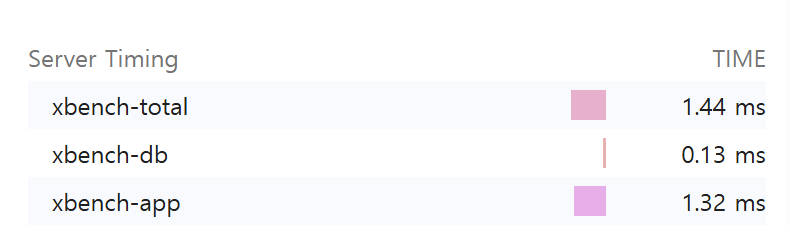
Measure Django request time breakdown (total / db / app) and query count with minimal setup.
Adds Server-Timing and X-Bench-Queries headers and optionally logs per-request metrics.
Goal: make performance debugging “visible” (DB vs app/serialization) without heavyweight APM.
Features
- ✅ Measures total request time and DB time (via
connection.execute_wrapper) - ✅ Calculates app time (= total - db)
- ✅ Counts DB queries
- ✅ Adds response headers:
Server-Timing: xbench-total;dur=..., xbench-db;dur=..., xbench-app;dur=...X-Bench-Queries: <int>
- ✅ Optional logging:
[XBENCH] GET /path | xbench_total=...ms xbench_db=...ms xbench_app=...ms q=...
- ✅ Tested with
pytest+pytest-django
Installation
pip install django-xbench
For local development (recommended):
pip install -e ".[dev]"
Quickstart
- Add middleware in your
settings.py:
MIDDLEWARE = [
    # Recommended: place near the top to approximate end-to-end server time
    # (includes other middleware overhead).
    "django_xbench.middleware.XBenchMiddleware",

    # ... other middleware ...

    # Optional: place near the bottom to focus on view/serializer/template time.
    # (Excludes middleware above XBench; includes anything below it.)
]
- Run your server and hit any endpoint:
In your project:
python manage.py runserver
curl -I http://127.0.0.1:8000/<your-endpoint>/
In this repo (demo):
python -m examples.manage runserver
curl -I http://127.0.0.1:8000/db-heavy/
You should see headers similar to:
Server-Timing: xbench-total;dur=12.345, xbench-db;dur=1.234, xbench-app;dur=11.111
X-Bench-Queries: 3
Output
Server-Timing
Example:
Server-Timing: xbench-total;dur=52.300, xbench-db;dur=14.100, xbench-app;dur=38.200
xbench-total: whole request durationxbench-db: total DB time measured by wrapperxbench-app:max(0, total - db)(serialization/template/python time etc.)
You can inspect this in Chrome DevTools → Network → Timing
(or any browser that supports the Server-Timing spec).
Query count header
X-Bench-Queries: 5
Configuration
You can configure XBench via settings.py or Environment Variables.
settings.py:
XBENCH_LOG_ENABLED = True
XBENCH_LOG_LEVEL = "debug"  # default: "info"
Example (Windows):
set XBENCH_LOG_ENABLED=1
set XBENCH_LOG_LEVEL=debug
Example (macOS/Linux):
export XBENCH_LOG_ENABLED=1
export XBENCH_LOG_LEVEL=debug
Development
Run tests
pytest
Note: this repo includes a bundled
examples/Django project used bypytest-django. In CI, we setPYTHONPATH=examplesto ensureexamples.config.settingscan be imported reliably.
If you want to see logs while testing:
pytest -s
Demo project (bundled)
This repository includes an examples/ Django project for manual testing.
Run it from the repository root:
python -m examples.manage runserver
Try a few endpoints:
curl -I http://127.0.0.1:8000/db-heavy/
curl -I http://127.0.0.1:8000/app-heavy/
curl -I http://127.0.0.1:8000/admin/login/
Compatibility
- Python: 3.9+
- Django: 3.2+ (tested on 5.2)
Roadmap
- DRF serialization time breakdown (view/serializer timing)
- More robust
Server-Timingmerging (preserve existing metrics) - Docs: real-world examples (N+1 detection demo endpoints)
Contributing
Issues and PRs are welcome.
If you propose new metrics, please include:
- minimal reproducible example
- tests
- documentation update
License
MIT


Download files
Download the file for your platform. If you're not sure which to choose, learn more about installing packages.
Source Distribution
Built Distribution
Filter files by name, interpreter, ABI, and platform.
If you're not sure about the file name format, learn more about wheel file names.
Copy a direct link to the current filters
File details
Details for the file django_xbench-0.1.2.tar.gz.
File metadata
- Download URL: django_xbench-0.1.2.tar.gz
- Upload date:
- Size: 6.5 kB
- Tags: Source
- Uploaded using Trusted Publishing? No
- Uploaded via: twine/6.2.0 CPython/3.10.0
File hashes
| Algorithm | Hash digest | |
|---|---|---|
| SHA256 |
b5d95166adae123c3dc4289e3ab1895d2a6198e37865847cd37eb63969901581
|
|
| MD5 |
122bd30ad372227e24a1b10e5b1a9882
|
|
| BLAKE2b-256 |
b71df88c37a1623aa156b90eb657b14aa27ae13443741f897cc1d93a760d4fb2
|
File details
Details for the file django_xbench-0.1.2-py3-none-any.whl.
File metadata
- Download URL: django_xbench-0.1.2-py3-none-any.whl
- Upload date:
- Size: 6.5 kB
- Tags: Python 3
- Uploaded using Trusted Publishing? No
- Uploaded via: twine/6.2.0 CPython/3.10.0
File hashes
| Algorithm | Hash digest | |
|---|---|---|
| SHA256 |
b78b87235356b19659a5a8e9f274edb98f051e14e8eab0b974e6441dfd6c14b0
|
|
| MD5 |
7ec86821197cf787617922d0691d47c7
|
|
| BLAKE2b-256 |
2d83aa93d3490041b9b75f1304757736c9aadbd7e4363b135fe460e74c859681
|






