
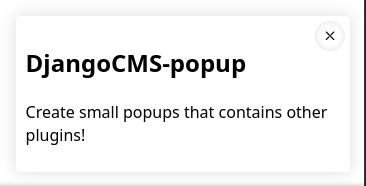
This is a screenshot of an actual popup with the default css.
Install
-
Install module
python3 -m pip install djangocms-popup -
Add it to your INSTALLED_APPS
"djangocms_popup", -
Migrate
python3 manage.py migrate djangocms_popup -
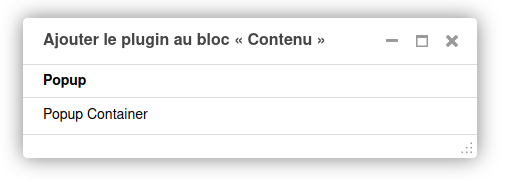
Launch your django-cms site, it should be here!
Requirements
django-cms: Obviously,django-sekizai: Only for the template.
Features
A popup

An Admin list of popups that you can access from a button in your taskbar

More popups!
You can add more choices for the popup using a tuple in your settings, that let you choose which template file to use for each popup.
To do so, just add a var named DJANGOCMS_POPUP_LIST in your settings, like this:
DJANGOCMS_POPUP_LIST = (
    ("bottom_right.html", "Bottom right popup"),
    ("bottom_left.html", "Bottom left popup"),
    ("top_right.html", "Top right popup"),
    ("top_left.html", "Top left popup"),
    ("center.html", "Center popup"),
)
Don't forget to add all the templates in the templates/popup/ folder!
Configuration
-
DJANGOCMS_POPUP_LIST(default:(("bottom_right.html", "Bottom right popup"),)) Just a tuple. Let user choose other templates for the popups. -
DJANGOCMS_POPUP_TOOLBAR_BUTTON(boolean, default:True) Whether to add a button in the CMS toolbar to list all existing popups -
DJANGOCMS_POPUP_TOOLBAR_MENU_IDENTIFIER(string, default:None) The identifier of the menu in which the new button will be added. If it is None it will be added in the main toolbar.:warning: Beware that the menu matching the provided menu identifier must exist prior to the creation of the Popup menu: the app defining this menu must appear before djangocms_popup in your INSTALLED_APPS.
-
DJANGOCMS_POPUP_TOOLBAR_MENU_POSITION(integer, default:None) The position of the button in the toolbar or in the menu defined byDJANGOCMS_POPUP_TOOLBAR_MENU_IDENTIFIER
Customize it!
The template included in this project serves demonstration purpose only, it's up to you to integrate it into your graphic charter by creating a file in templates/popup/popup_plugin.html.
How it works
It's a classic djangocms-plugin, with all the stuff in admin.py, cms_plugins.py, cms_toolbars.py and models.py.
The "fun" part is in the template.
The child plugins will be rendered inside a div which have a visibility property (see MDN doc).
Then, a very dumb script (in vanilla javascript) will display the div with a delay using setTimeout, and will add an event listener on a small button (that will show/hide the popup when clicked).
If the option "Allow the popup to be reopened if it is closed", the small button will still be visible, even if you refresh the page.
The state of the popup is stored inside the localStorage (the id is popup_is_open_{{ instance.id }}), so a closed popup won't reopen at a page reload.
Warning! The plugin uses the visibility property! So if any of the plugins you put inside the popup have a visibilit: visible property it will be shown!
1 maintainer

Metadata
1 maintainer
Release files for djangocms-popup 1.3.3
For a detailed explanation of source distributions (sdists) and built distributions (wheels), please see the package formats documentation.
Source distribution (sdist)
| File | Size | Uploaded | |
|---|---|---|---|
| djangocms_popup-1.3.3.tar.gz | 22.0 kB | Details |
Built distribution (wheel)
| File | Interpreter | ABI | Platform | Reset |
|---|---|---|---|---|
| djangocms_popup-1.3.3-py3-none-any.whl | Python 3 | none | any | Details |
Total release size: 45.7 kB
Release files / djangocms_popup-1.3.3.tar.gz
| Download URL | djangocms_popup-1.3.3.tar.gz |
|---|---|
| Size | 22.0 kB |
| Tags | Source |
|
SHA-256 checksum How to use checksums |
f45d00c96cfbd5194472ab719bc2bab60883cffad205f63889116374b7988dd1
|
|
BLAKE2b-256 checksum How to use checksums |
9c866ea49f758e35407a7fa905053072db69da195f4251b24b6313c20b68c3b6
|
| Upload date | |
|
Uploaded using Trusted Publishing? What is trusted publishing? |
No |
| Uploaded via |
twine/4.0.2 CPython/3.11.5
|
Release files / djangocms_popup-1.3.3-py3-none-any.whl
| Download URL | djangocms_popup-1.3.3-py3-none-any.whl |
|---|---|
| Size | 23.6 kB |
| Tags | Python 3 |
|
SHA-256 checksum How to use checksums |
3df6fdcef0944e7ae67fc6c142b6741f692bd7b07b09f532a9c8a996200c3cd0
|
|
BLAKE2b-256 checksum How to use checksums |
8bd0999ff1616b4faeb6ba9fb868baf994f75cce5a8682cc5d5d22de8bbc8ab8
|
| Upload date | |
|
Uploaded using Trusted Publishing? What is trusted publishing? |
No |
| Uploaded via |
twine/4.0.2 CPython/3.11.5
|














