
An API for working with results from any Bladed version.


Project description
Bladed Results API Version 2
The Bladed Results API v2 is an easy, fast, and robust way to access Bladed results using Python.
It provides features for:
- Discovering Bladed runs
- Finding variables in runs
- Getting data from variables
- Reporting run and variable metadata
- Writing user-defined output groups.
The API is able to read results from any Bladed version.
The API depends on the numpy package, version 2.0.2 or later.
Currently only Windows is supported.
Bladed Results API v2 replaces Results API 1.x which has been discontinued.
Results API v2.1 Release Notes
Cross-version support
- Scripts can now work with results from any past or future Bladed version. If a variable or group is not found, the API automatically checks for renamed alternatives.
- This behaviour can be disabled using
ResultsApi.SearchSettings.retry_using_alternative_name = False.
Updated tooling
- Upgraded to NumPy 2.
- Added support for Python 3.13 and 3.14.
Faster performance
- Significant speed-up when reading ASCII result files.
- Various other performance and stability improvements across the API.
Improved debugging
- Metadata values previously accessed via
get_functions are now available as properties, which are automatically evaluated in the IDE. - Existing scripts using the old
get_function names will need to be updated to use the new properties. For example,variable.get_name()has been replaced withvariable.name.
Pre-requisites
- Requires a 32- or 64-bit Windows installation of any Python version from 3.9 to 3.14 inclusive.
64-bit Python is recommended.
- The Results API has been tested on Windows 11.
Quick Start
pip install --upgrade dnv-bladed-results
from dnv_bladed_results import ResultsApi, Run

run = ResultsApi.get_run(run_dir, run_name)
var_1d = run.get_variable_1d(variable_name)
print(var_1d.get_data())
Code Completion
We recommend enabling code completion in the IDE for the best user experience. Code completion displays a popup listing the available functions and properties as the user types. Together with inline documentation, code completion makes it easy to explore and understand the API.

In Visual Studio Code, a type hint is needed for code completion to work with API classes inside a loop. This issue does not affect PyCharm.
# Note the following type hint declared on the run loop variable
run: Run
for run in runs:
   # Do something with run - easy now code completion works!
Function overloads returning NumPy arrays of different type may not trigger automatic docstring pop-ups. A workaround is to place the cursor on the function name and hit F12, or place the cursor inside the function parentheses and hit Ctrl + Shift + Space to view parameter and docstring hints.
See IntelliSense in Visual Studio Code
In PyCharm, we recommend enabling the options "Show suggestions as you type" and "Show the documentation popup in...", available in Settings > Editor > General > Code Completion.
See Code completion in PyCharm
Usage Examples
Usage examples demonstrating core functionality are distributed with the package. A brief description of each example follows.
The UsageExamples installation folder and list of available examples may be enquired as follows:
import os
from dnv_bladed_results import UsageExamples
print(UsageExamples.__path__[0])
os.listdir(UsageExamples.__path__[0])
The examples below show how each script may be launched from within a Python environment.
Basic Operations
Load a Bladed run, request groups and variables, and get data for tower members and blade stations:
from dnv_bladed_results.UsageExamples import ResultsApi_BasicOperations
ResultsApi_BasicOperations.run_script()
Variable Data
Load a Bladed run, request 1D and 2D variables* from both the run and from a specific output group, and obtain data from the returned variables:
from dnv_bladed_results.UsageExamples import ResultsApi_VariableData_ReadBasic
ResultsApi_VariableData_ReadBasic.run_script()
Obtain data from a 2D variable* for specific independent variable values, and specify the precision of the data to read:
from dnv_bladed_results.UsageExamples import ResultsApi_VariableData_ReadExtended
ResultsApi_VariableData_ReadExtended.run_script()
*1D and 2D variables are dependent variables with one and two independent variables respectively.
Runs
Use filters and regular expressions to find a subset of runs in a directory tree:
from dnv_bladed_results.UsageExamples import ResultsApi_FindRuns
ResultsApi_FindRuns.run_script()
Find and process runs asynchronously using a Python generator:
from dnv_bladed_results.UsageExamples import ResultsApi_FindRunsUsingGenerator
ResultsApi_FindRunsUsingGenerator.run_script()
Metadata
Get metadata for runs, groups, and variables:
from dnv_bladed_results.UsageExamples import ResultsApi_RunMetadata
ResultsApi_RunMetadata.run_script()
from dnv_bladed_results.UsageExamples import ResultsApi_GroupMetadata
ResultsApi_GroupMetadata.run_script()
from dnv_bladed_results.UsageExamples import ResultsApi_VariableMetadata
ResultsApi_VariableMetadata.run_script()
from dnv_bladed_results.UsageExamples import ResultsApi_VariableStats
ResultsApi_VariableStats.run_script()
Output
Export 1D and 2D Bladed output groups, as well as an entire run, using the HDF5 file format:
Requires the
h5pylibrary, available via pip:pip install h5py. The example has been tested with h5py >= 3.14.0.
from dnv_bladed_results.UsageExamples import ResultsApi_VariableData_ExportHDF5
ResultsApi_VariableData_ExportHDF5.run_script()
Export Bladed output groups using the Matlab file format:
Requires the
scipylibrary, available via pip:pip install scipy. The example has been tested with scipy >= 1.13.1.
from dnv_bladed_results.UsageExamples import ResultsApi_VariableData_ExportMatlab
ResultsApi_VariableData_ExportMatlab.run_script()
Write 1D and 2D output groups using the Bladed file format:
from dnv_bladed_results.UsageExamples import ResultsApi_WriteGroup
ResultsApi_WriteGroup.run_script()
Charting
Create 2D and 3D plots of blade loads:
Requires the
matplotliblibrary, available via pip:pip install matplotlib. The examples have been tested with matplotlib >= 3.9.4.
from dnv_bladed_results.UsageExamples import ResultsApi_Charting2D
ResultsApi_Charting2D.run_script()
from dnv_bladed_results.UsageExamples import ResultsApi_Charting3D
ResultsApi_Charting3D.run_script()
Post-Processing
Post-process two-dimensional variable data into bespoke data structures and into a Pandas DataFrame. Plot the data choosing specific points of the DataFrame.
Requires the
matplotliblibrary, available via pip:pip install matplotlib. The example has been tested with matplotlib >= 3.9.4.
Requires the
pandaslibrary, available via pip:pip install pandas. The example has been tested with pandas >= 2.3.0.
from dnv_bladed_results.UsageExamples import ResultsApi_PostProcessing
ResultsApi_PostProcessing.run_script()
Results Viewer example
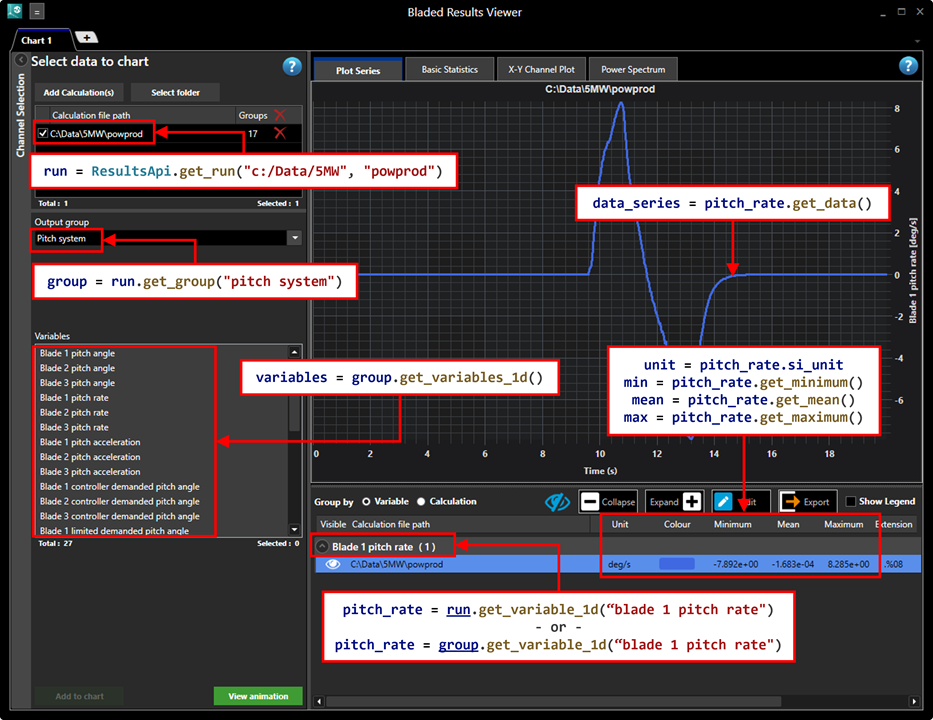
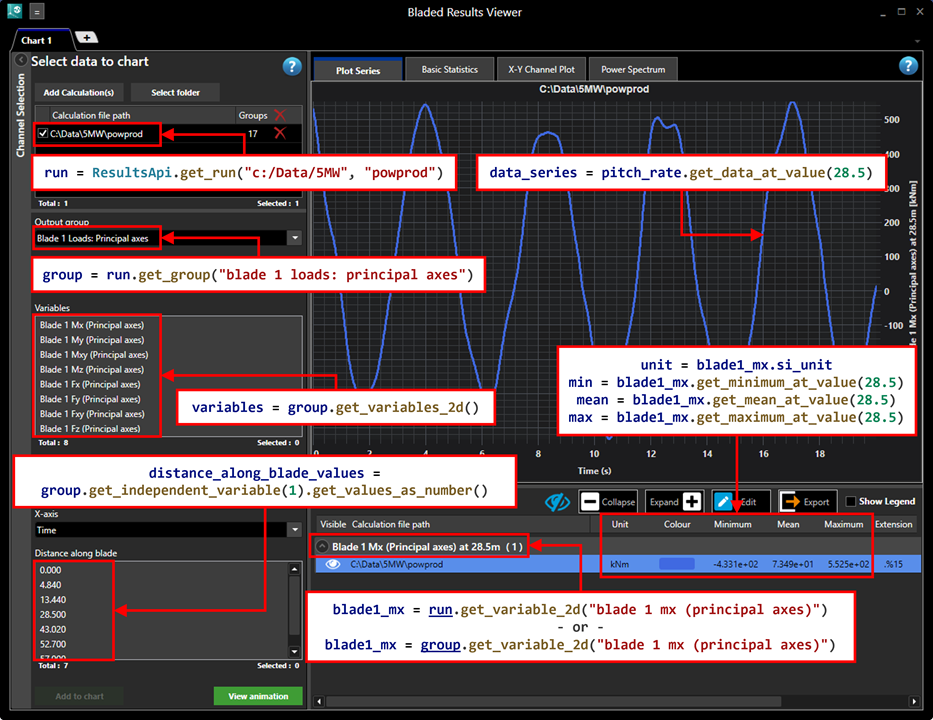
The following images illustrate how Bladed results shown in Results Viewer can be accessed through the Results API.
Results Viewer is a standalone package providing enhanced results viewing functionality. Bladed and the Results Viewer application are both available from the Downloads page.
One-dimensional variables:
Two-dimensional variables:
Technical Information
The API comprises a Python wrapper dispatching to a C++ backend. The backend performs the work of fetching and storing data, validation, and memory management.
NumPy integration
Several API functions accept and return NumPy ndarray objects, which wrap the underlying data without copying*.
Each Function returning ndarray has a counterpart function with the suffix _native_array which returns a C-style native array. These variants offer slightly better performance by avoiding the small overhead of NumPy wrapping.
In most cases, the NumPy versions are recommended for their convenience and improved memory safety.
*Functions returning two-dimensional array, for example the Variable2D function get_data, perform a deep copy. In performance-critical code, the corresponding _native_array function is recommended.
One- and two-dimensional variable return types
The API provides separate functions for getting 1D and 2D variables due to differences in the shape of the data, which in turn requires different operations:
- A 1D variable is a dependent variable with one independent variable. Data is stored in a one-dimensional array - essentially a flat list of values.
- A 2D variable is a dependent variable with two independent variables. Data is stored in a two-dimensional array - essentially a table (rows x columns).
See the Glossary for more information about 1D and 2D variables.
Glossary
Run
The output from running a Bladed calculation. Typically, this comprises several output groups, with each group containing variables that relate to a specific part of the model.
Variable
In the context of the Results API, the term variable is synonymous with dependent variable.
Dependent variable
A variable calculated as the result of changing one or more independent variables. Dependent variables are listed next to the VARIAB key of an output group header file.
Dependent variables may be one-dimensional (1D) or two-dimensional (2D).
-
A 1D variable depends on a single independent variable, known as the primary independent variable.
Example: in a time series turbine simulation, the 1D variable
Rotor speeddepends on the primary independent variableTime. Its data is a one-dimensional array indexed by time. -
A 2D variable depends on two independent variables, known as the primary and secondary independent variables.
Example: In a time series turbine simulation with a multi-member tower, the 2D variable
Tower Mxdepends on the primary independent variableTimeand the secondary independent variableLocation. Its data is a two-dimensional array indexed by member location and time.
Independent variable
A variable whose value does not depend on other variables in the calculation. Independent variables are denoted by the AXISLAB key of an output group header file.
In a time series calculation, the primary independent variable typically represents time. The secondary independent variable typically represents an measurement point, such as a blade station.
Header file
A file containing metadata describing an output group. A header files extension takes the form .%n, where n is a number uniquely identifying the group within the run.
Data file
A file containing an output group’s data (binary or ASCII). A data file extension takes the form .$n, where n matches the corresponding header file number.
(Output) group
A collection of variables that relate to a specific part of the model. For example, the variables Rotor speed and Generator speed belong to the Drive train variables group.
A Bladed group is represented by two files: a header file containing metadata, and a data file containing the data for all dependent variables in the group.
Release history Release notifications | RSS feed


Download files
Download the file for your platform. If you're not sure which to choose, learn more about installing packages.
Source Distribution
File details
Details for the file dnv_bladed_results-2.1.0.tar.gz.
File metadata
- Download URL: dnv_bladed_results-2.1.0.tar.gz
- Upload date:
- Size: 18.1 MB
- Tags: Source
- Uploaded using Trusted Publishing? No
- Uploaded via: twine/6.2.0 CPython/3.11.9
File hashes
| Algorithm | Hash digest | |
|---|---|---|
| SHA256 |
835ce3a560bd78bd9bb5ac2373442120583ce45134b92f476bda47d99529c5e4
|
|
| MD5 |
dc2c3cd1c91c68140473de2aa6c64de5
|
|
| BLAKE2b-256 |
651e20dce44f05a686a5ff3d0899465f0e33245c5011937ccb9a0e1008af81d8
|






