






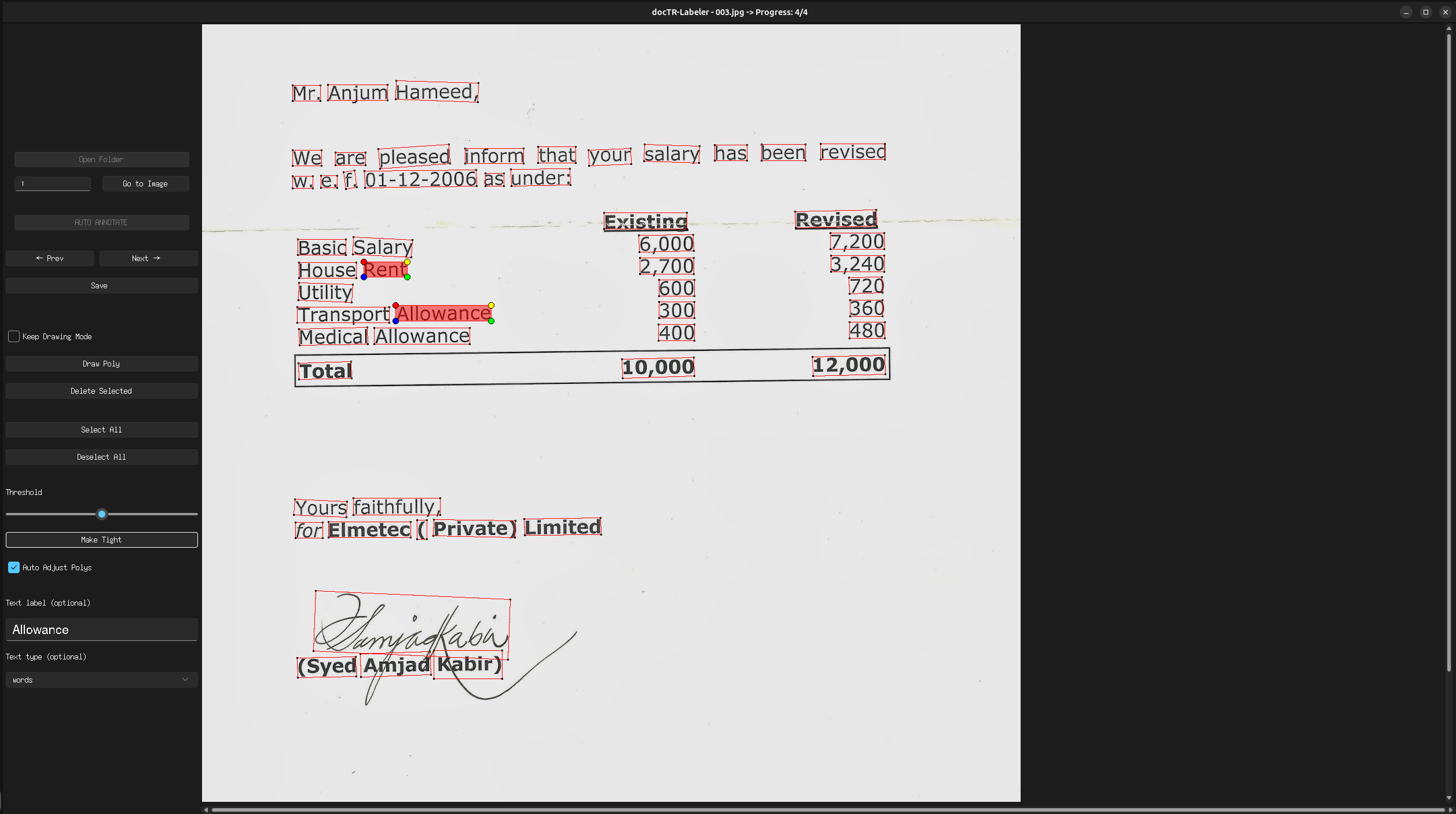
docTR Labeler is a tool to label OCR data for the docTR and OnnxTR projects.
Attention: This project is still in development - and currently a pre-release version - please report any issues you encounter.
What you can expect from this repository:
- Efficient way to label OCR data
- Features like auto-annotation using OnnxTR and auto polygon adjustment
- Easy to use frontend with keybindings
- CLI and programmatic usage
- No Login required
Installation
Prerequisites
Python 3.11 (or higher) and pip are required to install docTR-Labeler.
Latest release
You can then install the latest release of the package using pypi as follows:
# Install the CPU version
pip3 install "doctr-labeler[cpu]"
# Or with GPU support
pip3 install "doctr-labeler[gpu]"
Keybindings
-
Ctrl + a: Select all polygons -
Esc: Deselect all selected polygons -
Ctrl + t: Auto adjust the selected polygons -
Ctrl + r: Reset last auto adjustment -
Ctrl + s: Save the current progress / image annotation -
Ctrl + d: Delete the selected polygon -
Ctrl + f: Draw a new polygon -
Ctrl + c: Undo while drawing a polygon -
Ctrl + +: Zoom in (up to 150% by default) - Can be changed by setting a environment variableDOCTR_LABELER_MAX_ZOOMto a value between 1.1 and 2.0 -
Ctrl + -: Zoom out (down to 50% by default) - Can be changed by setting a environment variableDOCTR_LABELER_MIN_ZOOMto a value between 0.1 and 0.9
Configuration
You can set the following environment variables to configure the tool:
DOCTR_LABELER_MAX_ZOOM: Maximum zoom level (default: 1.5)DOCTR_LABELER_MIN_ZOOM: Minimum zoom level (default: 0.5)RECOGNITION_ARCH: The recognition architecture to use (default:Felix92/onnxtr-parseq-multilingual-v1)DETECTION_ARCH: The detector architecture to use (default:fast_base)OBJECTNESS_THRESHOLD: The objectness threshold for the detector (default: 0.5)
Usage CLI
After installation you can use the CLI to start the tool:
For this open a terminal and run:
doctr-labeler
Usage Programmatic
You can also use the tool programmatic:
from labeler.views import GUI
from labeler.utils import prepare_data_folder, hf_upload_dataset

# (Optional)
# Prepare the data folder you can pass a path to a folder containing images and PDFs
# The function will create a new folder 'images' with the prepared data
prepared_data_path = prepare_data_folder("path/to/folder")

# Start the GUI
gui = GUI(image_folder=prepared_data_path)
gui.start_gui()

# or if you want to annotate also for KIE
types = ["Total", "Date", "Invoice Number", "VAT Number", "Address", "Company Name"]
gui = GUI(image_folder=prepared_data_path, text_types=types)
gui.start_gui()

# (Optional) Upload the prepared data to the Hugging Face dataset hub
# The path to the folder should contain an 'images' folder and it's corresponding 'labels.json' file or the 'tmp
hf_upload_dataset(prepared_data_path)
Credits
- This project is based on the Form-Labeller project by Devarshi Aggarwal.
Citation
If you wish to cite please refer to the base project citation, feel free to use this BibTeX references:
@misc{docTR-Labeler,
    title={docTR Labeler: docTR OCR Annotation Tool},
    author={{Dittrich, Felix}, {List, Ian}},
    year={2024},
    publisher = {GitHub},
    howpublished = {\url{https://github.com/text2knowledge/docTR-Labeler}}
}
@misc{Form-Labeller,
  author = {Aggarwal, Devarshi},
  title = {{Form Labeller}},
  howpublished = {\url{https://github.com/devarshi16/Form-Labeller}},
  year = {2020},
  note = {Online; accessed 01-March-2020}
}
Contributing
Contributions are what make the open-source community such an amazing place to learn, inspire, and create.
Any contributions you make are greatly appreciated.
- Fork the Project
- Create your Feature Branch (
git checkout -b feature/AmazingFeature) - Add your Changes
- Run the tests and quality checks (
make testandmake styleandmake quality) - Commit your Changes (
git commit -m 'Add some AmazingFeature') - Push to the Branch (
git push origin feature/AmazingFeature)
License
Distributed under the Apache 2.0 License. See LICENSE for more information.
1 maintainer

Metadata
1 maintainer
Release files for doctr-labeler 0.4.0
For a detailed explanation of source distributions (sdists) and built distributions (wheels), please see the package formats documentation.
Source distribution (sdist)
| File | Size | Uploaded | Provenance | Actions |
|---|---|---|---|---|
| doctr_labeler-0.4.0.tar.gz | 31.5 kB | Without provenance | Details for doctr_labeler-0.4.0.tar.gz |
Built distribution (wheel)
| File | Interpreter | ABI | Platform | Actions Reset |
|---|---|---|---|---|
| doctr_labeler-0.4.0-py3-none-any.whl | Python 3 | none | any | Details for doctr_labeler-0.4.0-py3-none-any.whl |
Total release size: 71.1 kB
Release files / doctr_labeler-0.4.0.tar.gz
| Download URL | doctr_labeler-0.4.0.tar.gz |
|---|---|
| Size | 31.5 kB |
| Tags | Source |
|
SHA-256 checksum How to use checksums |
3327c46a76c40c324ff33dbadd0357f51ba1dbb60e0cb28fe8e6e046089d30ff
|
|
BLAKE2b-256 checksum How to use checksums |
852489382bde322fcc9c36f3a8e2ef2ba9e39a6b0d8d8cf6ba209e4c7d7f3625
|
| Upload date | |
|
Uploaded using Trusted Publishing? What is trusted publishing? |
No |
| Uploaded via |
twine/6.2.0 CPython/3.11.15
|
Release files / doctr_labeler-0.4.0-py3-none-any.whl
| Download URL | doctr_labeler-0.4.0-py3-none-any.whl |
|---|---|
| Size | 39.6 kB |
| Tags | Python 3 |
|
SHA-256 checksum How to use checksums |
3249bdb0c2c24ed9d8f2a12304c05334a010d59733eec974df326b65cd013ce5
|
|
BLAKE2b-256 checksum How to use checksums |
07baa5f540c6fd5f5e3ab0e189ba4538b6b377be6f7476cf06a1b48d1c737a95
|
| Upload date | |
|
Uploaded using Trusted Publishing? What is trusted publishing? |
No |
| Uploaded via |
twine/6.2.0 CPython/3.11.15
|
Security for doctr-labeler 0.4.0
Provenance
Provenance describes where a file came from. On PyPI, provenance is shared via attestations, which provide a verifiable record of the build or publishing details. View details, limitations and caveats.
No provenance found
None of the files in this release were uploaded with provenance metadata.
A note on package security
PyPI is a repository for distributing packages, not a service for auditing them. While third-party security researchers and our staff do their best to detect and remove malicious packages, PyPI cannot guarantee the quality, security or suitability of any given package.
To learn more about protecting yourself from malicious actors, visit our package security documentation.














