






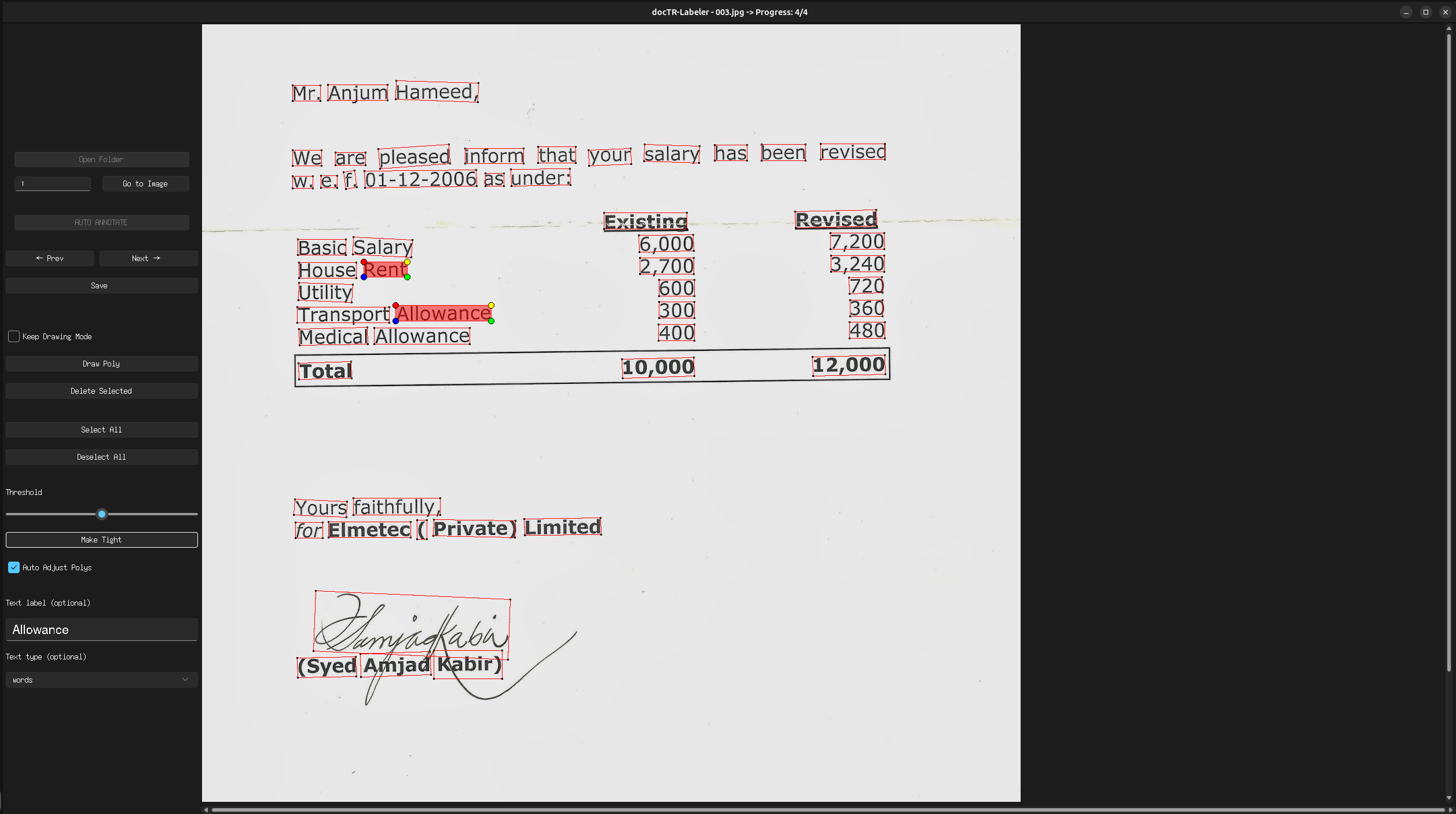
docTR Labeler is a tool to label OCR data for the docTR and OnnxTR projects.
Attention: This project is still in development - and currently a pre-release version - please report any issues you encounter.
What you can expect from this repository:
- Efficient way to label OCR data
- Features like auto-annotation using OnnxTR and auto polygon adjustment
- Easy to use frontend with keybindings
- CLI and programmatic usage
- No Login required
Installation
Prerequisites
Python 3.11 (or higher) and pip are required to install docTR-Labeler.
Latest release
You can then install the latest release of the package using pypi as follows:
# Install the CPU version
pip3 install "doctr-labeler[cpu]"
# Or with GPU support
pip3 install "doctr-labeler[gpu]"
Keybindings
-
Ctrl + a: Select all polygons -
Esc: Deselect all selected polygons -
Ctrl + t: Auto adjust the selected polygons -
Ctrl + r: Reset last auto adjustment -
Ctrl + s: Save the current progress / image annotation -
Ctrl + d: Delete the selected polygon -
Ctrl + f: Draw a new polygon -
Ctrl + c: Undo while drawing a polygon -
Ctrl + +: Zoom in (up to 150% by default) - Can be changed by setting a environment variableDOCTR_LABELER_MAX_ZOOMto a value between 1.1 and 2.0 -
Ctrl + -: Zoom out (down to 50% by default) - Can be changed by setting a environment variableDOCTR_LABELER_MIN_ZOOMto a value between 0.1 and 0.9
Configuration
You can set the following environment variables to configure the tool:
DOCTR_LABELER_MAX_ZOOM: Maximum zoom level (default: 1.5)DOCTR_LABELER_MIN_ZOOM: Minimum zoom level (default: 0.5)RECOGNITION_ARCH: The recognition architecture to use (default:Felix92/onnxtr-parseq-multilingual-v1)DETECTION_ARCH: The detector architecture to use (default:fast_base)OBJECTNESS_THRESHOLD: The objectness threshold for the detector (default: 0.5)
Usage CLI
After installation you can use the CLI to start the tool:
For this open a terminal and run:
doctr-labeler
Usage Programmatic
You can also use the tool programmatic:
from labeler.views import GUI
from labeler.utils import prepare_data_folder, hf_upload_dataset

# (Optional)
# Prepare the data folder you can pass a path to a folder containing images and PDFs
# The function will create a new folder 'images' with the prepared data
prepared_data_path = prepare_data_folder("path/to/folder")

# Start the GUI
gui = GUI(image_folder=prepared_data_path)
gui.start_gui()

# or if you want to annotate also for KIE
types = ["Total", "Date", "Invoice Number", "VAT Number", "Address", "Company Name"]
gui = GUI(image_folder=prepared_data_path, text_types=types)
gui.start_gui()

# (Optional) Upload the prepared data to the Hugging Face dataset hub
# The path to the folder should contain an 'images' folder and it's corresponding 'labels.json' file or the 'tmp
hf_upload_dataset(prepared_data_path)
Credits
- This project is based on the Form-Labeller project by Devarshi Aggarwal.
Citation
If you wish to cite please refer to the base project citation, feel free to use this BibTeX references:
@misc{docTR-Labeler,
    title={docTR Labeler: docTR OCR Annotation Tool},
    author={{Dittrich, Felix}, {List, Ian}},
    year={2024},
    publisher = {GitHub},
    howpublished = {\url{https://github.com/text2knowledge/docTR-Labeler}}
}
@misc{Form-Labeller,
  author = {Aggarwal, Devarshi},
  title = {{Form Labeller}},
  howpublished = {\url{https://github.com/devarshi16/Form-Labeller}},
  year = {2020},
  note = {Online; accessed 01-March-2020}
}
Contributing
Contributions are what make the open-source community such an amazing place to learn, inspire, and create.
Any contributions you make are greatly appreciated.
- Fork the Project
- Create your Feature Branch (
git checkout -b feature/AmazingFeature) - Add your Changes
- Run the tests and quality checks (
make testandmake styleandmake quality) - Commit your Changes (
git commit -m 'Add some AmazingFeature') - Push to the Branch (
git push origin feature/AmazingFeature)
License
Distributed under the Apache 2.0 License. See LICENSE for more information.
1 maintainer

Metadata
1 maintainer
Release files for doctr-labeler 0.4.0
For a detailed explanation of source distributions (sdists) and built distributions (wheels), please see the package formats documentation.
Source distribution (sdist)
| File | Size | Uploaded | |
|---|---|---|---|
| doctr_labeler-0.4.0.tar.gz | 31.5 kB | Details |
Built distribution (wheel)
| File | Interpreter | ABI | Platform | Reset |
|---|---|---|---|---|
| doctr_labeler-0.4.0-py3-none-any.whl | Python 3 | none | any | Details |
Total release size: 71.1 kB
Release files / doctr_labeler-0.4.0.tar.gz
| Download URL | doctr_labeler-0.4.0.tar.gz |
|---|---|
| Size | 31.5 kB |
| Tags | Source |
|
SHA-256 checksum How to use checksums |
3327c46a76c40c324ff33dbadd0357f51ba1dbb60e0cb28fe8e6e046089d30ff
|
|
BLAKE2b-256 checksum How to use checksums |
852489382bde322fcc9c36f3a8e2ef2ba9e39a6b0d8d8cf6ba209e4c7d7f3625
|
| Upload date | |
|
Uploaded using Trusted Publishing? What is trusted publishing? |
No |
| Uploaded via |
twine/6.2.0 CPython/3.11.15
|
Release files / doctr_labeler-0.4.0-py3-none-any.whl
| Download URL | doctr_labeler-0.4.0-py3-none-any.whl |
|---|---|
| Size | 39.6 kB |
| Tags | Python 3 |
|
SHA-256 checksum How to use checksums |
3249bdb0c2c24ed9d8f2a12304c05334a010d59733eec974df326b65cd013ce5
|
|
BLAKE2b-256 checksum How to use checksums |
07baa5f540c6fd5f5e3ab0e189ba4538b6b377be6f7476cf06a1b48d1c737a95
|
| Upload date | |
|
Uploaded using Trusted Publishing? What is trusted publishing? |
No |
| Uploaded via |
twine/6.2.0 CPython/3.11.15
|














