
Dashboard for some admin tasks


Project description
ALDashboard: a docassemble Admin and Configuration Tool

A single tool and interview to centralize some tedious Docassemble admin configuration tasks.
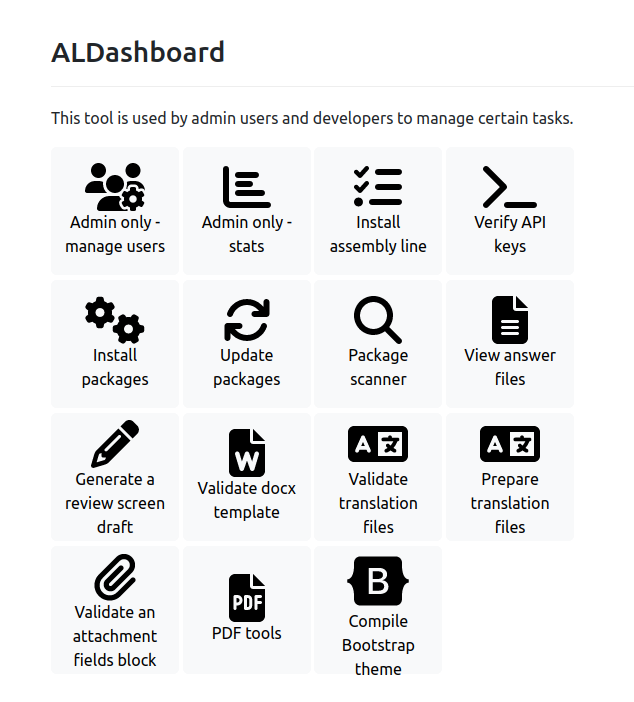
- Install the Document Assembly Line packages (support files for Court Forms Online)
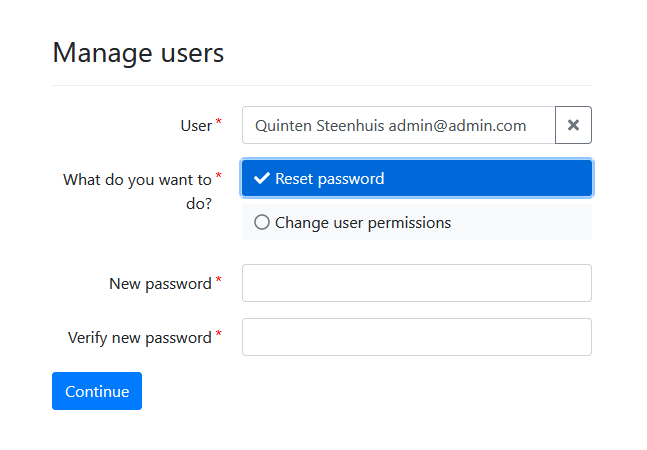
- Searchable user management - reset passwords and change privileges.
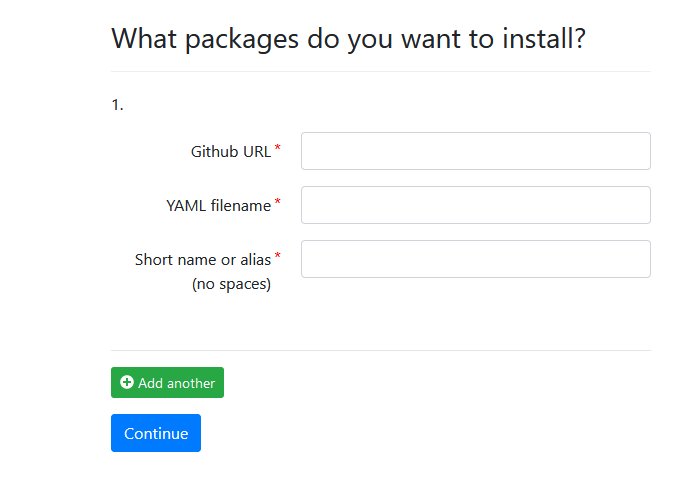
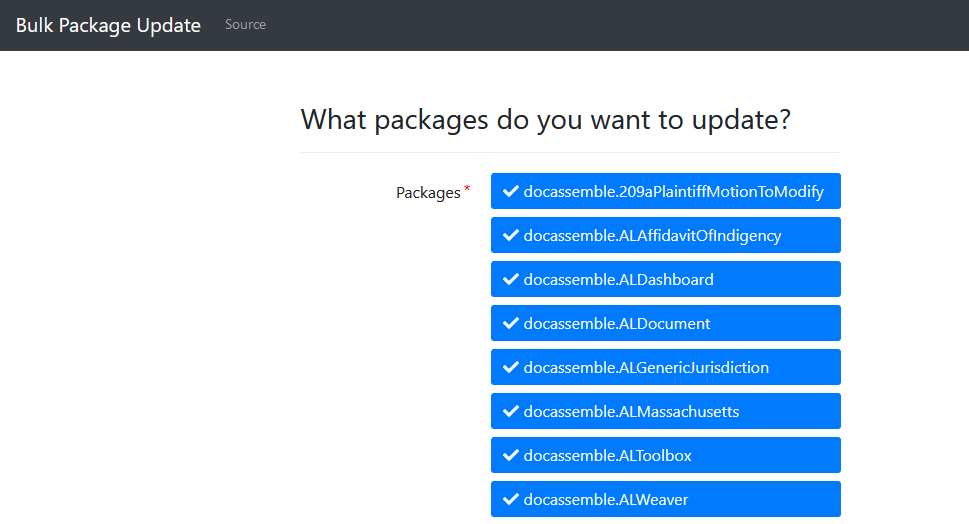
- Installing or updating several packages at once.
- Listing and viewing the contents of an (unencrypted) interview to facilitate debugging errors on production servers.
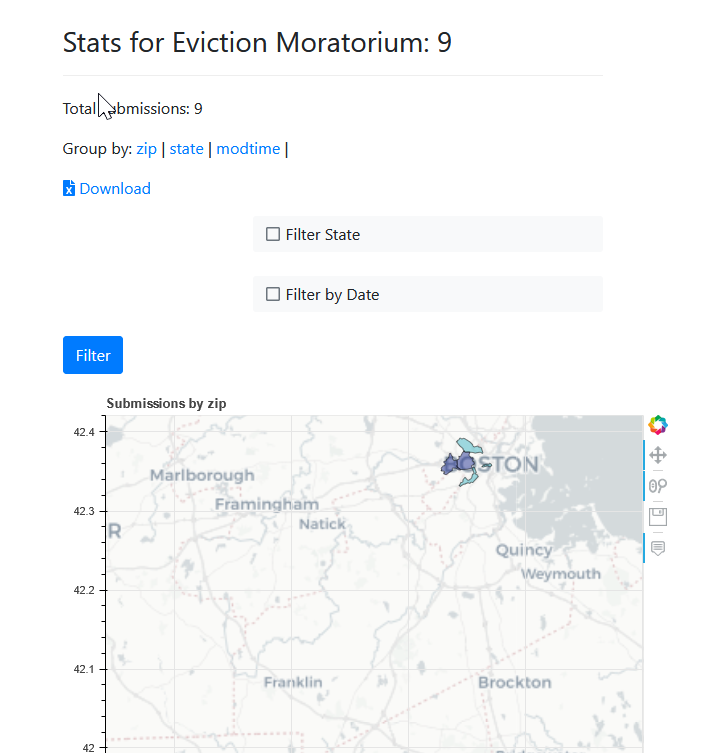
- View analytics/stats captured with
store_variable_snapshot. - List the files inside a particular package installed on the server.
- Gather files from a user who left the organization/unknown username and password.
- Review screen generator
- validate DOCX Jinja2 templates
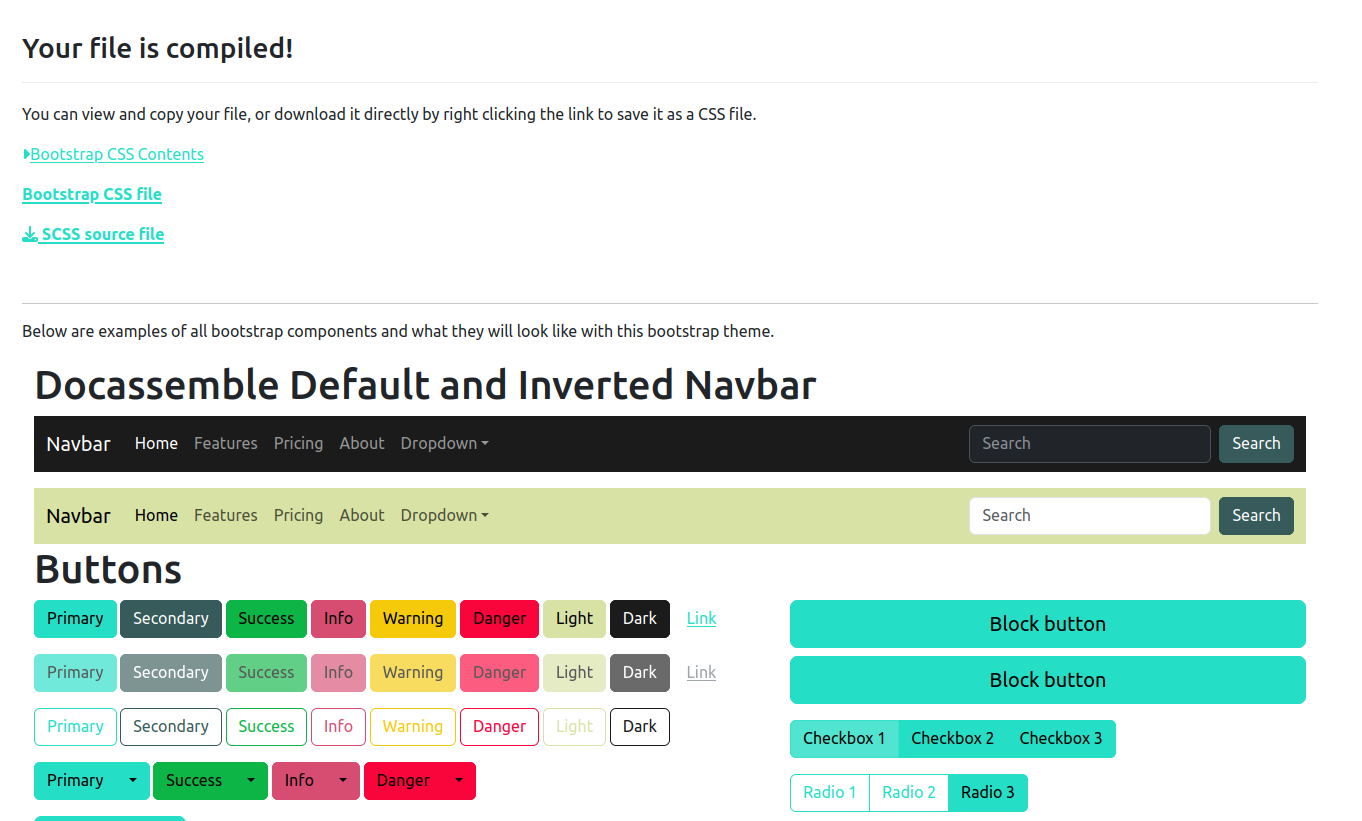
- Generate a custom bootstrap theme for your interviews.
Ideas:
- Add a link to the dispatch directive for an existing file in an existing package.
- Generate translation files [TBD].
Use
To use, you must create a docassemble API key and add it to your configuration, like this:
install packages api key: xxxxxxxxxxxxxxxxxxxxxxxxxxxxxxxxxxxxx
If you want the ALDashboard to be a dropdown option for admins and developers, add the following to the configuration before your install packages api key:
administrative interviews:
  - interview: docassemble.ALDashboard:data/questions/menu.yml
    title: Dashboard
    required privileges:
      - admin
      - developer
ALDashboard API
When installed on a docassemble server, ALDashboard exposes a Flask API at:
POST /al/api/v1/dashboard/translationPOST /al/api/v1/dashboard/docx/auto-labelPOST /al/api/v1/dashboard/docx/runsPOST /al/api/v1/dashboard/docx/relabelPOST /al/api/v1/dashboard/bootstrap/compilePOST /al/api/v1/dashboard/translation/validatePOST /al/api/v1/dashboard/review-screen/draftPOST /al/api/v1/dashboard/docx/validatePOST /al/api/v1/dashboard/yaml/checkPOST /al/api/v1/dashboard/yaml/reformatPOST /al/api/v1/dashboard/pdf/label-fieldsPOST /al/api/v1/dashboard/pdf/fields/detectPOST /al/api/v1/dashboard/pdf/fields/relabelPOST /al/api/v1/dashboard/pdf/repairGET /al/api/v1/dashboard/jobs/{job_id}GET /al/api/v1/dashboard/jobs/{job_id}/downloadDELETE /al/api/v1/dashboard/jobs/{job_id}GET /al/api/v1/dashboard/openapi.jsonGET /al/api/v1/dashboard/docs
The API uses docassemble API key authentication via api_verify(). Endpoints default to synchronous execution and support mode=async (or async=true) for Celery-backed processing.
To enable async mode, add this module to your docassemble configuration:
celery modules:
  - docassemble.ALDashboard.api_dashboard_worker
Endpoint Notes
POST /al/api/v1/dashboard/translation- Input:
interview_path, one or more target languages (tr_langs), optional GPT settings. - Output: translation XLSX metadata and optional base64 file content.
- Input:
POST /al/api/v1/dashboard/docx/auto-label- Input: DOCX file upload, optional
custom_people_names. - Uses
docassemble.ALToolbox.llmsfor OpenAI configuration. - Optional per-request overrides:
openai_api,openai_base_url,openai_model. - Prompt customization:
custom_prompt,additional_instructions. - Optional output budget override:
max_output_tokens. - Output:
resultsarray by default; includeinclude_labeled_docx_base64=trueto also get updated DOCX bytes.
- Input: DOCX file upload, optional
POST /al/api/v1/dashboard/docx/runs- Input: DOCX file upload (or base64 content).
- Output: parsed run list as
results, each entry[paragraph_index, run_index, run_text]. - Traversal includes body paragraphs, tables, headers, and footers.
POST /al/api/v1/dashboard/docx/relabel- Input: existing
resultsfrom first-pass label run and/or DOCX upload. - Supports index-based edits:
replace_labels_by_index,skip_label_indexes. - Supports explicit additions:
add_labels. - Supports range-based rule additions:
add_label_rules(paragraph range + match conditions). - Output: edited
resultsarray by default; includeinclude_labeled_docx_base64=trueto also get updated DOCX bytes. - In async mode, download binary file output from
GET /al/api/v1/dashboard/jobs/{job_id}/download.
- Input: existing
POST /al/api/v1/dashboard/bootstrap/compile- Input: SCSS upload or
scss_text. - Output: compiled CSS text or base64.
- Operational notes:
- Requires
nodeandnpmavailable on serverPATH. - First run downloads Bootstrap source into
/tmpand runsnpm install/npm run css-compile, so it may be noticeably slower. - Requires outbound HTTPS access to fetch Bootstrap and npm dependencies.
- Writes temporary build artifacts under
/tmp; ensure adequate disk space and cleanup policies.
- Requires
- Input: SCSS upload or
POST /al/api/v1/dashboard/translation/validate- Input: translation XLSX.
- Output: structured errors/warnings/empty rows.
POST /al/api/v1/dashboard/review-screen/draft- Input: one or more YAML files.
- Output: generated review-screen YAML draft.
POST /al/api/v1/dashboard/docx/validate- Input: one or more DOCX templates.
- Output: per-file Jinja rendering errors.
POST /al/api/v1/dashboard/yaml/check- Input:
yaml_text(oryaml_content) and optionalfilename. - Output: structured DAYamlChecker issues with
errors,warnings, andvalid.
- Input:
POST /al/api/v1/dashboard/yaml/reformat- Input:
yaml_text(oryaml_content), optionalline_lengthandconvert_indent_4_to_2. - Output: reformatted YAML in
formatted_yamlandchangedboolean.
- Input:
POST /al/api/v1/dashboard/pdf/label-fields- Input: PDF upload.
- Output: PDF with fields detected and optionally relabeled (backward-compatible alias of
/pdf/fields/detect).
POST /al/api/v1/dashboard/pdf/fields/detect- Input: PDF upload.
- Optional flags:
relabel_with_ai,include_pdf_base64,include_parse_stats. - Optional exact-name list:
target_field_names(ordered list to apply after detection). - Output: PDF with detected fields added, plus optional AI/target-name relabeling.
POST /al/api/v1/dashboard/pdf/fields/relabel- Input: PDF with existing fields.
- Relabel modes:
field_name_mapping(exact old->new map), orderedtarget_field_names, or AI (relabel_with_ai=true). - Output: Relabeled PDF and resulting field names; optional parse stats/base64 output.
POST /al/api/v1/dashboard/pdf/repair- Run a single repair action on an uploaded PDF. Omit
actionto list available actions. actionvalues:ghostscript_reprint,qpdf_repair,unlock,repair_metadata,ocr.ghostscript_reprint: Re-distill through Ghostscript. Optionalpreserve_fields=trueto extract and re-apply field locations.qpdf_repair: Fix cross-reference tables and rebuild the page tree via pikepdf.unlock: Remove encryption/permissions. Optionalpasswordparameter.repair_metadata: Fix broken catalog/metadata entries (pikepdf, then pdfrw fallback).ocr: Add searchable text layer via ocrmypdf. Optionallanguage(defaulteng) andskip_text(defaulttrue).- Output:
repair_resultobject and optionalpdf_base64.
- Run a single repair action on an uploaded PDF. Omit
GET /al/api/v1/dashboard/jobs/{job_id}/download- Streams the first available file artifact from a completed async job.
- Optional query parameters:
index(0-based artifact index)field(exact artifact field path from JSON result)
Live docs:
GET /al/api/v1/dashboard/openapi.jsonGET /al/api/v1/dashboard/docs
MCP Bridge API
ALDashboard also exposes a lightweight MCP-style discovery layer over HTTP:
POST /al/api/v1/mcp(JSON-RPC 2.0 endpoint)GET /al/api/v1/mcp(endpoint metadata)GET /al/api/v1/mcp/tools(convenience tool listing)GET /al/api/v1/mcp/docs(human-readable docs)
Supported JSON-RPC methods:
initializepingtools/listtools/call
tools/list discovers tools generated from:
- ALDashboard REST OpenAPI paths (
/al/api/v1/dashboard/...) - ALWeaver REST paths (
/al/api/v1/weaver...) only whendocassemble.ALWeaveris installed.
For development-only fallback discovery from a local checkout, set:
export ALDASHBOARD_MCP_DEV_MODE=true
export ALWEAVER_REPO_PATH=~/docassemble-ALWeaver
Example:
curl -X POST "https://YOURSERVER/al/api/v1/mcp" \
  -H "Content-Type: application/json" \
  -H "X-API-Key: YOUR_API_KEY" \
  -d '{"jsonrpc":"2.0","id":1,"method":"tools/list","params":{}}'
Tool execution example:
curl -X POST "https://YOURSERVER/al/api/v1/mcp" \
  -H "Content-Type: application/json" \
  -H "X-API-Key: YOUR_API_KEY" \
  -d '{"jsonrpc":"2.0","id":2,"method":"tools/call","params":{"name":"aldashboard.get_al_api_v1_dashboard_openapi_json","arguments":{}}}'
tools/call securely reuses the same authenticated request context (for example X-API-Key or Authorization) and does not require storing a separate API key in MCP configuration.
DOCX Modes and End-to-End Workflow
Purpose of each mode:
POST /docx/runs: inspection mode- Returns
[paragraph_index, run_index, run_text]. - Use this to understand document coordinates before deterministic edits.
- Returns
POST /docx/auto-label: draft generation mode- Generates initial label suggestions (
results).
- Generates initial label suggestions (
POST /docx/relabel: editing/apply mode- Edits draft labels (
replace_labels_by_index,skip_label_indexes,add_labels,add_label_rules). - If DOCX content is provided and
include_labeled_docx_base64=true, returns an updated DOCX.
- Edits draft labels (
GET /jobs/{job_id}/download: async file download mode- Streams final binary output from completed async jobs.
Full workflow: upload DOCX -> draft labels -> manual edits (change, delete, add) -> download final DOCX
Step 1. Create draft labels (async)
curl -X POST "https://YOURSERVER/al/api/v1/dashboard/docx/auto-label" \
  -H "X-API-Key: YOUR_API_KEY" \
  -F "mode=async" \
  -F "file=@/path/to/input.docx" \
  -F "openai_base_url=https://YOURRESOURCE.openai.azure.com/openai/v1/" \
  -F "openai_api=YOUR_AZURE_OPENAI_KEY" \
  -F "openai_model=gpt-5-mini"
Step 2. Poll job until status=succeeded, then read data.results
curl -H "X-API-Key: YOUR_API_KEY" \
  "https://YOURSERVER/al/api/v1/dashboard/jobs/JOB_ID_FROM_STEP_1"
Step 3. Edit labels manually (change one, delete one, add one) and request final DOCX (async)
curl -X POST "https://YOURSERVER/al/api/v1/dashboard/docx/relabel" \
  -H "Content-Type: application/json" \
  -H "X-API-Key: YOUR_API_KEY" \
  -d '{
    "mode": "async",
    "filename": "input.docx",
    "file_content_base64": "BASE64_DOCX_HERE",
    "results": [[1,0,"{{ letter_date }}",0],[2,0,"{{ old_name }}",0],[3,0,"{{ keep_me }}",0]],
    "replace_labels_by_index": {"0":"{{ edited_letter_date }}"},
    "skip_label_indexes": [1],
    "add_labels": [[0,0,"{{ added_new_label }}",0]],
    "include_labeled_docx_base64": true
  }'
Step 4. Poll relabel job, then download final DOCX
curl -H "X-API-Key: YOUR_API_KEY" \
  "https://YOURSERVER/al/api/v1/dashboard/jobs/JOB_ID_FROM_STEP_3"

curl -L -o final_labeled.docx \
  -H "X-API-Key: YOUR_API_KEY" \
  "https://YOURSERVER/al/api/v1/dashboard/jobs/JOB_ID_FROM_STEP_3/download"
Some screenshots
Main page
Manage users
Bulk install packages from GitHub
Bulk update packages
View answer files
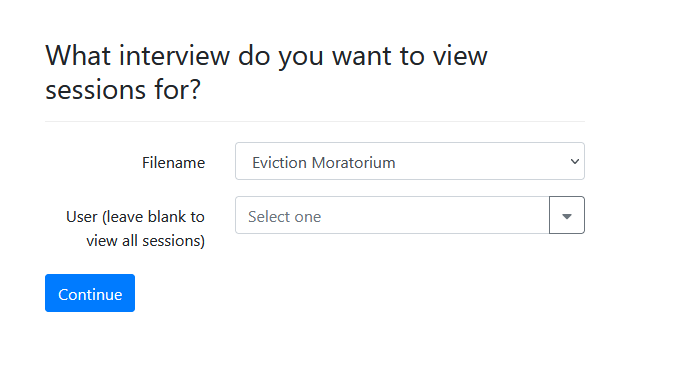
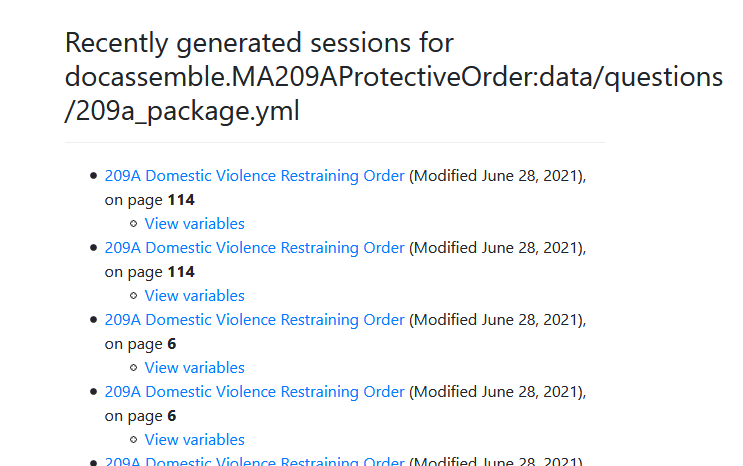
View / search sessions by user and interview name
View interview stats captured with store_variables_snapshot()
Generate a bootstrap theme
Release history Release notifications | RSS feed


Download files
Download the file for your platform. If you're not sure which to choose, learn more about installing packages.
Source Distribution
Built Distribution
Filter files by name, interpreter, ABI, and platform.
If you're not sure about the file name format, learn more about wheel file names.
Copy a direct link to the current filters
File details
Details for the file docassemble_aldashboard-2.0.0.tar.gz.
File metadata
- Download URL: docassemble_aldashboard-2.0.0.tar.gz
- Upload date:
- Size: 962.9 kB
- Tags: Source
- Uploaded using Trusted Publishing? No
- Uploaded via: twine/6.2.0 CPython/3.13.12
File hashes
| Algorithm | Hash digest | |
|---|---|---|
| SHA256 |
448c3c6bed383b9a28748cb857fa9589a984f3233066d1a99d77199b8213386b
|
|
| MD5 |
634fce88595b7043d036dbc808d8cd81
|
|
| BLAKE2b-256 |
14cb67e499720b47446147de728f8bf603e0ace54f15cd78a6efd151303a3c58
|
File details
Details for the file docassemble_aldashboard-2.0.0-py3-none-any.whl.
File metadata
- Download URL: docassemble_aldashboard-2.0.0-py3-none-any.whl
- Upload date:
- Size: 1.0 MB
- Tags: Python 3
- Uploaded using Trusted Publishing? No
- Uploaded via: twine/6.2.0 CPython/3.13.12
File hashes
| Algorithm | Hash digest | |
|---|---|---|
| SHA256 |
16e18ba9de74e05bb0af559228c581fab9bffb545bb94abc3da9f6f2b526163a
|
|
| MD5 |
8646db383c7ef5611e090ef357eb5912
|
|
| BLAKE2b-256 |
eea53f55c46f4815869479cf7ab7ee9f0cfe830c70add916834c32e80cd74c23
|






