

docker-run – docker run and docker exec with useful defaults




docker-run is a CLI tool for simplified interaction with Docker images. Use it to easily start and attach to Docker containers with useful predefined arguments.
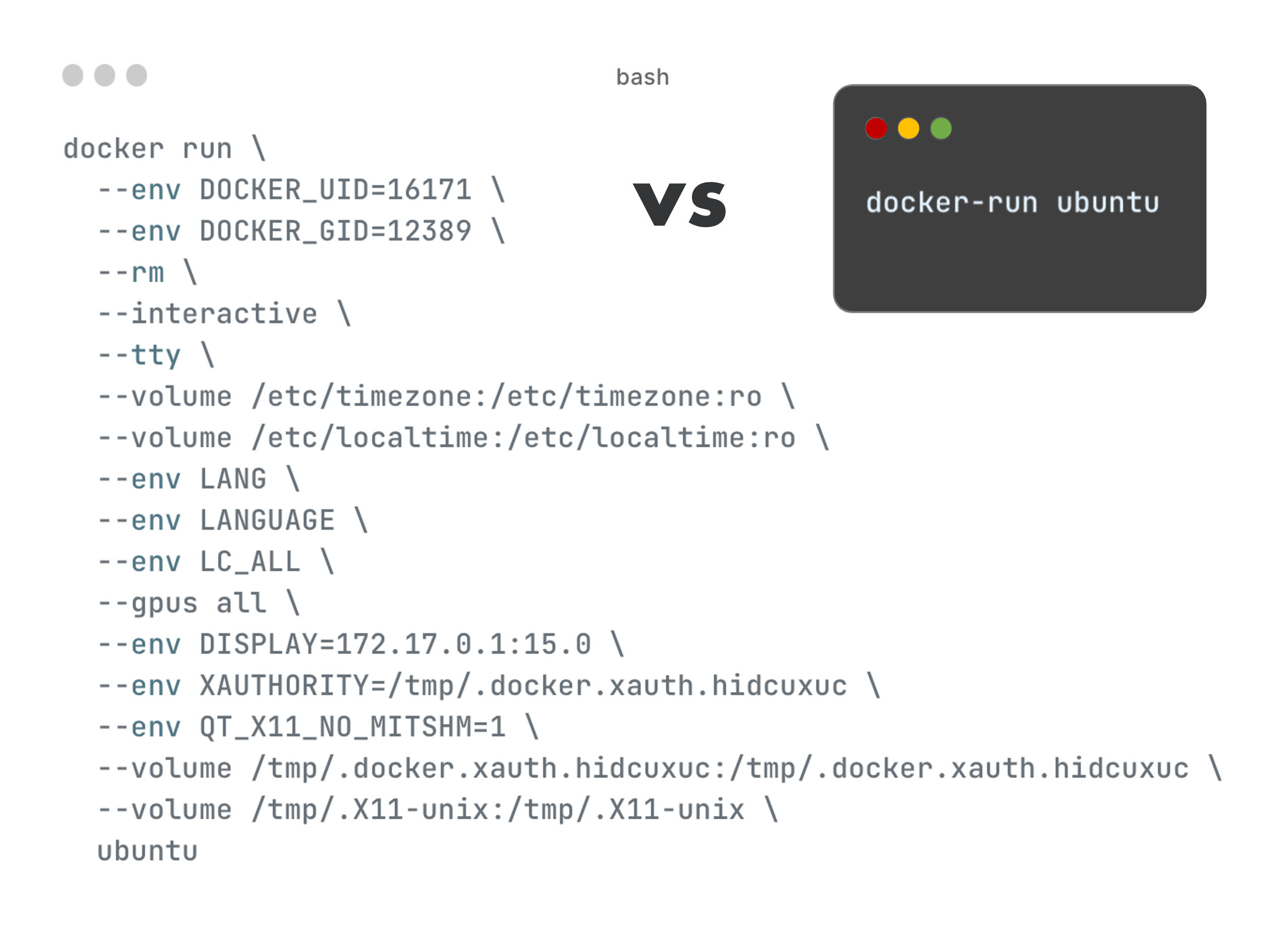
While docker-run can be used with any Docker image, we recommend to also check out our other tools for Docker and ROS.
- docker-ros automatically builds minimal container images of ROS applications
- docker-ros-ml-images provides machine learning-enabled ROS Docker images


Quick Demo
The following quickly launches the GUI application xeyes to demonstrate how docker-run takes care of X11 forwarding from container to host. The --verbose flag prints the underlying docker run command that is run under the hood.
docker-run --verbose 607qwq/xeyes
Functionality
docker-run is designed to be used the same way as the official docker run and docker exec commands.
In general, you can pass the same arguments to docker-run as you would pass to docker run, e.g.
docker-run --volume $(pwd):/volume ubuntu ls /volume
In addition to the arguments you are passing, docker-run however also enables the following features by default. Most of these default features can be disabled, see Usage.
- container removal after exit (
--rm) - interactive tty (
--interactive --tty) - current directory name as container name (
--name) - relative bind mounts (
--volume [./RELATIVE_PATH>]:[TARGET_PATH]) - GPU support (
--gpus all/--runtime nvidia) - X11 GUI forwarding
If a container with matching name is already running, docker-run will execute a command in that container via docker exec instead. This lets you quickly attach to a running container without passing any command, e.g.
docker-run --name my-running-container
Unlike with docker run, you can also set the Docker image via the --image arguments, see Usage. This may be required for more complex use cases.
Installation
pip install docker-run-cli

# (optional) shell auto-completion
source $(activate-python-docker-run-shell-completion 2> /dev/null)
Usage
usage: docker-run [--help] [--image IMAGE] [--loc] [--mwd] [--name NAME]
                  [--no-gpu] [--no-it] [--no-name] [--no-rm] [--no-tz]
                  [--no-x11] [--verbose] [--version]

Executes `docker run` with the following features enabled by default, each of
which can be disabled individually: container removal after exit, interactive
tty, current directory name as container name, GPU support, X11 GUI
forwarding. Passes any additional arguments to `docker run`. Executes `docker
exec` instead if a container with the specified name (`--name`) is already
running.

options:
  --help         show this help message and exit
  --image IMAGE  image name (may also be specified without --image as last
                 argument before command)
  --loc          enable automatic locale
  --mwd          mount current directory at same path
  --name NAME    container name; generates `docker exec` command if already
                 running
  --no-gpu       disable automatic GPU support
  --no-it        disable automatic interactive tty
  --no-name      disable automatic container name (current directory)
  --no-rm        disable automatic container removal
  --no-tz        disable automatic timezone
  --no-x11       disable automatic X11 GUI forwarding
  --verbose      print generated command
  --version      show program's version number and exit
Plugins
docker-run can be extended through plugins. Plugins are installed as optional dependencies.
# install specific plugin <PLUGIN_NAME>
pip install docker-run-cli[<PLUGIN_NAME>]

# install all plugins
pip install docker-run-cli[plugins]
| Plugin | Description |
|---|---|
docker-ros |
extra functionality for Docker images built by docker-ros |


Release files for docker-run-cli 0.10.2
For a detailed explanation of source distributions (sdists) and built distributions (wheels), please see the package formats documentation.
Source distribution (sdist)
| File | Size | Uploaded | |
|---|---|---|---|
| docker_run_cli-0.10.2.tar.gz | 15.5 kB | Details |
Built distribution (wheel)
| File | Interpreter | ABI | Platform | Reset |
|---|---|---|---|---|
| docker_run_cli-0.10.2-py3-none-any.whl | Python 3 | none | any | Details |
Total release size: 30.7 kB
Release files / docker_run_cli-0.10.2.tar.gz
| Download URL | docker_run_cli-0.10.2.tar.gz |
|---|---|
| Size | 15.5 kB |
| Tags | Source |
|
SHA-256 checksum How to use checksums |
9ad94533e887cafabda19fa393b4633b299d62e68a7e302bed9c1439003d0b35
|
|
BLAKE2b-256 checksum How to use checksums |
c4eff88bf16c05ca0c4bd233e382b097c46c535fae49a6dd54bc16caf48eec7c
|
| Upload date | |
|
Uploaded using Trusted Publishing? What is trusted publishing? |
No |
| Uploaded via |
twine/6.1.0 CPython/3.12.8
|
Release files / docker_run_cli-0.10.2-py3-none-any.whl
| Download URL | docker_run_cli-0.10.2-py3-none-any.whl |
|---|---|
| Size | 15.2 kB |
| Tags | Python 3 |
|
SHA-256 checksum How to use checksums |
8fe6641cd7c18c78ace88a044c5a74d9950e840290d05c9a7b4b618d2c557c4c
|
|
BLAKE2b-256 checksum How to use checksums |
17686e13d5b2bf39f1b18729862f19e2a34f8583b8d785abf30b482dd1565165
|
| Upload date | |
|
Uploaded using Trusted Publishing? What is trusted publishing? |
No |
| Uploaded via |
twine/6.1.0 CPython/3.12.8
|














