
Docker Cluster Monitor
Stop SSH-ing into servers just to check container status.
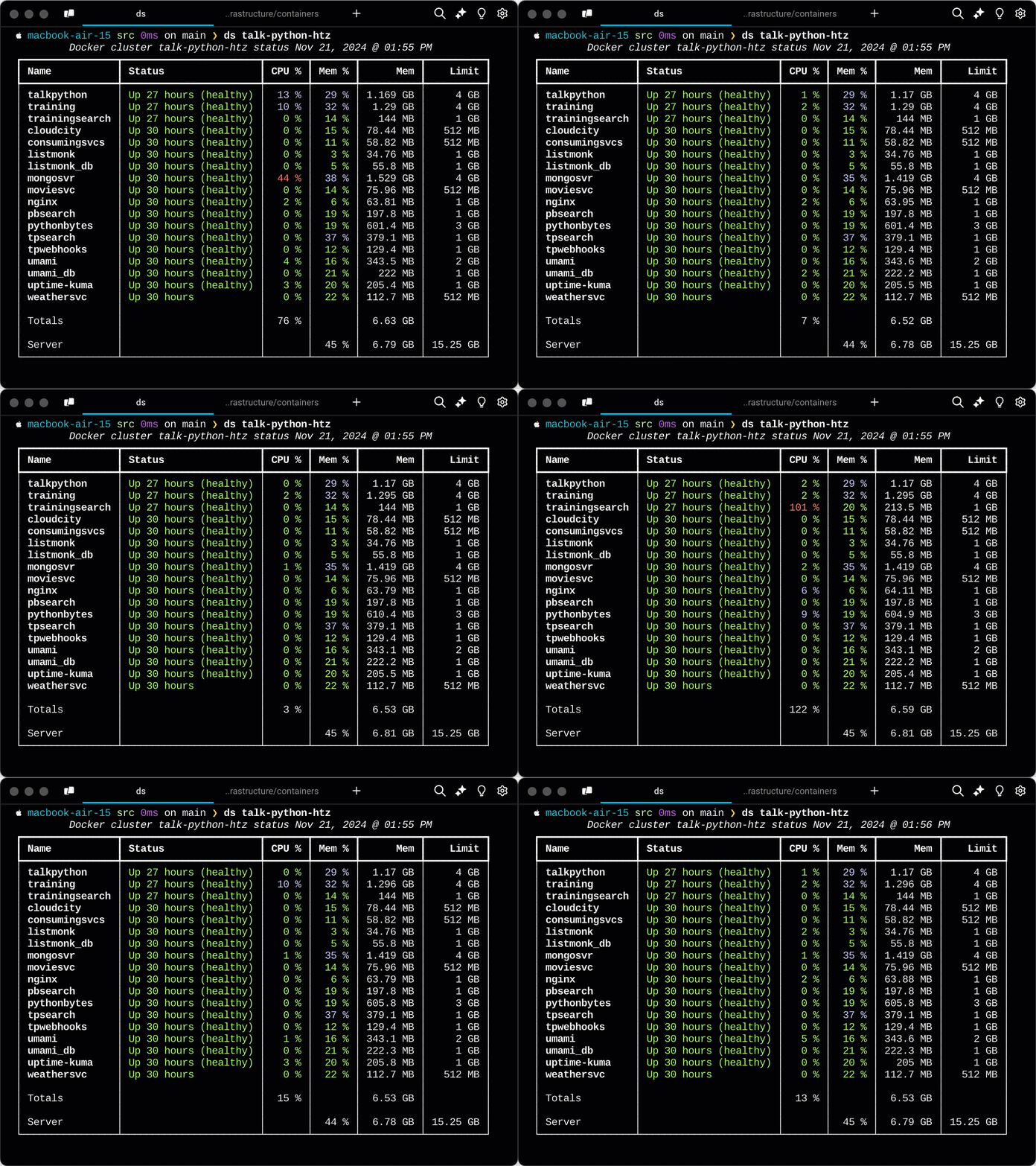
Get a live, color-coded dashboard of all your Docker containers across remote servers-right from your terminal. See CPU, memory, and health at a glance, updated automatically every few seconds.
Why Docker Cluster Monitor?
⚡ Save Time: No more logging into servers to run docker stats or docker ps
👀 Instant Clarity: Color-coded metrics show problems at a glance
🔄 Stay Informed: Auto-refreshing dashboard keeps you updated
🚀 Zero Configuration: Just point it at your server and go
See Everything at a Glance
Smart color coding helps you spot issues instantly:
- 🟢 Green: Healthy, low resource usage
- 🔵 Cyan: Moderate load-everything's fine
- 🔴 Red: High CPU or memory usage-time to investigate
Memory percentages reflect your Docker Compose deployment limits, so you know exactly how close each container is to its configured threshold-not just the physical machine limits.
Quick Start
Install
Using uv (recommended):
uv tool install dockerclustermon
Note: Make sure you have uv installed first.
Monitor Your Containers
Run dockerstatus (or the shorter ds alias) with your server hostname:
dockerstatus my-docker-host
That's it! You now have a live dashboard of your containers, refreshing automatically.
How to Use
Basic Usage
Monitor containers on a remote server:
dockerstatus server.example.com
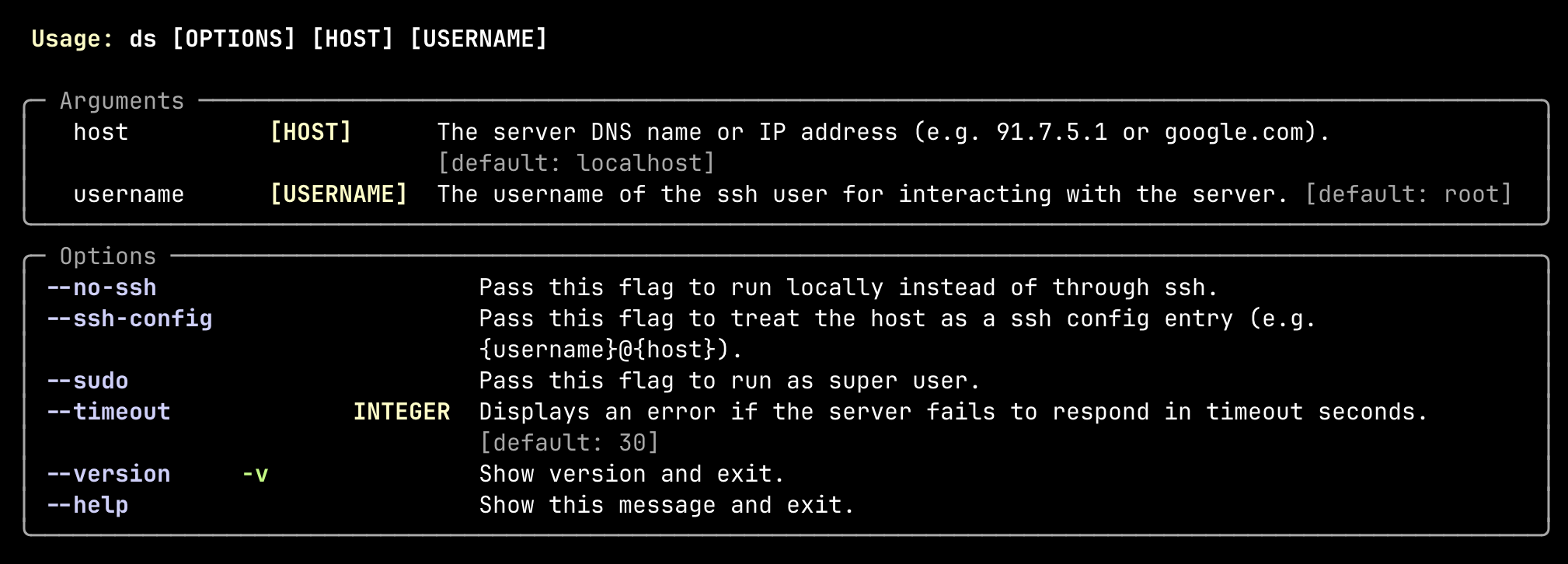
Specify a different SSH user (defaults to root):
dockerstatus server.example.com myuser
Use with SSH config entries:
dockerstatus my-server --ssh-config
Run with sudo privileges:
dockerstatus server.example.com --sudo
Complete Command Reference
System Requirements
Docker Cluster Monitor works on any system that supports SSH and has Docker CLI tools installed on the remote server.
Tested on: Ubuntu Linux
Should work on: Most Linux distributions and Unix-like systems
Current limitation: Does not work on the local machine (remote servers only)
Want local support? Contributions welcome! PRs accepted.
About
Docker Cluster Monitor is available on PyPI as dockerclustermon. While it's published as a Python package, it's designed as a standalone CLI tool rather than a library to import into your programs.
1 maintainer

Release files for dockerclustermon 0.3.1
For a detailed explanation of source distributions (sdists) and built distributions (wheels), please see the package formats documentation.
Source distribution (sdist)
| File | Size | Uploaded | |
|---|---|---|---|
| dockerclustermon-0.3.1.tar.gz | 11.8 kB | Details |
Built distribution (wheel)
| File | Interpreter | ABI | Platform | Reset |
|---|---|---|---|---|
| dockerclustermon-0.3.1-py3-none-any.whl | Python 3 | none | any | Details |
Total release size: 23.1 kB
Release files / dockerclustermon-0.3.1.tar.gz
| Download URL | dockerclustermon-0.3.1.tar.gz |
|---|---|
| Size | 11.8 kB |
| Tags | Source |
|
SHA-256 checksum How to use checksums |
9b93e83057b1cd0e9aa94e24f2eeefe0c04a0502762a7bc2668be89c892abbe4
|
|
BLAKE2b-256 checksum How to use checksums |
9c2849be6a61e22b39b9a55f3392a98cdc7d24d1608dcf806bfd7e04b34d84b0
|
| Upload date | |
|
Uploaded using Trusted Publishing? What is trusted publishing? |
No |
| Uploaded via |
uv/0.10.7 {"installer":{"name":"uv","version":"0.10.7","subcommand":["publish"]},"python":null,"implementation":{"name":null,"version":null},"distro":{"name":"macOS","version":null,"id":null,"libc":null},"system":{"name":null,"release":null},"cpu":null,"openssl_version":null,"setuptools_version":null,"rustc_version":null,"ci":null}
|
Release files / dockerclustermon-0.3.1-py3-none-any.whl
| Download URL | dockerclustermon-0.3.1-py3-none-any.whl |
|---|---|
| Size | 11.3 kB |
| Tags | Python 3 |
|
SHA-256 checksum How to use checksums |
5e50be575c493268c56529b09a325e1a489d441456fdd57caffbcdb48c87d152
|
|
BLAKE2b-256 checksum How to use checksums |
add38ccd1924f4fae77988a9166b62d0ca7ec81bf153e05503dd7ae4cf5fa6a8
|
| Upload date | |
|
Uploaded using Trusted Publishing? What is trusted publishing? |
No |
| Uploaded via |
uv/0.10.7 {"installer":{"name":"uv","version":"0.10.7","subcommand":["publish"]},"python":null,"implementation":{"name":null,"version":null},"distro":{"name":"macOS","version":null,"id":null,"libc":null},"system":{"name":null,"release":null},"cpu":null,"openssl_version":null,"setuptools_version":null,"rustc_version":null,"ci":null}
|














