
A CLI tool for a live view of your docker containers running on a remote server.

Project description
Docker Cluster Monitor - A TUI utility to monitor your docker containers
A TUI tool for a live view of your docker containers running on a remote server. Here's a graphic of it running (refreshes every 5 seconds or so automatically):
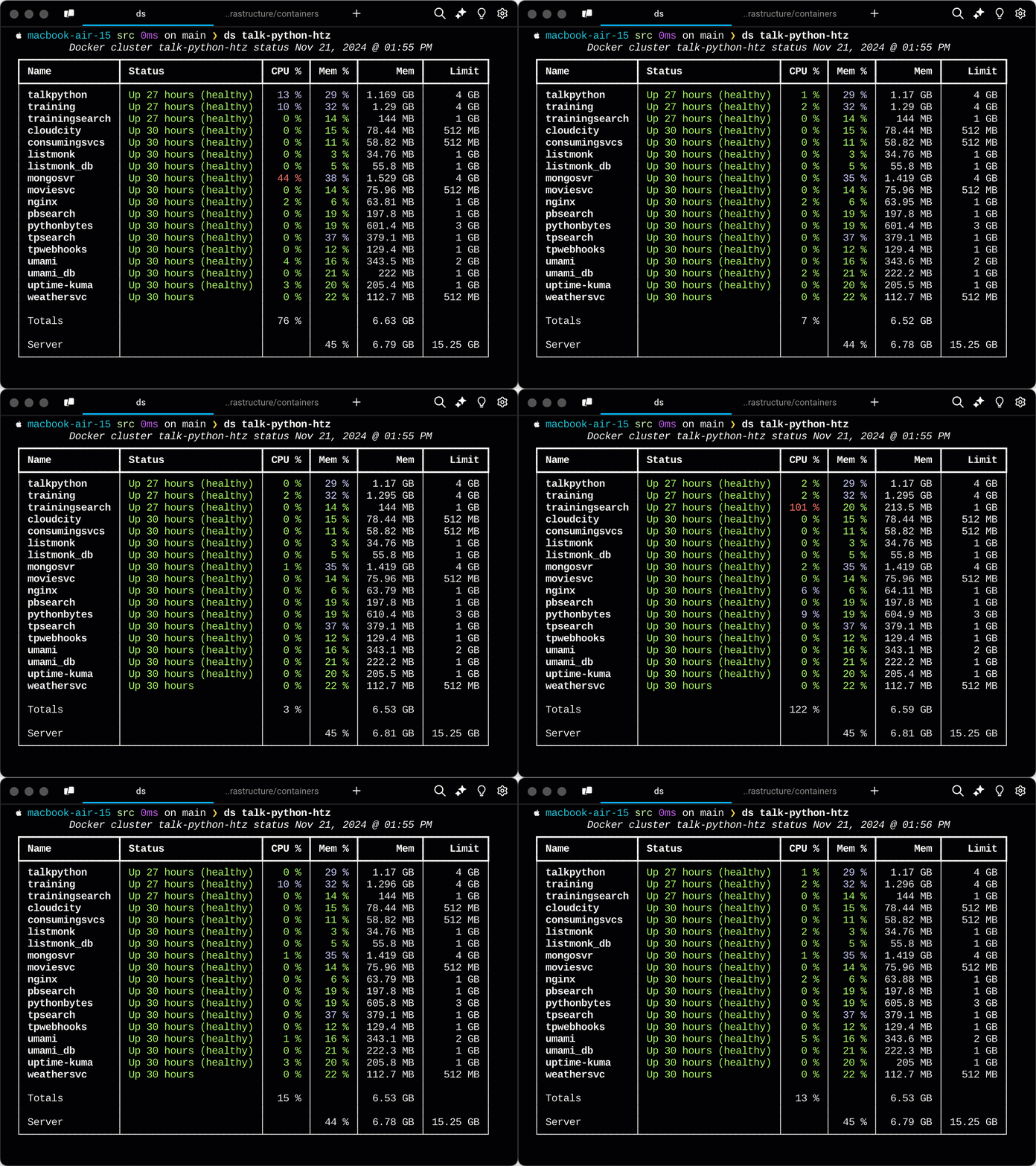
Notice that it uses color to communicate outlier values. For example, low CPU is green, middle-of-the-road CPU is cyan, and heavy CPU usage is red. Similarly for memory. The memory limit column reflects the deploy>memory limit in Docker Compose for that container and the percentage reported is for the imposed memory limit rather than the machine physical memory limits.
Usage
To use the tool, it has one command, dockerstatus with a shorter alias ds. If you are running a set of Docker containers (say via Docker Compose) on server my-docker-host, then just run:
dockerstatus my-docker-host
You can optionally pass the username if you're not logging in as root. Here is the full help text (thank you Typer):
 Usage: dockerstatus [OPTIONS] HOST [USERNAME]
╭─ Arguments ───────────────────────────────────────────────────────────╮
│ * host     TEXT       The server DNS name or IP address (e.g. 91.7.5.1│
│                       or google.com). [default: None]  [required]     │
│   username [USERNAME] The username of the ssh user for interacting    │
│                       with the server. [default: root]                │
╰───────────────────────────────────────────────────────────────────────╯
╭─ Options ─────────────────────────────────────────────────────────────╮
| --ssh-config    Whether the host is a SSH config entry or not.        |
| --sudo          Whether to run as the super user or not.              |
│ --help          Show this message and exit.                           │
╰───────────────────────────────────────────────────────────────────────╯
Installation
This package is available on PyPI as dockerclustermon. However, it is ideally used as a CLI tool and not imported into programs. As such, using uv or pipx will be most useful. Take your pick:
uv
uv tool install dockerclustermon
Of course this requires that you have uv installed and in the path.
pipx
pipx install dockerclustermon
And this requires that you have pipx installed and in the path.
Compatibility
Docker Cluster Monitor has been tested against Ubuntu Linux. It should work on any system that supports SSH and has the Docker CLI tools installed. Note that it does not work on the local machine at the moment. PRs are welcome. ;)
Release history Release notifications | RSS feed


Download files
Download the file for your platform. If you're not sure which to choose, learn more about installing packages.
Source Distribution
Built Distribution
Filter files by name, interpreter, ABI, and platform.
If you're not sure about the file name format, learn more about wheel file names.
Copy a direct link to the current filters
File details
Details for the file dockerclustermon-0.2.5.tar.gz.
File metadata
- Download URL: dockerclustermon-0.2.5.tar.gz
- Upload date:
- Size: 8.6 kB
- Tags: Source
- Uploaded using Trusted Publishing? No
- Uploaded via: uv/0.8.22
File hashes
| Algorithm | Hash digest | |
|---|---|---|
| SHA256 |
80b9cb05d41c1acf2d8e9ff4e123d92df6f358cd052e8a4e679f0703b4ff19ee
|
|
| MD5 |
0cb53b4cb2fc93da9ab290f66a6a4bb5
|
|
| BLAKE2b-256 |
d3d76dee80827ff8f35051b26ad8ad917bde303f71c0f5d929a78d7791581843
|
File details
Details for the file dockerclustermon-0.2.5-py3-none-any.whl.
File metadata
- Download URL: dockerclustermon-0.2.5-py3-none-any.whl
- Upload date:
- Size: 8.1 kB
- Tags: Python 3
- Uploaded using Trusted Publishing? No
- Uploaded via: uv/0.8.22
File hashes
| Algorithm | Hash digest | |
|---|---|---|
| SHA256 |
9afe94ae781537b2dcc5f7ef219b3b79c980d4461b6a8d3e239c4afe1c9206cf
|
|
| MD5 |
9f6bea8bfc26c9b677d282ef0ce46f28
|
|
| BLAKE2b-256 |
8c394009de935586edbbfdec427bf6c5b3ad347950131986c4855014fa90d977
|






