
docket — local document AI, invoice & receipt OCR parser with LLMs
Turn scanned invoices, receipts, and contracts into structured, validated JSON using OCR and LLMs, then export them as EU e-invoices (XRechnung, Factur-X / ZUGFeRD, Peppol BIS, UBL, Facturae) and check them with the official EN 16931, Peppol, XRechnung and Factur-X rules. Use it as a Python library, an HTTP service, or a CLI. Apache-2.0, so commercial use is fine.
Ollama or any OpenAI-compatible API (Mistral, OpenAI, Azure, vLLM) · Pydantic schemas · Every value cited to its source line · Deterministic validation
Quick start
Requirements: Python 3.10+, Tesseract on PATH (brew install tesseract / apt install tesseract-ocr), and an LLM, meaning either Ollama with a text and a vision model pulled, or an OpenAI-compatible API key (see Configuration).
pip install docket-idp
docket process invoice.pdf                       # JSON result on stdout, exit code 2 if validation fails
docket process invoice.pdf --export xrechnung-ubl --validate-export   # e-invoice XML, checked with the official rules
docket validate-einvoice invoice.xml              # XSD + Schematron report for any UBL/CII XML or Factur-X PDF
docket schemas list                              # every document type, with its version
{
  "status": "succeeded",
  "document_type": "invoice",
  "schema_id": "invoice",
  "schema_version": "2.0",
  "extracted": {
    "invoice_number": "FAC-2026-0042",
    "issue_date": "2026-03-15",
    "seller": {"name": "Talleres Montjuïc S.A.", "tax_ids": [{"value": "A28015865", "scheme": "vat"}]},
    "buyer": {"name": "Aerolíneas del Sur S.L."},
    "subtotal": 1234.56,
    "tax_amount": 259.26,
    "total_amount": 1493.82,
    "currency": "EUR"
  },
  "field_sources": {"total_amount": {"page": 1, "quote": "Total factura: 1.493,82 €", "bbox": {"x0": 0.62, "y0": 0.71, "x1": 0.89, "y1": 0.73}}}
}
Use it in your application
Python library
from docket import ExportError, OcrOptions, ProcessOptions, ReviewOptions, export_document, process_document

options = ProcessOptions(
    document_type="invoice",                      # skip classification (or schema_model=YourModel)
    ocr=OcrOptions(backend="tesseract", fallbacks=["vlm"]),
    review=ReviewOptions(enqueue=False),          # your app owns the review flow
)
result = process_document("invoice.pdf", options)
try:
    xml = export_document(result, "xrechnung-ubl").content   # refuses invalid or unreviewed results
except ExportError:
    print(result.status, result.review_reasons)
result.document is the typed schema (Invoice, Receipt, Contract, …) and result.status is succeeded, needs_review or failed (with a structured error); unset options fall back to the DOCKET_* environment. result.field_sources gives the page, quote and bounding box each value was read from, and result.layout holds every page's words, lines, columns and tables with normalized coordinates.
Batches
from docket import BatchOptions, process_batch

batch = process_batch("scans/", options, BatchOptions(recursive=True, workers=4, checkpoint="run.jsonl"))
print(batch.succeeded, batch.needs_review, batch.failed, batch.metrics.document_seconds_median)
docket batch scans/ --recursive --format csv --output results.csv # + results.line_items.csv
Results keep input order, one failing document never stops the rest (unless --fail-fast), and rerunning after an interruption skips documents already in the checkpoint. CSV columns are the same for every document type (document_number, document_date, issuer, recipient, currency, subtotal, tax_amount, total_amount plus status and review columns); line items go to a second CSV linked by document_id. Exit codes: 0 all succeeded, 1 partial (some failed or need review), 2 all failed, 3 configuration error.
HTTP service (any language)
docker run -p 8000:8000 -e DOCKET_API_KEY=secret ghcr.io/kazkozdev/docket
curl -H "Authorization: Bearer secret" -F file=@invoice.pdf localhost:8000/process
curl -H "Authorization: Bearer secret" -F files=@a.pdf -F files=@b.jpg localhost:8000/jobs
POST /process is synchronous. POST /jobs takes one or more files and returns 202 with a job to poll at GET /jobs/{id}; results come from /jobs/{id}/results/{index}, results.jsonl, results.csv and line-items.csv. Form fields choose a registered schema (document_type), the OCR chain and include_layout; an Idempotency-Key header makes retries safe; errors are {"error": {"code", "message"}}. /schemas, /ocr-backends and /export-formats describe the deployment, /review-queue serves flagged documents. Generate a typed client from docs/openapi.json; interactive docs are at /docs. Without Docker: pip install "docket-idp[api]" && docket-api.
examples/ has runnable scripts, a TypeScript client, a Mistral-backed docker-compose.yml and plugin packages.
Document types
A versioned catalog of 14 schemas (docket schemas list, GET /schemas):
| Stable | Experimental (added in the catalog, not yet measured on real documents) |
|---|---|
| invoice 2.0, purchase order 2.0, receipt 1.1, contract 1.1, bank statement 1.1, acceptance act 1.1, waybill 1.1, boarding pass 1.1 | credit note, tax invoice, utility bill, delivery note, certificate of origin, ID document (printed text fields only — no biometrics or identity verification) |
Invoice-family schemas share Party, Address, TaxIdentifier, DocumentReference and BankAccount; results saved under an older schema version are migrated when read (docket.catalog.migrate). docket schemas show invoice prints a schema's metadata, cited fields and export formats; docket schemas json-schema invoice its JSON Schema.
To add your own, write a Pydantic model and register it:
from datetime import date
from docket import CitedDocument, Party, SchemaSpec, keywords, register_schema

class ParkingTicket(CitedDocument):      # CitedDocument adds page/quote citations
    ticket_number: str
    issuing_authority: Party
    issue_date: date
    fine: float

register_schema(SchemaSpec(
    schema_id="parking_ticket", version="1.0", model=ParkingTicket,
    description="Parking ticket / Strafzettel for a parking offence",   # read by the LLM classifier
    keywords=keywords("parking ticket", "strafzettel"),                  # free rules tier
    cited_fields=("ticket_number", "issuing_authority.name", "fine"),
))
Registered schemas are classified, extracted, citation-checked and exported like the built-in ones; give examples= sentences and the TF-IDF tier learns them too. A model can also be used without registering it: ProcessOptions(schema_model=ParkingTicket) or docket process file.pdf --schema mypkg.models:ParkingTicket. add_validator("invoice", fn) adds rules to any schema, and the docket.schemas entry point lets a separate package ship schemas. See examples/custom_document_type.py and examples/schema_plugin/.
Export formats
| Format | Name | Checked against |
|---|---|---|
| UBL 2.1, EN 16931 core | ubl |
EN 16931 |
| Peppol BIS Billing 3.0 (UBL) | peppol |
EN 16931 + Peppol BIS 3.0.20 |
| XRechnung 3.0, UBL / CII | xrechnung-ubl, xrechnung-cii |
EN 16931 + XRechnung 3.0.2 |
| Factur-X 1.0 / ZUGFeRD 2.x CII XML, EN16931 / BASIC | factur-x-en16931, factur-x-basic |
Factur-X 1.09 profile rules |
| Facturae 3.2.2 (Spain) | facturae |
— |
| SAP IDoc / journal CSV | sap-idoc, sap-csv |
|
| Xero, QuickBooks | xero-csv, xero-json, quickbooks-iif, quickbooks-json |
The EN 16931 exporters take an Invoice, TaxInvoice or CreditNote (a credit note becomes a UBL CreditNote or CII type 381). They refuse a document they can't represent faithfully instead of guessing: no line items (BR-16), a tax rate that can't be determined, tax that doesn't match the lines, or a discount spread over several rates. Only standard-rated (S) and zero-rated (Z) VAT is written. Recipients still check routing data the extraction can't know, e.g. a Peppol endpoint (seller.electronic_address with an EAS electronic_address_scheme) or the XRechnung Leitweg-ID (buyer_reference).
Add your own with register_exporter("my-erp", func, accepts=(Invoice,)) or the docket.exporters entry point. docket formats shows everything available.
E-invoice validation
pip install "docket-idp[einvoice]" adds offline validation with the official artifacts, vendored with their versions, licenses and SHA-256 checksums in src/docket/einvoice/resources/manifest.json: the UBL 2.1 and CII D16B XML Schemas, the CEN EN 16931 Schematron 1.3.16, KoSIT XRechnung Schematron 2.6.0 (XRechnung 3.0.2), OpenPeppol BIS Billing 3.0.20 and the Factur-X 1.09 profile schemas and Schematron. XSD runs in lxml, Schematron (XSLT 2.0) in SaxonC-HE; no Java, no network.
docket validate-einvoice invoice.xml                     # exit 0 valid, 2 invalid, 3 extra missing
docket validate-einvoice invoice.pdf --profile factur-x-en16931 --format json
curl -F file=@invoice.xml -F profile=xrechnung localhost:8000/validate/einvoice
from docket import EInvoiceValidationOptions, validate_einvoice

report = validate_einvoice("invoice.xml", EInvoiceValidationOptions(profile="peppol"))
report.valid, report.detected_format, report.profile, report.validation_resource_version
for issue in report.issues:        # code (BR-CO-15, PEPPOL-EN16931-R001, BR-DE-15, XSD), severity,
    print(issue.code, issue.layer, issue.location, issue.message)   # layer xsd/schematron, rule source
The profile comes from the document's specification identifier (BT-24) unless you pass one; when you do and the document declares another, the report carries DOCKET-PROFILE-MISMATCH. Schematron only runs on XML that passed the XML Schema. Factur-X / ZUGFeRD PDFs are validated from their embedded factur-x.xml / zugferd-invoice.xml; the PDF/A-3 container itself is not checked. export_document(..., ExportOptions(validate_einvoice=True)) validates right after export, and docket process --export FORMAT --validate-export does the same on the command line. python scripts/update_einvoice_resources.py rebuilds the artifacts from their pinned official downloads (--check verifies the vendored copy). See examples/validate_xrechnung.py and examples/validate_peppol.py.
How it works
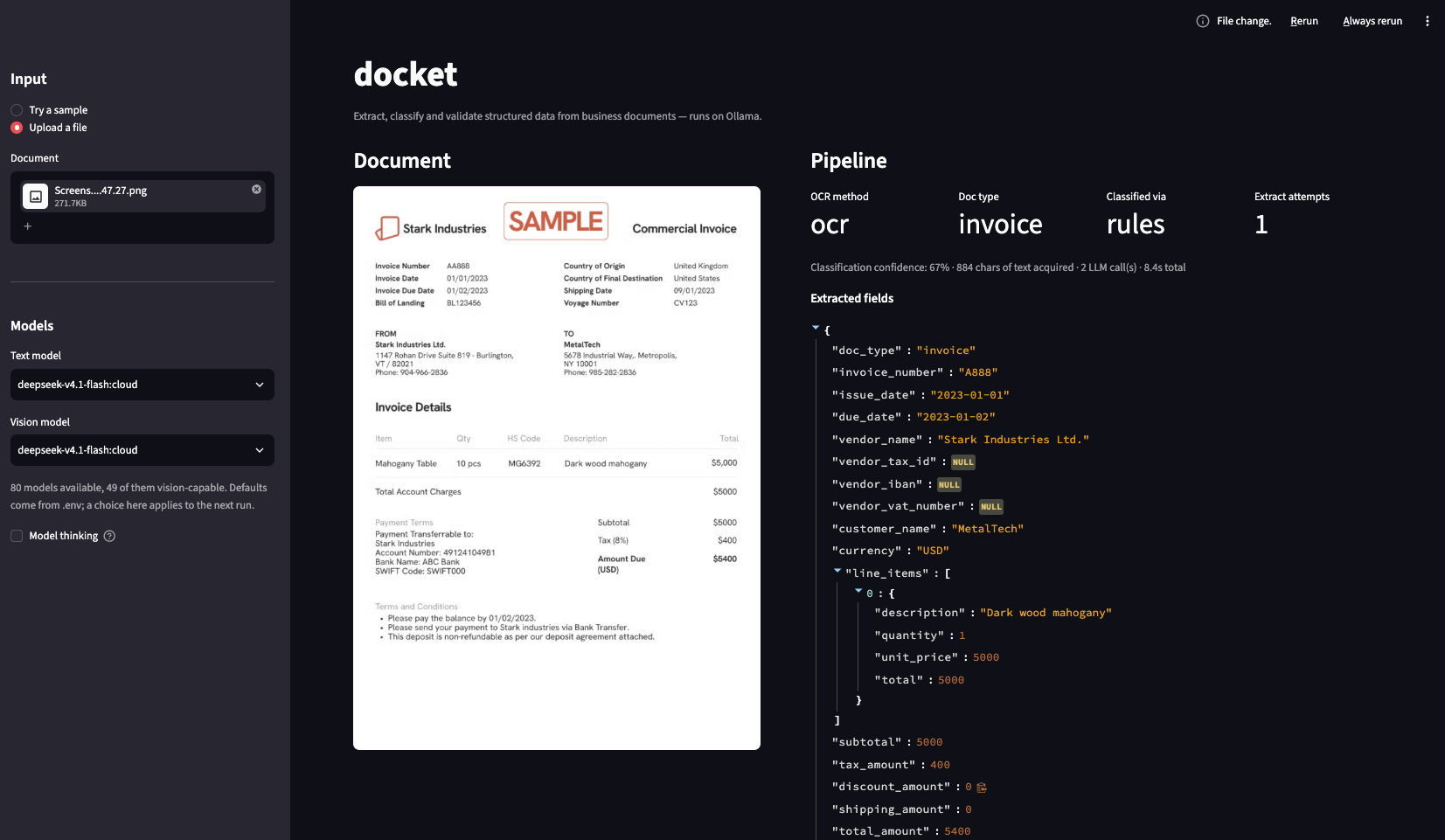
document → text layer / OCR / VLM → classify → extract + cite → validate → JSON or review
- Text comes from the cheapest source that works, page by page: the PDF text layer, then the OCR backend (Tesseract by default; pluggable), then a vision model, which is used only when OCR confidence is low or a cheap text model judges the scan unusable. Every backend returns the same layout model — words with boxes, lines, columns, tables.
- Classification tries keyword rules, then TF-IDF, then an LLM. Each tier runs only when the one before it was unsure. Rules and TF-IDF cover English, Spanish, German, French, Italian, Dutch and Portuguese; any other language falls through to the LLM.
- Extraction fills a Pydantic schema under a JSON Schema contract and cites the verbatim line for every value. Output that fails the schema goes back to the model with the error attached.
- Validation never calls a model. It checks arithmetic (to the cent: an absolute 0.01 tolerance), dates, IBAN mod-97, VAT check digits (all 27 EU states, UK, CH, NO), national tax IDs, and that every cited line exists and contains the claimed value. Contracts also get counterparty, grounding and risk checks (unlimited liability, auto-renewal, notice periods).
- Review: low confidence, failed extraction or a validation error sends the document to a review queue that keeps the original and an audit history. Nothing is silently reconciled. An invoice whose
Amount Due: 500.00disagrees with its own 270.60 subtotal and tax is flagged, not fixed.
Also included: cross-document matching (invoice ↔ PO, three-way PO/waybill/invoice, invoice ↔ contract, receipt ↔ bank transactions) and a heuristic stamp, signature and alteration check (docket forensics file.pdf). Details are in ARCHITECTURE.md.
Configuration
Settings come from, in rising priority: built-in defaults, a TOML config file, the environment (or .env), and explicit arguments (ProcessOptions, CLI flags, HTTP form fields). The config file is --config PATH (docket and docket-api), else DOCKET_CONFIG, else ./docket.toml:
[ocr]
backend = "paddle"
fallbacks = ["tesseract", "vlm"]
languages = ["en", "de"]

[batch]
workers = 8
Every setting and its environment variable is in docket.example.toml; docket config show prints the effective values and where each came from, docket config check validates them. An invalid value, an unknown key or a missing config file stops the CLI (exit 3), docket-api and process_document() before any document is read, with every problem listed at once.
| Option | Default | What it does |
|---|---|---|
DOCKET_LLM_PROVIDER |
ollama |
ollama, or openai for any OpenAI-compatible API |
DOCKET_LLM_BASE_URL / DOCKET_LLM_API_KEY |
OpenAI / unset | Endpoint and key for openai, e.g. https://api.mistral.ai/v1 (EU-hosted) |
DOCKET_TEXT_MODEL / DOCKET_VISION_MODEL |
deepseek-v4.1-flash:cloud |
Models for extraction and for reading scans |
OLLAMA_HOST |
http://localhost:11434 |
Where Ollama is listening |
DOCKET_OCR_BACKEND |
auto |
Primary OCR backend: tesseract, paddle, auto, or a plugin name |
DOCKET_OCR_FALLBACKS |
vlm |
Comma-separated backends tried when a page's reading is rejected |
DOCKET_OCR_LANGUAGES |
en |
ISO 639-1 codes, e.g. en,de,fr,es,it |
DOCKET_PADDLE_DEVICE / DOCKET_PADDLE_MODEL / DOCKET_PADDLE_TABLES |
cpu / mobile / false |
PaddleOCR device, model size (mobile, medium), table-structure pipeline |
DOCKET_MIN_CONFIDENCE |
0.55 |
Classification confidence below which a document goes to review |
DOCKET_REVIEW_QUEUE_ENABLED |
true |
Write flagged documents to the file-based review queue |
DOCKET_API_KEY |
unset | Bearer token the HTTP API requires when set |
DOCKET_BATCH_WORKERS |
4 |
Documents in flight per batch |
DOCKET_LLM_CONCURRENCY / DOCKET_OCR_CONCURRENCY |
4 / half the CPUs |
Process-wide limits on simultaneous LLM requests and OCR engines |
DOCKET_MAX_BATCH_FILES / DOCKET_MAX_BATCH_BYTES |
100 / 200 MB |
HTTP upload limits per job (DOCKET_MAX_FILE_BYTES per file) |
DOCKET_INCLUDE_LAYOUT / DOCKET_LAYOUT_MARKERS |
true / true |
Keep page layouts in results; mark [TABLE n] / [COLUMN n] in the text the LLM reads |
DOCKET_EINVOICE_RESOURCES |
bundled | Directory with your own copy of the validation artifacts (same layout and manifest.json) |
Limitations
- The TF-IDF tier is trained on a small embedded corpus (about 20 phrases per type), so it only answers when confident and leaves the rest to the LLM.
--forensicsis a pixel heuristic, not a trained vision model. It finds colored stamps and seals and handwriting in colored or black ink, but never reports black stamps, which it can't tell apart from logos or table graphics. Its confidence scores come from geometry and aren't calibrated probabilities.- The vision model has been observed changing digits so that a page reconciles (a printed
450.00read as480.00three times out of three). There is no fix for that in this repo. - Line items carry no source citations, so the citation check doesn't cover them.
- The review queue is a single file: durable on one node, not across hosts.
- Windows is untested. A document takes a median of 6.4–22.7 s depending on the OCR backend (measured over 33 scans), longer when a page needs the vision model.
Install options, source setup, development
pip install docket-idp            # library + CLI
pip install "docket-idp[api]"     # + HTTP service (docket-api)
pip install "docket-idp[all]"     # + Langfuse tracing and e-invoice validation
pip install "docket-idp[paddle]"  # + PaddleOCR backend (--ocr-backend paddle)
pip install "docket-idp[einvoice]" # + official EN 16931 / Peppol / XRechnung / Factur-X validation
From source:
git clone https://github.com/KazKozDev/docket.git
cd docket && python3 -m venv .venv && source .venv/bin/activate
pip install -e ".[dev]" && cp .env.example .env
streamlit run examples/streamlit_demo.py   # demo UI: document preview + per-stage results
On macOS, double-clicking start.command sets everything up and opens the UI.
pytest                                # no test needs a running LLM
python eval/run_eval.py               # accuracy, P/R/F1, latency on the golden set
python eval/benchmark_methods.py      # rules vs TF-IDF vs LLM comparison (incl. confidence)
python eval/benchmark_ocr.py         # Tesseract vs Paddle (OCR-only + full pipeline) on the scans
python eval/benchmark_variance.py     # extraction stability: same document 10 times
Measured on the 33 labeled scans (golden + real samples; JSON with every
document in eval/results/):
| OCR backend | word F1 | table cells | docs ok | fields | items F1 | median s |
|---|---|---|---|---|---|---|
| Tesseract | 0.905 | 0.620 | 22/33 | 0.916 | 0.989 | 6.4 |
| Paddle (mobile) | 0.994 | 0.897 | 27/33 | 0.927 | 0.989 | 10.6 |
| Paddle (medium) | 0.986 | 0.839 | 27/33 | 0.927 | 0.989 | 22.7 |
Word F1 / table cells are OCR-only (16 golden scans with text and table
truth); docs ok counts correct classification plus every graded field right;
"median s" is the full pipeline per document. Extraction is deterministic at
temperature 0: 10 runs of the coupon receipt produce 15/15 identical fields.
Dropping the [TABLE] / [COLUMN] serialization markers changes nothing
measurable (identical outcomes for Paddle, ±2 marginal scans for Tesseract) —
the gain of layout serialization is for hard tables, not this set.






1 maintainer

Release files for docket-idp 0.3.0
For a detailed explanation of source distributions (sdists) and built distributions (wheels), please see the package formats documentation.
Source distribution (sdist)
| File | Size | Uploaded | |
|---|---|---|---|
| docket_idp-0.3.0.tar.gz | 766.8 kB | Details |
Built distribution (wheel)
| File | Interpreter | ABI | Platform | Reset |
|---|---|---|---|---|
| docket_idp-0.3.0-py3-none-any.whl | Python 3 | none | any | Details |
Total release size: 1.5 MB
Release files / docket_idp-0.3.0.tar.gz
| Download URL | docket_idp-0.3.0.tar.gz |
|---|---|
| Size | 766.8 kB |
| Tags | Source |
|
SHA-256 checksum How to use checksums |
5d0e3ff45a2b1636c1ad6f95fb00fbaa36db2baffceac258a59d136012bbc6a1
|
|
BLAKE2b-256 checksum How to use checksums |
f90ea530087f6f758a294f911da1403a7550577c135c2e89a49fd7e70ab0ac5c
|
| Upload date | |
|
Uploaded using Trusted Publishing? What is trusted publishing? |
Yes |
| Uploaded via |
twine/7.0.0 CPython/3.13.14
|
Provenance
Provenance describes where a file came from. On PyPI, provenance is shared via attestations, which provide a verifiable record of the build or publishing details. View details, limitations and caveats.


PyPI Publish Attestation
PyPI verified that this artifact, at this checksum, originated from the publisher listed below.
Signed by GitHub Actions, verified by PyPI on Sep 21, 2026.
Transparency logRelease files / docket_idp-0.3.0-py3-none-any.whl
| Download URL | docket_idp-0.3.0-py3-none-any.whl |
|---|---|
| Size | 740.6 kB |
| Tags | Python 3 |
|
SHA-256 checksum How to use checksums |
1324fe957347673c6acfc951ff1dfbd145c76292349ecad088bcb1c9d39f43b6
|
|
BLAKE2b-256 checksum How to use checksums |
d77d512b507f5e2712a2a0644bf4c22fa500a94feba862741714a3b882660ad9
|
| Upload date | |
|
Uploaded using Trusted Publishing? What is trusted publishing? |
Yes |
| Uploaded via |
twine/7.0.0 CPython/3.13.14
|
Provenance
Provenance describes where a file came from. On PyPI, provenance is shared via attestations, which provide a verifiable record of the build or publishing details. View details, limitations and caveats.
PyPI Publish Attestation
PyPI verified that this artifact, at this checksum, originated from the publisher listed below.
Signed by GitHub Actions, verified by PyPI on Sep 21, 2026.
Transparency log













