
AI-Powered Docker Security Analyzer

Project description














What is DockSec?
DockSec is an OWASP Incubator Project that bridges the gap between complex security scan results and actionable developer fixes. It integrates industry-standard scanners (Trivy, Hadolint, Docker Scout) with advanced AI to provide context-aware security analysis.
Instead of overwhelming you with a list of 200+ CVEs, DockSec:
- Prioritizes what actually affects your specific container setup.
- Explains vulnerabilities in plain English, not just security jargon.
- Suggests specific, line-by-line fixes for your Dockerfile.
- Generates professional, interactive security reports for your team.
Think of it as having a security expert sitting right next to you, reviewing your Dockerfiles in real-time.
How It Works
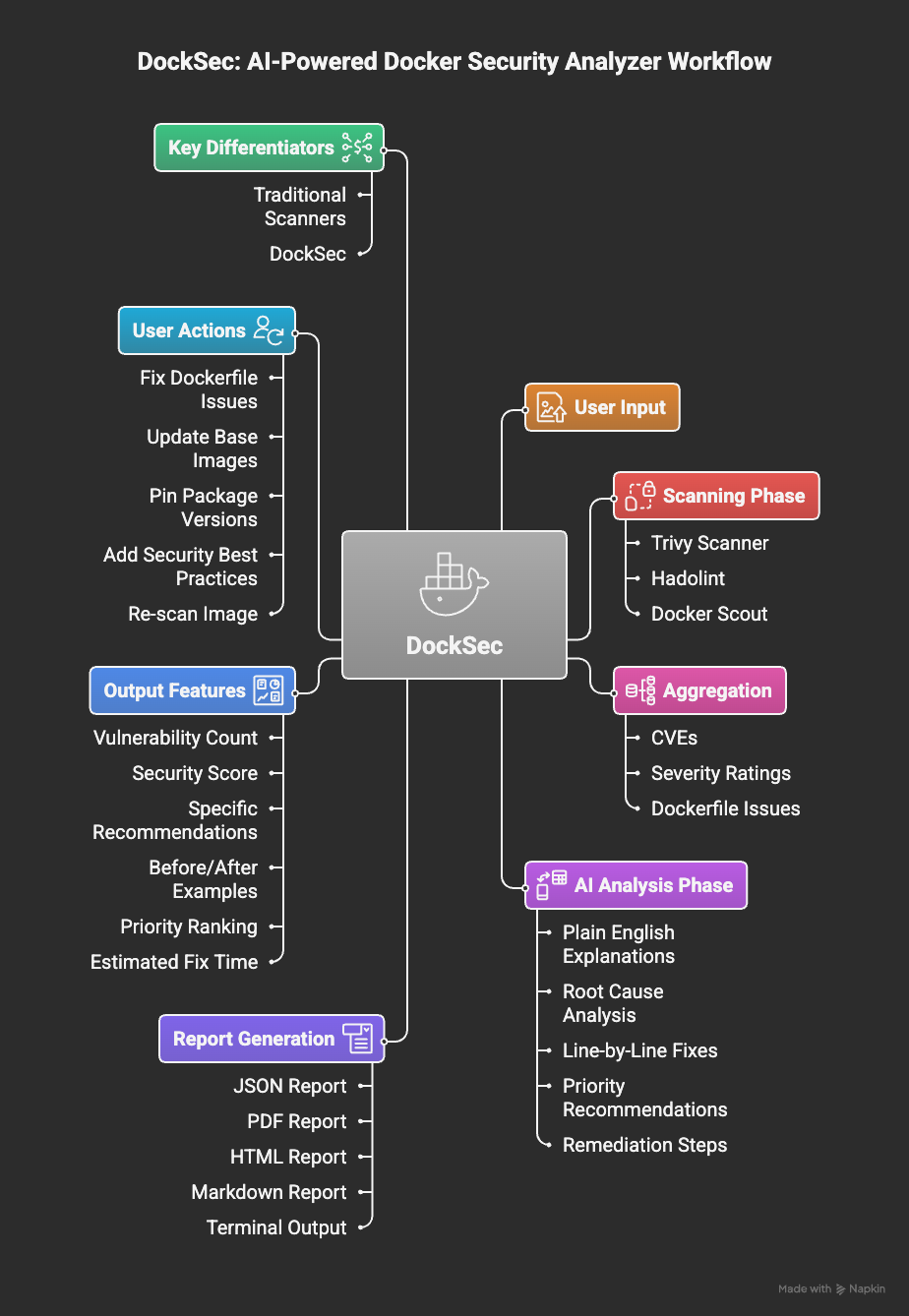
DockSec workflow: From scanning to actionable insights
DockSec follows a robust four-stage pipeline:
- Scan: Runs Trivy, Hadolint, and Docker Scout locally on your environment.
- Analyze: AI correlates findings across all scanners to remove noise and assess real-world impact.
- Recommend: Generates human-readable explanations and specific remediation steps.
- Report: Exports actionable results in JSON, PDF, HTML, or Markdown formats.
Leaders
DockSec is led by a dedicated team committed to making container security accessible.
- Advait Patel - Project Lead
For questions or discussions, please join the #project-docksec channel on OWASP Slack.
Quick Start
GitHub Action
Integrate DockSec into your GitHub Actions workflow:
- name: Run DockSec AI Scanner
  uses: OWASP/DockSec@main
  with:
    dockerfile: 'Dockerfile'
    openai_api_key: ${{ secrets.OPENAI_API_KEY }}
CLI Usage
# Install DockSec
pip install docksec

# Scan a Dockerfile (AI-powered)
# Reports will be saved to ~/.docksec/results/
docksec Dockerfile

# Scan Dockerfile + Docker image
docksec Dockerfile -i myapp:latest

# Fast scan only (no AI)
docksec Dockerfile --scan-only
Features
- Smart Analysis: AI explains what vulnerabilities mean for your specific setup.
- Multi-LLM Support: Use OpenAI, Anthropic Claude, Google Gemini, or local models via Ollama.
- Deep Integration: Combines Trivy (vulnerabilities), Hadolint (linting), and Docker Scout.
- Security Scoring: Get a 0-100 score to track your security posture over time.
- Centralized Reporting: All reports are neatly organized in
~/.docksec/results/by default. - Rich Formats: Professional exports in HTML (interactive), PDF, JSON, and CSV.
- CI/CD Ready: Designed for easy integration into GitHub Actions and build pipelines.
- GitHub Action: Available on the GitHub Marketplace for automated security scans.
Contributing
DockSec thrives on community contributions. Whether you are a developer, designer, or security enthusiast, there are many ways to get involved:
- Code Contributions: Fix bugs or add new features.
- Documentation: Improve guides or create tutorials.
- Issue Reporting: Identify and report bugs.
- Feedback: Share your experience and suggestions.
To get started, check out our Contributing Guidelines, Code of Conduct, and Sponsorship Guide.
Community and Social Media
- OWASP Project Page: owasp.org/DockSec/
- OWASP Slack: #project-docksec
- PyPI: pypi.org/project/docksec/
- Issues: Report a bug
Built with ❤️ by Advait Patel and the OWASP community.
Release history Release notifications | RSS feed


Download files
Download the file for your platform. If you're not sure which to choose, learn more about installing packages.
Source Distribution
Built Distribution
Filter files by name, interpreter, ABI, and platform.
If you're not sure about the file name format, learn more about wheel file names.
Copy a direct link to the current filters
File details
Details for the file docksec-2026.5.22.1.tar.gz.
File metadata
- Download URL: docksec-2026.5.22.1.tar.gz
- Upload date:
- Size: 57.1 kB
- Tags: Source
- Uploaded using Trusted Publishing? No
- Uploaded via: twine/6.2.0 CPython/3.12.13
File hashes
| Algorithm | Hash digest | |
|---|---|---|
| SHA256 |
1d107f3f55045a7a9f8cc46681a631ccd6f6907aaceb18c35cd3a95244009e93
|
|
| MD5 |
372cf96213f212626da2c9fab9f761be
|
|
| BLAKE2b-256 |
96200a609a366f2b581729d63e09b2b6f36a94fb22ef45b34486457e98ba059e
|
File details
Details for the file docksec-2026.5.22.1-py3-none-any.whl.
File metadata
- Download URL: docksec-2026.5.22.1-py3-none-any.whl
- Upload date:
- Size: 62.6 kB
- Tags: Python 3
- Uploaded using Trusted Publishing? No
- Uploaded via: twine/6.2.0 CPython/3.12.13
File hashes
| Algorithm | Hash digest | |
|---|---|---|
| SHA256 |
71a9b0a102a43096358981e7c29ae9d33ddd15b278b31459593f5184dd971b77
|
|
| MD5 |
1eb668d5f85924fa2f6b8cac50cbcb50
|
|
| BLAKE2b-256 |
f5fff0b4a0e0a9e07de4bda5fc1cea538d7b889c0075c31b90aaeb795a37b317
|






