
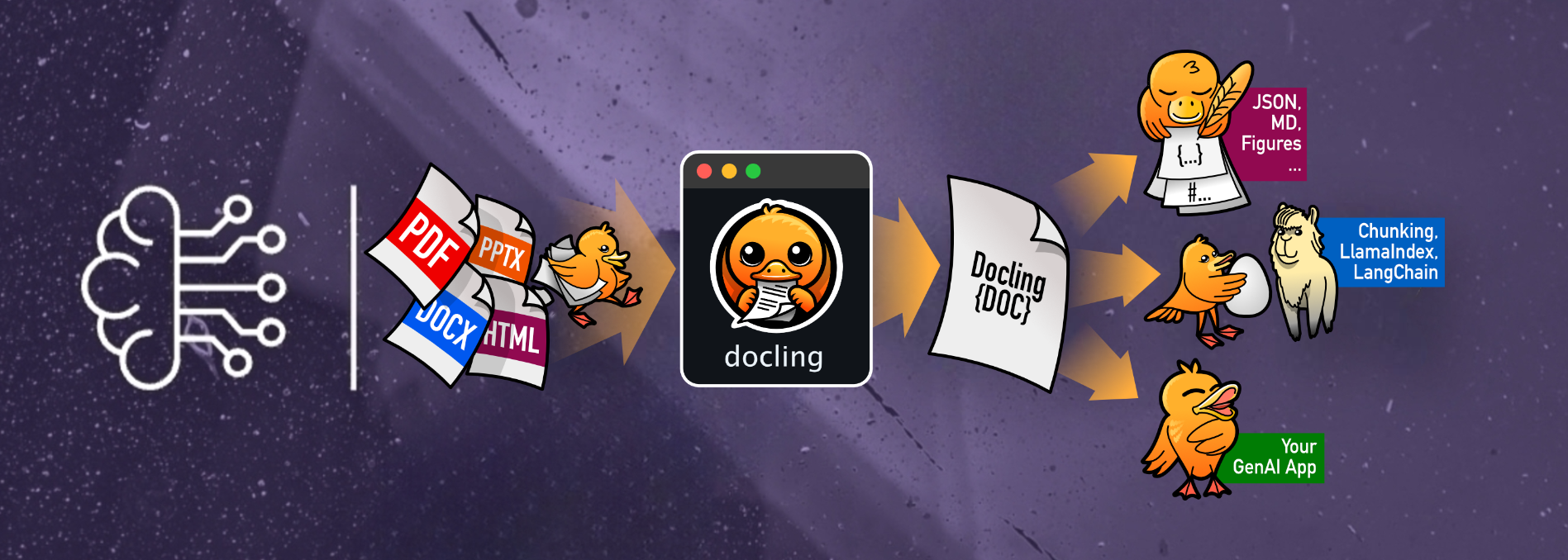







The docling-OCR-OnnxTR repository provides a plugin that integrates the OnnxTR OCR engine into the Docling framework, enhancing document processing capabilities with efficient and accurate text recognition.
Key Features:
-
Seamless Integration: Easily incorporate OnnxTR's OCR functionalities into your Docling workflows for improved document parsing and analysis.
-
Optimized Performance: Leverages OnnxTR's lightweight architecture to deliver faster inference times and reduced resource consumption compared to traditional OCR engines.
-
Flexible Deployment: Supports various hardware configurations, including CPU, GPU, and OpenVINO, allowing you to choose the best setup for your needs.
Installation:
To install the plugin, use one of the following commands based on your hardware:
For GPU support please take a look at: ONNX Runtime.
- Prerequisites: CUDA & cuDNN needs to be installed before Version table.
# For CPU
pip install "docling-ocr-onnxtr[cpu]"
# For Nvidia GPU
pip install "docling-ocr-onnxtr[gpu]"
# For Intel GPU / Integrated Graphics
pip install "docling-ocr-onnxtr[openvino]"

# Headless mode (no GUI)
# For CPU
pip install "docling-ocr-onnxtr[cpu-headless]"
# For Nvidia GPU
pip install "docling-ocr-onnxtr[gpu-headless]"
# For Intel GPU / Integrated Graphics
pip install "docling-ocr-onnxtr[openvino-headless]"
By integrating OnnxTR with Docling, users can achieve more efficient and accurate OCR results, enhancing the overall document processing experience.
Usage
from docling.datamodel.pipeline_options import PdfPipelineOptions
from docling.document_converter import (
    ConversionResult,
    DocumentConverter,
    InputFormat,
    PdfFormatOption,
)
from docling_ocr_onnxtr import OnnxtrOcrOptions


def main():
    # Source document to convert
    source = "https://arxiv.org/pdf/2408.09869v4"

    # Available detection & recognition models can be found at
    # https://github.com/felixdittrich92/OnnxTR

    # Or you choose a model from Hugging Face Hub
    # Collection: https://huggingface.co/collections/Felix92/onnxtr-66bf213a9f88f7346c90e842

    ocr_options = OnnxtrOcrOptions(
        # Text detection model
        det_arch="db_mobilenet_v3_large",
        # Text recognition model - from Hugging Face Hub
        reco_arch="Felix92/onnxtr-parseq-multilingual-v1",
        # This can be set to `True` to auto-correct the orientation of the pages
        auto_correct_orientation=False,
    )

    pipeline_options = PdfPipelineOptions(
        ocr_options=ocr_options,
    )
    pipeline_options.allow_external_plugins = True  # <-- enabled the external plugins

    # Convert the document
    converter = DocumentConverter(
        format_options={
            InputFormat.PDF: PdfFormatOption(
                pipeline_options=pipeline_options,
            ),
        },
    )

    conversion_result: ConversionResult = converter.convert(source=source)
    doc = conversion_result.document
    md = doc.export_to_markdown()
    print(md)


if __name__ == "__main__":
    main()
It is also possible to load the models from local files instead of using the Hugging Face Hub or downloading them from the repo:
from docling.datamodel.pipeline_options import PdfPipelineOptions
from docling.document_converter import (
    ConversionResult,
    DocumentConverter,
    InputFormat,
    PdfFormatOption,
)
from docling_ocr_onnxtr import OnnxtrOcrOptions
from onnxtr.models import db_mobilenet_v3_large, parseq


def main():
    # Source document to convert
    source = "https://arxiv.org/pdf/2408.09869v4"

    # Load models from local files
    # NOTE: You need to download the models first and then adjust the paths accordingly.
    det_model = db_mobilenet_v3_large("/home/felix/.cache/onnxtr/models/db_mobilenet_v3_large-1866973f.onnx")
    reco_model = parseq("/home/felix/.cache/onnxtr/models/parseq-00b40714.onnx")

    ocr_options = OnnxtrOcrOptions(
        # Text detection model
        det_arch=det_model,
        # Text recognition model
        reco_arch=reco_model,
        # This can be set to `True` to auto-correct the orientation of the pages
        auto_correct_orientation=False,
    )

    pipeline_options = PdfPipelineOptions(
        ocr_options=ocr_options,
    )
    pipeline_options.allow_external_plugins = True  # <-- enabled the external plugins

    # Convert the document
    converter = DocumentConverter(
        format_options={
            InputFormat.PDF: PdfFormatOption(
                pipeline_options=pipeline_options,
            ),
        },
    )

    conversion_result: ConversionResult = converter.convert(source=source)
    doc = conversion_result.document
    md = doc.export_to_markdown()
    print(md)


if __name__ == "__main__":
    main()
Configuration
The configuration of the OCR engine is done via the OnnxtrOcrOptions class. The following options are available:
lang: List of languages to use for OCR. Default is["en", "fr"].confidence_score: Word confidence threshold for the recognition model. Default is0.5.objectness_score: Detection model objectness score threshold. Default is0.3.det_arch: Detection model architecture. Default is"fast_base".reco_arch: Recognition model architecture. Default is"crnn_vgg16_bn".reco_bs: Batch size for the recognition model. Default is512.auto_correct_orientation: Whether to auto-correct the orientation of the pages. Default isFalse.preserve_aspect_ratio: Whether to preserve the aspect ratio of the images. Default isTrue.symmetric_pad: Whether to use symmetric padding. Default isTrue.paragraph_break: Paragraph break threshold. Default is0.035.load_in_8_bit: Whether to load the model in 8-bit. Default isFalse. (Not supported for Hugging Face loaded models yet)providers: List of providers to use for the Onnxruntime. Default isNonewhich means auto-select.session_options: Session options for the Onnxruntime. Default isNonewhich means default OnnxTR session options.
Available Hugging Face models can be found at Hugging Face.
Further information:
Please take a look at OnnxTR.
Contributing
Contributions are welcome!
Before opening a pull request, please ensure that your code passes the tests and adheres to the project's coding standards.
You can run the tests and checks using:
make style
make quality
make test
License
Distributed under the Apache 2.0 License. See LICENSE for more information.
1 maintainer

Metadata
1 maintainer
Release files for docling-ocr-onnxtr 0.3.1
For a detailed explanation of source distributions (sdists) and built distributions (wheels), please see the package formats documentation.
Source distribution (sdist)
| File | Size | Uploaded | |
|---|---|---|---|
| docling_ocr_onnxtr-0.3.1.tar.gz | 23.6 kB | Details |
Built distribution (wheel)
| File | Interpreter | ABI | Platform | Reset |
|---|---|---|---|---|
| docling_ocr_onnxtr-0.3.1-py3-none-any.whl | Python 3 | none | any | Details |
Total release size: 41.6 kB
Release files / docling_ocr_onnxtr-0.3.1.tar.gz
| Download URL | docling_ocr_onnxtr-0.3.1.tar.gz |
|---|---|
| Size | 23.6 kB |
| Tags | Source |
|
SHA-256 checksum How to use checksums |
fa03299d3b5cd7622d570319bea0496d3dbd03c36f7132861f84f546eb82640f
|
|
BLAKE2b-256 checksum How to use checksums |
cd5ff30c05b003af8354e4f3b432b0873fc1ee1a94f4801cc39824a3410fc56d
|
| Upload date | |
|
Uploaded using Trusted Publishing? What is trusted publishing? |
No |
| Uploaded via |
twine/7.0.0 CPython/3.11.17
|
Release files / docling_ocr_onnxtr-0.3.1-py3-none-any.whl
| Download URL | docling_ocr_onnxtr-0.3.1-py3-none-any.whl |
|---|---|
| Size | 18.1 kB |
| Tags | Python 3 |
|
SHA-256 checksum How to use checksums |
64001dcaa3892aebbe16c671259878375e2c32bda63baf7bb61cd54db6f22d37
|
|
BLAKE2b-256 checksum How to use checksums |
e62e048ca3dd8e36778942971cbba9b7b6c47e8ceebfdce0b691c7492d24c4d8
|
| Upload date | |
|
Uploaded using Trusted Publishing? What is trusted publishing? |
No |
| Uploaded via |
twine/7.0.0 CPython/3.11.17
|














