
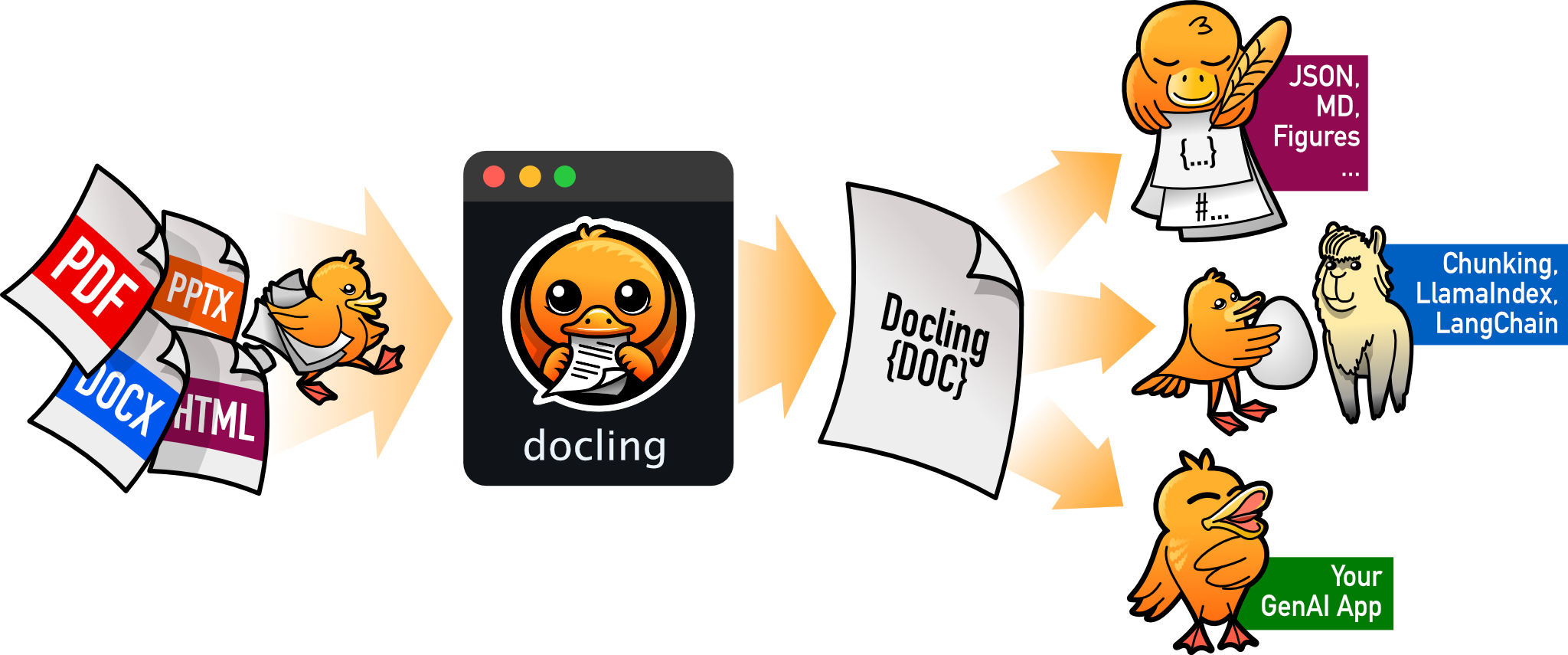
SDK and CLI for parsing PDF, DOCX, HTML, and more, to a unified document representation for powering downstream workflows such as gen AI applications.
Verified details
These details have been verified by PyPIProject links
GitHub Statistics
Maintainers

Project description
Docling















Docling simplifies document processing, parsing diverse formats — including advanced PDF understanding — and providing seamless integrations with the gen AI ecosystem.
Features
- 🗂️ Parsing of multiple document formats incl. PDF, DOCX, PPTX, XLSX, HTML, WAV, MP3, WebVTT, images (PNG, TIFF, JPEG, ...), LaTeX, plain text, and more
- 📑 Advanced PDF understanding incl. page layout, reading order, table structure, code, formulas, image classification, and more
- 🧬 Unified, expressive DoclingDocument representation format
- ↪️ Various export formats and options, including Markdown, HTML, WebVTT, DocTags and lossless JSON
- 📜 Support of several application-specifc XML schemas incl. USPTO patents, JATS articles, and XBRL financial reports.
- 🔒 Local execution capabilities for sensitive data and air-gapped environments
- 🤖 Plug-and-play integrations incl. LangChain, LlamaIndex, Crew AI & Haystack for agentic AI
- 🔍 Extensive OCR support for scanned PDFs and images
- 👓 Support of several Visual Language Models (GraniteDocling)
- 🎙️ Audio support with Automatic Speech Recognition (ASR) models
- 🔌 Connect to any agent using the MCP server
- 💻 Simple and convenient CLI
What's new
- 📤 Structured information extraction [🧪 beta]
- 📑 New layout model (Heron) by default, for faster PDF parsing
- 🔌 MCP server for agentic applications
- 💼 Parsing of XBRL (eXtensible Business Reporting Language) documents for financial reports
- 💬 Parsing of WebVTT (Web Video Text Tracks) files and export to WebVTT format
- 💬 Parsing of LaTeX files
- 📝 Parsing of plain-text files (
.txt,.text) and Markdown supersets (.qmd,.Rmd)
Coming soon
- 📝 Metadata extraction, including title, authors, references & language
- 📝 Chart understanding (Barchart, Piechart, LinePlot, etc)
- 📝 Complex chemistry understanding (Molecular structures)
Installation
To use Docling, simply install docling from your package manager, e.g. pip:
pip install docling
Note: Python 3.9 support was dropped in docling version 2.70.0. Please use Python 3.10 or higher.
Works on macOS, Linux and Windows environments. Both x86_64 and arm64 architectures.
More detailed installation instructions are available in the docs.
Getting started
To convert individual documents with python, use convert(), for example:
from docling.document_converter import DocumentConverter

source = "https://arxiv.org/pdf/2408.09869"  # document per local path or URL
converter = DocumentConverter()
result = converter.convert(source)
print(result.document.export_to_markdown())  # output: "## Docling Technical Report[...]"
More advanced usage options are available in the docs.
CLI
Docling has a built-in CLI to run conversions.
docling https://arxiv.org/pdf/2206.01062
You can also use 🥚GraniteDocling and other VLMs via Docling CLI:
docling --pipeline vlm --vlm-model granite_docling https://arxiv.org/pdf/2206.01062
This will use MLX acceleration on supported Apple Silicon hardware.
Read more here
Documentation
Check out Docling's documentation, for details on installation, usage, concepts, recipes, extensions, and more.
Examples
Go hands-on with our examples, demonstrating how to address different application use cases with Docling.
Integrations
To further accelerate your AI application development, check out Docling's native integrations with popular frameworks and tools.
Get help and support
Please feel free to connect with us using the discussion section.
Technical report
For more details on Docling's inner workings, check out the Docling Technical Report.
Contributing
Please read Contributing to Docling for details.
References
If you use Docling in your projects, please consider citing the following:
@techreport{Docling,
  author = {Deep Search Team},
  month = {8},
  title = {Docling Technical Report},
  url = {https://arxiv.org/abs/2408.09869},
  eprint = {2408.09869},
  doi = {10.48550/arXiv.2408.09869},
  version = {1.0.0},
  year = {2024}
}
License
The Docling codebase is under MIT license. For individual model usage, please refer to the model licenses found in the original packages.
LF AI & Data
Docling is hosted as a project in the LF AI & Data Foundation.
IBM ❤️ Open Source AI
The project was started by the AI for knowledge team at IBM Research Zurich.
Project details
Verified details
These details have been verified by PyPIProject links
GitHub Statistics
Maintainers
Release history Release notifications | RSS feed


Download files
Download the file for your platform. If you're not sure which to choose, learn more about installing packages.
Source Distribution
Built Distribution
Filter files by name, interpreter, ABI, and platform.
If you're not sure about the file name format, learn more about wheel file names.
Copy a direct link to the current filters
File details
Details for the file docling-2.85.0.tar.gz.
File metadata
- Download URL: docling-2.85.0.tar.gz
- Upload date:
- Size: 428.6 kB
- Tags: Source
- Uploaded using Trusted Publishing? Yes
- Uploaded via: twine/6.1.0 CPython/3.13.12
File hashes
| Algorithm | Hash digest | |
|---|---|---|
| SHA256 |
142a2e50cae32a5c9c2297484ee946b6042eaeb448724019ff801dfa8d1c61bf
|
|
| MD5 |
42ba26e937d23c8aa6d61599edcdd816
|
|
| BLAKE2b-256 |
319c20c7979f97fa872dd88227c34132817541dccba1416d6f0abe0f1359433c
|
Provenance
The following attestation bundles were made for docling-2.85.0.tar.gz:
Publisher:
pypi.yml on docling-project/docling
-
Statement:
-
Statement type:
https://in-toto.io/Statement/v1 -
Predicate type:
https://docs.pypi.org/attestations/publish/v1 -
Subject name:
docling-2.85.0.tar.gz -
Subject digest:
142a2e50cae32a5c9c2297484ee946b6042eaeb448724019ff801dfa8d1c61bf - Sigstore transparency entry: 1247225695
- Sigstore integration time:
-
Permalink:
docling-project/docling@50b9b63b663b5c82e6f1907e149d72b250947953 -
Branch / Tag:
refs/tags/v2.85.0 - Owner: https://github.com/docling-project
-
Access:
public
-
Token Issuer:
https://token.actions.githubusercontent.com -
Runner Environment:
github-hosted -
Publication workflow:
pypi.yml@50b9b63b663b5c82e6f1907e149d72b250947953 -
Trigger Event:
release
-
Statement type:
File details
Details for the file docling-2.85.0-py3-none-any.whl.
File metadata
- Download URL: docling-2.85.0-py3-none-any.whl
- Upload date:
- Size: 452.6 kB
- Tags: Python 3
- Uploaded using Trusted Publishing? Yes
- Uploaded via: twine/6.1.0 CPython/3.13.12
File hashes
| Algorithm | Hash digest | |
|---|---|---|
| SHA256 |
d69cf7068ca0d83023306eaf80bdc7a5e4c3b7421f6d6782de17f0786ee6da77
|
|
| MD5 |
4bee99a58a3094a0152281ac586f931b
|
|
| BLAKE2b-256 |
fa34143f061b6c0f40032ae981314e8f472e22b94a0cc1f2859fb9a6099cd24b
|
Provenance
The following attestation bundles were made for docling-2.85.0-py3-none-any.whl:
Publisher:
pypi.yml on docling-project/docling
-
Statement:
-
Statement type:
https://in-toto.io/Statement/v1 -
Predicate type:
https://docs.pypi.org/attestations/publish/v1 -
Subject name:
docling-2.85.0-py3-none-any.whl -
Subject digest:
d69cf7068ca0d83023306eaf80bdc7a5e4c3b7421f6d6782de17f0786ee6da77 - Sigstore transparency entry: 1247225703
- Sigstore integration time:
-
Permalink:
docling-project/docling@50b9b63b663b5c82e6f1907e149d72b250947953 -
Branch / Tag:
refs/tags/v2.85.0 - Owner: https://github.com/docling-project
-
Access:
public
-
Token Issuer:
https://token.actions.githubusercontent.com -
Runner Environment:
github-hosted -
Publication workflow:
pypi.yml@50b9b63b663b5c82e6f1907e149d72b250947953 -
Trigger Event:
release
-
Statement type:






