
Docmancer gives every coding agent on your machine one local memory, so you stop re-explaining your project to each of them.
Verified details
These details have been verified by PyPIProject links
GitHub Statistics
Maintainers

Project description

Docmancer
Docmancer gives every coding agent on your machine one local memory, so you stop re-explaining your project to each of them.





Website · Documentation · Blog · Changelog · Discussions
Your agents already learned this. They just cannot tell each other.
Claude Code knows why you moved off Railway. Codex learned your migration convention. Cursor is still following a rule you overruled two months ago. Each agent wrote something down, none of them agree, and none of it is anywhere you can read.
That knowledge is real, and it is already on your disk. It is sitting in CLAUDE.md files, AGENTS.md files, Cursor rules, agent memory directories, and session history, in a different place and a different format for every tool you use.
Docmancer is built around two questions, in this order:
- I re-explain my project to every coding agent. How do I get them all working from the same context? Docmancer arranges the durable parts as plain local Markdown you can read and edit, then delivers the relevant files to every agent you connect, so a decision you record once reaches all of them.
- What do my coding agents already know about me and my working style? Docmancer indexes the memory, instructions, and rules they wrote on this machine, and keeps the contributing source attached to every claim, so you can read the answer instead of guessing at it.
Nothing leaves your machine unless you ask it to. There is no telemetry, no account, and no API key needed for the core product.
Install
pipx install docmancer --python python3.13
docmancer setup
setup finds every supported coding agent, shows you one complete plan and privacy warning, and waits for your confirmation before it changes anything. Then it indexes what it found, builds your canonical memory, installs the agent skills, and turns on automatic recall where the agent supports it.
Ask it something:
docmancer ask "Why did we choose Railway?"
You get a bounded, cited answer built from your own agents' evidence. Then open the app for the current project:
cd /path/to/your-project
docmancer web
That is the whole first run. It takes about a minute, and setup does not modify the project you are standing in.
What you get
One memory instead of six. Every supported agent reads from the same canonical Markdown, so a decision recorded once is available to Claude Code, Codex, Cursor, Gemini, and the rest without you copying it around.
Answers with receipts. Recall returns the mandatory policy, the curated memory, and the supporting agent evidence with stable citations, so you can see which agent said what and when. The optional language model turns that evidence into prose but never chooses what goes into it.
Files you own, not a database. Shared Memory is ordinary Markdown in ordinary directories. You can open it in your editor, commit it, grep it, or delete it. Stable docmancer://memory/<id> addresses keep working even after you move a file.
Local and offline by default. The default profile uses SQLite FTS5, sqlite-vec, and a small vendored embedding model. No daemon, no model download, no network call, no key.
Edits that cannot clobber each other. Changing or moving an existing memory file requires the content hash you last read, so one agent cannot silently overwrite a newer decision made by another.
Approval before anything is written. When you ask Docmancer to remember or change something, it prepares one complete file proposal and shows you the diff. The default answer is no, and a later "yes" in conversation never applies a stored proposal.
See what each agent actually receives
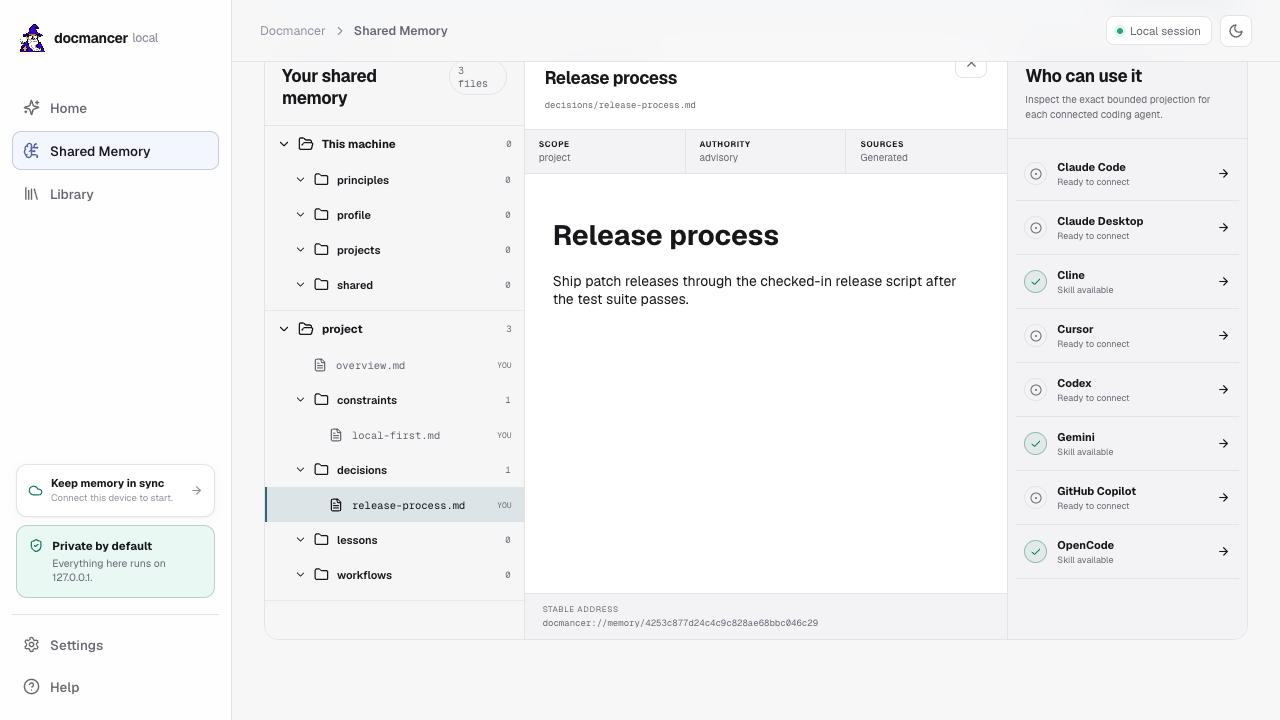
Run docmancer web and open Shared Memory. The left pane is the real file tree on disk, the middle pane reads the selected file with its provenance, and the right pane lists your connected agents. Select an agent to inspect the exact bounded projection it will receive, before it receives it.
The scaffold is opinionated, but the files are yours:
~/.docmancer/tree/                 # machine-wide, follows you between projects
├── profile/
│   ├── about.md
│   └── preferences.md
├── principles/
│   └── working-style.md
├── projects/
│   └── active.md
└── shared/

<project>/.docmancer/tree/         # per project
├── overview.md
├── decisions/
├── constraints/
├── workflows/
└── lessons/
Connect your agents
docmancer setup installs everything it detects. To manage one integration on its own:
docmancer agent install claude-code --hooks
docmancer agent install codex --hooks
| Agent | Skill file | Automatic recall | Session capture | MCP |
|---|---|---|---|---|
| Claude Code | Yes | Yes | Yes | Yes |
| Codex (CLI, app, desktop) | Yes | Yes | Yes | Yes |
| Cursor | Yes | |||
| Cline | Yes | |||
| Gemini CLI | Yes | |||
| OpenCode | Yes | |||
| GitHub Copilot | Yes | |||
| Claude Desktop | Manual upload | Yes |
Installed skills teach an agent when to ask Docmancer for prior decisions and how to write deliberate memory when you explicitly request it, which is why every supported agent can use the same memory. Automatic recall and session capture need lifecycle hooks, and only Claude Code and Codex expose those today, so the other agents recall on demand through their skill file instead.
MCP is an alternative transport over the same local services, not a second memory store:
pipx install "docmancer[mcp]"
docmancer mcp install codex
docmancer mcp doctor
Record a decision on purpose
Discovery finds what your agents already wrote. When you want something recorded deliberately:
docmancer write $'# Deployment\n\nDeploy the API on Railway.' \
  --path decisions/deployment.md \
  --scope project
Read it back later, from any agent or from your shell:
docmancer read decisions/deployment.md
Or let Ask do it, with an approval step:
docmancer ask "Remember that production releases require a smoke test"
docmancer ask "Update decisions/release.md to require two reviewers" --apply
Everyday commands
| Command | Purpose |
|---|---|
docmancer setup |
Discover agent memory and connect every supported agent. |
docmancer ask "..." |
Recall evidence, answer a question, or propose one memory change. |
docmancer web |
Open the local app for the current project. |
docmancer common |
Show what several agents recorded independently. |
docmancer delivery |
Show installed integrations, recall state, and recent use. |
docmancer timeline |
Show how curated memory changed over time. |
docmancer write ... --path file.md |
Write one deliberate Markdown memory file. |
docmancer read <address-or-path> |
Read one memory file with its provenance. |
docmancer edit ... --expected-hash <hash> |
Safely edit a memory file. |
docmancer move ... --expected-hash <hash> |
Safely rename or move a memory file. |
docmancer import ./notes |
Copy arbitrary Markdown into the project inbox. |
docmancer docs query "..." |
Search the separate documentation Library. |
docmancer status |
Show memory, source, security, integration, and Cloud health. |
docmancer doctor |
Diagnose installation and configuration problems. |
Run docmancer --help or docmancer <command> --help for exact arguments, and see the command reference for the full surface.
Documentation is a separate Library
Your decisions and a vendor's API reference answer different questions, so Docmancer keeps them apart. Library content is searchable but is never injected into your personal memory automatically.
docmancer docs add https://docs.pytest.org
docmancer docs query "How do I parametrize a fixture?"
Use ask for your own decisions, preferences, and rules. Use docs query for libraries, APIs, and vendor documentation.
Choose a retrieval profile
The default needs no daemon and no large download:
docmancer setup --profile local
It runs SQLite FTS5, sqlite-vec, and the bundled Model2Vec model. For sustained ingestion and filtered vector search across roughly 50,000 to 100,000 documents, switch to the scale profile:
pipx install "docmancer[embeddings-heavy]"
docmancer qdrant up
docmancer setup --profile scale
Scale uses Qdrant, FastEmbed dense embeddings, sparse SPLADE retrieval, and reciprocal-rank fusion. It helps with vector filtering, concurrent writes, and operational headroom. It will not fix poor source coverage or weak evaluation, and both profiles implement identical memory semantics: switching changes storage and capacity, never authority, provenance, or what counts as Shared Memory.
Privacy
Your memory, credentials, indexes, and the local app stay on your machine, and Docmancer has no telemetry. It reaches the network only when you explicitly fetch online documentation, use an external model, check a package registry, or enable Cloud.
Everything above is free and stays free. There are two problems the free single-machine product does not solve, and those are what the paid tiers exist for. The first is that your memory is built on one machine while you work on more than one, which optional paid Personal Sync answers by carrying the same canonical memory to every machine you approve, encrypted on the device before it leaves, with managed revision history and recovery. The second is that the context your agents accumulated about a feature is stranded on one machine where the rest of your team cannot reach it, which is the problem Team Sync is being designed to solve. Team Sync is not available yet.
The hosted service receives ciphertext, and it cannot read your plaintext memory or run anything on your machine. The security architecture describes exactly what metadata remains visible rather than claiming the server knows nothing.
Where things live
| Location | Contents |
|---|---|
~/.docmancer/tree/ |
Machine-wide Markdown under profile/, principles/, projects/, shared/. |
<project>/.docmancer/tree/ |
Project memory under decisions/, constraints/, workflows/, lessons/. |
<project>/.docmancer/inbox/ |
Markdown you imported, waiting for optional curation. |
<project>/.docmancer/trash/ |
Recoverable deleted memory files. |
<project>/.docmancer/state/decision-journal.jsonl |
Append-only history of curated files. |
~/.docmancer/memory.db |
Rebuildable machine-wide index. |
~/.docmancer/docmancer.yaml |
Local configuration. |
Requirements
Docmancer supports Python 3.11, 3.12, and 3.13. The install command pins the interpreter because pipx otherwise picks the newest Python it can find, including 3.14, which this package does not support. If an install has already gone wrong, docmancer doctor will tell you why.
Contributing
Issues and pull requests are welcome. Start with CONTRIBUTING.md for project layout and extension points, and open a discussion if you want to talk through an idea first. Security reports have their own private channel, described in SECURITY.md.
For architecture, supported sources, Cloud boundaries, and troubleshooting, see the wiki or the full documentation.
License
MIT. See LICENSE.
Project details
Verified details
These details have been verified by PyPIProject links
GitHub Statistics
Maintainers
Release history Release notifications | RSS feed


Download files
Download the file for your platform. If you're not sure which to choose, learn more about installing packages.
Source Distribution
Built Distribution
Filter files by name, interpreter, ABI, and platform.
If you're not sure about the file name format, learn more about wheel file names.
Copy a direct link to the current filters
File details
Details for the file docmancer-0.9.8.tar.gz.
File metadata
- Download URL: docmancer-0.9.8.tar.gz
- Upload date:
- Size: 33.3 MB
- Tags: Source
- Uploaded using Trusted Publishing? Yes
- Uploaded via: twine/7.0.0 CPython/3.13.14
File hashes
| Algorithm | Hash digest | |
|---|---|---|
| SHA256 |
7cefd7d791c67d40796a1386c6a47cb8628d1f5cfcfb427aa16f4446e3c2da30
|
|
| MD5 |
223d462de2a35564f6c8e39d3860496c
|
|
| BLAKE2b-256 |
fc577113852f805ca82fdbba257f5e614e274f3a9a36d887cd3a4ef33af3a6b2
|
Provenance
The following attestation bundles were made for docmancer-0.9.8.tar.gz:
Publisher:
publish.yml on docmancer/docmancer
-
Statement:
-
Statement type:
https://in-toto.io/Statement/v1 -
Predicate type:
https://docs.pypi.org/attestations/publish/v1 -
Subject name:
docmancer-0.9.8.tar.gz -
Subject digest:
7cefd7d791c67d40796a1386c6a47cb8628d1f5cfcfb427aa16f4446e3c2da30 - Sigstore transparency entry: 2306360640
- Sigstore integration time:
-
Permalink:
docmancer/docmancer@a124e8899afbdb1f5b418745a7c3a0eb9c4f6b72 -
Branch / Tag:
refs/tags/v0.9.8 - Owner: https://github.com/docmancer
-
Access:
public
-
Token Issuer:
https://token.actions.githubusercontent.com -
Runner Environment:
github-hosted -
Publication workflow:
publish.yml@a124e8899afbdb1f5b418745a7c3a0eb9c4f6b72 -
Trigger Event:
push
-
Statement type:
File details
Details for the file docmancer-0.9.8-py3-none-any.whl.
File metadata
- Download URL: docmancer-0.9.8-py3-none-any.whl
- Upload date:
- Size: 29.7 MB
- Tags: Python 3
- Uploaded using Trusted Publishing? Yes
- Uploaded via: twine/7.0.0 CPython/3.13.14
File hashes
| Algorithm | Hash digest | |
|---|---|---|
| SHA256 |
d74b39c86273002757120f4ac1d9c090499788538e670eafd12a75c3b2c1580b
|
|
| MD5 |
e8f98f16c1b07de2ed6aa8c52aaac087
|
|
| BLAKE2b-256 |
b755e45ecf2e180cab97b296e3b2abda0f08b5dbc1d7b64c9d6cba7ac718847d
|
Provenance
The following attestation bundles were made for docmancer-0.9.8-py3-none-any.whl:
Publisher:
publish.yml on docmancer/docmancer
-
Statement:
-
Statement type:
https://in-toto.io/Statement/v1 -
Predicate type:
https://docs.pypi.org/attestations/publish/v1 -
Subject name:
docmancer-0.9.8-py3-none-any.whl -
Subject digest:
d74b39c86273002757120f4ac1d9c090499788538e670eafd12a75c3b2c1580b - Sigstore transparency entry: 2306360680
- Sigstore integration time:
-
Permalink:
docmancer/docmancer@a124e8899afbdb1f5b418745a7c3a0eb9c4f6b72 -
Branch / Tag:
refs/tags/v0.9.8 - Owner: https://github.com/docmancer
-
Access:
public
-
Token Issuer:
https://token.actions.githubusercontent.com -
Runner Environment:
github-hosted -
Publication workflow:
publish.yml@a124e8899afbdb1f5b418745a7c3a0eb9c4f6b72 -
Trigger Event:
push
-
Statement type:






