
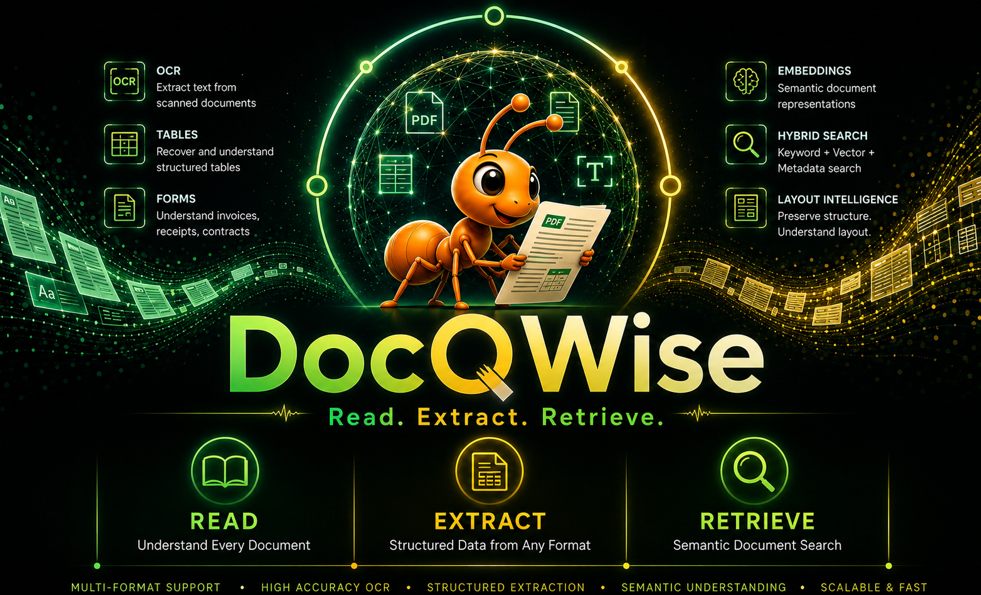
Document intelligence that adapts, accelerates, and scales.




What is DocQWise?
DocQWise is a pluggable, AI-powered document intelligence engine. It reads any document format, extracts structured data using LLMs and RAG pipelines, and retrieves information with semantic search — locally, at scale, for zero per-page cost.
What's New in v0.4.0
- Agentic Extraction — Multi-pass, self-correcting extraction agent with validate → retry → cross-check loop
- MCP Server — Model Context Protocol server for AI agent integration (Claude, GPT, etc.)
- GraphRAG — Entity graph traversal with evidence chains and knowledge graph visualization
- FAISS Vector Store — Production-scale similarity search alongside SQLite
- Source Attribution — Every answer includes source, confidence, method, and evidence
- Vision Model Routing — Auto-routes to Ollama vision, HuggingFace, OpenAI, or local models (.gguf, .onnx, .pt)
- Custom Prompts — Full control with
prompt,prompt_template, andsystem_prompt - Python 3.9–3.13 Compatible — Zero
requestsdependency (uses urllib), no charset_normalizer crash
Install
# Core (PDF reading, AI extraction)
pip install docqwise

# With ML (RAG pipeline, embeddings, OCR — recommended)
pip install docqwise[ml]

# Everything
pip install docqwise[all]

# Specific extras
pip install docqwise[graph]       # GraphRAG + NetworkX visualization
pip install docqwise[connectors]  # FAISS, ChromaDB, Qdrant, etc.
pip install docqwise[server]      # MCP server + FastAPI
LLM Backend (pick one)
# Ollama — local, free, recommended
# Download from https://ollama.com then:
ollama pull nemotron-mini

# OR HuggingFace — local GPU
pip install transformers torch bitsandbytes accelerate

# OR OpenAI — cloud API (no SDK needed, docqwise uses urllib)
export OPENAI_API_KEY=your-key
Quick Start
from docqwise import Docqwise

dq = Docqwise()

# Ingest any document
dq.ingest("documents/")

# Extract fields with template
result = dq.extract_fields("invoice.pdf", template="invoice")
print(result.to_json())

# Ask questions
answer = dq.ask("What is the total amount?")
Agentic Extraction (v0.4.0)
Multi-pass, self-correcting extraction that validates, retries failed fields, and cross-checks results:
from docqwise import Docqwise

dq = Docqwise()

# Agentic extraction — autonomous multi-pass pipeline
result = dq.extract_agentic(
    "invoice.pdf",
    template="invoice",
    max_retries=3,        # retry failed fields up to 3 times
    cross_check=True,     # verify with cross-check
)

print(result.to_json())
print(f"Confidence: {result.confidence}")
print(f"Strategy: {result.strategy_used}")  # 'agentic'
print(f"Warnings: {result.warnings}")

# Direct agent usage with full trace
from docqwise.agent import ExtractionAgent

agent = ExtractionAgent(max_retries=2, cross_check=True)
result = agent.extract("contract.pdf", template="contract")

# Full audit trail
print(agent.trace.summary())
# Agent trace: 4 passes, 2 retries, confidence=0.92
#   ✓ Step 1: extract (350ms) RAG extraction: 8 fields
#   ✓ Step 2: validate (5ms) 2 fields failed validation
#   ✓ Step 3: retry (280ms) Attempt 1: retried 2, fixed 2
#   ✓ Step 4: cross_check (120ms) Cross-checked extraction
#   ✓ Step 5: merge (1ms) Final confidence: 0.92
Custom Validation Rules
from docqwise.agent.extraction_agent import ExtractionAgent, ValidationRule

rules = [
    ValidationRule("invoice_number", "required"),
    ValidationRule("total", "range", {"min": 0, "max": 1000000}),
    ValidationRule("email", "pattern", {"pattern": r"[\w.]+@[\w.]+"}),
    ValidationRule("status", "choices", {"values": ["paid", "pending", "overdue"]}),
]

agent = ExtractionAgent(validation_rules=rules)
result = agent.extract("invoice.pdf", schema={
    "invoice_number": "string",
    "total": "number",
    "email": "string",
    "status": "string",
})
MCP Server (v0.4.0)
Use docqwise as a tool server for any AI agent via the Model Context Protocol:
# Start MCP server (stdio transport)
python -m docqwise.server.mcp_server

# Or with HTTP transport
python -m docqwise.server.mcp_server --port 8080
Claude Desktop Integration
Add to your claude_desktop_config.json:
{
  "mcpServers": {
    "docqwise": {
      "command": "python",
      "args": ["-m", "docqwise.server.mcp_server"]
    }
  }
}
Available MCP Tools
| Tool | Description |
|---|---|
docqwise_extract |
Extract fields from any document |
docqwise_extract_agentic |
Multi-pass self-correcting extraction |
docqwise_ask |
RAG-powered Q&A over documents |
docqwise_ingest |
Ingest documents into vector store |
docqwise_classify |
Zero-shot document classification |
docqwise_extract_tables |
Extract tables as structured data |
docqwise_extract_entities |
Extract named entities |
docqwise_compare |
Compare two documents |
docqwise_detect_pii |
Detect PII in documents |
docqwise_retrieve |
Semantic search across corpus |
Extraction Methods
dq = Docqwise()

# RAG (default) — chunk → embed → retrieve → LLM extract
dq.extract_fields("doc.pdf", template="invoice")

# Agentic — multi-pass, self-correcting (v0.4.0)
dq.extract_agentic("doc.pdf", template="invoice")

# Direct LLM
dq.extract_fields("doc.pdf", template="invoice", method="llm")

# Vision (scanned docs, handwriting)
dq.extract_fields("scan.jpg", method="vision", model="gpt-4o")

# Agentic (multi-pass, self-correcting)
dq.extract_agentic("doc.pdf", template="invoice")
GraphRAG (v0.4.0)
Entity graph traversal with evidence chains:
dq = Docqwise()
dq.ingest("contracts/")

# RAG with graph-enhanced retrieval
result = dq.ask_rag(
    "What is the payment terms for Acme Corp?",
    mode="graphrag",
    sources=["contract_acme.pdf"],
)
print(result["answer"])
print(result["evidence"])     # evidence chain
print(result["confidence"])   # confidence score

# Build and visualize knowledge graph
engine = dq.build_graph(sources=["contract1.pdf", "contract2.pdf"])
print(engine.graph.stats())  # {'nodes': 42, 'edges': 87, 'documents': 2}

# Visualize
dq.visualize_graph("graph.png", sources=["contract1.pdf"])
dq.visualize_graph("graph.html", sources=["contract1.pdf"])  # interactive vis.js

# Query-aware visualization (highlights relevant nodes)
result = dq.visualize_query(
    "Who signed the contract?",
    output="query_graph.png",
    sources=["contract1.pdf"],
)
print(result["answer"])
Source Attribution (v0.4.0)
Every answer tracks where it came from:
dq = Docqwise()
dq.ingest("invoices/")

# Answer with source tracking
answer = dq.ask_with_source("What is invoice #1234 total?", source="inv_1234.pdf")
print(answer.answer)       # "$15,750.00"
print(answer.source_name)  # "inv_1234.pdf"
print(answer.confidence)   # 0.85
print(answer.method)       # "qa_engine"

# Full RAG with source attribution
result = dq.ask_rag(
    "What is the total amount?",
    mode="general",
    source="invoice.pdf",
    system_prompt="You are an accounting assistant.",
)
print(result["answer"])
print(result["source_name"])
print(result["confidence"])
print(result["method"])     # "general", "graphrag", or "multimodal"
LLM Backends
# Ollama (local, free)
dq.extract_fields("doc.pdf", model="nemotron-mini")

# HuggingFace (local GPU)
from docqwise.llm.hf_llm import HuggingFaceLLM
llm = HuggingFaceLLM("Qwen/Qwen2.5-3B-Instruct", quantize="4bit")
dq.extract_fields("doc.pdf", llm=llm)

# OpenAI (cloud — no SDK needed)
from docqwise.llm.openai_llm import OpenAILLM
llm = OpenAILLM(model="gpt-4o-mini")
dq.extract_fields("doc.pdf", llm=llm)

# Azure / vLLM / LM Studio (any OpenAI-compatible API)
llm = OpenAILLM(model="my-model", base_url="https://my-server.com/v1")
Vision Models (v0.4.0)
Comprehensive vision model routing:
# Ollama vision models
dq.extract_fields("scan.jpg", method="vision", model="qwen2-vl")
dq.extract_fields("scan.jpg", method="vision", model="gemma3")
dq.extract_fields("scan.jpg", method="vision", model="llava")

# OpenAI / Azure vision
dq.extract_fields("scan.jpg", method="vision", model="gpt-4o")

# HuggingFace vision
dq.extract_fields("scan.jpg", method="vision", model="Qwen/Qwen2-VL-7B-Instruct")
dq.extract_fields("scan.jpg", method="vision", model="microsoft/Florence-2-large")

# Local model files
dq.extract_fields("scan.jpg", method="vision", model="model.gguf")   # llama-cpp
dq.extract_fields("scan.jpg", method="vision", model="model.onnx")   # ONNX Runtime
dq.extract_fields("scan.jpg", method="vision", model="model.pt")     # PyTorch
Custom Prompts
Full control over extraction prompts:
dq = Docqwise()

# Your own prompt
dq.extract_fields("doc.pdf", prompt="""
You are a medical record parser.
Extract patient name, diagnosis, and prescribed medications.
Return JSON only.

Document:
{context}

JSON:
""")

# Prompt template with schema placeholder
dq.extract_fields("doc.pdf",
    schema={"patient": "string", "diagnosis": "string"},
    prompt_template="""
Given this schema: {schema}
Parse this document: {context}
Return JSON matching the schema exactly.
""")

# System prompt for LLM role
result = dq.ask_rag(
    "Summarize the contract terms",
    source="contract.pdf",
    system_prompt="You are a legal analyst. Be precise and cite clause numbers.",
)
Vector Stores
# SQLite (default — zero install)
dq = Docqwise(vector_store="sqlite")

# FAISS (production scale — v0.4.0)
dq = Docqwise(vector_store="faiss")
# pip install faiss-cpu
# GPU: pip install faiss-gpu
Templates
dq.extract_fields("invoice.pdf", template="invoice")
dq.extract_fields("contract.pdf", template="contract")
dq.extract_fields("resume.pdf", template="resume")
dq.extract_fields("receipt.jpg", template="receipt")

# Custom schema
schema = {
    "vendor": {"type": "string", "description": "Company name"},
    "total": {"type": "number", "description": "Total amount"},
    "date": {"type": "date"},
}
dq.extract_fields("doc.pdf", schema=schema)
Self-Improving Corrections
result = dq.extract_fields("invoice.pdf", template="invoice")
result.correct({"tax": 33300.00, "gst_number": "29AABCU9603R1ZM"})
# Next similar document → corrections applied automatically
Structured Data Q&A
dq.ingest("sales.xlsx")
dq.ask("What is the total amount?")         # exact SUM
dq.ask("Which vendor has highest sales?")    # GROUP BY + MAX
dq.ask("How many invoices are overdue?")     # COUNT + WHERE
All Features
dq = Docqwise()

# Ingestion
dq.ingest("file.pdf")                    # single file
dq.ingest("documents/")                  # folder (all formats)
dq.ingest("data.csv")                    # structured data

# Extraction
dq.extract_fields("doc.pdf")             # RAG field extraction
dq.extract_agentic("doc.pdf")            # agentic multi-pass (v0.4.0)
dq.extract_tables("doc.pdf")             # table extraction
dq.extract_entities("doc.pdf")           # entity extraction
dq.extract_images("doc.pdf")             # image extraction
dq.extract_text("doc.pdf")               # text extraction
dq.auto_extract("doc.pdf")               # auto-detect + extract

# Intelligence
dq.retrieve("query", top_k=5)            # semantic search
dq.ask("question")                       # Q&A
dq.ask_with_source("question")           # Q&A with source attribution
dq.ask_rag("question", mode="graphrag")  # RAG with graph/multimodal
dq.classify("doc.pdf")                   # classification
dq.compare("v1.pdf", "v2.pdf")           # comparison
dq.detect_schema("data.csv")             # schema detection
dq.detect_pii("doc.pdf")                 # PII detection

# Knowledge Graph
dq.build_graph(sources=["a.pdf", "b.pdf"])
dq.visualize_graph("graph.png")
dq.visualize_query("Who signed?", output="query.html")
Demos
| Demo | What | Install |
|---|---|---|
python demo/01_quickstart.py |
All core features | pip install docqwise |
python demo/02_ollama.py |
AI extraction with Ollama | ollama pull nemotron-mini |
python demo/03_huggingface.py |
AI extraction on GPU | pip install transformers torch bitsandbytes accelerate |
python demo/04_rag.py |
Full RAG pipeline | pip install sentence-transformers |
python demo/05_agentic.py |
Agentic multi-pass extraction | pip install docqwise |
python demo/06_mcp_server.py |
MCP server for AI agents | pip install docqwise |
python demo/07_graphrag.py |
GraphRAG + visualization | pip install docqwise[graph] |
Architecture
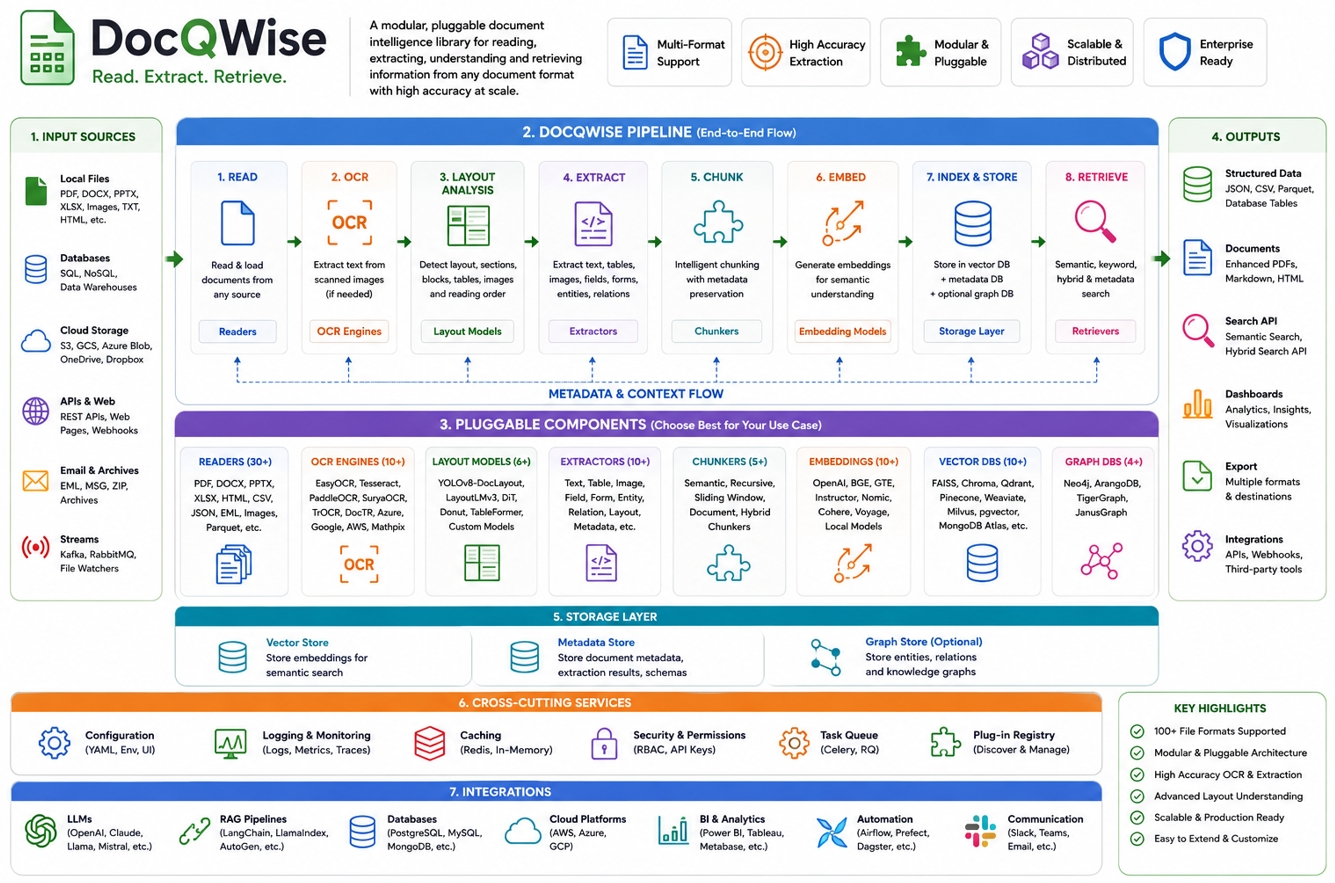
engine.py (stable — never changes)
    └── factory.py (all component selection)
            ├── ExtractorFactory  → rag | llm | vision | agentic
            ├── LLMFactory        → ollama | huggingface | openai
            ├── EmbedderFactory   → sentence-transformers | any
            ├── StoreFactory      → sqlite | faiss | any
            ├── ChunkerFactory    → structure | fixed | sentence
            └── TemplateFactory   → invoice | contract | resume | receipt

    └── agent/
            └── ExtractionAgent   → validate → retry → cross-check → merge

    └── retrieval/
            ├── RAGStrategy       → general | graphrag | multimodal
            ├── GraphRAGEngine    → entity graph + evidence chains
            └── QAEngine          → structured data Q&A

    └── server/
            └── MCPServer         → JSON-RPC over stdio (MCP protocol)
Testing
pip install pytest
pytest -v
Docker
docker compose up --build
License
Apache License 2.0
Author
Venkatkumar Rajan
Ant Intelligence Ecosystem
Documentation: https://vk-ant.github.io/ant-intelligence-ecosystem/#home
1 maintainer

Metadata
1 maintainer
Release files for docqwise 0.4.1
For a detailed explanation of source distributions (sdists) and built distributions (wheels), please see the package formats documentation.
Source distribution (sdist)
| File | Size | Uploaded | |
|---|---|---|---|
| docqwise-0.4.1.tar.gz | 96.1 kB | Details |
Built distribution (wheel)
| File | Interpreter | ABI | Platform | Reset |
|---|---|---|---|---|
| docqwise-0.4.1-py3-none-any.whl | Python 3 | none | any | Details |
Total release size: 220.9 kB
Release files / docqwise-0.4.1.tar.gz
| Download URL | docqwise-0.4.1.tar.gz |
|---|---|
| Size | 96.1 kB |
| Tags | Source |
|
SHA-256 checksum How to use checksums |
76f71ba3e63e7d6c2002ed9b56594deb6986b43f87ddbecdc58516554bce614f
|
|
BLAKE2b-256 checksum How to use checksums |
33b453d0c6fe6fc6ff11bd95975caa1c01b8ac32f1e482cd70828b1071c3a083
|
| Upload date | |
|
Uploaded using Trusted Publishing? What is trusted publishing? |
No |
| Uploaded via |
twine/7.0.0 CPython/3.14.2
|
Release files / docqwise-0.4.1-py3-none-any.whl
| Download URL | docqwise-0.4.1-py3-none-any.whl |
|---|---|
| Size | 124.8 kB |
| Tags | Python 3 |
|
SHA-256 checksum How to use checksums |
5637b1de4ce5c2d661c00da71165c11769ec72d6975951861d1054fcedb42be3
|
|
BLAKE2b-256 checksum How to use checksums |
6143183d77a7756426ea6f84602679b83743f2d93b77894215ecf80af894f116
|
| Upload date | |
|
Uploaded using Trusted Publishing? What is trusted publishing? |
No |
| Uploaded via |
twine/7.0.0 CPython/3.14.2
|














