
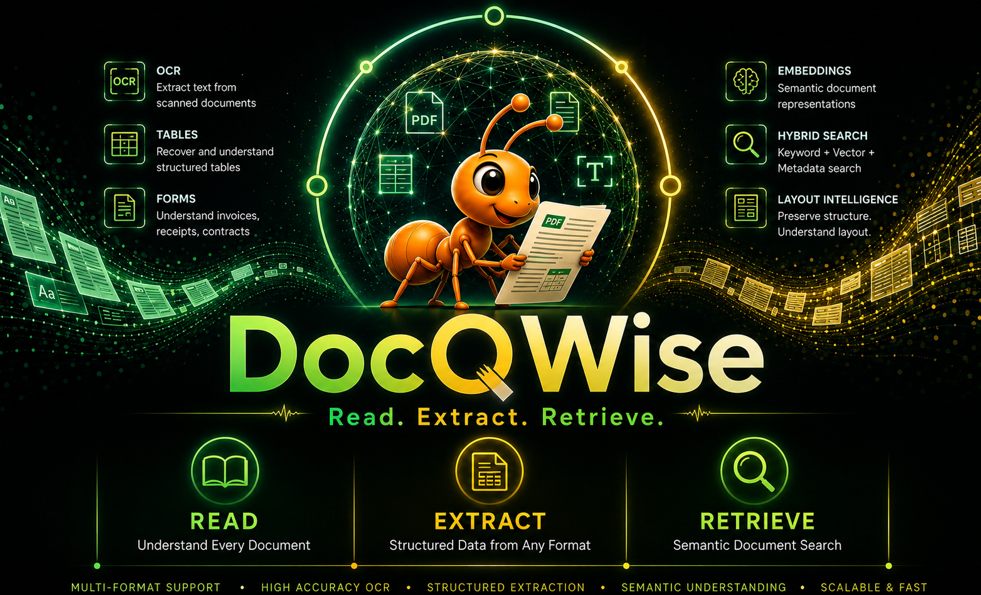
Document intelligence that adapts, accelerates, and scales.



What is DocQWise?
DocQWise is a pluggable, AI-powered document intelligence engine. It reads any document format, extracts structured data using LLMs and RAG pipeline, and retrieves information with semantic search — locally, at scale, for zero per-page cost.
Install
Choose your install based on what you need:
# Option 1: Core only (PDF reading, regex extraction, no ML)
pip install docqwise

# Option 2: With ML (RAG pipeline, embeddings, OCR — recommended)
pip install -r requirements-ml.txt

# Option 3: Everything (all features, all formats)
pip install -r requirements-full.txt
LLM backend (pick one)
# Ollama — local, free, recommended
# Download from https://ollama.com then:
ollama pull nemotron-mini

# OR HuggingFace — local GPU
pip install transformers torch bitsandbytes accelerate

# OR OpenAI — cloud API
export OPENAI_API_KEY=your-key
Quick Start
from docqwise import Docqwise

dq = Docqwise()

# Ingest any document
dq.ingest("documents/")

# Extract fields with template
result = dq.extract_fields("invoice.pdf", template="invoice")
print(result.to_json())

# Ask questions about structured data
dq.ingest("sales.csv")
answer = dq.ask("What is the total amount?")
Extraction Methods
dq = Docqwise()

# RAG (default) — chunk → embed → retrieve → LLM extract
dq.extract_fields("doc.pdf", template="invoice")

# Direct LLM
dq.extract_fields("doc.pdf", template="invoice", method="llm")

# Vision (scanned docs, handwriting)
dq.extract_fields("scan.jpg", method="vision", model="gpt-4o")

# Regex (fast, no ML)
dq.extract_fields("doc.pdf", template="invoice", method="regex")
LLM Backends
# Ollama (local)
dq.extract_fields("doc.pdf", model="nemotron-mini")

# HuggingFace (local GPU)
from docqwise.llm.hf_llm import HuggingFaceLLM
llm = HuggingFaceLLM("Qwen/Qwen2.5-3B-Instruct", quantize="4bit")
dq.extract_fields("doc.pdf", llm=llm)

# OpenAI (cloud)
dq.extract_fields("doc.pdf", model="gpt-4o-mini")
Templates
dq.extract_fields("invoice.pdf", template="invoice")
dq.extract_fields("contract.pdf", template="contract")
dq.extract_fields("resume.pdf", template="resume")
dq.extract_fields("receipt.jpg", template="receipt")

# Custom schema
schema = {
    "vendor": {"type": "string", "description": "Company name"},
    "total": {"type": "number", "description": "Total amount"},
}
dq.extract_fields("doc.pdf", schema=schema)
Custom Prompts
You design the prompts. We run the pipeline.
dq = Docqwise()

# Default — docqwise handles the prompt
dq.extract_fields("doc.pdf", template="invoice")

# Your own prompt — full control
dq.extract_fields("doc.pdf", prompt="""
You are a medical record parser.
Extract patient name, diagnosis, and prescribed medications.
Return JSON only.

Document:
{context}

JSON:
""")

# Your prompt template with schema
dq.extract_fields("doc.pdf",
    schema={"patient": {"type": "string"}, "diagnosis": {"type": "string"}},
    prompt_template="""
Given this extraction schema:
{schema}

Parse this document:
{context}

Return JSON matching the schema exactly.
""")
System Prompt
Set the LLM's role before extraction. Works with all backends and all RAG modes.
# Set the role — LLM behaves as this specialist
dq.extract_fields("invoice.pdf",
    system_prompt="You are a maritime document specialist with 20 years experience.",
    prompt="Extract vessel name, port, and total cost.

Document:
{context}

JSON:",
)

# System prompt + schema + template — full control
dq.extract_fields("contract.pdf",
    system_prompt="You are a legal analyst specializing in shipping law.",
    schema={"parties": {"type": "array"}, "liability": {"type": "number"}},
    prompt_template="Extract {schema} from:
{context}
JSON:",
)

# System prompt with GraphRAG
dq.ask_rag("What is the liability cap?",
    mode="graphrag",
    system_prompt="You are a risk analyst. Be precise with numbers.",
)
Self-Improving Corrections
result = dq.extract_fields("invoice.pdf", template="invoice")
result.correct({"tax": 33300.00, "gst_number": "29AABCU9603R1ZM"})
# Next similar document → corrections applied automatically
Structured Data Q&A
dq.ingest("sales.xlsx")
dq.ask("What is the total amount?")         # exact SUM
dq.ask("Which vendor has highest sales?")    # GROUP BY + MAX
dq.ask("How many invoices are overdue?")     # COUNT + WHERE
Source Attribution
Every answer tells you which document it came from.
# Simple ask — shows source in output
answer = dq.ask("What is the total amount?")
print(answer)
# 2,18,300.00
#   Source: sample_invoice.pdf

# Detailed answer with metadata
result = dq.ask_with_source("What is the governing law?")
print(result.answer)        # "laws of India"
print(result.source_name)   # "sample_contract.pdf"
print(result.confidence)    # 0.85
print(result.method)        # "llm"
RAG Modes
Choose your retrieval strategy:
dq = Docqwise()
dq.ingest("documents/")

# General RAG (default) — chunk → embed → retrieve → LLM
result = dq.ask_rag("total amount?", mode="general")

# GraphRAG — entity graph → graph traversal → cross-document answers
result = dq.ask_rag("Who is the vendor for PO-2012?", mode="graphrag")
print(result["answer"])         # "SuperStore"
print(result["source"])         # "invoice_001.pdf"
print(result["evidence"])       # [{entity, relation, target}, ...]

# Multimodal RAG — text + images → vision LLM
result = dq.ask_rag("What is in this scan?", mode="multimodal", source="scan.jpg")
Graph Visualization
Build and visualize document knowledge graphs:
dq = Docqwise()
dq.ingest("documents/")

# Build knowledge graph from all documents
graphrag = dq.build_document_graph()
graph = graphrag.get_graph()
print(f"Nodes: {graph.node_count}, Edges: {graph.edge_count}")

# Generate interactive HTML visualization
dq.visualize_graph(output="my_graph.html")
# Open my_graph.html in browser — interactive, color-coded, draggable nodes
All Features
dq = Docqwise()

# Ingestion
dq.ingest("file.pdf")                    # single file
dq.ingest("documents/")                  # folder (all formats)
dq.ingest("data.csv")                    # structured data

# Extraction
dq.extract_fields("doc.pdf")             # field extraction
dq.extract_tables("doc.pdf")             # table extraction
dq.extract_entities("doc.pdf")           # entity extraction
dq.extract_images("doc.pdf")             # image extraction
dq.extract_text("doc.pdf")               # text extraction
dq.auto_extract("doc.pdf")               # auto-detect + extract

# Intelligence
dq.retrieve("query", top_k=5)            # semantic search
dq.ask("question")                       # Q&A
dq.classify("doc.pdf")                   # classification
dq.compare("v1.pdf", "v2.pdf")           # comparison
dq.detect_schema("data.csv")             # schema detection
dq.detect_pii("doc.pdf")                 # PII detection
Demos
Run in order:
| Demo | What | Install |
|---|---|---|
python demo/01_quickstart.py |
All core features | pip install docqwise |
python demo/02_ollama.py |
AI extraction with Ollama | ollama pull nemotron-mini |
python demo/03_huggingface.py |
AI extraction on GPU | pip install transformers torch bitsandbytes accelerate |
python demo/04_rag.py |
Full RAG pipeline | pip install sentence-transformers |
Notebook
pip install jupyter
jupyter notebook notebooks/docqwise_getting_started.ipynb
Testing
pip install pytest
pytest -v
Docker
docker compose up --build
Architecture
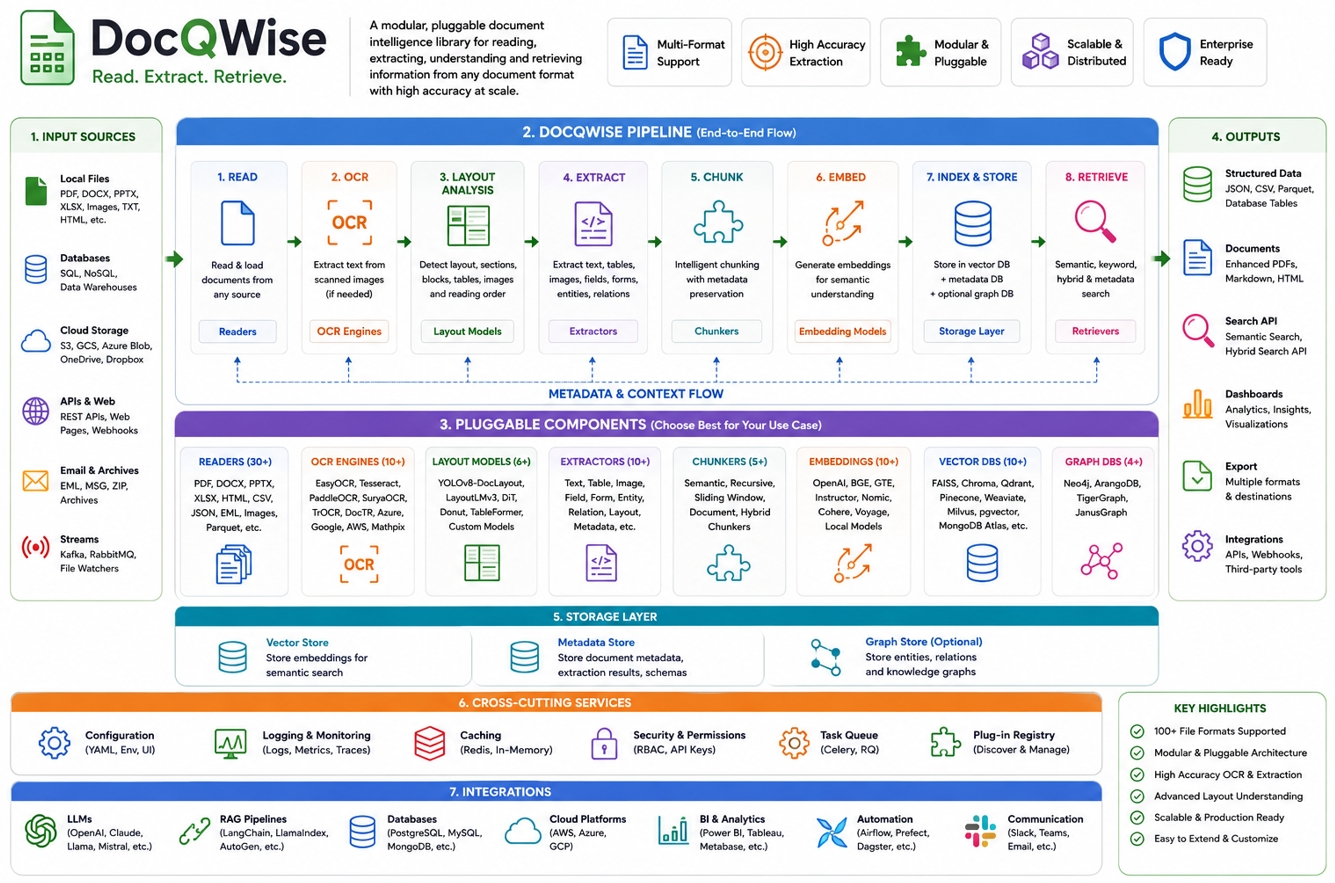
engine.py (stable — never changes)
    └── factory.py (all component selection)
            ├── ExtractorFactory  → rag | llm | vision | regex
            ├── LLMFactory        → ollama | huggingface | openai
            ├── EmbedderFactory   → sentence-transformers | any
            ├── StoreFactory      → sqlite | qdrant | faiss | any
            ├── ChunkerFactory    → structure | fixed | sentence
            └── TemplateFactory   → invoice | contract | resume | receipt
Ecosystem
| Library | Tagline | Domain |
|---|---|---|
| SightRAG | See. Search. Retrieve. | Visual intelligence |
| sonarwise | Hear. Search. Retrieve. | Audio intelligence |
| docqwise | Read. Extract. Retrieve. | Document intelligence |
| adaptive-intelligence | Learn. Remember. Adapt. | Orchestration |
| llmevalkit | Evaluate. Score. Improve. | Evaluation |
License
Apache License 2.0
Author
Venkatkumar Rajan
1 maintainer

Download files
Download the file for your platform. If you're not sure which to choose, learn more about installing packages.
Source Distribution
Built Distribution
Filter files by name, interpreter, ABI, and platform.
If you're not sure about the file name format, learn more about wheel file names.
Copy a direct link to the current filters
File details
Details for the file docqwise-0.3.1.tar.gz.
File metadata
- Download URL: docqwise-0.3.1.tar.gz
- Upload date:
- Size: 85.2 kB
- Tags: Source
- Uploaded using Trusted Publishing? No
- Uploaded via:
twine/7.0.0 CPython/3.14.2
File hashes
| Algorithm | Hash digest | |
|---|---|---|
| SHA256 |
84f93e7d98db2f0c6e68c3da9f2236269ee176a9664db39c2bb54ff86a347ca9
|
|
| MD5 |
bac0ffd0683fa6abdbdebb7fe12e9ca0
|
|
| BLAKE2b-256 |
12cc61fc4a9dfc54f1f0f6c5012464034ddaf944b4cc100944f7cd99a2efc3ea
|
File details
Details for the file docqwise-0.3.1-py3-none-any.whl.
File metadata
- Download URL: docqwise-0.3.1-py3-none-any.whl
- Upload date:
- Size: 114.9 kB
- Tags: Python 3
- Uploaded using Trusted Publishing? No
- Uploaded via:
twine/7.0.0 CPython/3.14.2
File hashes
| Algorithm | Hash digest | |
|---|---|---|
| SHA256 |
c1dec97d7b14bfabf00d365d762bc03b3343f4fb9a4d863994afa0990a74650c
|
|
| MD5 |
42e9d7a2fc5f9d849a9c71a7add3b744
|
|
| BLAKE2b-256 |
16b7f9b1dfda0386c2756593e547310fbb2a0ee9c5d622e348d0c54cde7faa1f
|







