
This project has been archived by its maintainers, and is no longer receiving any updates.
Docu-lite-kit
Standalone cli/importable components inspired by docu-lite
The first component here is the ultra-light Python parser:
- Rewritten to be more robust around docstrings
- Packaged to be useable from the command line or imported as a module into other code
- Soon to replace the parser used within docu-lite
Current plans / ideas:
- Add the 'pattern'/'include' options in the demo file as cli arguments
- Add standalone / importable docu-lite-like html rendering components
- Add standalone / importable API delta checkers
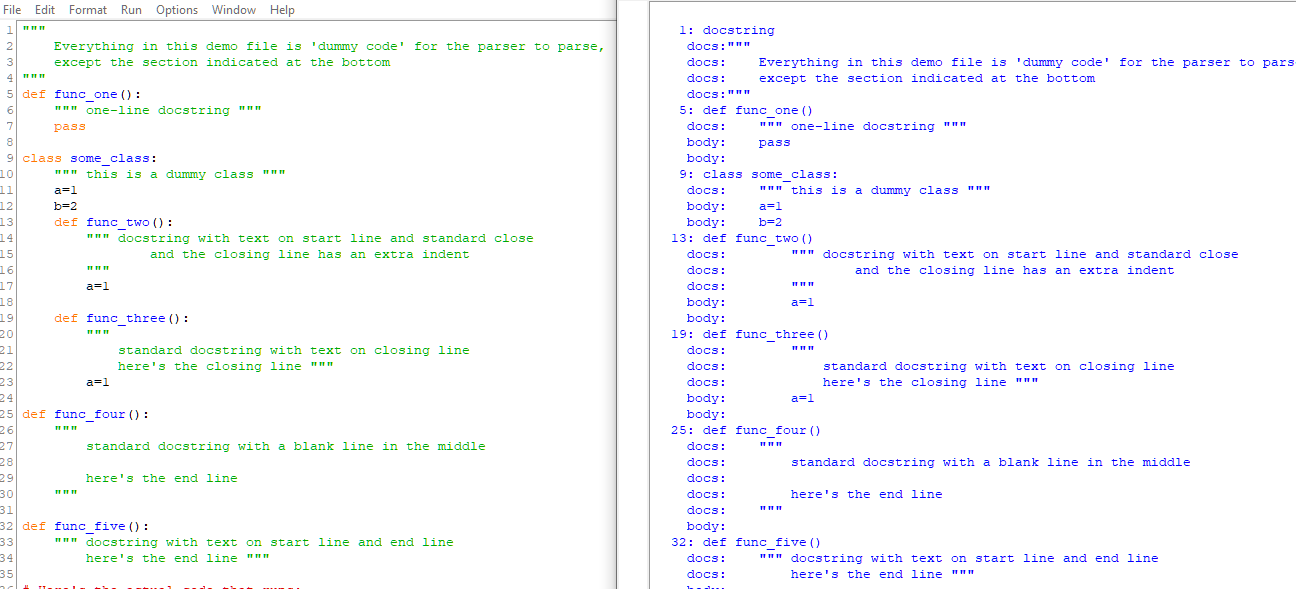
Screenshot
🛠 Installation
Install using pip: open a command window and type
pip install docu-lite-kit
💡 Usage
Command line:
dlk.cli [-h] [--out] [--noprint] input.py
- -h = show help
- --out specifies the output file (JSON format)
- --noprint = don't print the basic printout to the console
Imported as a module:
import dlk
Provides the following three interfaces (see demo_minimal.py):
    input_file = r"./demo_minimal.py"
    # parse the doc looking for objects matching a,b,c,d:
    # parser = dlk.dlkIO(input_file, [ pattern_list =  [a,b,c,d] ])
    # For the pattern list, docstring and body are implied & don't need to be mentioned.
    # The pattern list itself is optional and defaults to ['class', 'def']
    parser = dlk.dlkIO(input_file)

    # print out the result including the elements a,b,c,d:
    # parser.dlkPrint([a,b,c,d])
    # This time 'docstring' and 'body' do need to be explicitly mentioned if wanted in the printout
    # However pattern list is optional and defaults to ['class', 'def', 'docstring']
    # parser.dlkPrint( pattern_list = ['def', 'class', 'docstring', 'body'])
    parser.dlkPrint(['def', 'class', 'docstring', 'body'])

    # Similar to dlkPrint, this dumps the output to a JSON file:
    # parser.dlkDumpJSON(self, JSON_file = 'dlk.json', pattern_list = ['def', 'class', 'docstring'])
    parser.dlkDumpJSON()
1 maintainer

Metadata
1 maintainer
Release files for docu-lite-kit 0.3.0
For a detailed explanation of source distributions (sdists) and built distributions (wheels), please see the package formats documentation.
Source distribution (sdist)
| File | Size | Uploaded | Provenance | Actions |
|---|---|---|---|---|
| docu_lite_kit-0.3.0.tar.gz | 5.2 kB | Without provenance | Details for docu_lite_kit-0.3.0.tar.gz |
Built distribution (wheel)
| File | Interpreter | ABI | Platform | Actions Reset |
|---|---|---|---|---|
| docu_lite_kit-0.3.0-py3-none-any.whl | Python 3 | none | any | Details for docu_lite_kit-0.3.0-py3-none-any.whl |
Total release size: 11.1 kB
Release files / docu_lite_kit-0.3.0.tar.gz
| Download URL | docu_lite_kit-0.3.0.tar.gz |
|---|---|
| Size | 5.2 kB |
| Tags | Source |
|
SHA-256 checksum How to use checksums |
3f90209c4cc4a4d100d7e9df18472c52f88ee143a16bc6249371c46b0389eaf7
|
|
BLAKE2b-256 checksum How to use checksums |
9ef1d3883d3f31c6912bc50e7d11f685ca8b628ca624a745fa9f2d27bbc72344
|
| Upload date | |
|
Uploaded using Trusted Publishing? What is trusted publishing? |
No |
| Uploaded via |
twine/6.1.0 CPython/3.12.2
|
Release files / docu_lite_kit-0.3.0-py3-none-any.whl
| Download URL | docu_lite_kit-0.3.0-py3-none-any.whl |
|---|---|
| Size | 5.9 kB |
| Tags | Python 3 |
|
SHA-256 checksum How to use checksums |
25cffe8fbe53665262610462ef9016af2e8185e5f81e3e5509c3c50e83bea927
|
|
BLAKE2b-256 checksum How to use checksums |
60fe01cf9d921cf548a1e92e8a11f139a1d782b92684528d9497a34ca805f03e
|
| Upload date | |
|
Uploaded using Trusted Publishing? What is trusted publishing? |
No |
| Uploaded via |
twine/6.1.0 CPython/3.12.2
|
Security for docu-lite-kit 0.3.0
Provenance
Provenance describes where a file came from. On PyPI, provenance is shared via attestations, which provide a verifiable record of the build or publishing details. View details, limitations and caveats.
No provenance found
None of the files in this release were uploaded with provenance metadata.
A note on package security
PyPI is a repository for distributing packages, not a service for auditing them. While third-party security researchers and our staff do their best to detect and remove malicious packages, PyPI cannot guarantee the quality, security or suitability of any given package.
To learn more about protecting yourself from malicious actors, visit our package security documentation.














