
DOE Analyzer
Desktop application for analysing design-of-experiments results stored in CSV: one row per run, an ID column, the DOE parameters and the result functions, with the names in the first line.
Install and run
Runs on Linux and Windows with Python 3.9 or newer. From PyPI:
pip install doe_analyzer                   # or 'doe_analyzer[umap]' for UMAP embeddings (numba)
doe_analyzer                               # or: doe_analyzer file.csv | project.doeproj | --demo branin
doe_analyzer --gl software                 # WebGL in software, where the GPU driver draws blank plots
On Windows doe_analyzer-gui starts it without a console window. A desktop Linux has the system libraries Qt needs;
a minimal one (a container, a server image) needs those the CI installs (.gitlab-ci.yml).
From a clone of the repository:
python3 -m venv .venv
.venv/bin/pip install -e '.[dev,umap]'     # umap is optional (UMAP embeddings)
./doe_analyzer.sh                          # or: .venv/bin/doe_analyzer [file.csv | project.doeproj]
./doe_analyzer.sh --demo zdt_constrained   # synthetic datasets: branin, ishigami, zdt_constrained,
                                           # mixed_categorical, large_20k
./doe_analyzer.sh --diagnose               # print the WebGL renderer in use
On Windows: py -3 -m venv .venv, .venv\Scripts\pip install -e .[dev], then
.venv\Scripts\doe_analyzer-gui (no console window).
In the browser
From a clone of the repository, python scripts/build_web.py writes doe_analyzer.html: the application as one file of about 70 MB that opens in
a current Chrome, Edge or Firefox with no server and no network. It is the same application, not a report of one:
open a CSV or a project, set the columns, and use every page (the Python analysis code runs in the page, in
WebAssembly). Nothing leaves the browser.
- Files are opened with the folder button or dropped on the page; what the application writes (projects, plots as
PNG, SVG or a zip, rows, reports) is downloaded. A project is the
.doeprojfile next to its CSV: give the page both files to restore it. - Reload (F5) reads the CSV again in Chrome and Edge; other browsers cannot read a file twice and ask for it.
- Files the CSV names per run (images, curves) are given to the page with More → Add run files….
- The first start takes about ten seconds (the page unpacks Python and its libraries); the pages show at once. Long computations (surrogates, optimisation) take about as long as in the desktop application, and Cancel stops one by starting the engine again. Unlike the desktop application, pages compute one at a time (a page opened while another computes waits for it, and says so), an option changed while a page computes takes effect when that computation ends, Export all plots and the report have Stop, which stops after the current plot, and Export all plots writes PNG or SVG (a PDF is made one plot at a time).
- Not in the browser: UMAP (PCA, t-SNE and MDS are; a project saved with UMAP opens with PCA), the PDF report (the HTML report is), the log folder, recent files, Save project as… and the WebGL setting.
- The build downloads the pinned runtime once into
build/web-cache. See DEVELOPMENT.md.
Using it
- Open a CSV (Ctrl+O, or drop it on the window; the dialog's File name field takes a pasted
full path). The import preview shows the
detected encoding, delimiter and decimal separator (Swedish Excel
1,5;2,3works); override them if needed. No runs yet? New design… writes a design to run: Latin hypercube or Sobol, full or two-level fractional factorial (highest resolution), Plackett–Burman, Taguchi orthogonal arrays, central composite, Box–Behnken, D-optimal, or for a mixture a simplex lattice, simplex centroid or extreme vertices (with process variables); with a dataset open it also adds space-filling, D-optimal, centre, replicate or axial runs to its design. Reload (F5) reads the CSV again after new runs were added, keeping every setting. - Data page → Columns. Tick the ID column and the result functions; every
other column is a DOE parameter (or tick Fidelity on the column that tells
cheap runs from expensive ones). Per column:
- type (continuous / discrete / categorical),
- scale — Linear, Log10 or Symlog (signed values spread over decades; C is the half-width of the linear zone). The scale is suggested from the data and is used everywhere: plot axes, binning, correlation, models, sampling;
- for results: goal (minimise / maximise / target), a constraint (≤ / ≥ limit or a range) and an importance (1–5) for the overall desirability;
- for parameters: design-space bounds.
Constraints limits combinations of parameters (
x1 + x2 <= 10): New design, Next runs, Optimisation and What-if keep to them. A mixture is one with=(cement + water + sand = 100; found on opening when the shares add up). Derived column adds a result computed from others (P_out / P_in).
- Explore with the pages in the drawer. Lasso or box-select points in a scatter, brush parallel-coordinate axes, select table rows, click a category path: the selection is shared by every page. Highlight fades the rest; Filter shows only the selection on the other pages. Chips under the title clear it, turn it into a filter (keep only / exclude), hide failed runs or show feasible runs only.
- Export (download icon / Ctrl+E): PNG with embedded DPI, SVG and PDF
(vector), with size presets, font size and theme (publication white, current UI,
dark). Export all plots writes every page; rows can be exported as CSV with
full precision. Export plot as Python script (code icon) writes the calls
of
doe_analyzer.apithat draw the plot without the app (see Scripting below). - Save the project (Ctrl+S):
name.doeprojnext to the CSV keeps roles, scales, goals and targets, constraints, importances, bounds, derived columns, curve matches, constraints between parameters (a mixture's too), filters, page settings and the neural network's shape, and is restored automatically when the CSV is opened again.
Numbers are read and written exactly (round-trip), stored as doubles, and shown with N significant digits (Settings → Numbers); a nonzero value never shows as 0.
Pages
Every page, plot, method and option is explained in docs/HELP.md; the same text is in the app (help button or F1 for the open page, Help in the navigation drawer for all of it).
| Group | Page | What it does |
|---|---|---|
| Data | Data | Column roles, scales, goals (minimise, maximise, target), constraints (≤, ≥, range), importance, bounds, derived columns, constraints between parameters and mixtures (components adding up to a total); table; statistics |
| DOE quality | Space filling (discrepancy, distances) against a random design, 1D/2D projections, parameter correlation and VIF; where runs fail: rate per bin, classifier AUC, drivers, P(fail) map | |
| Outliers | Robust z, robust Mahalanobis (MCD), isolation forest, LOF, cross-validated model residuals; select or exclude the flagged runs | |
| Explore | Distributions | Histograms, density, box, violin, ECDF, normal QQ; split by selection or category |
| Scatter | 2D (colour, size, trend), scatter matrix, 3D, ternary (three components' shares) | |
| Parallel coordinates | Brushable axes (brushing selects), parallel categories | |
| Correlation | Pearson (scale space), Spearman, Kendall, partial, mutual information, distance correlation | |
| Structure | PCA / t-SNE / UMAP | PCA scree, loadings and biplot; t-SNE, UMAP, MDS maps |
| Self-organizing map | Component planes (each column on the same map of the runs: correlated columns look alike) and the U-matrix with the runs (groups and the borders between them; lasso to select) | |
| Clustering | k-means, Gaussian mixture, Ward, HDBSCAN, DBSCAN; profiles, choice of k, dendrogram; click a run to select its cluster | |
| Model | Sensitivity | SRC, SRRC, PRCC, RBD-FAST, PAWN, delta, type II ANOVA, main effects, interactions, half-normal plot and Pareto of effects; Sobol S1/ST and Morris on an automatic surrogate (its Q² shown); Sobol indices from a polynomial chaos expansion |
| Surrogate models | Linear model, polynomial RSM (also with terms selected by AICc), Gaussian process, RBF, random forest, extra trees, gradient boosting, SVR, MLP, kNN, polynomial chaos, multi-fidelity GP (co-kriging of cheap and expensive runs, marked by a Fidelity column), Scheffé mixture polynomials; 5-fold CV leaderboard in scale space and original units; parity, residuals, response surface, partial dependence with ICE, importance, a neural network's training history; equations and model export | |
| What-if | Sliders per parameter (a mixture's keeping their total), every result predicted with a 90 % interval, prediction profiler, desirability with importance; maximise desirability; sweet spot (probability that every constraint is met over two parameters); design space (the largest box of parameter ranges around the point in which every setting meets every constraint with the required probability); robustness (Monte Carlo of parameter tolerances: P(met), ppm out, Cpk; FORM and importance sampling for small failure probabilities); predictions for a CSV of new settings; a whole curve predicted by a reduced-order model (POD) of the runs' curves; a mixture's triangle (a result, D or P(met) over three components) | |
| Calibration | Bayesian calibration of the parameters experiments cannot set: a CSV of experiments (known settings, measured results and curves), the posterior by an ensemble MCMC on the surrogates (corner plot, credible intervals, measured against predicted, chains), the samples exported | |
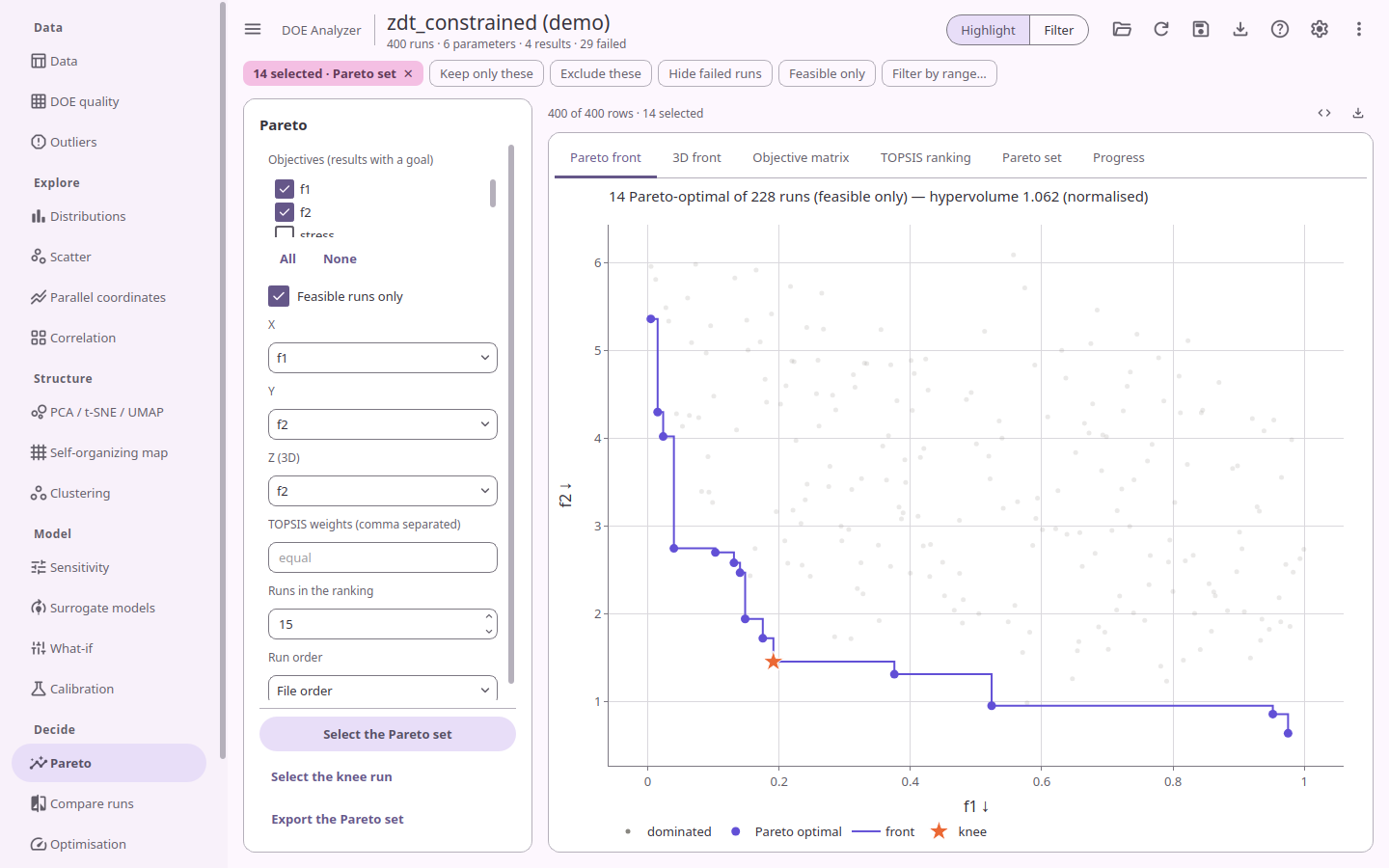
| Decide | Pareto | Non-dominated runs, 2D/3D fronts, objective matrix, hypervolume, knee, TOPSIS ranking; progress over run order (best so far, hypervolume, feasible share); export the Pareto set |
| Compare runs | The selected runs side by side (the best values in bold, unmet constraints marked), as a radar of their parameters and results, their images, the images of the best and worst runs by a result, and their curves among all runs' (columns of per-run image or curve files); match a measured curve (a result to minimise, for calibration). A run's picture also shows when hovering over its point on any plot | |
| Optimisation | Single objective (differential evolution + local polish) or NSGA-II on surrogates, with constraints; candidates with intervals and the nearest real run; robust design: the mean against the spread under parameter scatter, with reliability constraints and a limit on the spread (± 3σ), the best mean within it first | |
| Next runs | Expected improvement, probability of improvement, lower confidence bound, expected hypervolume improvement (2–3 objectives), maximum uncertainty or maximin space filling; respects constraints and avoids failure regions; exports a CSV in your column layout |
Model-based pages fit in each result's scale space (log10 of a Log10 result) and report accuracy in both spaces. Long computations run in the background with a progress bar and can be cancelled; GP fits use at most 1 500 runs, t-SNE 3 000 and MDS 1 500 by default (always stated on the plot).
Reports (download icon): an interactive HTML report (plotly inlined, opens offline) or a PDF report, with the column table, statistics and the chosen pages.
Scripting
doe_analyzer.api is the same analysis without the window: each step a function, each returning a new dataset.
Export plot as Python script writes these calls for the plot on screen; they are kept working across versions.
import doe_analyzer.api as da

ds = da.read_csv("study.csv")
ds = da.set_column(ds, "y", role="result", goal="min")
runs = da.runs(ds, [da.hide_failed()])
snap = da.snapshot(ds, runs)
opts = da.options(ds, "scatter", x="x1", y="y")
result = da.compute(snap, "scatter", opts)
fig = da.figure(snap, "scatter", "scatter", opts, result, da.publication_theme(font_pt=9))
da.export(fig, "scatter.png", width=160, height=100, unit="mm", dpi=300)     # offscreen: no display needed
Driving a study
A script can also run the study: DOE Analyzer chooses each run, your model or simulation evaluates it, and the runs go to a CSV with a project beside it that the app opens set up (bounds, goals, constraints).
import doe_analyzer.api as da

def rosenbrock(p):
    return {"f": (1 - p["x1"]) ** 2 + 100 * (p["x2"] - p["x1"] ** 2) ** 2}

study = da.Study("rosenbrock.csv", {"x1": (-2, 2), "x2": (-2, 2)}, {"f": "min"}, rosenbrock)
study.design(runs=20)                          # a New design: Latin hypercube by default
study.next_runs(budget=60, criterion="ei")     # Next runs' batches, each evaluated, to 60 runs
study.optimise(budget=600)                     # or an optimiser calling the function itself
print(study.best())
- Parameters are
(low, high),(low, high, "log10")or a list of levels (numbers: discrete, text: categorical); results a goal ("min","max") or column settings ({"goal": "min", "scale": "log10"},{"constraint": ("<=", 300)});constraints=["x1 + x2 <= 1"]holds between parameters, a mixture's too. - Choosing runs.
designevaluates any New design.next_runsproposes batches with Next runs' criteria: Expected improvement and its kin to optimise, Maximum uncertainty or Space filling to explore, EHVI for two or three goals.optimiseruns differential evolution (one goal) or NSGA-II (several) on the evaluations themselves, for models that are fast. Each stops atbudgetruns in the study. - Evaluating runs. A Python function takes the parameters as a dict and returns the results. A
simulation runs through
da.Command("mysim", workers=4): each run gets a folder of its own with aparams.txtofname = valuelines; the command runs there asmysim params.txt results.txtand writes its results the same way. An exception, an error exit or a missingresults.txtfails the run, which stays in the CSV without results (Next runs then steers away from such regions). - Stopping and going on. The CSV is the study's memory: run the script again and nothing it holds is evaluated again, so a study interrupted, or given a larger budget, goes on where it stopped.
New design's Study script… writes such a script from the design, with the results' goals, the steps and the evaluator; the desktop app runs it and shows its progress on the Study page. Open a study's project (Open project…), finished or still running, to analyse it on every page.
examples/rosenbrock minimises Rosenbrock's function with each strategy, and with the function run as a separate program.
Tests
.venv/bin/pytest                    # everything, headless (offscreen + software WebGL)
.venv/bin/pytest -m "not webengine" # without QtWebEngine
.venv/bin/python scripts/bench.py   # responsiveness on 20 000 rows
.venv/bin/python scripts/export_all.py --demo all --out /tmp/plots
.venv/bin/python scripts/build_help.py   # regenerate docs/HELP.md after editing doe_analyzer/data/help/*.md
License
MIT, see LICENSE. The icons are Google's Material Symbols, under Apache-2.0: doe_analyzer/data/icons/LICENSE.
1 maintainer

Metadata
1 maintainer
Release files for doe-analyzer 0.4.0
For a detailed explanation of source distributions (sdists) and built distributions (wheels), please see the package formats documentation.
Source distribution (sdist)
| File | Size | Uploaded | Provenance | |
|---|---|---|---|---|
| doe_analyzer-0.4.0.tar.gz | 797.1 kB | Without provenance | Details |
Built distribution (wheel)
| File | Interpreter | ABI | Platform | Reset |
|---|---|---|---|---|
| doe_analyzer-0.4.0-py3-none-any.whl | Python 3 | none | any | Details |
Total release size: 1.4 MB
Release files / doe_analyzer-0.4.0.tar.gz
| Download URL | doe_analyzer-0.4.0.tar.gz |
|---|---|
| Size | 797.1 kB |
| Tags | Source |
|
SHA-256 checksum How to use checksums |
11d841f57fedb1abff5f8900db9fce0402b23bd1a10baf7344cc4061dc8342cf
|
|
BLAKE2b-256 checksum How to use checksums |
538f6ac3edeec13104990d2988438de2cdf49690b8911afe8b99d78a1a8673db
|
| Upload date | |
|
Uploaded using Trusted Publishing? What is trusted publishing? |
Yes |
| Uploaded via |
twine/7.0.0 CPython/3.12.15
|
Release files / doe_analyzer-0.4.0-py3-none-any.whl
| Download URL | doe_analyzer-0.4.0-py3-none-any.whl |
|---|---|
| Size | 652.9 kB |
| Tags | Python 3 |
|
SHA-256 checksum How to use checksums |
c892681a868f6ef1cc4e157f293a4ed077e636dd9ffb1e9c235ca4818b24a3b4
|
|
BLAKE2b-256 checksum How to use checksums |
3746fb1c6a384e10def3d10b960969ffa6adb25674f259e40e8ef2b51a1b3a68
|
| Upload date | |
|
Uploaded using Trusted Publishing? What is trusted publishing? |
Yes |
| Uploaded via |
twine/7.0.0 CPython/3.12.15
|
Security for doe-analyzer 0.4.0
Provenance
Provenance describes where a file came from. On PyPI, provenance is shared via attestations, which provide a verifiable record of the build or publishing details. View details, limitations and caveats.
No provenance found
None of the files in this release were uploaded with provenance metadata.
A note on package security
PyPI is a repository for distributing packages, not a service for auditing them. While third-party security researchers and our staff do their best to detect and remove malicious packages, PyPI cannot guarantee the quality, security or suitability of any given package.
To learn more about protecting yourself from malicious actors, visit our package security documentation.














