
Dokli


A magical CLI/TUI for interacting with Dokploy.
                                                                    █
                                                                   ████
                                                                    ███████            █
               █████████████████████████                             ████████   ████████
             ███████████████████████████████                          ██████████████████
            ████                        █████████                       ██████████████
            ████          ███               █████████                      ████
            ███           ███                   ██████████               █████
            ███                                      ████████████████████████
            ████████████████                              █████████████████
            ██████████████████████                               ███████
            ████            ██████████                     ██████████          ██████
             ██████               ███████████████████████████████          ████████
               ████████                ████████████████████             ████████
             █     █████████                                        ████████     ███
            █████      █████████                                ████████      ██████
            ████████       ███████████                    ███████████      █████████
            ████ ██████         ████████████████████████████████        ███████ ████
            ████   ███████            ████████████████████           ███████    ████
             █████    ████████                                   ████████    ██████
              ███████     ████████                           █████████     ███████
              █████████      ████████████              ███████████      ██████████
               ████ ██████        ████████████████████████████       ███████ ████
                ████   ██████            ██████████████            ██████   ████
                 █████   ███████                               ████████   █████
                   █████    █████████                      █████████    █████
                    ██████      ████████████████████████████████      ██████
                      ██████         ██████████████████████         ██████
                        ███████                                  ██████
                           ████████                          ████████
                              ███████████               ██████████
                                   ██████████████████████████
                                          ████████████
Installation
pip install dokli
# with TUI support
pip install "dokli[tui]"

# with uv tool
uv tool install dokli
# with TUI support from UV
uv tool install "dokli[tui]"

# latest from git
pip install git+https://github.com/jonykalavera/dokli.git
# with TUI support from git
pip install git+https://github.com/jonykalavera/dokli.git#egg=dokli[tui]
Tested with Dokploy versions:
- 0.29.13
Configuration
Create the configuration file at ~/.config/dokli/dokli.yaml. Example:
connections:
  - name: test-env
    url: https://test.example.com
    api_key: ****************************************
    notes: "Our test environment. Handle with care!"
  - name: prod-env
    url: https://prod.example.com
    api_key_cmd: "secret-tool lookup dokli prodEnvApikey"
    notes: "Our prod environment. Handle with even more care!"
You can use api_key_cmd to load the API key from a command such as secret-tool instead of entering it in the config file. This is highly recommended for security reasons.
Configuration uses pydantic-settings which means it can also be set via environment variables using the DOKLI_ prefix.
You can also manage connections with dokli connections ls|add|update|remove|get|test, or from the TUI.
Secrets in the system keychain
API keys, git provider credentials and database passwords can be stored in your OS keychain instead of the YAML files:
dokli secrets set|get|rm <account>— manage keychain entries (accounts likeconn.<name>,provider.<name>,db.<name>);getmasks by default,--showprints in plain text.dokli connections add <name> --keyring/dokli connections update <name> --keyring— store the API key in the keychain (api_key_keyring: true) so it never touches the config file.- In manifests,
token_keyring: true(git providers) andpassword_keyring: true(databases) resolve those secrets from the keychain at apply time. Genericresources:fields resolve secrets with{"keyring": "account"}or{"cmd": "..."}indata. - Resolution order is: literal value → keychain →
*_cmd.
Uses the cross-platform keyring package (SecretService / macOS Keychain / Windows Credential Locker).
CLI
Features
- Commands are inferred from the OpenAPI spec, which allows:
- support for multiple Dokploy API versions.
- support for all API entities actions/verbs.
- magical JSON parameters
%json:{"projectId": "daspdoada798sda"} - magical file parameters
%file:/path/to/data/foo.redis.json - shell completion for configured connection names (
dokli state <TAB>,dokli connections get <TAB>, ...) - output formats:
- yaml
- json
- python
- table (experimental)
Usage
$ dokli

 Usage: dokli [OPTIONS] COMMAND [ARGS]...

 Magical Dokploy CLI/TUI.


╭─ Options ───────────────────────────────────────────────────────────────────────────╮
│ --install-completion          Install completion for the current shell.             │
│ --show-completion             Show completion for the current shell, to copy it or  │
│                               customize the installation.                           │
│ --help                        Show this message and exit.                           │
╰─────────────────────────────────────────────────────────────────────────────────────╯
╭─ Commands ──────────────────────────────────────────────────────────────────────────╮
│ tui      Text User Interface.                                                       │
│ init     Scaffold a new dokli manifest.                                             │
│ refresh  Refetch and refresh the cached OpenAPI schema for a connection.            │
│ state    Show the current state of a Dokploy instance.                              │
│ plan     Show what would change between the manifest and the live instance.         │
│ apply    Apply the manifest to a Dokploy instance (idempotent, additive).           │
│ validate Validate the manifest offline against the connection's schema.             │
│ export   Export the live state of an instance into a manifest.                      │
│ api      API commands                                                               │
│ connections  Manage connections.                                                    │
╰─────────────────────────────────────────────────────────────────────────────────────╯

$ dokli api test-env project all
- organizationId: ysHDHlhX4a3zOG2fLsske
  applications: []
  compose: []
  createdAt: '2024-08-05T02:45:38.168Z'
  description: null
  mariadb: []
  mongo: []
  mysql: []
  name: Dokli
  postgres: []
  projectId: zuanf1SWHMFO11y6xqpRR
  redis: []

$ dokli api test-env project create --body '%json:{"name": "Dokli"}' --format table
               API Response
┏━━━━━━━━━━━━━━━━━━━━┳━━━━━━━━━━━━━━━━━━━━━━━━━━┓
┃ Key                ┃ Value                    ┃
┡━━━━━━━━━━━━━━━━━━━━╇━━━━━━━━━━━━━━━━━━━━━━━━━━┩
│ projectId          │ zuanf1SWHMFO11y6xqpRR    │
│ name               │ Dokli                    │
│ description        │ None                     │
│ createdAt          │ 2024-08-05T02:45:38.168Z │
│ organizationId     │ ysHDHlhX4a3zOG2fLsske    │
└────────────────────┴──────────────────────────┘

$ dokli api test-env project one --format json zuanf1SWHMFO11y6xqpRR
{"projectId": "zuanf1SWHMFO11y6xqpRR", "name": "Dokli", "description": null,
"createdAt": "2024-08-05T02:45:38.168Z", "organizationId": "ysHDHlhX4a3zOG2fLsske",
"applications": [], "mariadb": [], "mongo": [], "mysql": [], "postgres": [],
"redis": [], "compose": []}
Dokli as Code
Dokli can manage a Dokploy instance declaratively, like Docker Compose for Dokploy. A manifest file (dokploy.yaml) describes the desired state and dokli apply brings the instance to match it — idempotent and additive (it never deletes resources that are not in the manifest, unless you pass --prune).
Commands
| Command | Description |
|---|---|
dokli init |
Scaffold a new manifest. |
dokli refresh [connection] |
Refetch and refresh the cached OpenAPI schema for a connection. |
dokli state [connection] |
Show the current state of an instance. |
dokli plan [-f dokploy.yaml] [--prune] |
Preview what would change. -f also accepts a directory (every *.yaml/*.yml in it). --prune also plans deletions. |
dokli apply [-f dokploy.yaml] [--dry-run] [--deploy] [--prune] |
Configure the instance to match the manifest. --dry-run only previews; --deploy also triggers deployments. |
dokli validate [-f dokploy.yaml] |
Validate the manifest offline against the connection's schema. |
dokli export [connection] [-o file] [--include-secrets] |
Reverse-engineer a live instance into a manifest, including generic resources:. |
--prune (destructive): deletes child records and services that exist in the instance but are not described in the manifest — scoped to projects declared in the manifest; projects and environments absent from it are never touched. Always preview with dokli plan --prune first.
Manifest
# dokploy.yaml
apiVersion: v1
connection: prod

git_providers:
  - name: github
    provider: github
    token_cmd: "secret-tool lookup dokli github"

projects:
  - name: myapp
    services:
      - type: compose
        name: backend
        source:
          provider: github
          repository: <owner>/backend
          branch: main
        compose_path: docker-compose.yml
      - type: application
        name: web
        image: nginx:latest
        env: |
          NODE_ENV=production

resources:
  - kind: domain
    name: www.example.com
    in: compose:backend
    data:
      host: www.example.com
      https: true
  - kind: port
    name: 8080
    in: application:web
    data:
      publishedPort: 8080
      targetPort: 80
      protocol: tcp
apiVersionis the Dokli manifest format version (onlyv1today);dokployVersion(the Dokploy API version the manifest was written against) is stamped byinit/export.- Services live in the project's default environment (Dokploy creates one per project).
compose_fileaccepts raw compose YAML or a path to a local file (mutually exclusive withsource).- Secrets are never stored in the manifest. Git provider credentials are write-only in Dokploy's API; reference them with
token_cmd(same pattern asapi_key_cmd).exportredacts service environment variables by default (--include-secretsto include them) and reports which providers need credentials.
*_cmd references (api_key_cmd, token_cmd, password_cmd) run through a shell, so they can resolve secrets from tools like Ansible Vault:
# dokploy.yaml
projects:
  - name: myapp
    services:
      - type: postgres
        name: db
        password_cmd: "ansible-vault view --vault-password-file ~/.vault-pass secrets/vault.yml | yq -r '.db_password'"
Generic resources
projects: describes the services themselves (the typed backbone: state, plan/apply, deploy). resources: describes the leaf records that hang off those services — domains, ports, redirects, security, schedules, backups, mounts. They are resolved against the connection's OpenAPI document, so any field (or future entity) is supported without a code change.
A resource has kind, name, in (the parent path) and data (the create/update fields; parent ids are derived from in, never repeated in data):
resources:
  - kind: domain
    name: www.example.com
    in: project:myapp / environment:production / compose:backend
    data:
      host: www.example.com
      https: true
inis a<kind>:<name>path to the parent service. Ancestor segments (project:,environment:) scope the lookup and disambiguate same-named services across projects.in: compose:backendalone matches globally.- Matching is string-based on a per-kind match key, falling back to
name:domain → host,port → publishedPort,redirects → regex,security → username,mount → filePath,backup → schedule. - Parent restrictions:
port/security/redirectshang offapplicationservices only;domainoffapplication/compose;mountoff any service.dokli validateflags violations. - Secrets in
datause the same dict references as elsewhere:{"cmd": "..."}(run through a shell) or{"keyring": "account"}(from your OS keychain):
resources:
  - kind: security
    name: admin
    in: application:web
    data:
      username: admin
      password: {keyring: app-web-admin}
apply is additive here too: an existing resource is updated, a missing one is created, and nothing is ever deleted because it is absent from the manifest. dokli export emits the instance's existing child records as resources: entries (match key included, ids and secrets omitted; backup destinations by name), so the manifest round-trips: export → edit → apply.
Workflow
dokli export <conn> -o dokploy.yaml   # capture an existing instance
dokli plan                           # preview changes
dokli apply --dry-run                # dry run
dokli apply                          # configure the instance
-f accepts a directory: apply/plan/validate then process every
*.yaml/*.yml in it (sorted), one report per manifest.
TUI
A schema-driven TUI (dokli tui) that generates its interface from the Dokploy OpenAPI document — no hand-written screens per entity, so it adapts to any API version.
- Yazi-style 3-column browser: parent | current | detail, with
j/knavigate,h/ldrill in/out,/filter,F5refresh, and auto-generated action keybindings per entity. - Command palette (
ctrl+p): search across commands and the focused screen's available actions, with shortcuts shown in the help line. - Help (
?): lists the app, screen and contextual keybindings. - Related actions: entities whose list action needs a parent (e.g.
deployment.allByCompose) are surfaced as a separate contextual action on the parent record (Deploymentson a compose/application/server,d), opening a navigable list; entities whoseallrequires a parent are listed at the top level via their canonical no-param action (e.g.deployment.allCentralized). - Children by category: drilling into a record shows an intermediate level
of child categories — e.g.
Containers,Deployments,Domains (N),Mounts (N),Ports (N)— with free counts for nested arrays and lazy loading for containers/deployments. Selecting a category lists its records; a single-category record drills straight through, and environments (a per-project filter) go directly to their services. - Containers: selecting a container exposes docker actions
(restart/stop/start/...) and the parent service's logs
(
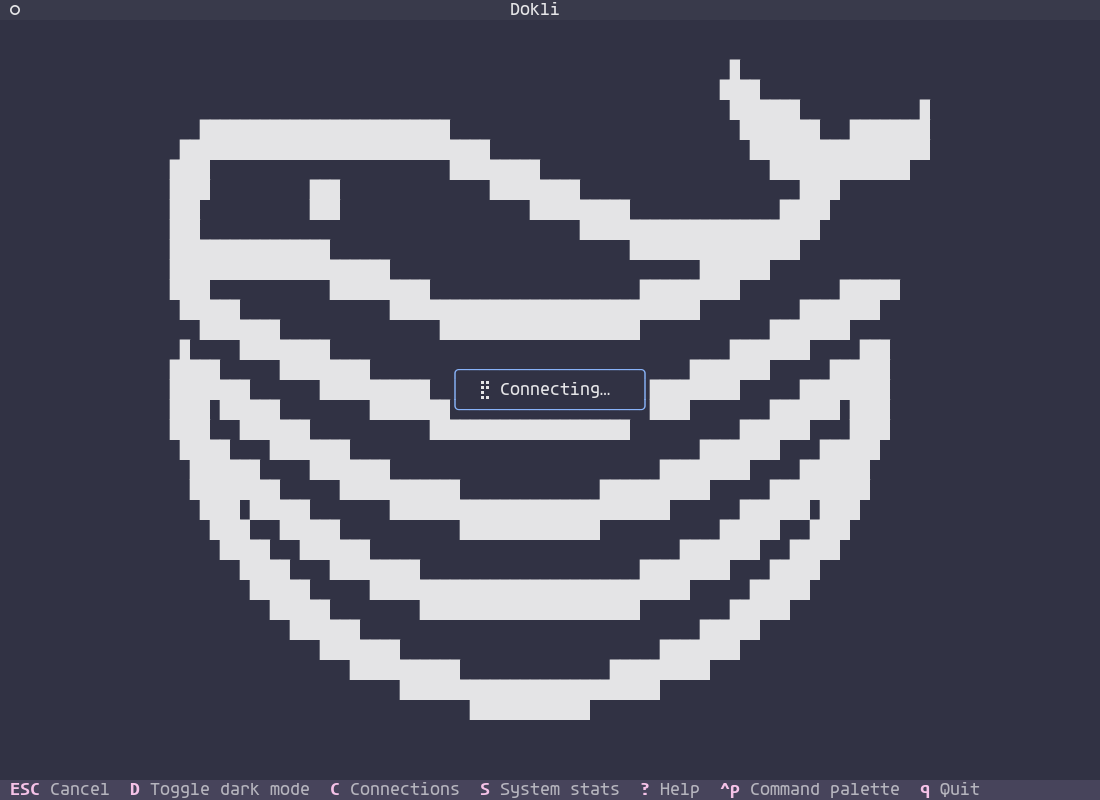
compose.readLogs/application.readLogswith the container id); swarm-aware forstackcomposes.delete/removeactions are bound to the Delete key,deploytox. - Loading feedback: a splash screen with the Dokploy logo shows while a
connection's schema is fetched (off the event loop;
escapecancels it), and loading spinners appear while the browser refreshes entities and results re-fetch. API calls run off the event loop and time out quickly, so an unreachable instance never freezes the UI; a live connectivity check warns when the instance is unreachable but a cached schema was used. - Results: read-only queries open a result screen with search (
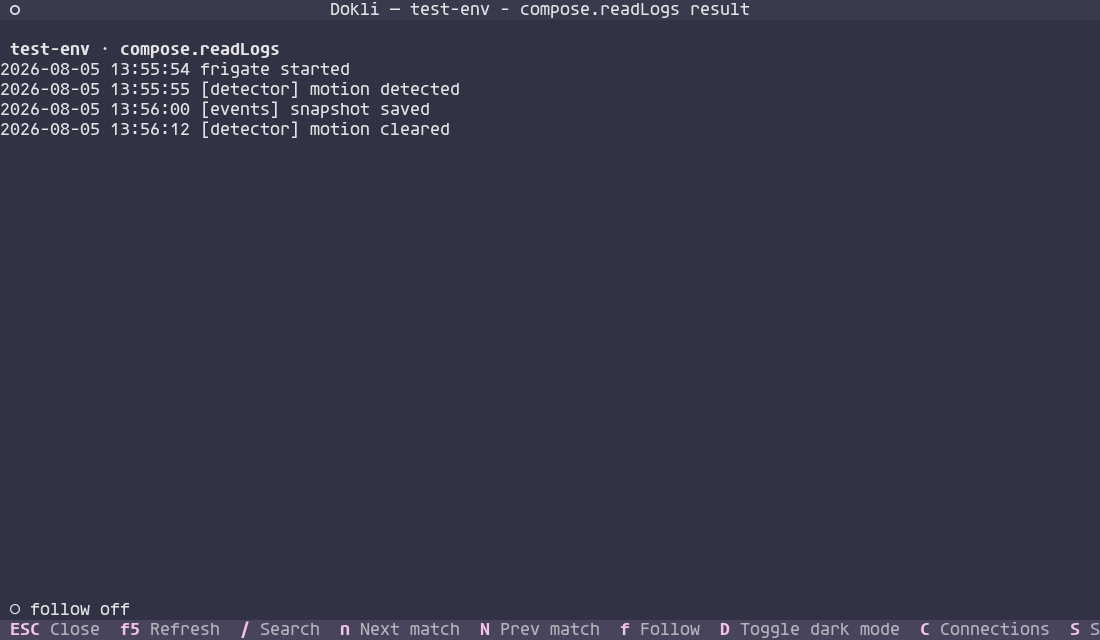
/,n/Nto jump) andF5to re-fetch — handy for logs. - Forms: foreign-key id fields (
serverId,destinationId,registryId,certificateId,sshKeyId, git provider ids,environmentIdscoped to the current project, service/db parents likecomposeId/postgresIdenumerated across the project tree, andmounts.create'sserviceIddriven byserviceType) render as a dropdown of live candidates instead of a raw id; when the source is empty or unreachable they fall back to free text. Parent-id fields of child records are hidden and injected from the navigation context. Update forms (and the wizard, which skips the hidden steps) hide provider-specific fields until a switch value is chosen (e.g.sourceType=rawshows the inlinecomposeFileand hides the github/bitbucket/gitlab/gitea fields — git sources show their repo path instead; applications also gate build fields onbuildType, which is itself hidden forsourceType=docker). - Entity icons are color-coded (Catppuccin palette), and container states show as a traffic-light dot.
- Connections are managed from the TUI (add/edit/delete, persisted to the config file);
dokli tui [connection]opens a specific connection directly. - Mask secret-like fields in forms and results.
Connections
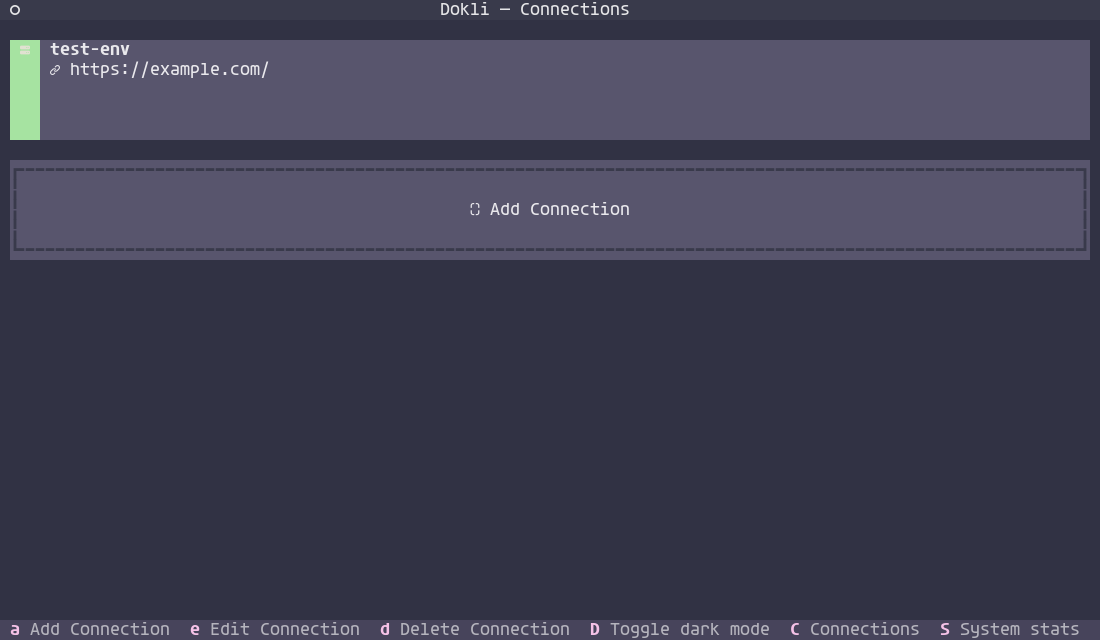
Yazi-style browser
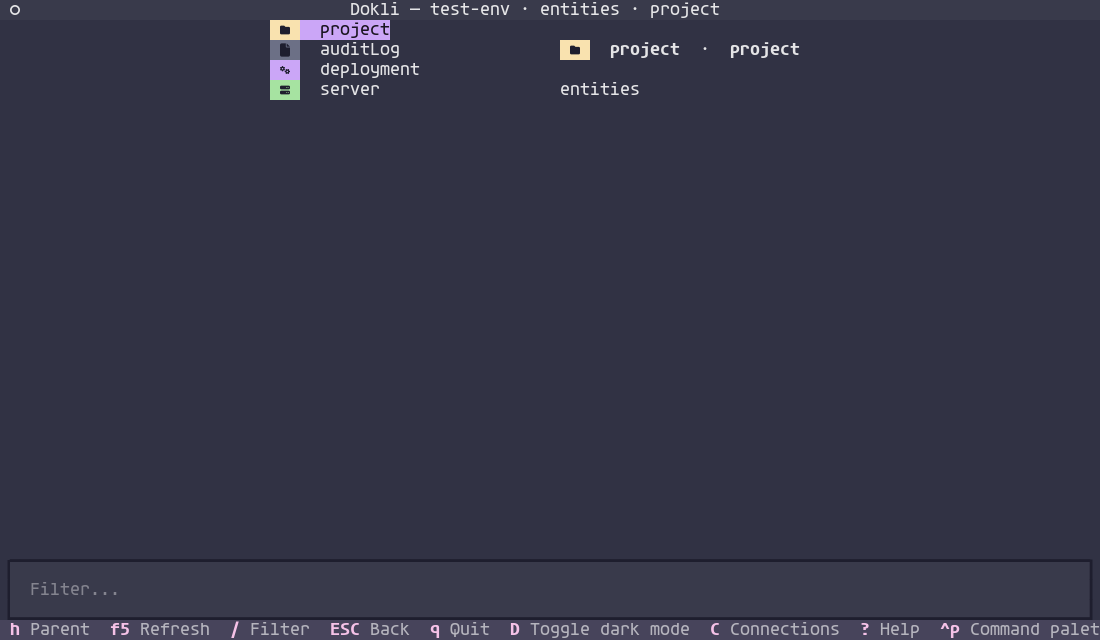
Compose detail
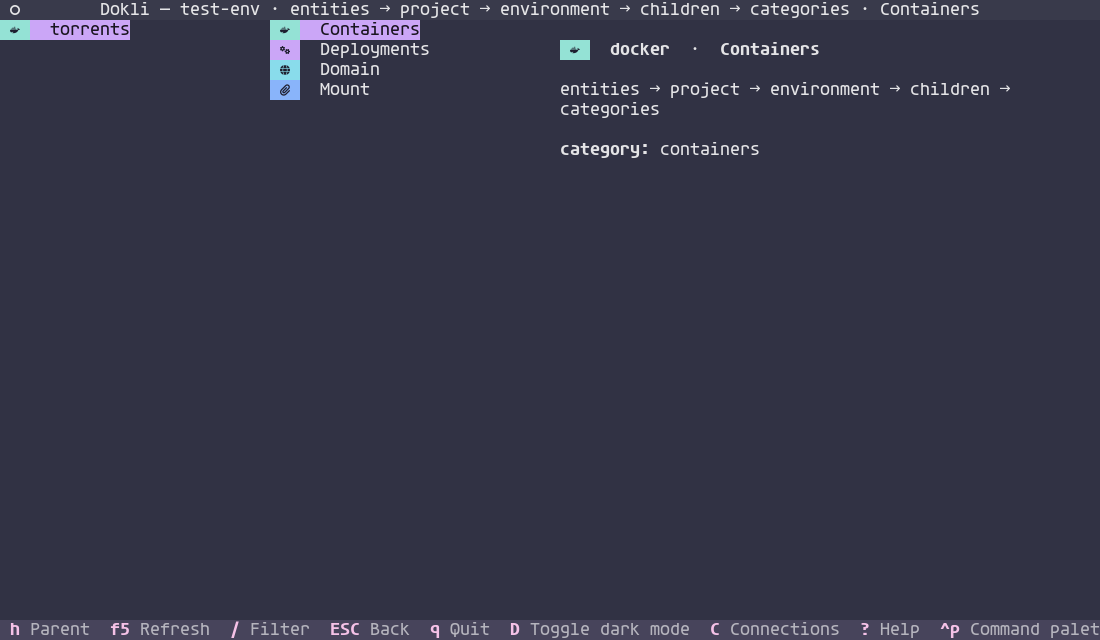
Command palette
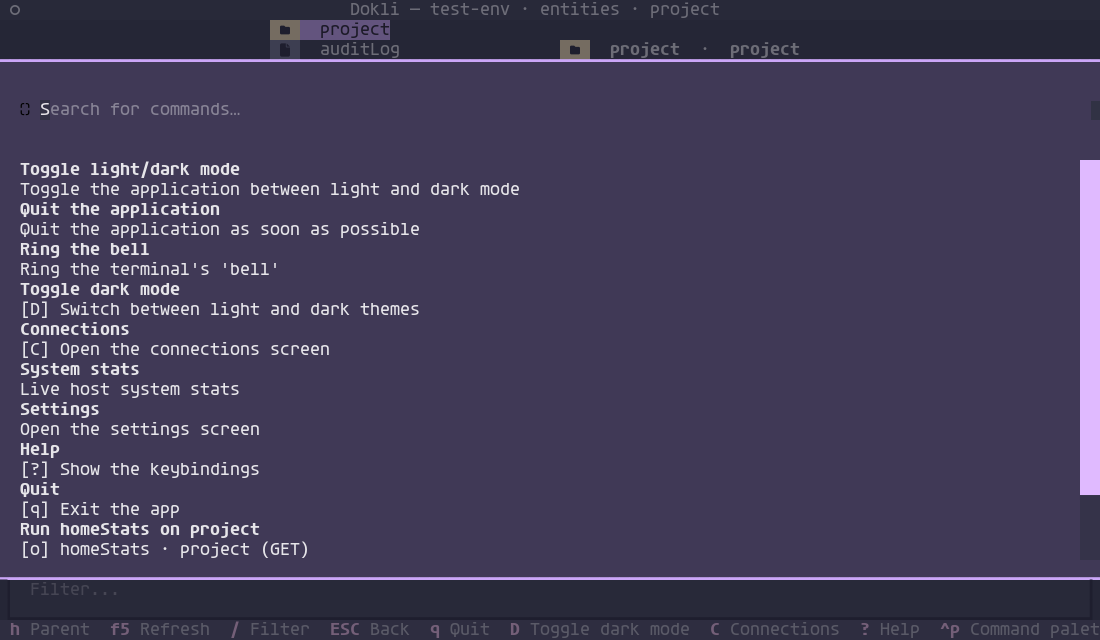
Result view (logs + search)
Splash
TUI customization
A tui: section in the config customizes the appearance and behavior (defaults
are the built-in Catppuccin look, so nothing breaks):
tui:
  theme: dark            # or "light"
  colors:                # Textual ColorSystem field overrides (both variants)
    primary: "#89b4fa"
    background: "#1e1e2e"
  entity_colors:         # per-entity icon colors (compose, application, redis, ...)
    compose: "#a6e3a1"
    redis: "#fab387"
  state_colors:          # container-state traffic-light colors
    running: "#a6e3a1"
    exited: "#f38ba8"
  entity_order: [project]   # entities surfaced first in the browser list (default: project)
  keys:
    app:                 # app-level actions: toggle_dark, connections, help, quit, command_palette, cancel
      connections: n
    verbs:               # action verbs: create, update, delete, deploy, ...
      deploy: z
  auto_deploy: false     # deploy a service after a create/update from a form
colorsaccepts anyColorSystemfield:primary,secondary,warning,error,success,accent,background,surface,panel,boost. Accent fields apply to both theme variants; structural fields (background,surface,panel) only affect the activetheme:variant, so toggling light/dark (D) still switches the background.- App keys remap the global shortcuts (
Ddark,Cconnections,?help,qquit,ctrl+ppalette,escapeback); remapped keys are reserved so entity actions never clash with them. entity_colorsoverrides the per-entity icon colors (compose,application,redis,project, ...);state_colorsoverrides the container-state traffic-light colors (running,paused,exited,dead, ...). Any entity/state not listed keeps its default.entity_orderlists the entities surfaced first in the top-level browser list (in order); the rest follow alphabetically. Empty defaults toprojectfirst.keys.verbsoverrides the per-action bindings (deployisx,redeployX,deleted, ...).auto_deploytriggers the entity'sdeployaction after a successful create/update form (best effort — skipped when the record id is unknown).
Motivation
The CLI is designed to keep up with any changes in the API. Commands are dynamically inferred from the OpenAPI spec.
I did this because I want to do some test automation and the official CLI seems incomplete at the moment. The TUI is because I am into tools like yazi, lazygit, k9s, dry, etc. I like to keep my terminal open at all times $.
Also, it seemed to me like something cool to do this weekend. I learned a bunch about textual, typer and Dokploy.
Release
Releases are automated via GitHub Actions (.github/workflows/release.yml): pushing a v* tag builds the package with uv build, publishes it to PyPI via trusted publishing (OIDC), and creates a GitHub Release.
make release VERSION=0.2.0
This requires the repo to be configured as a trusted publisher on PyPI (no API token needed). The version in pyproject.toml must match the tag.
Buy me a 🌮
I'm Mexican, I prefer tacos. But ☕ is also nice. You can use the 🫶 sponsor button on the top.
Also pretty please and thanks in advance 🥺.
1 maintainer

Download files
Download the file for your platform. If you're not sure which to choose, learn more about installing packages.
Source Distribution
Built Distribution
Filter files by name, interpreter, ABI, and platform.
If you're not sure about the file name format, learn more about wheel file names.
Copy a direct link to the current filters
File details
Details for the file dokli-0.4.1.tar.gz.
File metadata
- Download URL: dokli-0.4.1.tar.gz
- Upload date:
- Size: 459.5 kB
- Tags: Source
- Uploaded using Trusted Publishing? Yes
- Uploaded via:
twine/7.0.0 CPython/3.13.14
File hashes
| Algorithm | Hash digest | |
|---|---|---|
| SHA256 |
ab9d9e5efc137c17418e81097180dff53de4a6fa1e2cd4b5543007089358c514
|
|
| MD5 |
302c500b96805465dcb9b3c852a18225
|
|
| BLAKE2b-256 |
84f060663e0c4c56f456e09ae687e5fea014a4506647aacabeae03fea4fcd995
|
Provenance
The following attestation bundles were made for dokli-0.4.1.tar.gz:
Publisher:
release.yml on jonykalavera/dokli
-
Statement:
-
Statement type:
https://in-toto.io/Statement/v1 -
Predicate type:
https://docs.pypi.org/attestations/publish/v1 -
Subject name:
dokli-0.4.1.tar.gz -
Subject digest:
ab9d9e5efc137c17418e81097180dff53de4a6fa1e2cd4b5543007089358c514 - Sigstore transparency entry: 2510393431
- Sigstore integration time:
-
Permalink:
jonykalavera/dokli@33c9756568f8dbde6a88e5084bc52a44afbcbe57 -
Branch / Tag:
refs/tags/v0.4.1 - Owner: https://github.com/jonykalavera
-
Access:
public
-
Token Issuer:
https://token.actions.githubusercontent.com -
Runner Environment:
github-hosted -
Publication workflow:
release.yml@33c9756568f8dbde6a88e5084bc52a44afbcbe57 -
Trigger Event:
push
-
Statement type:
File details
Details for the file dokli-0.4.1-py3-none-any.whl.
File metadata
- Download URL: dokli-0.4.1-py3-none-any.whl
- Upload date:
- Size: 113.9 kB
- Tags: Python 3
- Uploaded using Trusted Publishing? Yes
- Uploaded via:
twine/7.0.0 CPython/3.13.14
File hashes
| Algorithm | Hash digest | |
|---|---|---|
| SHA256 |
18dd3933cbe1657ce8de16d02b325af5d562becc537cd4c8d992f1980ed479cf
|
|
| MD5 |
51cf5289423d48a00b5608f66f136a29
|
|
| BLAKE2b-256 |
702e3581c6a7b1400c6b5ef92d0ff8f9af5b11680e74430048a73b44d22478dc
|
Provenance
The following attestation bundles were made for dokli-0.4.1-py3-none-any.whl:
Publisher:
release.yml on jonykalavera/dokli
-
Statement:
-
Statement type:
https://in-toto.io/Statement/v1 -
Predicate type:
https://docs.pypi.org/attestations/publish/v1 -
Subject name:
dokli-0.4.1-py3-none-any.whl -
Subject digest:
18dd3933cbe1657ce8de16d02b325af5d562becc537cd4c8d992f1980ed479cf - Sigstore transparency entry: 2510393667
- Sigstore integration time:
-
Permalink:
jonykalavera/dokli@33c9756568f8dbde6a88e5084bc52a44afbcbe57 -
Branch / Tag:
refs/tags/v0.4.1 - Owner: https://github.com/jonykalavera
-
Access:
public
-
Token Issuer:
https://token.actions.githubusercontent.com -
Runner Environment:
github-hosted -
Publication workflow:
release.yml@33c9756568f8dbde6a88e5084bc52a44afbcbe57 -
Trigger Event:
push
-
Statement type:














