
DP4+ App
This repository contains the tool presented in the publication titled DP4+App: Finding the Best Balance between Computational Cost and Predictive Capacity in the Structure Elucidation Process by DP4+. Factors Analysis and Automation, published in the Journal of Natural Products on September 18, 2023.
For all work using DP4+App please cite the primary publication:
- _J. Nat. Prod. 2023, 86, 10, 2360–2367 . https://doi.org/10.1021/acs.jnatprod.3c00566
If your work also uses one of the specialized modes below, please additionally cite the corresponding method paper:
- Gibbs-weighting mode: Amichetti, M.; Franco, B. A.; Zanardi, M. M.; Sarotti, A. M. "To Gibbs or Not to Gibbs: Effect of Entropic Contribution in the NMR Calculations of Flexible and Polar Molecules—Updating the DP4+App." Magn. Reson. Chem. 2024, 63(1), 74-85. https://doi.org/10.1002/mrc.5491
- HALO-DP4+ mode (organohalogenated molecules): Zanardi, M. M.; Sarotti, A. M. et al. "Mending Ties with Halogens. HALO-DP4+: An Approach for DP4+ Calculations in Organohalogenated Molecules." J. Org. Chem. 2025, 90 (44), 15737–15747. https://doi.org/10.1021/acs.joc.5c01979
- STX150 training/report tools: Luciano, E. R.; Armas Argentino, M. G.; Comba, M. B.; Franco, B. A.; Passaglia, L.; Amichetti, M. D.; Zanardi, M. M.; Sarotti, A. M. "STX150: A Curated Database for the Development and Validation of DP4+ Methods." J. Chem. Inf. Model. 2026, ASAP. https://doi.org/10.1021/acs.jcim.6c01653
A tool for DP4+, MM-DP4+ and Custom DP4+ probability calculation
The DP4+App is a powerful tool designed to assist researchers in the structure elucidation process by balancing computational cost and predictive capacity using DP4+ factors analysis and automation. It provides valuable insights and streamlines the decision-making process, making it a valuable asset for chemists and researchers working in natural product chemistry and related fields.
This is a comprehensive software was designed to facilitate DP4+ and MM-DP4+ calculations. With its user-friendly graphical interface, users can seamlessly handle multiple Gaussian calculations and leverage automated data processing for accurate probabilistic analysis. The software offers the flexibility to perform Custom-DP4+ calculations, enabling parameterization of theory levels as per individual requirements.
Characteristics
Functionalities
The DP4+ App utilizes advanced calculation methods to determine the probability of correlation between experimental information and two or more sets of calculated magnetic tensors from a group of candidate molecules under study. These probabilities are determined using both raw and scaled data, following the mathematical formalism of Bayesian methods.
To perform a calculation, you need to provide the one-dimensional spectrum of the carbon (C) and/or hydrogen (H) atoms of the molecule you are studying, along with the Gaussian "nmr" calculations of its plausible isomers (candidates).
It is important to note that the theory level used in the Gaussian calculations must match the level used in the DP4+ App. To accommodate various requirements, the software offers a wide range of options, including 24 DP4+ levels, 36 MM-DP4+ levels, and, if needed, the ability to parameterize your own custom level using Custom DP4+. For detailed information about the available functions and levels, please refer to the DP4+ App user guide
Installation Requirements
To run the DP4+ App, you will need Python 3.8 or a later version. If you don't have Python installed on your system, you can download it from https://www.python.org/downloads/.
Please make sure to add Python to your system's PATH environment variable to ensure correct usage of the DP4+ App. The following steps explain how to enable Python in your system's PATH:
-
Download and install Python from the provided link.
-
During the installation process, you will come across an option called "Add Python to PATH" or something similar. Make sure to check this option before proceeding with the installation.
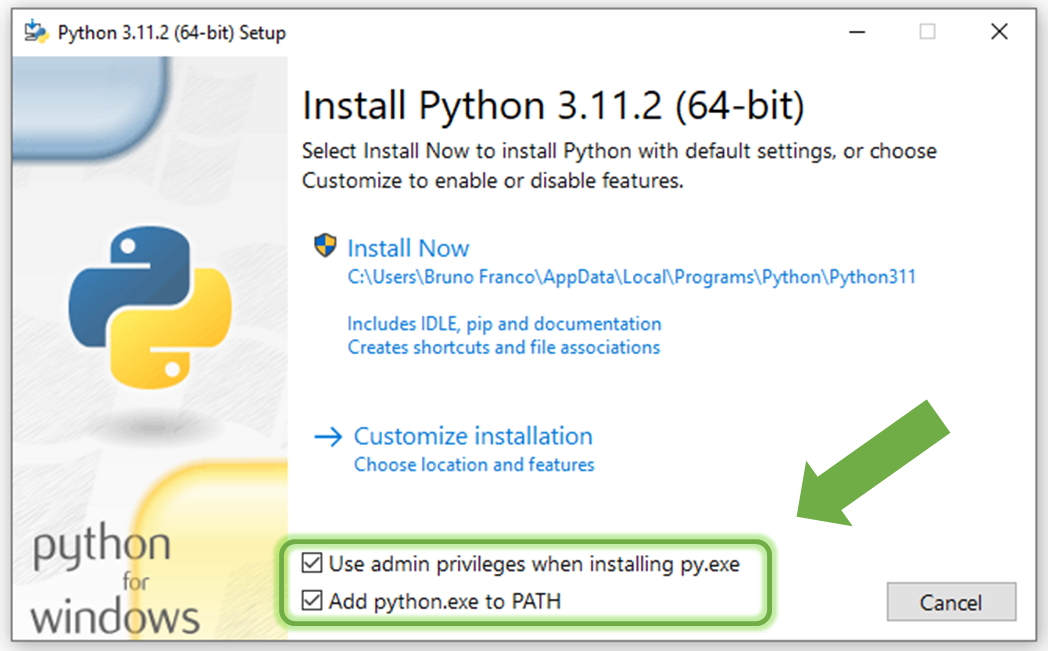
- By enabling this option, Python will be added to your system's PATH, allowing you to run Python commands and scripts from any location in your command prompt or terminal.
By following these instructions and ensuring Python is correctly added to your system's PATH, you will be able to use the DP4+ App without any issues.
Install DP4+App
To get started with the DP4+ App, you can choose from two installation methods:
-
Running the Installer Script: Install the DP4+ App by running the provided installer script available at DP4+App_Installer. Simply save the code by opening it in raw format and right-clicking on the website screen to choose "Save as". Then, run the saved script on your system.
-
Using the OS Console (Command Line): Alternatively, you can install the DP4+App by executing the following command in your operating system's console (command line):
pip install dp4plus-app
Linux (Ubuntu) users be aware that Python module tkinter is not installed with pip in your OS. In case your want to install DP4+ App by command line, make sure to also install tk with > sudo apt-get install python3-tk . If you prefer the installer script, this issue is already addressed within it.
Choose the installation method that suits you best, and you'll be ready to use the DP4+ App for your probabilistic analysis needs.
Running DP4+App
Once you have successfully installed the DP4+ App, you can execute it using the following methods:
- If you have installed the program via the command line, you can run it directly in the same console by using the command:
dp4plus
- In case you have used the DP4+App_Installer is used, the program can be executed either through the command line or by double-clicking on the shortcut named
dp4plus.exethat has been created on your desktop.
If the executable is missing or not created yet, the dp4plus.exe shortcut can be generated using command line:
dp4plus-exe
User Guide and Examples
To help you get started with the DP4+ App and learn how to use its features effectively, we provide a comprehensive DP4+ App user guide. It is available in the repository and can also be accessed directly within the program by clicking on the User Guide button.

The user guide offers detailed instructions, explanations, and step-by-step tutorials to assist you in navigating the DP4+ App and making the most of its functionalities. It serves as a valuable resource to enhance your understanding of the tool and perform accurate probabilistic analyses.
Additionally, within the DP4+ App, you will find a corroborated study case that serves as an example. This study case demonstrates how to utilize the tool effectively, providing practical insights into its usage and showcasing its capabilities.
By referring to the user guide and exploring the example study case, you can quickly familiarize yourself with the DP4+ App and gain confidence in performing probabilistic analyses for your research or projects.
Bugs and malfuntions
If you encounter any issues or experience faulty operations while using the DP4+App, we encourage you to report your situation in detail. By providing comprehensive information about the problem, you can assist us in improving the software. Please reach out to us using the following email addresses:
While you have the option to comment in this repository, we recommend using the email addresses mentioned above, as we monitor them more frequently.
F.A.Q.
- How can I uninstall DP4+App ?
In your terminal run the code:
pip uninstall dp4plus_apporpip3 uninstall dp4plus_app
- Why I get this error:
pip is not recognized as an internal or external command, operable program or batch file.?
This error occurs when the pip command or any other command is not recognized in the terminal. It typically happens when the required executable modules are not included in the system's PATH list.
To resolve this issue, you have a couple of options:
Reinstall Python, ensuring that you enable the option to add it to your computer's PATH during the installation process.
Manually add the appropriate directories to the PATH environment variable on your computer. This will involve modifying the system settings and adding the paths of the required executable modules. You can find step-by-step instructions on how to do this in the following resources: Link 1 y Link 2
- ¿ ... ?
1 maintainer

Metadata
1 maintainer
Release files for dp4plus-app 2.2.3
For a detailed explanation of source distributions (sdists) and built distributions (wheels), please see the package formats documentation.
Source distribution (sdist)
| File | Size | Uploaded | Provenance | |
|---|---|---|---|---|
| dp4plus_app-2.2.3.tar.gz | 65.4 MB | Without provenance | Details |
Built distribution (wheel)
| File | Interpreter | ABI | Platform | Reset |
|---|---|---|---|---|
| dp4plus_app-2.2.3-py3-none-any.whl | Python 3 | none | any | Details |
Total release size: 129.7 MB
Release files / dp4plus_app-2.2.3.tar.gz
| Download URL | dp4plus_app-2.2.3.tar.gz |
|---|---|
| Size | 65.4 MB |
| Tags | Source |
|
SHA-256 checksum How to use checksums |
1c1107e388a853b8242a758024d0dda7a356705a11887f5cf303b607deea4d05
|
|
BLAKE2b-256 checksum How to use checksums |
9c6bc32fc3a5f7e5cac7609cc1829fd72272e5a4e4def8d7f69fa678079aa9eb
|
| Upload date | |
|
Uploaded using Trusted Publishing? What is trusted publishing? |
No |
| Uploaded via |
twine/6.2.0 CPython/3.12.3
|
Release files / dp4plus_app-2.2.3-py3-none-any.whl
| Download URL | dp4plus_app-2.2.3-py3-none-any.whl |
|---|---|
| Size | 64.3 MB |
| Tags | Python 3 |
|
SHA-256 checksum How to use checksums |
fd836022df65b693bd22af25979aa71ab6542f03d1b88b06ed8d39de68728ccc
|
|
BLAKE2b-256 checksum How to use checksums |
8cd3f595bb2d6892b66df78b72961393c65489fd5cf91c806d38a86e5b649a9f
|
| Upload date | |
|
Uploaded using Trusted Publishing? What is trusted publishing? |
No |
| Uploaded via |
twine/6.2.0 CPython/3.12.3
|
Security for dp4plus-app 2.2.3
Provenance
Provenance describes where a file came from. On PyPI, provenance is shared via attestations, which provide a verifiable record of the build or publishing details. View details, limitations and caveats.
No provenance found
None of the files in this release were uploaded with provenance metadata.
A note on package security
PyPI is a repository for distributing packages, not a service for auditing them. While third-party security researchers and our staff do their best to detect and remove malicious packages, PyPI cannot guarantee the quality, security or suitability of any given package.
To learn more about protecting yourself from malicious actors, visit our package security documentation.














