
A tool to simplify your DP4+ calculations

Project description
DP4+ App
This repository contains the tool presented in the publication titled DP4+App: Finding the Best Balance between Computational Cost and Predictive Capacity in the Structure Elucidation Process by DP4+. Factors Analysis and Automation, published in the Journal of Natural Products on September 18, 2023.
For all work using DP4+App please cite the primary publication:
- Franco, B. A.; Zanardi, M. M.; Sarotti, A. M. DP4+App: Finding the Best Balance between Computational Cost and Predictive Capacity in the Structure Elucidation Process by DP4+. Factors Analysis and Automation. J. Nat. Prod. 2023, 86 (10), 2360–2367. https://doi.org/10.1021/acs.jnatprod.3c00566
- Franco, B. A.; Zanardi, M. M.; Sarotti, A. M. Custom-STX150: A Machine-Learning-Aided Framework for Theory-Level Parameterization in DP4+ Calculations. J. Org. Chem. 2025, 90 (44), 15737–15747. https://doi.org/10.1021/acs.joc.5c01979
- Zanardi, M. M.; Sarotti, A. M. MMFF-DP4+ Combining MMFF Optimizations and DP4+ Calculations. How Far Can We Go? Magn. Reson. Chem. 2025, 63 (1), 74–85. https://doi.org/10.1002/mrc.5491
A tool for DP4+, MM-DP4+, Custom DP4+, HALO-DP4+ and Custom-STX150 probability calculation
The DP4+App is a powerful tool designed to assist researchers in the structure elucidation process by balancing computational cost and predictive capacity using DP4+ factors analysis and automation. It provides valuable insights and streamlines the decision-making process, making it a valuable asset for chemists and researchers working in natural product chemistry and related fields.
This comprehensive software was designed to facilitate DP4+, MM-DP4+, HALO-DP4+ and Custom-DP4+ calculations. With its user-friendly graphical interface, users can seamlessly handle multiple Gaussian calculations and leverage automated data processing for accurate probabilistic analysis. The software offers the flexibility to perform Custom-DP4+ and Custom-STX150 calculations, enabling parameterization of theory levels as per individual requirements.
Characteristics
Functionalities
The DP4+ App utilizes advanced calculation methods to determine the probability of correlation between experimental information and two or more sets of calculated magnetic tensors from a group of candidate molecules under study. These probabilities are determined using both raw and scaled data, following the mathematical formalism of Bayesian methods.
To perform a calculation, you need to provide the one-dimensional spectrum of the carbon (C) and/or hydrogen (H) atoms of the molecule you are studying, along with the Gaussian "nmr" calculations of its plausible isomers (candidates).
It is important to note that the theory level used in the Gaussian calculations must match the level used in the DP4+ App. To accommodate various requirements, the software offers a wide range of options, including 24 DP4+ levels, 36 MM-DP4+ levels, and, if needed, the ability to parameterize your own custom level using Custom DP4+. For detailed information about the available functions and levels, please refer to the DP4+ App user guide
New Functionalities
HALO-DP4+
The HALO-DP4+ module extends the standard DP4+ framework to support halogenated molecules (chlorinated and brominated compounds). It introduces dedicated statistical parameters for C–X and H–X environments in both sp² and sp³ hybridization states, allowing accurate probabilistic analysis for a chemical space that was previously underrepresented in standard DP4+ parameterizations.
Custom-STX150
The Custom-STX150 module provides an automated, end-to-end workflow for parameterizing new theory levels using the STX150 benchmark set — a curated collection of 150 molecules with experimental NMR data. Starting from a user-defined Gaussian route line, the app:
- Generates all required Gaussian input files for the STX150 set.
- Validates the completed calculations (termination checks, TMS reference, label consistency, and RMSD geometry comparison).
- Trains a new Custom DP4+ parameter set using global Ordinary Least Squares (OLS) regression, replacing the previous per-molecule scaling approach for improved statistical robustness.
- Produces a detailed training report and registers the new level directly into the Custom DP4+ database, making it immediately available for use.
This workflow dramatically reduces the manual effort required to benchmark and deploy a new theory level, and is described in detail in the Custom-STX150 user guide.
Installation Requirements
To run the DP4+ App, you will need Python 3.8 or a later version. If you don't have Python installed on your system, you can download it from https://www.python.org/downloads/.
Please make sure to add Python to your system's PATH environment variable to ensure correct usage of the DP4+ App. The following steps explain how to enable Python in your system's PATH:
-
Download and install Python from the provided link.
-
During the installation process, you will come across an option called "Add Python to PATH" or something similar. Make sure to check this option before proceeding with the installation.
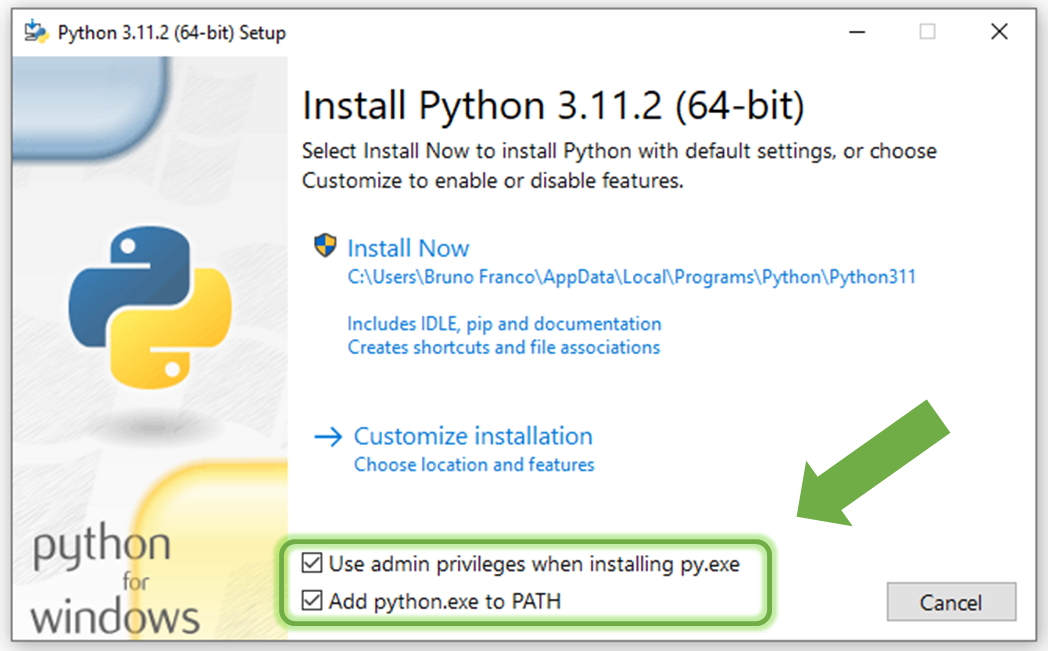
- By enabling this option, Python will be added to your system's PATH, allowing you to run Python commands and scripts from any location in your command prompt or terminal.
By following these instructions and ensuring Python is correctly added to your system's PATH, you will be able to use the DP4+ App without any issues.
Install DP4+App
To get started with the DP4+ App, you can choose from two installation methods:
-
Running the Installer Script: Install the DP4+ App by running the provided installer script available at DP4+App_Installer. Simply save the code by opening it in raw format and right-clicking on the website screen to choose "Save as". Then, run the saved script on your system.
-
Using the OS Console (Command Line): Alternatively, you can install the DP4+App by executing the following command in your operating system's console (command line):
pip install dp4plus-app
Linux (Ubuntu) users be aware that Python module tkinter is not installed with pip in your OS. In case your want to install DP4+ App by command line, make sure to also install tk with > sudo apt-get install python3-tk . If you prefer the installer script, this issue is already addressed within it.
Choose the installation method that suits you best, and you'll be ready to use the DP4+ App for your probabilistic analysis needs.
Running DP4+App
Once you have successfully installed the DP4+ App, you can execute it using the following methods:
- If you have installed the program via the command line, you can run it directly in the same console by using the command:
dp4plus
- In case you have used the DP4+App_Installer is used, the program can be executed either through the command line or by double-clicking on the shortcut named
dp4plus.exethat has been created on your desktop.
If the executable is missing or not created yet, the dp4plus.exe shortcut can be generated using command line:
dp4plus-exe
User Guide and Examples
To help you get started with the DP4+ App and learn how to use its features effectively, we provide a comprehensive DP4+ App user guide. It is available in the repository and can also be accessed directly within the program by clicking on the User Guide button.

The user guide offers detailed instructions, explanations, and step-by-step tutorials to assist you in navigating the DP4+ App and making the most of its functionalities. It serves as a valuable resource to enhance your understanding of the tool and perform accurate probabilistic analyses.
Additionally, within the DP4+ App, you will find a corroborated study case that serves as an example. This study case demonstrates how to utilize the tool effectively, providing practical insights into its usage and showcasing its capabilities.
By referring to the user guide and exploring the example study case, you can quickly familiarize yourself with the DP4+ App and gain confidence in performing probabilistic analyses for your research or projects.
Bugs and malfuntions
If you encounter any issues or experience faulty operations while using the DP4+App, we encourage you to report your situation in detail. By providing comprehensive information about the problem, you can assist us in improving the software. Please reach out to us using the following email addresses:
While you have the option to comment in this repository, we recommend using the email addresses mentioned above, as we monitor them more frequently.
F.A.Q.
- How can I uninstall DP4+App ?
In your terminal run the code:
pip uninstall dp4plus_apporpip3 uninstall dp4plus_app
- Why I get this error:
pip is not recognized as an internal or external command, operable program or batch file.?
This error occurs when the pip command or any other command is not recognized in the terminal. It typically happens when the required executable modules are not included in the system's PATH list.
To resolve this issue, you have a couple of options:
Reinstall Python, ensuring that you enable the option to add it to your computer's PATH during the installation process.
Manually add the appropriate directories to the PATH environment variable on your computer. This will involve modifying the system settings and adding the paths of the required executable modules. You can find step-by-step instructions on how to do this in the following resources: Link 1 y Link 2
- ¿ ... ?
Release history Release notifications | RSS feed


Download files
Download the file for your platform. If you're not sure which to choose, learn more about installing packages.
Source Distribution
Built Distribution
Filter files by name, interpreter, ABI, and platform.
If you're not sure about the file name format, learn more about wheel file names.
Copy a direct link to the current filters
File details
Details for the file dp4plus_app-2.2.1.tar.gz.
File metadata
- Download URL: dp4plus_app-2.2.1.tar.gz
- Upload date:
- Size: 67.3 MB
- Tags: Source
- Uploaded using Trusted Publishing? No
- Uploaded via: twine/6.2.0 CPython/3.12.3
File hashes
| Algorithm | Hash digest | |
|---|---|---|
| SHA256 |
552cffa6edcfe8179ae4ae4dfc94b44807845a5d4d0293180984a3d0c6c61aec
|
|
| MD5 |
3da92d60ab87ec8c84162667027b2799
|
|
| BLAKE2b-256 |
738500249792d564cf5fc9cd3308e62ad7a2ad91983eeedf5bf65a29e3172b2c
|
File details
Details for the file dp4plus_app-2.2.1-py3-none-any.whl.
File metadata
- Download URL: dp4plus_app-2.2.1-py3-none-any.whl
- Upload date:
- Size: 68.6 MB
- Tags: Python 3
- Uploaded using Trusted Publishing? No
- Uploaded via: twine/6.2.0 CPython/3.12.3
File hashes
| Algorithm | Hash digest | |
|---|---|---|
| SHA256 |
2f54b2ab63dd491e113efa349f027fc20ec53bd46d5f8e0e51244703a34272f1
|
|
| MD5 |
02a90f7f0fa6f2571d270abd6046a453
|
|
| BLAKE2b-256 |
1bf582a4deb51f3f3e2e03b205a6146c828dc824e16080f41bd86a67fd71168d
|






