
DrainTracer

Resource growth monitoring for Windows 10/11 and Linux with Python 3.10+. Launch an executable or script, or attach to a PID, and watch its recursive process tree in a live terminal dashboard. The target needs no source changes or instrumentation.
DrainTracer flags sustained growth in private memory, handles or Linux file descriptors, and threads. A signal is a lead for investigation, not proof of an unreleased allocation. Process counters do not identify allocation sites, and short runs can be inconclusive.
Install and run
From PowerShell:
python -m pip install draintracer
draintracer --version
draintracer
If the command is not on PATH, use python -m draintracer with the same
Python used for installation. In an interactive terminal, the startup overview
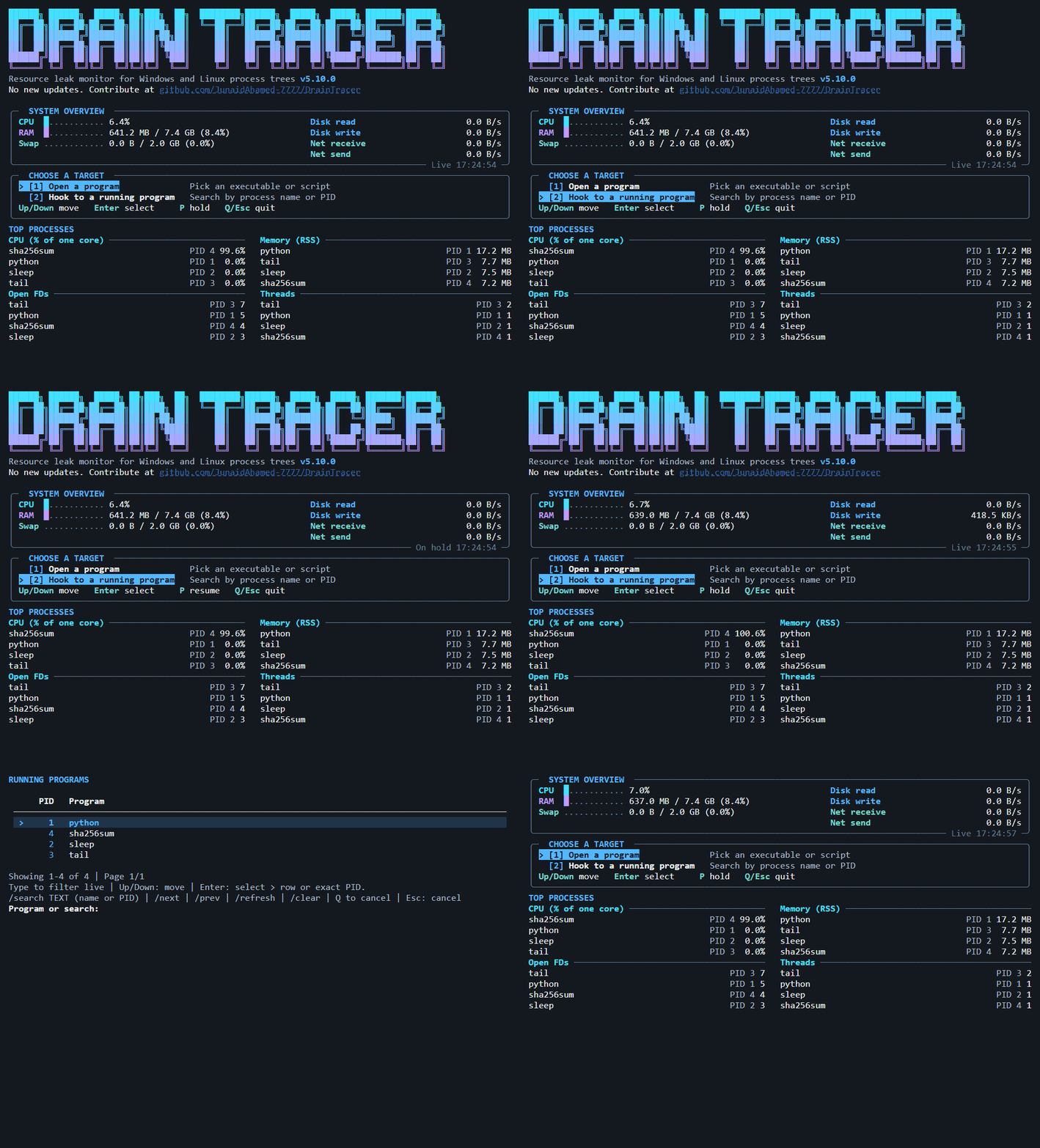
shows live CPU, RAM, swap, disk read/write rates and network traffic.
It ranks processes by CPU, memory, handles
(open file descriptors on Linux), and threads. Press P to hold or
resume the display, 1 to open a program, or 2 to hook to a running
process. Cancel either picker to return to the overview.
On Linux, install into a virtual environment:
python3 -m venv ~/.venvs/draintracer
~/.venvs/draintracer/bin/python -m pip install draintracer
~/.venvs/draintracer/bin/python -m draintracer --version
~/.venvs/draintracer/bin/draintracer --target /usr/bin/sleep -- 30
Linux supports native executables, Python .py targets, and executable
scripts with a shebang. Batch files and Windows executables require Windows.
A desktop picker uses optional tkinter; without a display or tkinter, enter
the target path in the terminal or pass --target. The dashboard and
headless mode work in Linux terminals and WSL.
# Launch a program
draintracer --target "C:\work\My App\worker.exe"

# Attach to an existing process; substitute its actual PID
draintracer --pid 4820

# Allow startup growth before checking a representative workload
draintracer --target .\server.exe --warmup 15s --timeout 2m
Quitting stops a launched target and its tracked tree. Quitting an attached session leaves the target running. Launched targets have their console input and output redirected; use their own file logging when needed.
Launched Linux trees receive their own session so descendants can be rediscovered after a parent exits. A daemon that leaves that session before being discovered can escape tracking; attach to its actual PID to monitor it. Attachment leaves session ownership alone and never includes unrelated processes merely because they share a session.
Python script targets use DrainTracer's Python interpreter. Install
DrainTracer in the target's environment, or launch that environment's
Python explicitly and put the script after --:
draintracer --target "C:\work\app\.venv\Scripts\python.exe" -- "C:\work\app\worker.py"
Inspect and save evidence
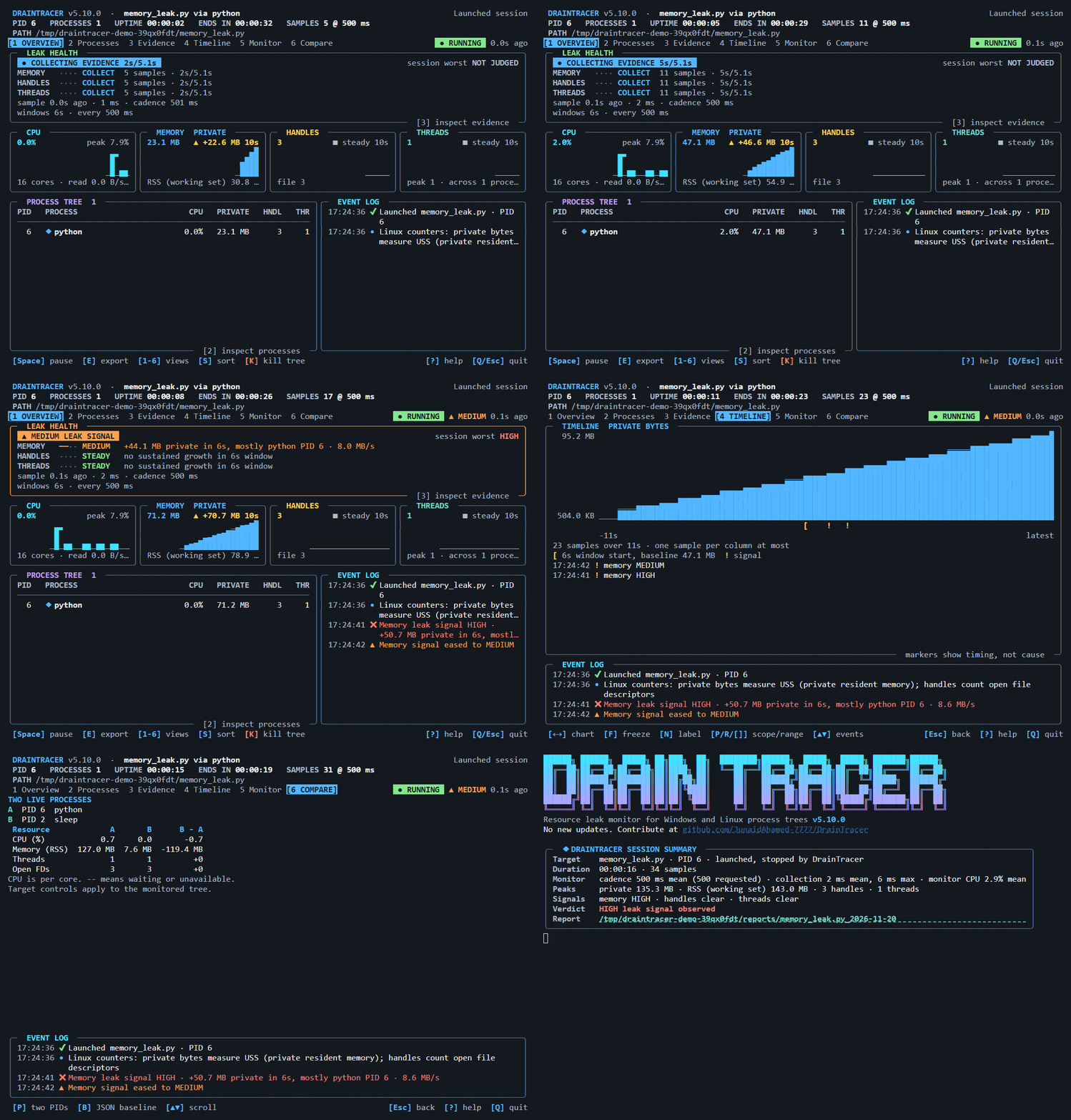
This Linux recording uses torture/memory_leak.py, a bounded example
included in the source checkout.
Track CPU, memory, handles, threads, and I/O across the discovered process tree. Use warm-up settings and project profiles to account for startup or legitimate workload growth.
Leak health says whether evidence is still being collected, whether a window showed no sustained growth, and whether any process could not be measured. Memory alerts are based on private bytes, shown alongside RSS (working set). Alerts name the processes that grew. Number keys open a process inspector, the evidence behind each signal, an annotated timeline, and monitor diagnostics. On page 6, press P to compare two running PIDs or B to compare this session with a saved DrainTracer JSON report. Esc returns to page 1. From there Q or Esc quits.
On Linux, private memory is USS (unique resident pages); Windows uses private
committed bytes. Linux handles readings and --budget-handles count open
file descriptors. The report keeps the existing private_bytes and
handles keys and records their platform semantics in its environment
metadata. Linux descriptor categories include files, sockets, eventfds, and
other descriptors such as pipes. /proc permissions can hide individual
counters; unavailable data stays unknown, and RSS is never substituted for
private memory. Compare runs using the same platform and workload.
Press E to export JSON and an offline interactive HTML report. Press O to open the HTML. Last Report in the overview footer and the folder path in the session summary both open the export directory in a compatible terminal.
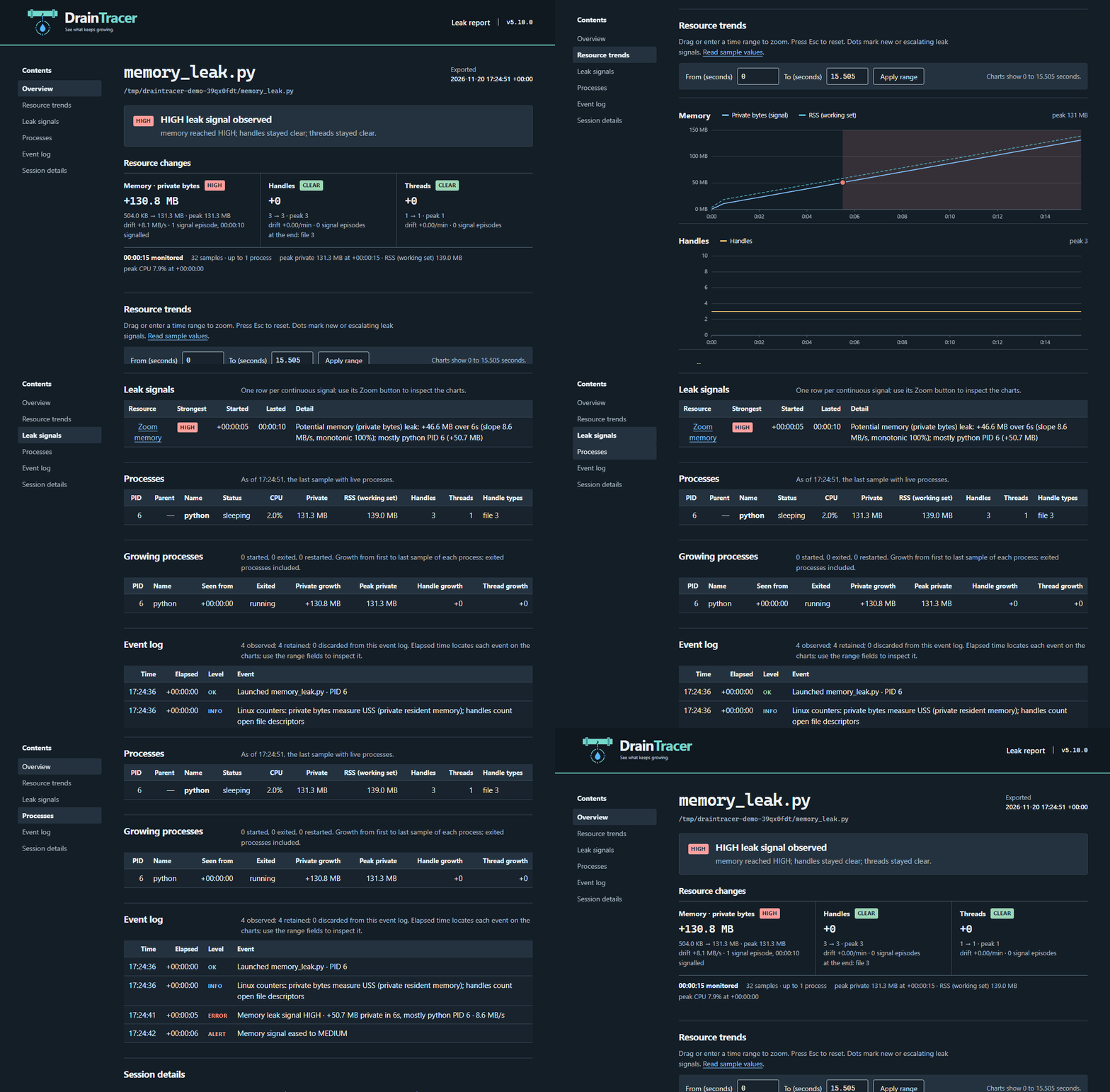
Use the report contents to jump to Resource trends or Leak signals. The retained-sample table beneath the charts can also be read with a keyboard.
Headless mode supports bounded checks, severity-based exit codes, and
GitHub Actions annotations and summaries. Compare saved evidence with
draintracer diff before.json after.json; add --strict to refuse
verdicts for runs that are not comparable, and record --workload-id,
--build, and --operations to make comparisons defensible. Reports
default to leak_reports/reports under the working directory. Review local
paths and process details before sharing exports.
Privacy and terms
Monitoring and reports stay local unless you or your environment share them. Interactive startup automatically checks PyPI for updates, sending the DrainTracer version in its user-agent and exposing the connecting IP address to PyPI. The check does not upload process data or install an update. Headless runs, help, version-only commands, report comparisons, and redirected startup output skip it. There is no dedicated interactive opt-out flag.
Reports and optional diagnostic logs can contain sensitive paths and process details. They have no built-in expiry or encryption; existing label redaction does not sanitize the entire JSON or HTML report. Read the privacy policy, terms of use, and safe sharing guide. The terms preserve the MIT software license. The project operates no hosted monitoring or report-storage service.
Documentation and contributions
- Usage and troubleshooting
- Configuration
- Reports and comparisons
- Detection and process handling
- Release notes
- Source and contributions
- Report a bug
- Legal and policy index
- Third-party notices
Released under the MIT license.
1 maintainer

Metadata
1 maintainer
Release files for draintracer 5.10.0
For a detailed explanation of source distributions (sdists) and built distributions (wheels), please see the package formats documentation.
Source distribution (sdist)
| File | Size | Uploaded | Provenance | Actions |
|---|---|---|---|---|
| draintracer-5.10.0.tar.gz | 631.6 kB | With provenance | Details for draintracer-5.10.0.tar.gz |
Built distribution (wheel)
| File | Interpreter | ABI | Platform | Actions Reset |
|---|---|---|---|---|
| draintracer-5.10.0-py3-none-any.whl | Python 3 | none | any | Details for draintracer-5.10.0-py3-none-any.whl |
Total release size: 1.0 MB
Release files / draintracer-5.10.0.tar.gz
| Download URL | draintracer-5.10.0.tar.gz |
|---|---|
| Size | 631.6 kB |
| Tags | Source |
|
SHA-256 checksum How to use checksums |
dbe68032ec040a3fbe741016011730e90fd636278305a1b7a5a01f8ee4a097c7
|
|
BLAKE2b-256 checksum How to use checksums |
20aac0579cc8d2b0256722cd7924867a5065270fc918620eb74b7dc3bc97248e
|
| Upload date | |
|
Uploaded using Trusted Publishing? What is trusted publishing? |
Yes |
| Uploaded via |
twine/7.0.0 CPython/3.13.16
|
Provenance
Provenance describes where a file came from. On PyPI, provenance is shared via attestations, which provide a verifiable record of the build or publishing details. View details, limitations and caveats.


PyPI Publish Attestation
PyPI verified that this artifact, at this checksum, originated from the publisher listed below.
Signed by GitHub Actions, verified by PyPI on Nov 20, 2026.
Transparency logRelease files / draintracer-5.10.0-py3-none-any.whl
| Download URL | draintracer-5.10.0-py3-none-any.whl |
|---|---|
| Size | 395.9 kB |
| Tags | Python 3 |
|
SHA-256 checksum How to use checksums |
f676c01c23d6cde20d5eff72dea92f4a91935f52c3ad5b98532afed6f1fcf189
|
|
BLAKE2b-256 checksum How to use checksums |
98f2798ca8c77729c88b41fe3b9d91845ae46d1609b8df4f83f9f5e8225ab91f
|
| Upload date | |
|
Uploaded using Trusted Publishing? What is trusted publishing? |
Yes |
| Uploaded via |
twine/7.0.0 CPython/3.13.16
|
Provenance
Provenance describes where a file came from. On PyPI, provenance is shared via attestations, which provide a verifiable record of the build or publishing details. View details, limitations and caveats.
PyPI Publish Attestation
PyPI verified that this artifact, at this checksum, originated from the publisher listed below.
Signed by GitHub Actions, verified by PyPI on Nov 20, 2026.
Transparency logSecurity for draintracer 5.10.0
Provenance
Provenance describes where a file came from. On PyPI, provenance is shared via attestations, which provide a verifiable record of the build or publishing details. View details, limitations and caveats.
Full provenance
Both files in this release have been uploaded with provenance metadata.
Attestation for draintracer-5.10.0.tar.gz
PyPI Publish Attestation
PyPI verified that this artifact, at this checksum, originated from the publisher listed below.
Signed by GitHub Actions, verified by PyPI on Nov 20, 2026.
Transparency logA note on package security
PyPI is a repository for distributing packages, not a service for auditing them. While third-party security researchers and our staff do their best to detect and remove malicious packages, PyPI cannot guarantee the quality, security or suitability of any given package.
To learn more about protecting yourself from malicious actors, visit our package security documentation.














