
DrainTracer

Resource growth monitoring for Windows 10/11 and Python 3.10+. Launch an executable or script, or attach to a PID, and watch its recursive process tree in a live terminal dashboard. The target needs no source changes or instrumentation.
DrainTracer flags sustained growth in private memory, handles, and threads. A signal is a lead for investigation, not proof of an unreleased allocation. Process counters do not identify allocation sites, and short runs can be inconclusive.
Install and run
From PowerShell:
python -m pip install draintracer
draintracer --version
draintracer
If the command is not on PATH, use python -m draintracer with the same
Python used for installation. The startup menu lets you open a program or
select a running process.
# Launch a program
draintracer --target "C:\work\My App\worker.exe"

# Attach to an existing process; substitute its actual PID
draintracer --pid 4820

# Allow startup growth before checking a representative workload
draintracer --target .\server.exe --warmup 15s --timeout 2m
Quitting stops a launched target and its tracked tree. Quitting an attached session leaves the target running. Launched targets have their console input and output redirected; use their own file logging when needed.
Python script targets use DrainTracer's Python interpreter. Install
DrainTracer in the target's environment, or launch that environment's
Python explicitly and put the script after --:
draintracer --target "C:\work\app\.venv\Scripts\python.exe" -- "C:\work\app\worker.py"
Inspect and save evidence
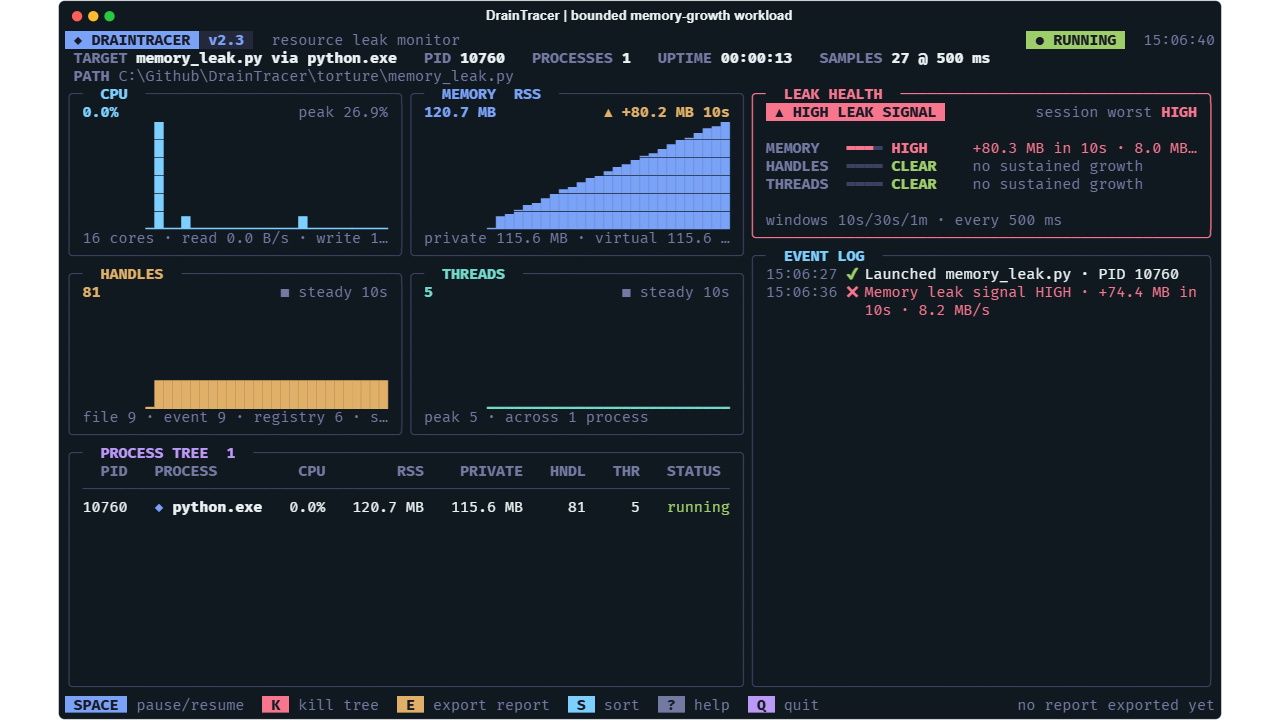
Track CPU, memory, handles, threads, and I/O across the discovered process
tree. Use warm-up settings and project profiles to account for startup or
legitimate workload growth. Press E to export JSON and an offline
interactive HTML report; press O to open the latest report.
Headless mode supports bounded checks, severity-based exit codes, and
GitHub Actions annotations and summaries. Compare saved evidence with
draintracer diff before.json after.json. Reports default to
leak_reports/reports under the working directory. Review local paths and
process details before sharing exports.
Documentation and contributions
- Usage and troubleshooting
- Configuration
- Reports and comparisons
- Detection and process handling
- Release notes
- Source and contributions
- Report a bug
Released under the MIT license.
1 maintainer

Metadata
1 maintainer
Release files for draintracer 5.1.1
For a detailed explanation of source distributions (sdists) and built distributions (wheels), please see the package formats documentation.
Source distribution (sdist)
| File | Size | Uploaded | Provenance | Actions |
|---|---|---|---|---|
| draintracer-5.1.1.tar.gz | 167.3 kB | With provenance | Details for draintracer-5.1.1.tar.gz |
Built distribution (wheel)
| File | Interpreter | ABI | Platform | Actions Reset |
|---|---|---|---|---|
| draintracer-5.1.1-py3-none-any.whl | Python 3 | none | any | Details for draintracer-5.1.1-py3-none-any.whl |
Total release size: 284.5 kB
Release files / draintracer-5.1.1.tar.gz
| Download URL | draintracer-5.1.1.tar.gz |
|---|---|
| Size | 167.3 kB |
| Tags | Source |
|
SHA-256 checksum How to use checksums |
717b1eda5832d63047cf0603057feef155ac2f7d682598ab8bf9917bddcc9891
|
|
BLAKE2b-256 checksum How to use checksums |
e4720b9211541130e282da5142e290e784e67be081ef20c33ec65f6d0d4fb048
|
| Upload date | |
|
Uploaded using Trusted Publishing? What is trusted publishing? |
Yes |
| Uploaded via |
twine/7.0.0 CPython/3.13.16
|
Provenance
Provenance describes where a file came from. On PyPI, provenance is shared via attestations, which provide a verifiable record of the build or publishing details. View details, limitations and caveats.


PyPI Publish Attestation
PyPI verified that this artifact, at this checksum, originated from the publisher listed below.
Signed by GitHub Actions, verified by PyPI on Oct 21, 2026.
Transparency logRelease files / draintracer-5.1.1-py3-none-any.whl
| Download URL | draintracer-5.1.1-py3-none-any.whl |
|---|---|
| Size | 117.2 kB |
| Tags | Python 3 |
|
SHA-256 checksum How to use checksums |
50e3b2b7558ea91f63a92737cf91dfcb59077db96500564be136b939dda0231e
|
|
BLAKE2b-256 checksum How to use checksums |
3e92f8ab39ae931648a64c42e5f2a9105b6e035d2b219a6576a0a41642b41904
|
| Upload date | |
|
Uploaded using Trusted Publishing? What is trusted publishing? |
Yes |
| Uploaded via |
twine/7.0.0 CPython/3.13.16
|
Provenance
Provenance describes where a file came from. On PyPI, provenance is shared via attestations, which provide a verifiable record of the build or publishing details. View details, limitations and caveats.
PyPI Publish Attestation
PyPI verified that this artifact, at this checksum, originated from the publisher listed below.
Signed by GitHub Actions, verified by PyPI on Oct 21, 2026.
Transparency logSecurity for draintracer 5.1.1
Provenance
Provenance describes where a file came from. On PyPI, provenance is shared via attestations, which provide a verifiable record of the build or publishing details. View details, limitations and caveats.
Full provenance
Both files in this release have been uploaded with provenance metadata.
Attestation for draintracer-5.1.1.tar.gz
PyPI Publish Attestation
PyPI verified that this artifact, at this checksum, originated from the publisher listed below.
Signed by GitHub Actions, verified by PyPI on Oct 21, 2026.
Transparency logA note on package security
PyPI is a repository for distributing packages, not a service for auditing them. While third-party security researchers and our staff do their best to detect and remove malicious packages, PyPI cannot guarantee the quality, security or suitability of any given package.
To learn more about protecting yourself from malicious actors, visit our package security documentation.














