
PyTorch tools for activation atlases, feature visualization, and image amplification.

Project description
DreamLens
DreamLens is a native PyTorch toolkit for understanding what neural-network layers respond to. It keeps the pretrained model fixed and optimizes generated images using feedback from internal activations.
The main workflows share one root FeatureVisualizer:
| Workflow | Question |
|---|---|
visualize(..., method="maximize") |
What image makes a layer, channel, neuron, class, or direction respond strongly? |
visualize(..., method="maco") |
What does the same target look like with natural-image magnitude fixed and phase optimized? |
visualize(..., method="feature_accentuation") |
What in this natural image drives a target, and how can it be revealed while preserving earlier features? |
visualize(..., method="caricature") |
What features does the model see in an original image, and how can they be amplified? |
activation_atlas() |
What feature groups appear across many real images? |
The root package also preserves the complete native-PyTorch feature- visualization surface: composable compatibility objectives, Fourier/pixel optimization, MaCo, Faccent feature accentuation, stochastic transforms, regularizers, losses, and preconditioning helpers. There is no parallel feature-visualization subpackage.
Setup
From the repository root:
python -m pip install -e ".[examples,atlas]"
The examples use pretrained torchvision models. Their weights may be downloaded the first time they are used.
Start with the learning notebooks
| Notebook | What it teaches | Saved output |
|---|---|---|
Feature_Visualization_Getting_started_PyTorch.ipynb |
One root API for all targets, classical maximize, MaCo, and caricature | results/feature_visualization_getting_started_pytorch/ |
learn_dreamlens_maximize.ipynb |
Target, render config, Fourier canvas, optimization, score evaluation | learning_outputs/dreamlens_maximize_notebook/ |
learn_dreamlens_maco.ipynb |
Fixed magnitude, trainable phase, crop schedules, and transparency maps | learning_outputs/dreamlens_maco_notebook/ |
learn_dreamlens_feature_accentuation.ipynb |
Torchvision ResNet18, image-seeded feature accentuation, paired crops, gradient balancing, and preservation | results/dreamlens_feature_accentuation_notebook/ |
learn_dreamlens_caricature.ipynb |
Original/generated paths, paired transforms, feature amplification | learning_outputs/dreamlens_caricature_notebook/ |
native_dreamlens_results.ipynb |
Complete reproducible gallery with multiple channels and caricatures | results/native_dreamlens_notebook/ |
To use a learning notebook:
- Open it in Jupyter or VS Code.
- Edit the clearly marked parameter cell.
- Run all cells from top to bottom.
- View the image and measurements in the notebook; the image is also saved to the output directory shown above.
The dedicated learning notebooks include embedded verified outputs, so you can inspect the expected result before rerunning them.
Verified maximize result
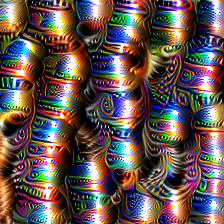
| Setting or measurement | Value |
|---|---|
| Model / layer / channel | ResNet18 / layer2.1.conv2 / 17 |
| Image size | 224 × 224 |
| Steps / learning rate | 400 / 0.012 |
| Final transformed-view score | 39.1118 |
| Clean untransformed norm | 43.8359 |
| Clean size-normalized RMS | 1.5656 |
The RMS score is included because a raw norm naturally increases when a larger image produces more spatial activation values.
Verified caricature result
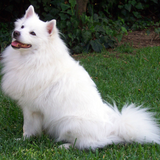
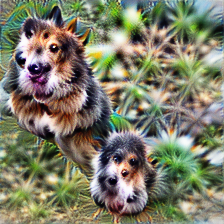
| Setting or measurement | Value |
|---|---|
| Model / layer | ResNet18 / layer3.1.conv2 |
| Image size | 224 × 224 |
| Steps / learning rate / power | 200 / 0.009 / 1.20 |
| Clean cosine similarity | 0.7661 |
| Generated/original feature-norm ratio | 4.0172× |
| Clean target projection | 191.0971 |
The original image is a fixed feature reference. The generated image starts from Fourier noise and is optimized separately; it is not a normal image filter.
Verified feature-accentuation result
DreamLens includes a separate native PyTorch implementation of Hamblin et al., “Feature Accentuation: Revealing 'What' Features Respond to in Natural Images”. Faccent starts from the natural image itself, applies identical stochastic crops/noise to the candidate and reference, and balances target maximization against L2 preservation at an explicit earlier layer.
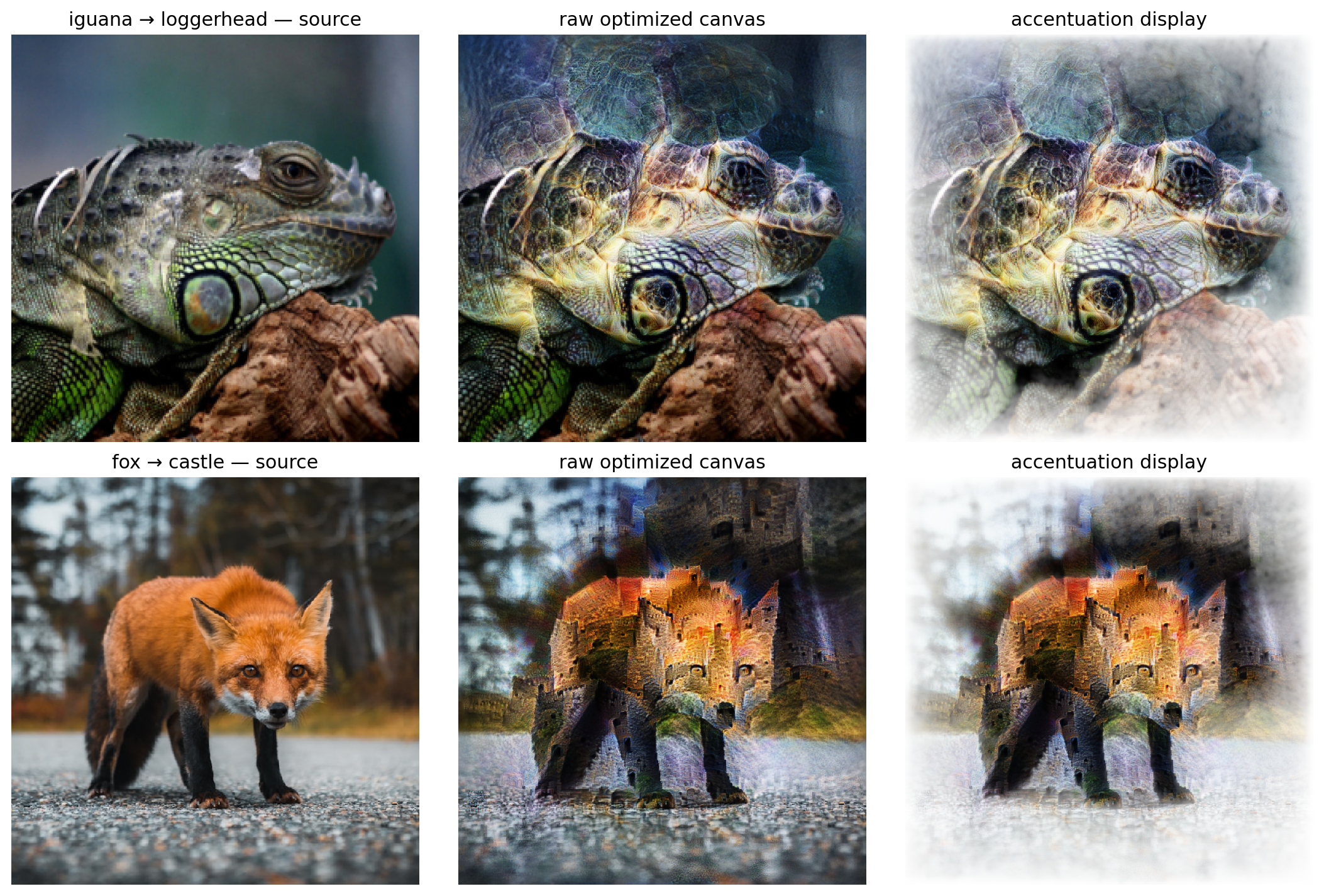
| Setting or measurement | Executed notebook result |
|---|---|
| Model / targets | torchvision ResNet18 / loggerhead class 33 and castle class 483 |
| Source images | learning_inputs/iguana.jpg and learning_inputs/fox.jpg |
| Preservation layer | layer2.1 |
| Canvas / model input | 512 × 512 / 224 × 224 |
| Steps / paired crops per step | 99 / 16 |
| Parameterization | Faccent full-complex seeded Fourier (default) |
| Gradient balance | 9.7570873578 (iguana), 6.8875874332 (fox) |
| Final target loss | -50.7389 (iguana), -29.1070 (fox) |
The middle column is the raw optimized Fourier canvas. The right column is
what Faccent actually plots: globally contrast-normalized RGB with accumulated
absolute target gradients used as a clipped, blurred alpha mask. Use
result.save_accentuation(...) for that view; result.save(...) intentionally
writes the raw canvas.
This is not the existing caricature algorithm. Caricature learns a separate
noise-seeded image that amplifies the input's captured feature direction.
Feature accentuation is image-seeded, maximizes an explicit FeatureTarget,
and preserves an explicit layer with gradient-balanced regularization.
Faccent's optional parameterization="fourier_phase" is also implemented. It
optimizes phase plus a sigmoid magnitude gate. magnitude_source="image"
uses the seed magnitude; magnitude_source="imagenet" uses the same packaged
clean_decorrelated.npy natural-image spectrum as default MaCo. Faccent's
reference default remains parameterization="fourier", where every
preconditioned complex Fourier coefficient is trainable.
Minimal API example
from torchvision.models import ResNet18_Weights, resnet18

from dreamlens import FeatureTarget, FeatureVisualizer
from dreamlens import (
    FeatureAccentuationConfig,
    MacoConfig,
    RenderConfig,
    TransformConfig,
)

model = resnet18(weights=ResNet18_Weights.DEFAULT).eval()
visualizer = FeatureVisualizer(model, device="cpu", normalize=True)

target = FeatureTarget.for_channel(
    model.layer2[1].conv2,
    17,
    reduction="norm",
)

result = visualizer.visualize(
    target,
    method="maximize",
    config=RenderConfig.reference(
        width=224,
        height=224,
        steps=400,
        lr=1.2e-2,
        transform=TransformConfig(
            rotate_degrees=6,
            scale_min=0.82,
            scale_max=1.12,
            translate_x=0.01,
            translate_y=0.01,
        ),
    ),
)

result.save("channel_17.png")

# The exact same target can use fixed-magnitude, phase-only MaCo.
maco_result = visualizer.visualize(
    target,
    method="maco",
    config=MacoConfig(
        width=512,
        height=512,
        input_shape=(3, 224, 224),
        steps=128,
        crops=8,
    ),
)
maco_result.save("channel_17_maco.png")
maco_result.save_transparency("channel_17_importance.png")

# Feature accentuation starts from a real image and requires an explicit
# preservation layer when regularization_strength is non-zero.
accentuated = visualizer.visualize(
    FeatureTarget.for_class(258, layer="fc"),
    method="feature_accentuation",
    image="dog.jpg",
    regularization_layer="layer2.1.conv2",
    config=FeatureAccentuationConfig(
        steps=99,
        crops=16,
        checkpoint_steps=(0, 20, 40, 60, 80, 98),
    ),
)
accentuated.save_accentuation("feature_accentuation.png", checkpoint=98)
accentuated.save_transparency("feature_accentuation_importance.png")
One target model
FeatureTarget is shared by classical maximize, MaCo, and feature accentuation:
import torch
from dreamlens import FeatureTarget

layer = FeatureTarget.for_layer("layer3.1.conv2")
channel = FeatureTarget.for_channel("layer3.1.conv2", 17, reduction="norm")
neuron = FeatureTarget.for_neuron("layer3.1.conv2", 2500)
image_class = FeatureTarget.for_class(96, layer="fc")
direction = FeatureTarget.for_direction("fc", torch.eye(1000)[96])
For classical rendering, the equivalent convenience methods are
maximize_layer, maximize_channel, maximize_neuron, maximize_class, and
maximize_direction. The lower-level Xplique-compatible functional API remains
available for backward compatibility, but is not required by the root workflow.
Native PyTorch MaCo
DreamLens includes a native PyTorch implementation of MaCo (MAgnitude Constrained Optimization) from Fel et al., “Unlocking Feature Visualization for Deeper Networks with MAgnitude Constrained Optimization” (NeurIPS 2023).
MaCo keeps a natural-image Fourier magnitude spectrum fixed and optimizes only its phase. This constrains the generated visualization toward natural-image statistics without using a learned generative prior. DreamLens also accumulates the absolute input gradient during optimization and returns it as the spatial importance/transparency map described in the paper.
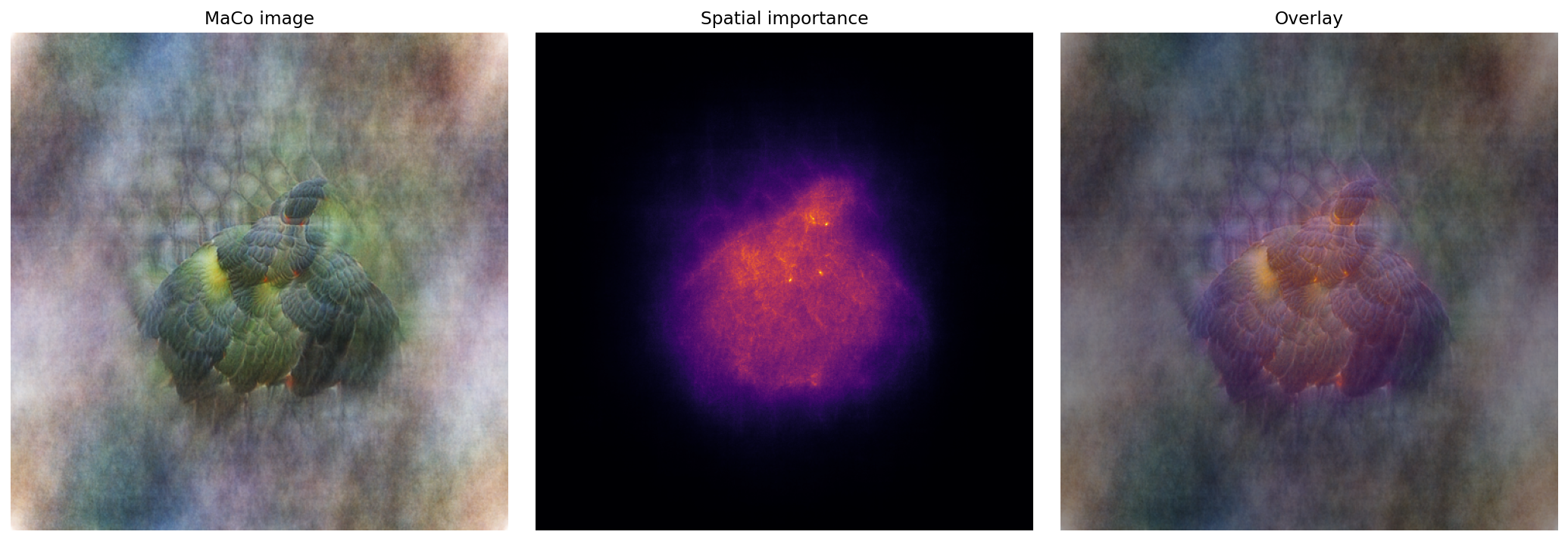
| Setting | Executed notebook result |
|---|---|
| Model / target | torchvision ResNet18 / ImageNet class 96 (Toucan) |
| Canvas | 512 × 512 RGB |
| Steps / crops per step | 128 / 8 |
| Optimized variable | Fourier phase only |
| Fixed variable | Magnitude computed from the checked-in high-resolution PyTorch Hub sample |
| Returned tensors | image [3, 512, 512], transparency [3, 512, 512] |
| Clean Toucan logit | 6.8193 |
from torchvision.models import ResNet18_Weights, resnet18

from dreamlens import FeatureTarget, FeatureVisualizer, MacoConfig

model = resnet18(weights=ResNet18_Weights.DEFAULT).eval()

def imagenet_preprocess(images):
    mean = images.new_tensor([0.485, 0.456, 0.406]).view(1, 3, 1, 1)
    std = images.new_tensor([0.229, 0.224, 0.225]).view(1, 3, 1, 1)
    return (images - mean) / std

visualizer = FeatureVisualizer(model, preprocess=imagenet_preprocess)
target = FeatureTarget.for_class(96, layer="fc")
result = visualizer.visualize(
    target,
    method="maco",
    config=MacoConfig(
        width=512,
        height=512,
        input_shape=(3, 224, 224),
        steps=128,
        crops=8,
        noise_intensity=0.08,
        values_range=(0, 1),
    ),
)

image = result.as_chw()
transparency = result.transparency_chw()
This implementation is PyTorch end to end: phase reconstruction uses
torch.fft, crops use differentiable torch.nn.functional.grid_sample, and
optimization uses torch.optim.NAdam. With no maco_dataset, DreamLens uses
the packaged Faccent/ImageNet natural magnitude, so the default path works
offline. To use a different image domain, pass a representative NCHW dataset;
the MaCo notebooks use the checked-in high-resolution
PyTorch Hub dog photograph.
Grayscale MaCo always requires a dataset.
See docs/FEATURE_VISUALIZATION_API.md
for the complete root API and tensor conventions.
The executed self-contained PyTorch API tutorial is
Feature_Visualization_Getting_started_PyTorch.ipynb.
It uses only root dreamlens imports, loads a pretrained torchvision ResNet18,
and runs classical maximize, MaCo, and caricature directly in its cells. It
saves the images and comparison panels under
results/feature_visualization_getting_started_pytorch/.
Use the learning notebooks for the full editable transform configuration, reproducible seeds, plots, and clean-score evaluation.
Where Fourier is used
random trainable Fourier coefficients
→ frequency scaling
→ inverse FFT (`torch.fft.irfft2`)
→ color mixing and sigmoid
→ ordinary RGB image
→ frozen neural network
The inverse FFT happens before model inference. The model never receives Fourier coefficients, and a forward FFT is not required when generation starts directly from coefficients.
More information
- Public package code:
src/dreamlens/ - Full API and capability guide:
docs/DREAMLENS_FEATURE_GUIDE.md
Run the smoke tests with:
PYTHONPATH=src pytest -q
Release history Release notifications | RSS feed


Download files
Download the file for your platform. If you're not sure which to choose, learn more about installing packages.
Source Distribution
Built Distribution
Filter files by name, interpreter, ABI, and platform.
If you're not sure about the file name format, learn more about wheel file names.
Copy a direct link to the current filters
File details
Details for the file dreamlens-0.1.0.tar.gz.
File metadata
- Download URL: dreamlens-0.1.0.tar.gz
- Upload date:
- Size: 1.5 MB
- Tags: Source
- Uploaded using Trusted Publishing? No
- Uploaded via: uv/0.11.15 {"installer":{"name":"uv","version":"0.11.15","subcommand":["publish"]},"python":null,"implementation":{"name":null,"version":null},"distro":{"name":"macOS","version":null,"id":null,"libc":null},"system":{"name":null,"release":null},"cpu":null,"openssl_version":null,"setuptools_version":null,"rustc_version":null,"ci":null}
File hashes
| Algorithm | Hash digest | |
|---|---|---|
| SHA256 |
91490eeddb1978319fa2b86ace6978fd680fa73d9ceca98512564a2d708796bf
|
|
| MD5 |
d6662484915c983ec1fd0934dceb9acc
|
|
| BLAKE2b-256 |
dd2b560b50148ea93c3bdf0dd63db16437f1fde2e72be43fe21f66a2627244d9
|
File details
Details for the file dreamlens-0.1.0-py3-none-any.whl.
File metadata
- Download URL: dreamlens-0.1.0-py3-none-any.whl
- Upload date:
- Size: 1.5 MB
- Tags: Python 3
- Uploaded using Trusted Publishing? No
- Uploaded via: uv/0.11.15 {"installer":{"name":"uv","version":"0.11.15","subcommand":["publish"]},"python":null,"implementation":{"name":null,"version":null},"distro":{"name":"macOS","version":null,"id":null,"libc":null},"system":{"name":null,"release":null},"cpu":null,"openssl_version":null,"setuptools_version":null,"rustc_version":null,"ci":null}
File hashes
| Algorithm | Hash digest | |
|---|---|---|
| SHA256 |
551d5fb2c62723d94cb04ec962b014a39eddcdd3d772eb4ccc454c1e3e2f3b5f
|
|
| MD5 |
988e2fd7bc10ad3feaad507d880cacf5
|
|
| BLAKE2b-256 |
49b5acd38fe053fc264a1288b4a61f99290fbcaf506465305ab74bf4d31dbf9b
|







