
An API Logger for your Django Rest Framework project.

Project description
DRF API Logger





A comprehensive API logging solution for Django Rest Framework projects that captures detailed request/response information with zero performance impact.
🚀 Key Features
DRF API Logger automatically captures and stores comprehensive API information:
- 📍 Request Details: URL, method, headers, body, and client IP
- 📊 Response Information: Status code, response body, and execution time
- 🔒 Security: Automatic masking of sensitive data (passwords, tokens)
- ⚡ Performance: Non-blocking background processing with configurable queuing
- 🎯 Flexible Storage: Database logging and/or real-time signal notifications
- 📈 Analytics: Built-in admin dashboard with charts and performance metrics
- 🔧 Highly Configurable: Extensive filtering and customization options
🌐 Community & Support




📦 Installation
1. Install Package
pip install drf-api-logger
2. Django Configuration
Add drf_api_logger to your INSTALLED_APPS:
INSTALLED_APPS = [
    # ... your other apps
    'drf_api_logger',
]
Add the API logger middleware:
MIDDLEWARE = [
    # ... your other middleware
    'drf_api_logger.middleware.api_logger_middleware.APILoggerMiddleware',
]
3. Database Migration (Optional)
If using database logging, run migrations:
python manage.py migrate
⚙️ Quick Start
Database Logging
Enable database storage for API logs:
# settings.py
DRF_API_LOGGER_DATABASE = True
Features:
- 📊 Admin Dashboard: View logs in Django Admin with charts and analytics
- 🔍 Advanced Search: Search across request body, response, headers, and URLs
- 🎛️ Smart Filtering: Filter by date, status code, HTTP method, and performance
- 📈 Visual Analytics: Built-in performance charts and statistics
Admin Dashboard Screenshots
| Feature | Screenshot |
|---|---|
| 📊 Overview & Analytics | 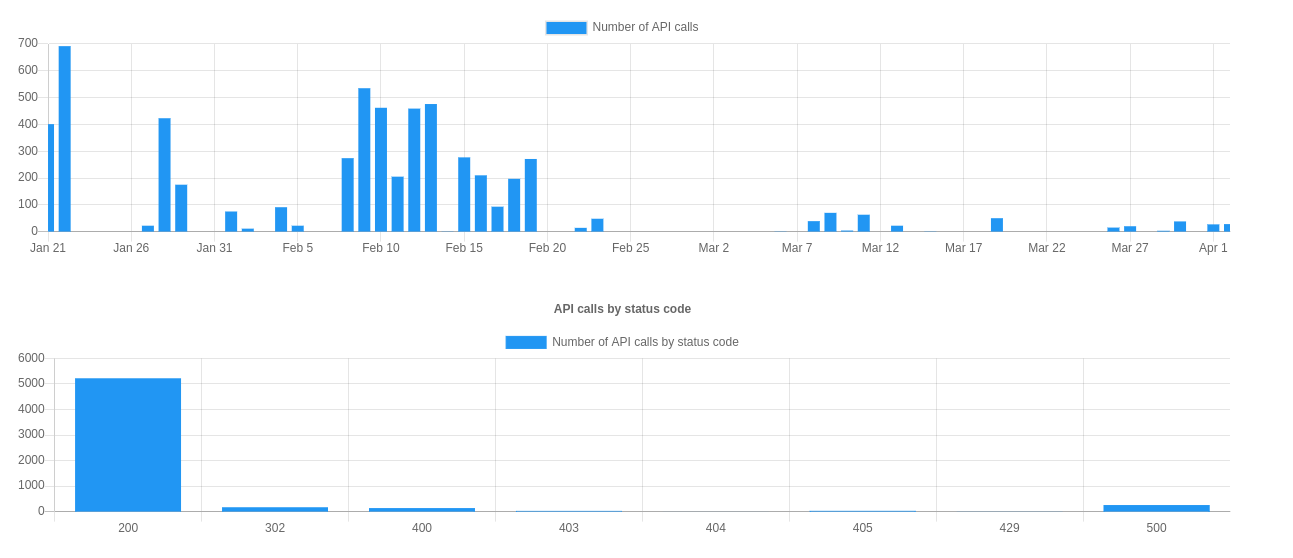 |
| 📋 Log Listing | 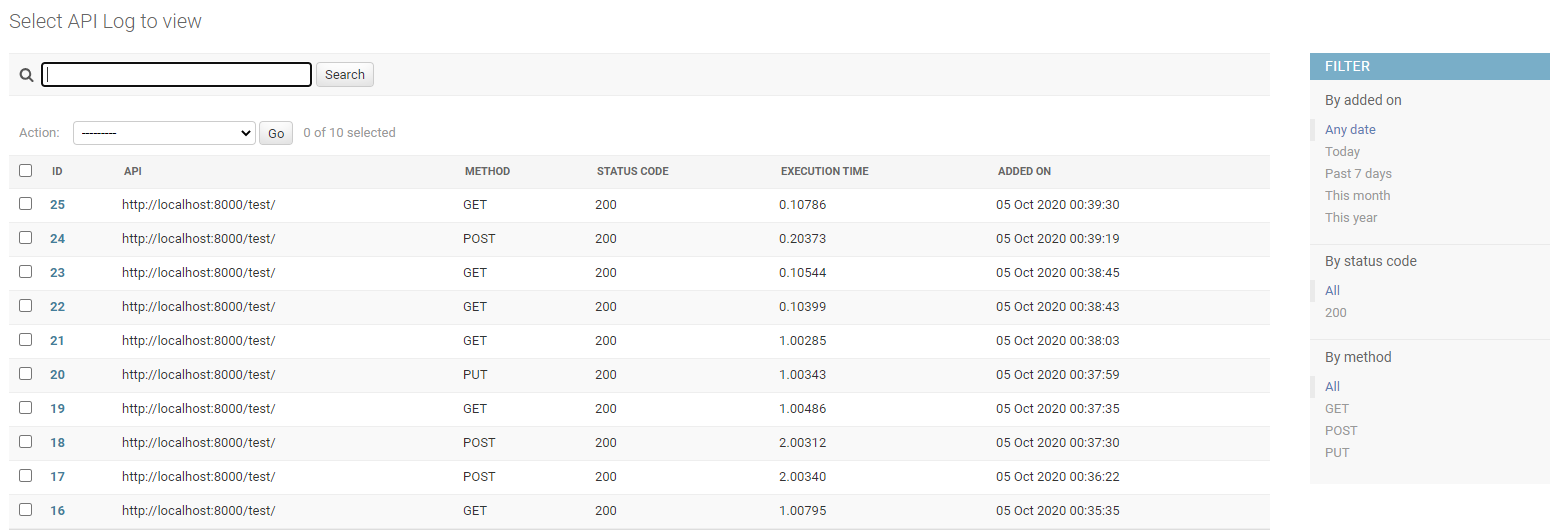 |
| 🔍 Detailed View | 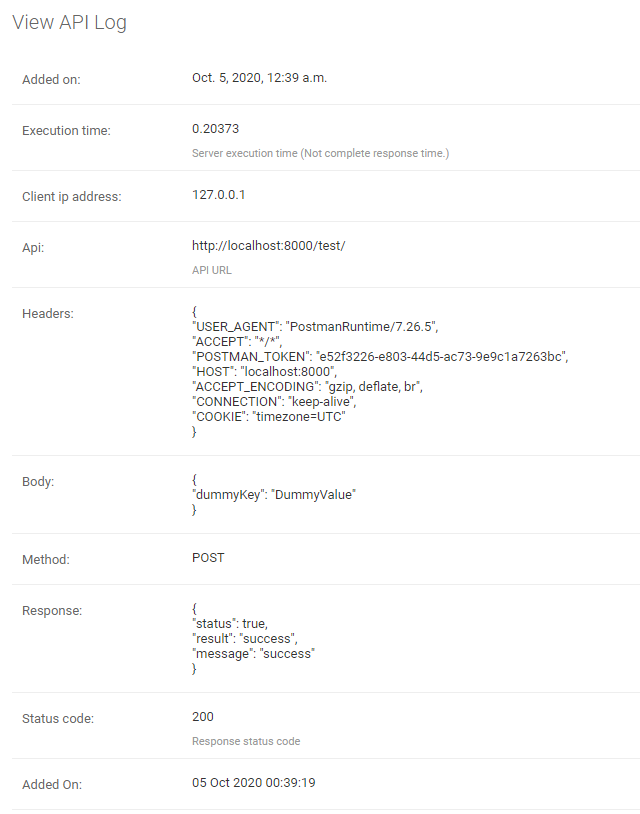 |
Signal-Based Logging
Enable real-time signal notifications for custom logging solutions:
# settings.py
DRF_API_LOGGER_SIGNAL = True
Signal Usage Example
from drf_api_logger import API_LOGGER_SIGNAL

# Create signal listeners
def log_to_file(**kwargs):
    """Log API data to file"""
    with open('api_logs.json', 'a') as f:
        json.dump(kwargs, f)
        f.write('\n')

def send_to_analytics(**kwargs):
    """Send API data to analytics service"""
    analytics_service.track_api_call(
        url=kwargs['api'],
        method=kwargs['method'],
        status_code=kwargs['status_code'],
        execution_time=kwargs['execution_time']
    )

# Subscribe to signals
API_LOGGER_SIGNAL.listen += log_to_file
API_LOGGER_SIGNAL.listen += send_to_analytics

# Unsubscribe when needed
API_LOGGER_SIGNAL.listen -= log_to_file
Signal Data Structure:
{
    'api': '/api/users/',
    'method': 'POST',
    'status_code': 201,
    'headers': '{"Content-Type": "application/json"}',
    'body': '{"username": "john", "password": "***FILTERED***"}',
    'response': '{"id": 1, "username": "john"}',
    'client_ip_address': '192.168.1.100',
    'execution_time': 0.142,
    'added_on': datetime.now(),
    'tracing_id': 'uuid4-string'  # if tracing enabled
}
🔧 Configuration Options
Performance Optimization
Control background processing and database performance:
# Queue size for batch database insertion
DRF_LOGGER_QUEUE_MAX_SIZE = 50  # Default: 50

# Time interval for processing queue (seconds)
DRF_LOGGER_INTERVAL = 10  # Default: 10 seconds
Selective Logging
Skip by Namespace:
# Skip entire Django apps
DRF_API_LOGGER_SKIP_NAMESPACE = ['admin', 'api_v1_internal']
Skip by URL Name:
# Skip specific URL patterns
DRF_API_LOGGER_SKIP_URL_NAME = ['health-check', 'metrics']
Filter by HTTP Method:
# Log only specific methods
DRF_API_LOGGER_METHODS = ['GET', 'POST', 'PUT', 'DELETE']
Filter by Status Code:
# Log only specific status codes
DRF_API_LOGGER_STATUS_CODES = [200, 201, 400, 401, 403, 404, 500]
Note: Admin panel requests are automatically excluded from logging.
Security & Privacy
Data Masking:
# Automatically mask sensitive fields (default)
DRF_API_LOGGER_EXCLUDE_KEYS = ['password', 'token', 'access', 'refresh', 'secret']
# Result: {"password": "***FILTERED***", "username": "john"}
Database Configuration:
# Use specific database for logs
DRF_API_LOGGER_DEFAULT_DATABASE = 'logging_db'  # Default: 'default'
Performance Monitoring
Slow API Detection:
# Mark APIs slower than threshold as "slow" in admin
DRF_API_LOGGER_SLOW_API_ABOVE = 200  # milliseconds
Response Size Limits:
# Prevent logging large payloads
DRF_API_LOGGER_MAX_REQUEST_BODY_SIZE = 1024   # bytes, -1 for no limit
DRF_API_LOGGER_MAX_RESPONSE_BODY_SIZE = 2048  # bytes, -1 for no limit
Content Type & Timezone
Custom Content Types:
# Extend supported content types
DRF_API_LOGGER_CONTENT_TYPES = [
    "application/json",           # Default
    "application/vnd.api+json",   # JSON API
    "application/xml",            # XML
    "text/csv",                   # CSV
]
Timezone Display:
# Admin timezone offset (display only, doesn't affect storage)
DRF_API_LOGGER_TIMEDELTA = 330   # IST (UTC+5:30) = 330 minutes
DRF_API_LOGGER_TIMEDELTA = -300  # EST (UTC-5:00) = -300 minutes
Path Configuration
URL Storage Format:
DRF_API_LOGGER_PATH_TYPE = 'ABSOLUTE' # Options: ABSOLUTE, FULL_PATH, RAW_URI
| Option | Example Output |
|---|---|
ABSOLUTE (default) |
http://127.0.0.1:8000/api/v1/?page=123 |
FULL_PATH |
/api/v1/?page=123 |
RAW_URI |
http://127.0.0.1:8000/api/v1/?page=123 (bypasses host validation) |
Request Tracing
Enable Request Tracing:
DRF_API_LOGGER_ENABLE_TRACING = True # Default: False
Custom Tracing Function:
# Use custom UUID generator
DRF_API_LOGGER_TRACING_FUNC = 'myapp.utils.generate_trace_id'

def generate_trace_id():
    return f"trace-{uuid.uuid4()}"
Extract Tracing from Headers:
# Use existing tracing header
DRF_API_LOGGER_TRACING_ID_HEADER_NAME = 'X-Trace-ID'
Access Tracing ID in Views:
def my_api_view(request):
    if hasattr(request, 'tracing_id'):
        logger.info(f"Processing request {request.tracing_id}")
    return Response({'status': 'ok'})
📊 Programmatic Access
Querying Log Data
Access log data programmatically when database logging is enabled:
from drf_api_logger.models import APILogsModel

# Get successful API calls
successful_apis = APILogsModel.objects.filter(status_code__range=(200, 299))

# Find slow APIs
slow_apis = APILogsModel.objects.filter(execution_time__gt=1.0)

# Recent errors
recent_errors = APILogsModel.objects.filter(
    status_code__gte=400,
    added_on__gte=timezone.now() - timedelta(hours=1)
).order_by('-added_on')

# Popular endpoints
popular_endpoints = APILogsModel.objects.values('api').annotate(
    count=Count('id')
).order_by('-count')[:10]
Model Schema
class APILogsModel(models.Model):
    id = models.BigAutoField(primary_key=True)
    api = models.CharField(max_length=1024, help_text='API URL')
    headers = models.TextField()
    body = models.TextField()
    method = models.CharField(max_length=10, db_index=True)
    client_ip_address = models.CharField(max_length=50)
    response = models.TextField()
    status_code = models.PositiveSmallIntegerField(db_index=True)
    execution_time = models.DecimalField(decimal_places=5, max_digits=8)
    added_on = models.DateTimeField()
🔧 Testing
The package includes comprehensive test coverage:
# Install test dependencies
pip install -e .

# Run core tests
python test_runner_simple.py

# Run full test suite
python run_tests.py

# With coverage
coverage run --source drf_api_logger run_tests.py
coverage report
For detailed testing instructions, see TESTING.md.
🚀 Performance & Production
Database Optimization
For high-traffic applications:
-
Use a dedicated database for logs:
DRF_API_LOGGER_DEFAULT_DATABASE = 'logs_db'
-
Optimize queue settings:
DRF_LOGGER_QUEUE_MAX_SIZE = 100    # Larger batches
DRF_LOGGER_INTERVAL = 5            # More frequent processing
-
Add database indexes:
CREATE INDEX idx_api_logs_added_on ON drf_api_logs(added_on);
CREATE INDEX idx_api_logs_api_method ON drf_api_logs(api, method);
-
Archive old data periodically:
# Delete logs older than 30 days
old_logs = APILogsModel.objects.filter(
    added_on__lt=timezone.now() - timedelta(days=30)
)
old_logs.delete()
Performance Impact
- Zero impact on API response times (background processing)
- Minimal memory footprint (configurable queue limits)
- Efficient storage (bulk database operations)
🤝 Contributing
We welcome contributions! Please read our Contributing Guide for details.
Development Setup
git clone https://github.com/vishalanandl177/DRF-API-Logger.git
cd DRF-API-Logger
pip install -e .
make test-core  # Run tests
📄 License
This project is licensed under the Apache 2.0 License - see the LICENSE file for details.
🌟 Acknowledgments
- Built with ❤️ for the Django and DRF community
- Inspired by the need for comprehensive API monitoring
- Thanks to all contributors and users
⭐ Star this repo if you find it useful!
Release history Release notifications | RSS feed


Download files
Download the file for your platform. If you're not sure which to choose, learn more about installing packages.
Source Distribution
Built Distribution
Filter files by name, interpreter, ABI, and platform.
If you're not sure about the file name format, learn more about wheel file names.
Copy a direct link to the current filters
File details
Details for the file drf_api_logger-1.1.21.tar.gz.
File metadata
- Download URL: drf_api_logger-1.1.21.tar.gz
- Upload date:
- Size: 110.8 kB
- Tags: Source
- Uploaded using Trusted Publishing? No
- Uploaded via: twine/6.1.0 CPython/3.13.0
File hashes
| Algorithm | Hash digest | |
|---|---|---|
| SHA256 |
9a76c9f72460804e0573396bca24a4cfc9096dcecad3d179f65663652878cfe5
|
|
| MD5 |
78dfec28bd30f559a02b9c6235abc671
|
|
| BLAKE2b-256 |
130b6d4568cedd6f7061cfc15dd687a8b8420cc96531a123559d0a5a18662d37
|
File details
Details for the file drf_api_logger-1.1.21-py3-none-any.whl.
File metadata
- Download URL: drf_api_logger-1.1.21-py3-none-any.whl
- Upload date:
- Size: 113.5 kB
- Tags: Python 3
- Uploaded using Trusted Publishing? No
- Uploaded via: twine/6.1.0 CPython/3.13.0
File hashes
| Algorithm | Hash digest | |
|---|---|---|
| SHA256 |
cc6e43a57da44bb5d70eba191a6b70ac294f6785b68e77e74e6847828fafbf6b
|
|
| MD5 |
3fc14ca0bb88e0fe39a08e5669374f84
|
|
| BLAKE2b-256 |
e8e1d2ad42c044fdfa45a19c1a46d48a35123b30dcceb2ed13f6bfc9d558f8f6
|






