
An API Logger for your Django Rest Framework project.

Project description
DRF API Logger

An API Logger for your Django Rest Framework project.
It logs all the API information for content type "application/json".
- URL
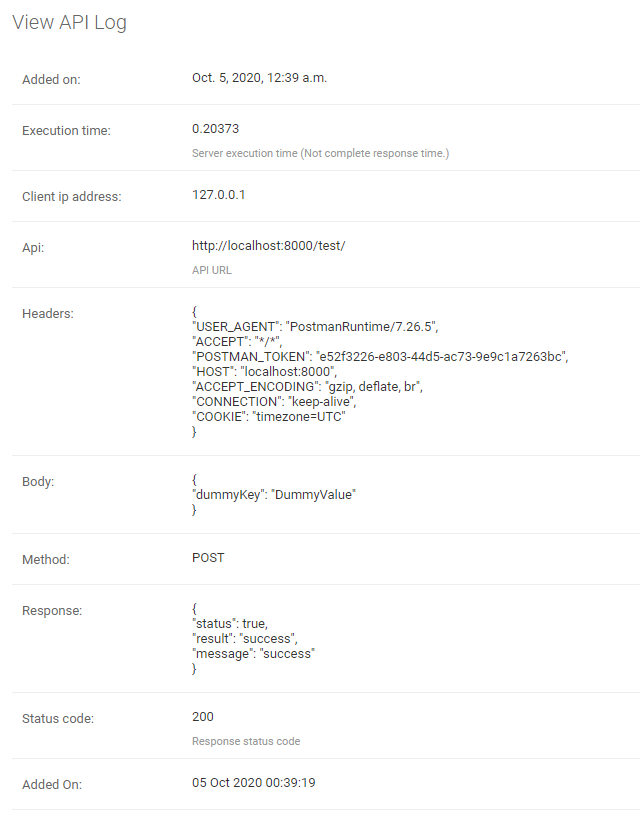
- Request Body
- Request Headers
- Request Method
- API Response
- Status Code
- API Call Time
- Server Execution Time
- Client IP Address
You can log API information into the database or listen to the logger signals for different use-cases or you can do both.
- The logger usage a separate thread to run so it won't affect your API response time.
Installation
Install or add drf-api-logger.
pip install drf-api-logger
Add in INSTALLED_APPS
INSTALLED_APPS = [
    'django.contrib.admin',
    'django.contrib.auth',
    'django.contrib.contenttypes',
    'django.contrib.sessions',
    'django.contrib.messages',
    'django.contrib.staticfiles',

    'drf_api_logger',  #  Add here
]
Add in MIDDLEWARE
MIDDLEWARE = [
    'django.middleware.security.SecurityMiddleware',
    'django.contrib.sessions.middleware.SessionMiddleware',
    'django.middleware.common.CommonMiddleware',
    'django.middleware.csrf.CsrfViewMiddleware',
    'django.contrib.auth.middleware.AuthenticationMiddleware',
    'django.contrib.messages.middleware.MessageMiddleware',
    'django.middleware.clickjacking.XFrameOptionsMiddleware',

    'drf_api_logger.middleware.api_logger_middleware.APILoggerMiddleware', # Add here
]
* Add these lines in Django Rest Framework settings file.
Store logs into the database
Log every request into the database.
DRF_API_LOGGER_DATABASE = True # Default to False
-
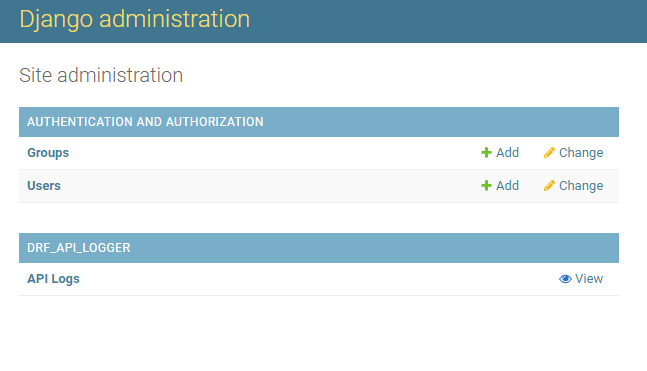
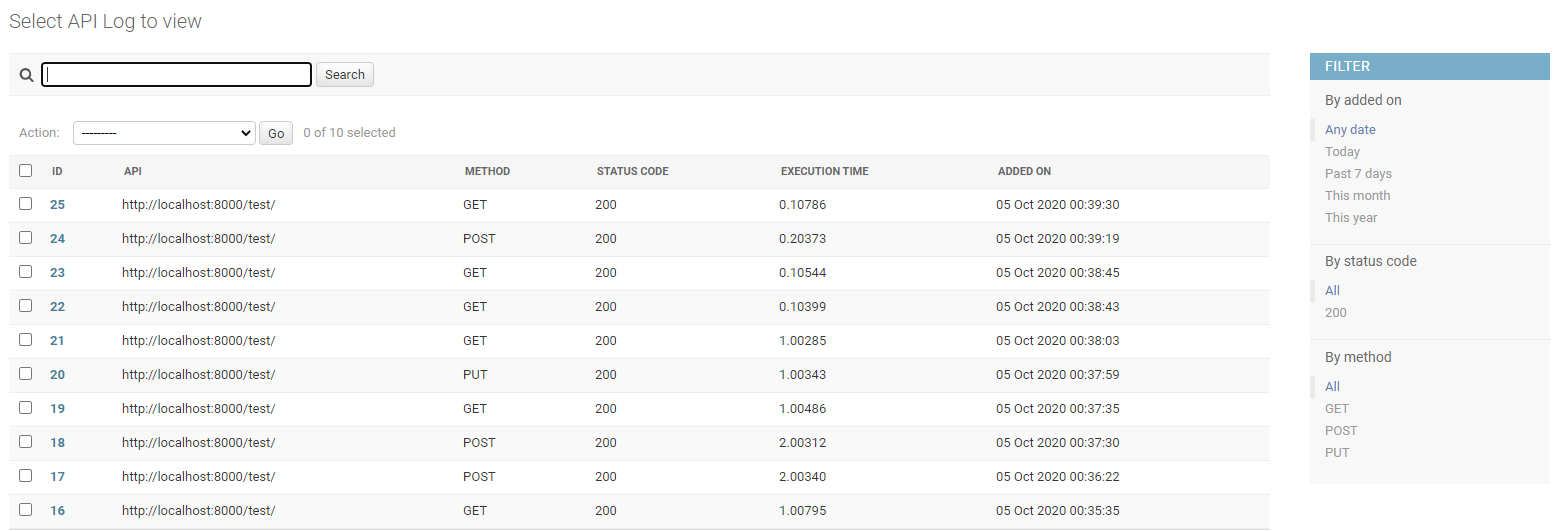
Logs will be available in Django Admin Panel.
-
The search bar will search in Request Body, Response, Headers and API URL.
-
You can also filter the logs based on the "added_on" date, Status Code and Request Methods.
Note: Make sure to migrate. It will create a table for logger if "DRF_API_LOGGER_DATABASE" is True else if already exists, it will delete the table.
To listen for the logger signals.
Listen to the signal as soon as any API is called. So you can log the API data into a file or for different use-cases.
DRF_API_LOGGER_SIGNAL = True # Default to False
Example code to listen to the API Logger Signal.
"""
Import API_LOGGER_SIGNAL
"""
from drf_api_logger import API_LOGGER_SIGNAL


"""
Create a function that is going to listen to the API logger signals.
"""
def listener_one(**kwargs):
    print(kwargs)

def listener_two(**kwargs):
    print(kwargs)

"""
It will listen to all the API logs whenever an API is called.
You can also listen signals in multiple functions.
"""
API_LOGGER_SIGNAL.listen += listener_one
API_LOGGER_SIGNAL.listen += listener_two

"""
Unsubscribe to signals.
"""

API_LOGGER_SIGNAL.listen -= listener_one
Queue
DRF API Logger usage queue to hold the logs before inserting into the database. Once queue is full, it bulk inserts into the database.
Specify the queue size.
DRF_LOGGER_QUEUE_MAX_SIZE = 50 # Default to 50 if not specified.
Interval
DRF API Logger also waits for a period of time. If queue is not full and there are some logs to be inserted, it inserts after interval ends.
Specify interval (In Seconds).
DRF_LOGGER_INTERVAL = 10 # In Seconds, Default to 10 seconds if not specified.
Note: The API call time (added_on) is timezone aware datetime object. It is actual time of API call irrespective of interval value or queue size.
Skip namespace
You can skip the entire app to be logged into the database by specifying namespace of the app as list.
DRF_API_LOGGER_SKIP_NAMESPACE = ['APP_NAMESPACE1', 'APP_NAMESPACE2']
Skip URL Name
You can also skip any API to be logged by using url_name of the API.
DRF_API_LOGGER_SKIP_URL_NAME = ['url_name1', 'url_name2']
Note: It does not log Django Admin Panel API calls.
Release history Release notifications | RSS feed


Download files
Download the file for your platform. If you're not sure which to choose, learn more about installing packages.
Source Distribution
File details
Details for the file drf_api_logger-0.0.5.tar.gz.
File metadata
- Download URL: drf_api_logger-0.0.5.tar.gz
- Upload date:
- Size: 7.4 kB
- Tags: Source
- Uploaded using Trusted Publishing? No
- Uploaded via: twine/1.15.0 pkginfo/1.5.0.1 requests/2.24.0 setuptools/50.3.0 requests-toolbelt/0.9.1 tqdm/4.48.2 CPython/3.5.4
File hashes
| Algorithm | Hash digest | |
|---|---|---|
| SHA256 |
283512404a5b245b8aa846fc0112363ebdc1f83c18a7ab4343cd8b3c72ab7aae
|
|
| MD5 |
a8e6d2c64e27caa43010ee940aee7b77
|
|
| BLAKE2b-256 |
e9b063b1a0d6a9832f14e6f3ba47310b6e5ce6f809f4103fdc119e4a95fc5d4b
|






