
Drone Flightplan Generator

Generate an optimized flight plan for aerial mapping with drones.



📖 Documentation: https://hotosm.github.io/drone-flightplan/
🖥️ Source Code: https://github.com/hotosm/drone-tm/blob/dev/src/backend/packages/drone-flightplan
Overview
The Drone Flightplan Generator is a Python package designed to automate the creation of flight plans for drones. This tool is essential for users needing efficient and precise aerial surveys, mapping, and imagery collection.
Waypoint File
DJI drones require waypoint files. WPML route files all end with a ".kmz" suffix and are essentially archive files packed in ZIP format. After decompression of a standard WPML route file, its file structure is as follows:
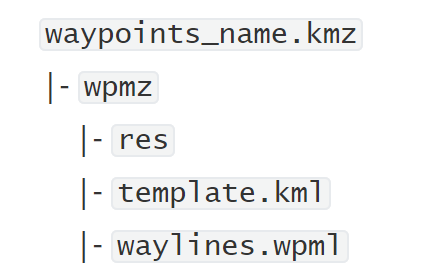
For more details, check the DJI Cloud API documentation.
Installation
To install the package, use pip:
pip install drone-flightplan
Modules
1. calculate_parameters
This module helps in calculating various parameters required for the flight plan, such as:
calculate_parameters(
    forward_overlap: float,
    side_overlap: float,
    agl: float,
    gsd: float = None,
    image_interval: int = 2,
)
Parameters:
AGL(Altitude above ground level in meters) = 115Forward overlap= 75Side overlap= 75
Fixed Parameters:
Image interval= 2 secVertical FOV= 0.99Horizontal FOV= 1.25
Calculations:
- Forward Photo height = AGL _Vertical_FOV
- Side Photo width = AGL _Horizontal_FOV
- Forward overlap distance = Forward photo height _Forward overlap
- Side overlap distance = Side photo width _Side overlap
- Forward spacing = Forward photo height - Forward overlap distance
- Side spacing = Side photo width - Side overlap distance
- Ground speed = Forward spacing / Image interval
Parameters:
- Run
uv run calcparamsto see options.
2. create_waypoint
This module generates waypoints for a given project area, using parameters such as altitude, GSD, overlap ratios, and the option to avoid no-fly zones. It can also create 3D waypoints:
from drone_flightplan import create_waypoint

create_waypoint(
    project_area,
    agl,
    gsd,
    forward_overlap,
    side_overlap,
    rotation_angle=0.0,
    flight_mode="waypoints",
    generate_3d=False,
    no_fly_zones=None,
    take_off_point=None,
)
Parameters:
- Run
uv run waypointsto see options.
3. add_elevation_from_dem
This module integrates elevation data from Digital Elevation Models (DEMs) into the flight plan to account for changes in terrain. This ensures more accurate waypoint positioning for varying altitudes:
from drone_flightplan import add_elevation_from_dem

add_elevation_from_dem(raster_file, points, outfile)
Parameters:
- Run
uv run addelevto see options.
4. create_placemarks
This module creates placemarks for the flight plan, useful for marking key locations:
from drone_flightplan import create_placemarks

create_placemarks(
    waypoints_geojson: Union[str, FeatureCollection, dict],
    parameters: dict
)
Parameters:
- Run
uv run placemarksto see options.
5. create_wpml
This module is responsible for creating WPML files (Waypoint Markup Language), which are often used for visualizing waypoints and flight paths in different tools or simulators:
from drone_flightplan import create_wpml

create_wpml(
    placemark_geojson: Union[str, FeatureCollection, dict],
    output_file_path: str = "/tmp/",
)
Parameters:
placemark_geojson: The placemark coordinates to be included in the flight plan mission.output_file_path: The output file path for the WPML file.
6. create_flightplan
This is the core function responsible for generating a complete flight plan for a specified area of interest (AOI):
from drone_flightplan import create_flightplan

create_flightplan(
    aoi,
    forward_overlap,
    side_overlap,
    agl,
    gsd=None,
    image_interval=2,
    dem=None,
    outfile=None,
    flight_mode="waypoints",
    rotation_angle=0.0,
    take_off_point=None,
)
Parameters:
- Run
uv run flightplanto see options.
1 maintainer

Metadata
1 maintainer
Release files for drone-flightplan 1.0.0
For a detailed explanation of source distributions (sdists) and built distributions (wheels), please see the package formats documentation.
Source distribution (sdist)
| File | Size | Uploaded | |
|---|---|---|---|
| drone_flightplan-1.0.0.tar.gz | 65.4 kB | Details |
Built distribution (wheel)
| File | Interpreter | ABI | Platform | Reset |
|---|---|---|---|---|
| drone_flightplan-1.0.0-py3-none-any.whl | Python 3 | none | any | Details |
Total release size: 139.1 kB
Release files / drone_flightplan-1.0.0.tar.gz
| Download URL | drone_flightplan-1.0.0.tar.gz |
|---|---|
| Size | 65.4 kB |
| Tags | Source |
|
SHA-256 checksum How to use checksums |
67dbc4855d9f0240d4a67b221deea80fa257074f5a7ea73bdb3e95205409cefb
|
|
BLAKE2b-256 checksum How to use checksums |
1fcb9348f91cfd5c09feaa4135271484d987d399c2a5cda09263faa74bf199bc
|
| Upload date | |
|
Uploaded using Trusted Publishing? What is trusted publishing? |
No |
| Uploaded via |
uv/0.8.22
|
Release files / drone_flightplan-1.0.0-py3-none-any.whl
| Download URL | drone_flightplan-1.0.0-py3-none-any.whl |
|---|---|
| Size | 73.7 kB |
| Tags | Python 3 |
|
SHA-256 checksum How to use checksums |
b8af6a408053a91b35ecb2357eedd883d208885260f1359955e9d476a278b1d5
|
|
BLAKE2b-256 checksum How to use checksums |
858d9d19143b286dad43fc5fb9d1ede7ddf67eb2b9d1b217428efb5d276760df
|
| Upload date | |
|
Uploaded using Trusted Publishing? What is trusted publishing? |
No |
| Uploaded via |
uv/0.8.22
|














