
Dropit – Local HTTPS file drop
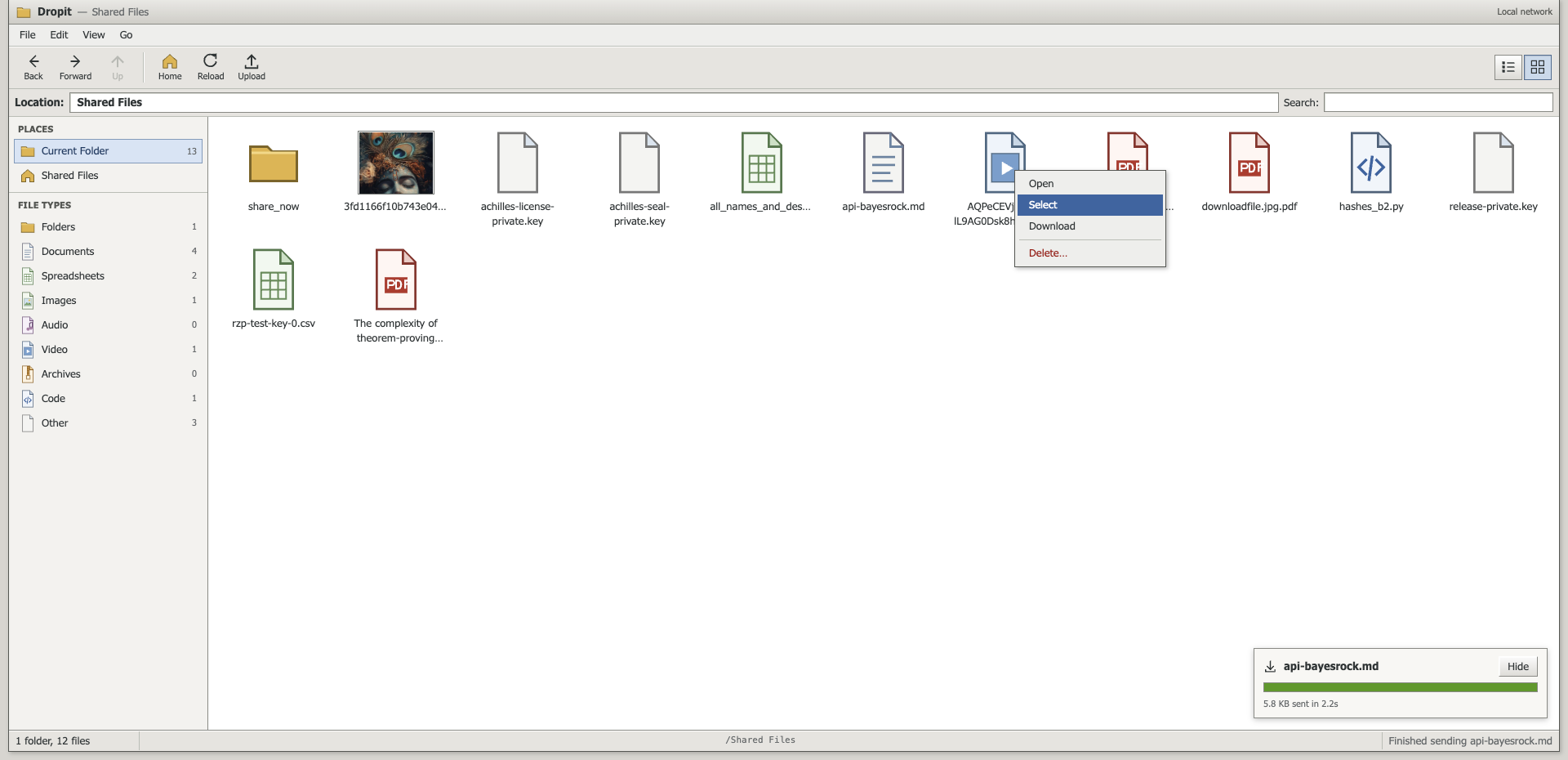
Dropit is a small Flask app that lets you share files with other devices on the same network. It runs a local HTTPS server with a drag-and-drop UI for uploading, downloading, and deleting files.
Install
pip install dropit
Python ≥ 3.9 is supported.
Commands and flags
dropit [--password <password>] [--geturl] [--getqr] [--maxsize <GB>] [--http] [--version]
--password <password>: enable Basic Auth with usernameadmin.--http: serve plain HTTP instead of HTTPS — no certificate warning, but traffic is unencrypted.--geturl: print the server URL in color to the terminal.--getqr: render the URL as an ASCII QR code in the terminal.--maxsize <GB>: maximum upload size in gigabytes (default:2).--version: print the installed Dropit version and exit.
Examples:
# start server and print URL
dropit --geturl

# start server and show an ASCII QR
dropit --getqr

# require a password (user: admin)
dropit --password "mypassword"

# allow larger uploads (10 GB)
dropit --maxsize 10

# just show the installed version
dropit --version

# no certificate warning (unencrypted — trusted networks only)
dropit --http
Quick start
dropit --geturl
Then, from another device on the same network, open the URL shown (e.g., https://<your-ip>:5001).
What you get
- Local HTTPS server on port
5001, with a certificate that is reused across restarts. - A file-manager UI: folders, breadcrumbs, search, type filters, details/icon views, image previews.
- Drag-and-drop upload, multi-file download as a ZIP, and delete.
- Optional Basic Auth: set a password and use the fixed username
admin. - Handy discovery: print the URL (
--geturl) and an ASCII QR code (--getqr). - Upload size limit configurable via
--maxsize(default 2 GB). - Files are stored under your home directory in
sharex($HOME/sharexon Linux/macOS,%USERPROFILE%\\sharexon Windows). The exact resolved path is printed on startup. - A keep-alive HTTP server (cheroot) with a worker pool, so several devices can browse while others download.
Certificates and the browser warning
Dropit serves HTTPS with a self-signed certificate stored at ~/.dropit/cert.pem. It is
generated once, covers localhost, your machine's hostname, and your current LAN IP, and is
reused on every restart — so a device only has to be told to trust it once, rather than on
every run.
Three ways to deal with the warning, in order of least friction:
-
Accept it per device. Tap through the browser's "advanced → proceed" prompt. Because the certificate no longer changes between runs, most browsers stop asking after the first time.
-
Install the certificate as trusted. Open
https://<your-ip>:5001/certificateon the device — that downloads the certificate and starts the system install flow. Then finish it (Android: Settings → Security → Encryption & credentials → Install a certificate → CA certificate; iOS: Settings → General → VPN & Device Management to install, then General → About → Certificate Trust Settings to enable full trust; macOS: open it in Keychain Access and mark it Always Trust). The warning is then gone for good.This is the fix if downloads fail. A phone's download manager is a separate component from the browser and does not inherit the "proceed anyway" exception you tapped through, so it rejects the certificate on its own and the transfer dies. Dropit prints a hint the first time it sees this.
-
Skip TLS entirely with
dropit --httpfor devices that refuse self-signed certificates. There is no warning at all, but everything — including your--passwordcredentials — travels the network in the clear, so only do this on a network you trust.
Dropit regenerates the certificate automatically if your LAN IP changes or it is about to expire.
Using the web UI
- Actions: right-click an item (long-press on a phone or tablet) to get Open, Select, Download, and Delete. Right-clicking empty space in the list offers Upload Files, Select All, Clear Selection, and Refresh.
- Selecting: a plain click never selects, so you can browse without disturbing a selection.
Use the row checkbox, the context menu's Select,
Ctrl/Cmd-click to add one item, orShift-click to extend a range.Ctrl/Cmd+Aselects everything currently shown. - Opening: double-click a row, or press
Enteron the focused row. Folders open in place; images open in a preview dialog. - Downloading: one selected file downloads directly; several items — or a whole folder — stream as a single ZIP that keeps the folder structure. Folders are walked recursively. Nothing is staged on disk first, so even a multi-gigabyte folder starts immediately.
- Progress: a tray in the bottom corner shows bytes transferred, percentage, speed, and time remaining, because the browser's own download manager is invisible to the page.
- Upload: drag files or whole folders anywhere onto the page, or use Upload in the
toolbar, then Upload Here. A dropped folder is walked recursively and its structure is
recreated on the server. Uploads land in the folder you are currently viewing and never
overwrite an existing file — a duplicate name is saved as
name (1).ext. - Deleting: folders must be empty before they can be removed.
- Storage: uploaded files are saved to
sharexunder your home directory ($HOME/sharexon Linux/macOS,%USERPROFILE%\\sharexon Windows).
Keyboard
| Key | Action |
|---|---|
↑ ↓ Home End |
Move between rows |
Space |
Toggle selection of the focused row |
Enter |
Open the focused row |
Ctrl/Cmd + A |
Select everything shown |
Ctrl/Cmd + F |
Jump to the search box |
Shift + F10 / Menu key |
Open the context menu for the focused row |
Esc |
Close menus, the preview, or the Places panel |
Authentication
- Default: open access.
- To require a password: start with
--password mysecret. Sign in asadminwith that password. Basic Auth is only enforced when a password is provided.
Anyone on your network can read, upload to, and delete from the shared folder while the server is running. Without
--passwordthere is no access control at all, so start it only on networks you trust and keep private files out of~/sharex.
Troubleshooting
- Browser warning about HTTPS: see Certificates and the browser warning. Quickest escape hatch is
dropit --http. - A device refuses to open the page at all: some Android builds will not let you past a self-signed certificate. Use
dropit --http, or install the certificate as trusted. - Slow with several devices connected: make sure you are on the release that uses the keep-alive server; large images are also served as icons rather than thumbnails past 2 MB.
- Downloads start then fail on a phone: the download manager is rejecting the self-signed certificate. Install it from
/certificate, or use--http. certificate unknownin the console: same cause — a device has not been told to trust the certificate. Dropit prints the fix once rather than repeating the alert.- Can’t reach the URL: ensure devices are on the same network and that port
5001is allowed through firewalls. - Upload fails due to size: increase
--maxsizeto the number of gigabytes you need. - Port 5001 is already in use: stop the other program using it, then start Dropit again.
Contributing
Issues and pull requests are welcome. For significant changes, please open an issue first to discuss what you’d like to adjust.
Contribution flow
- Branch from
master(e.g.,feature/...orfix/...). - Make your change. If it affects behavior, note how to verify in the PR.
- Quick local checks:
- Create/activate a virtual env to avoid polluting your global Python:
python3 -m venv .venv && source .venv/bin/activate(on Windows:python -m venv .venvthen.venv\Scripts\activate) pip install .(ensure dependencies and console entry work)dropit --version(standalone; prints the version and exits)dropit --geturlordropit --getqr(separate run; starts the server and prints URL or QR, shows the resolved storage path)
- Create/activate a virtual env to avoid polluting your global Python:
- Push your branch and open a PR against
masterwith a short description and verification steps. - Releases are driven by the version, not by tags. Bump
__version__indropit/__init__.pyin your PR; when it merges tomaster, CI builds, smoke-tests the wheel in a clean environment, publishes to PyPI, and creates thevX.Y.Ztag for you. Merging without bumping the version publishes nothing, so ordinary PRs are safe. - For larger contributions: discuss design/approach in an issue first, keep PRs focused, and add tests/docs alongside code changes so reviewers can validate quickly.
1 maintainer

Metadata
1 maintainer
Release files for dropit 0.1.22
For a detailed explanation of source distributions (sdists) and built distributions (wheels), please see the package formats documentation.
Source distribution (sdist)
| File | Size | Uploaded | |
|---|---|---|---|
| dropit-0.1.22.tar.gz | 167.5 kB | Details |
Built distribution (wheel)
| File | Interpreter | ABI | Platform | Reset |
|---|---|---|---|---|
| dropit-0.1.22-py3-none-any.whl | Python 3 | none | any | Details |
Total release size: 240.7 kB
Release files / dropit-0.1.22.tar.gz
| Download URL | dropit-0.1.22.tar.gz |
|---|---|
| Size | 167.5 kB |
| Tags | Source |
|
SHA-256 checksum How to use checksums |
9edc6266195e6a983b49df1ec9feeda99abf1ad6eea49fe32c9f70980d5b9751
|
|
BLAKE2b-256 checksum How to use checksums |
911871dc028fcdd422c17d849cfb8c8f85f110861faf5153fae175897da20abc
|
| Upload date | |
|
Uploaded using Trusted Publishing? What is trusted publishing? |
No |
| Uploaded via |
twine/7.0.0 CPython/3.13.14
|
Release files / dropit-0.1.22-py3-none-any.whl
| Download URL | dropit-0.1.22-py3-none-any.whl |
|---|---|
| Size | 73.2 kB |
| Tags | Python 3 |
|
SHA-256 checksum How to use checksums |
5d237c69fbca80fca2b9f97987c52ee6ed8d8a4b1b5e6b77f268b4e0766094fc
|
|
BLAKE2b-256 checksum How to use checksums |
6ae52d124565ada03df110c264acc75eda62c040aed37d45a46e386fc0383610
|
| Upload date | |
|
Uploaded using Trusted Publishing? What is trusted publishing? |
No |
| Uploaded via |
twine/7.0.0 CPython/3.13.14
|














