
dsm2dtm

Generate DTM (Digital Terrain Model) from DSM (Digital Surface Model)






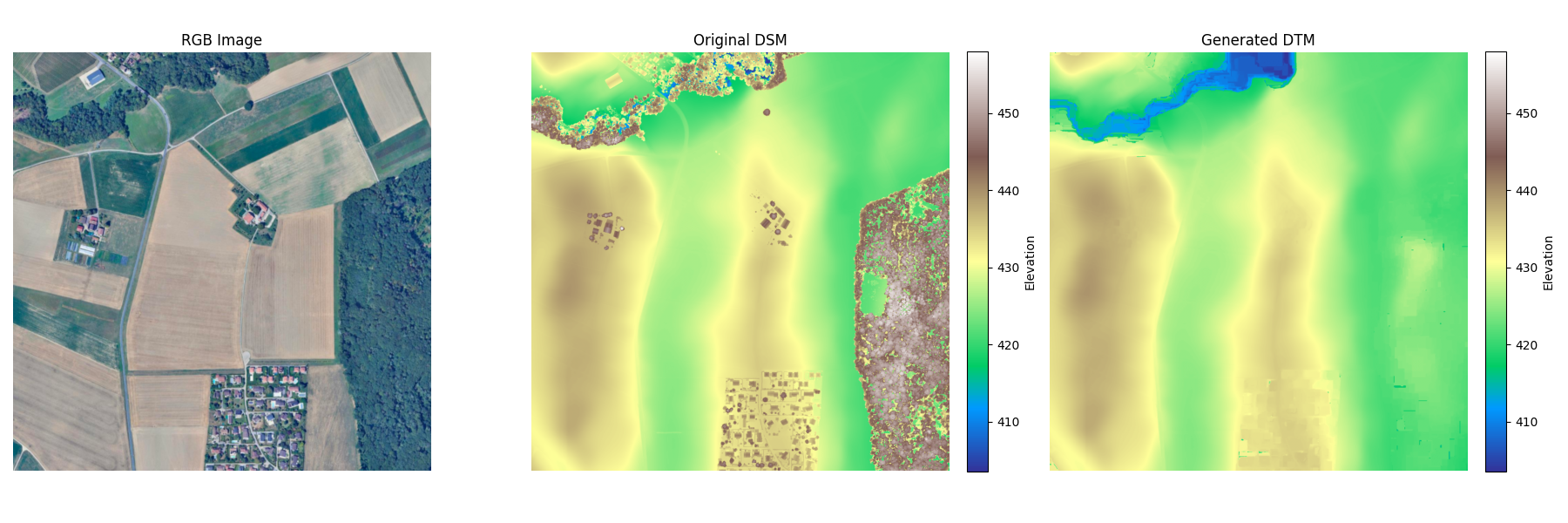
dsm2dtm is a robust, python library for extracting bare earth Digital Terrain Models (DTM) from Digital Surface Models (DSM). It effectively removes non-ground features like buildings, vegetation, and cars, leaving only the underlying terrain.
Key features:
- Pure Python: No external binary dependencies (no SAGA, no GDAL CLI). Just
numpy,scipy, andrasterio. - Robust: Handles noise, cliffs, and varied resolutions automatically.
- Adaptive: Automatically tunes parameters based on input resolution and terrain slope.
- Easy to Use: Simple CLI and a clean Python API for developers.
Installation
Via Pip
pip install dsm2dtm
Via Conda
conda install -c conda-forge dsm2dtm
From Source
git clone https://github.com/seedlit/dsm2dtm.git
cd dsm2dtm
pip install .
Usage
1. Python Library
You can integrate dsm2dtm into your own Python pipelines. We provide high-level and low-level APIs.
High-Level API (file based)
from dsm2dtm import generate_dtm, save_dtm

input_path = "dsm.tif"
output_path = "dtm.tif"

# 1. Generate DTM (returns numpy array and profile metadata)
dtm_array, profile = generate_dtm(input_path)

# 2. Save to disk
save_dtm(dtm_array, profile, output_path)
Large rasters (streaming, file to file)
generate_dtm holds the whole raster in memory (peak ~10x the input). For large DSMs, use
generate_dtm_file, which processes overlapping tiles in parallel threads, so memory is bounded
by workers x tile_size instead of raster size (a 16000 x 16000 DSM runs in ~23 s at ~2.5 GB):
from dsm2dtm import generate_dtm_file

generate_dtm_file("dsm.tif", "dtm.tif", tile_size=2048, workers=4)
Low-Level API (rasterio based)
Ideal for in-memory processing or integration with other libraries like xarray.
import rasterio
from dsm2dtm.algorithm import dsm_to_dtm
from dsm2dtm import save_dtm

# Load data yourself
with rasterio.open("dsm.tif") as src:
    dsm = src.read(1)
    res = src.res  # (x_res, y_res)
    nodata = src.nodata
    profile = src.profile

# Run algorithm on raw numpy array
dtm_array = dsm_to_dtm(dsm, resolution=res, nodata=nodata)

# Save to disk
save_dtm(dtm_array, profile, "dtm.tif")
2. Command Line Interface (CLI)
The simplest way to use dsm2dtm is via the command line.
dsm2dtm --dsm dsm.tif --out_dir output/
Arguments:
--dsm: Path to the input DSM (GeoTIFF).--out_dir: Directory where the output DTM will be saved (default:generated_dtm).--radius: (Optional) Kernel radius in meters for object removal. Objects larger than 2x this radius will typically NOT be removed. Set this to slightly larger than half the width of the largest building in your scene. Default: 40.0.--slope: (Optional) Terrain slope (0-1). Estimated automatically (capped at 0.1) if not provided.--tile_size: (Optional) Tile edge in pixels for streaming processing. Default: 2048.--workers: (Optional) Worker threads. Default: up to 4.
The CLI always streams tile by tile, so arbitrarily large DSMs fit in memory.
3. QGIS Plugin
The plugin is available in the official QGIS Plugin Repository.
- Open QGIS.
- Go to Plugins > Manage and Install Plugins...
- Search for
DSM to DTM. - Click Install Plugin.
Alternatively, view on the web: plugins.qgis.org/plugins/dsm2dtm/
Example: Vegetation & Structure Removal
This comparison highlights the removal of surface features, such as dense vegetation and buildings, to reveal the underlying bare earth topography and river details in the generated Digital Terrain Model.
How It Works
The library implements an optimized version of the Progressive Morphological Filter (PMF) combined with surface refinement.
graph LR
    subgraph Preprocessing [Preprocessing]
        A["Input DSM"] -->|Load & Reproject| B["Internal Grid (UTM)"];
        B -->|Resample if >0.5m| C["Working Resolution"];
        C --> D["Slope Estimation"];
    end

    subgraph Core [Core Filtering]
        D --> E{"Progressive Morphological Filter"};
        E -->|Iterative Opening| F["Rough Ground Estimate"];
        F --> G["Surface Refinement"];
        G -->|Remove Spikes| H["Refined Ground"];
    end

    subgraph Post [Post-Processing]
        H --> I["Gaussian Smoothing"];
        I --> J["Gap Filling"];
        J -->|Reproject| K["Final DTM"];
    end
- Resolution Adaptation: Parameters are scaled automatically based on the input pixel size. Inputs finer than 0.5m are downsampled to 0.5m for stability and speed, then upsampled back.
- Slope Estimation: Local terrain slopes are calculated to adapt the filtering thresholds.
- Progressive Morphological Filter (PMF): Iteratively applies morphological opening (erosion followed by dilation) with increasing window sizes. This effectively "shaves off" objects that stick out above the ground surface.
- Refinement: A smoothing step compares the rough ground estimate with the original surface to recover over-smoothed details while rejecting spikes.
- Gap Filling: Remaining holes (nodata) within 100m of valid ground are filled from the nearest valid cell before a light final smoothing; larger gaps (e.g. water bodies) stay nodata. The DTM is clamped to never exceed the DSM.
- Tiling: Large rasters are split into tiles with an overlap wide enough that results match whole-raster processing.
Contributing
We welcome contributions! Please feel free to submit a Pull Request.
Roadmap / Todo
We are actively looking for help with:
- Performance:
- GPU acceleration (e.g., using
cupy).
- GPU acceleration (e.g., using
- Algorithm Improvements:
- Reducing holes/artifacts on building borders
- Better removal of square-shaped buildings (currently works best on rectangular footprints).
Setup
We use uv for dependency management and pre-commit for code quality.
# 1. Clone
git clone https://github.com/seedlit/dsm2dtm.git

# 2. Install dependencies
uv sync --all-extras

# 3. Install hooks
uv run pre-commit install
Running Tests
We use pytest for testing. The suite includes unit tests, stress tests, and integration tests with real-world data (downloaded automatically).
# Run all tests
uv run pytest

# Run only stress tests
uv run pytest tests/test_stress.py
License
MIT License. See LICENSE for details.
1 maintainer

Metadata
1 maintainer
Release files for dsm2dtm 0.4.0
For a detailed explanation of source distributions (sdists) and built distributions (wheels), please see the package formats documentation.
Source distribution (sdist)
| File | Size | Uploaded | |
|---|---|---|---|
| dsm2dtm-0.4.0.tar.gz | 33.0 kB | Details |
Built distribution (wheel)
| File | Interpreter | ABI | Platform | Reset |
|---|---|---|---|---|
| dsm2dtm-0.4.0-py3-none-any.whl | Python 3 | none | any | Details |
Total release size: 55.1 kB
Release files / dsm2dtm-0.4.0.tar.gz
| Download URL | dsm2dtm-0.4.0.tar.gz |
|---|---|
| Size | 33.0 kB |
| Tags | Source |
|
SHA-256 checksum How to use checksums |
7a8acfad6e5ea1127b37069ba92931edf5275fb707a626906c125da8bee851aa
|
|
BLAKE2b-256 checksum How to use checksums |
ad388349d12ccdcc0c2153b6786601da026e8dd8c6881454e5709e7086fd732c
|
| Upload date | |
|
Uploaded using Trusted Publishing? What is trusted publishing? |
Yes |
| Uploaded via |
twine/7.0.0 CPython/3.13.14
|
Provenance
Provenance describes where a file came from. On PyPI, provenance is shared via attestations, which provide a verifiable record of the build or publishing details. View details, limitations and caveats.


PyPI Publish Attestation
PyPI verified that this artifact, at this checksum, originated from the publisher listed below.
Signed by GitHub Actions, verified by PyPI on Sep 29, 2026.
Transparency logRelease files / dsm2dtm-0.4.0-py3-none-any.whl
| Download URL | dsm2dtm-0.4.0-py3-none-any.whl |
|---|---|
| Size | 22.0 kB |
| Tags | Python 3 |
|
SHA-256 checksum How to use checksums |
d24850636b59822d9c228970e4ca9fca6c9fd324927e570ed64bb8099219886c
|
|
BLAKE2b-256 checksum How to use checksums |
9417700c67bf6aa46edbbaf25dc99a8ff579efbc5184763a5827b82a17d12ad3
|
| Upload date | |
|
Uploaded using Trusted Publishing? What is trusted publishing? |
Yes |
| Uploaded via |
twine/7.0.0 CPython/3.13.14
|
Provenance
Provenance describes where a file came from. On PyPI, provenance is shared via attestations, which provide a verifiable record of the build or publishing details. View details, limitations and caveats.
PyPI Publish Attestation
PyPI verified that this artifact, at this checksum, originated from the publisher listed below.
Signed by GitHub Actions, verified by PyPI on Sep 29, 2026.
Transparency log













