
dtflow





English | 中文
A terminal browser for LLM training data, plus a CLI toolbox to filter, clean, convert and export it.
dt view opens an SFT / DPO / agent JSONL file as a table-plus-detail browser: conversations rendered as colored chat turns, tool calls formatted with bad JSON flagged, full-file search across every field, mouse support, and windowed loading that keeps a 900k-line file under 100 MB of RAM. The rest of dt is a pipeable Unix-style toolkit for the same data, where every condition is plain Python.
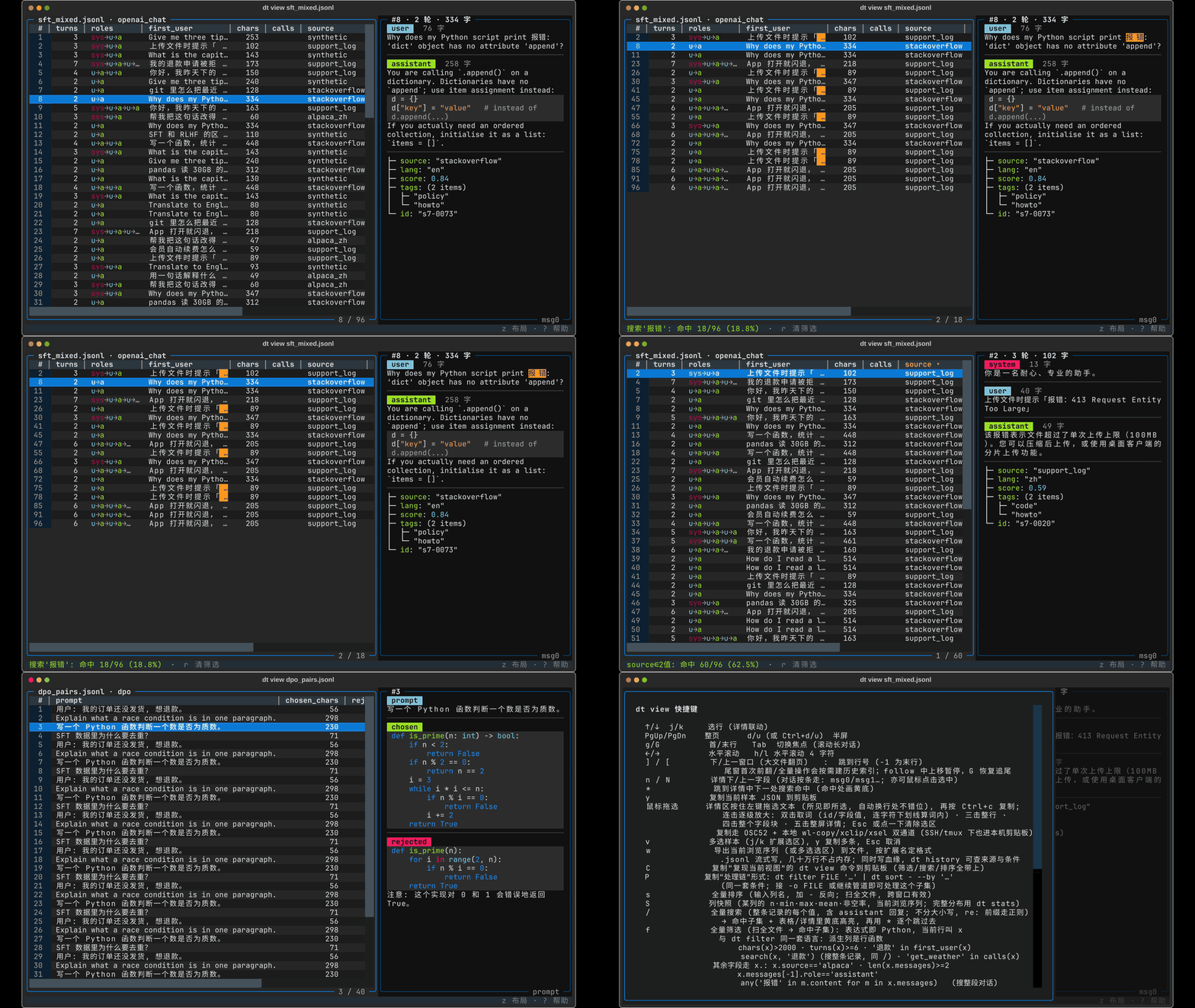
dt view data.jsonl — one command turns a training set into a searchable, filterable terminal browser
Try it in 30 seconds
pip install dtflow                      # or, without installing: uvx --from dtflow dt view data.jsonl

dt view data.jsonl                                              # browse (press ? for keys)
dt stats data.jsonl --schema                                    # nested schema: types, null rates, values
dt filter data.jsonl "turns(x) >= 2 and search(x, 'refund')" \
  | dt select - "id,turns=turns(x),last=x.messages[-1].content" \
  | dt sort - --by x.turns --desc | dt head - 5
dt transform data.jsonl --preset=openai_chat -o train.jsonl     # sharegpt / alpaca / dpo → OpenAI messages
Reads JSONL/NDJSON (also .gz), JSON, CSV/TSV, Parquet, Arrow and Excel. Every data command accepts - for stdin and writes to stdout when no -o is given, so everything composes. The interface is in English; dt lang zh switches it to Chinese. No data at hand? examples/ has small synthetic chat / ShareGPT / Alpaca / DPO files to try these on.
Why dtflow
- It knows what a training sample is. Generic table tools show
messagesas{3}or a truncated string.dt viewdetectsopenai_chat/sharegpt/dpo/alpacaand renders one complete sample per screen: turns colored by role, code highlighted,tool_callsandreasoning_contentunpacked, malformed tool arguments flagged, images of VLM samples one key away (i) with<image>count mismatches flagged. - Conditions are Python, not a DSL.
x.score > 0.8 and 'wiki' in x.meta.source,any('refund' in m.content for m in x.messages), plus row helpers that know what a conversation is:turns(x),roles(x),calls(x),search(x, 'refund'). One expression language acrossfilter,select,map,sort,group,join, the viewer and YAML pipelines. - Built for agents as much as humans. stdout carries only data, stderr carries messages, exit codes are contractual,
dt schemaprints the machine-readable command tree, anddt install-skillteaches Claude Code or Codex the whole tool in one command. - Streams by default.
filter/select/map/clean/dedupe/transformnever load the file; the viewer opens a 910k-row JSONL at ~90 MB RSS with parallel full-file scans.
dt view: browse training data in the terminal
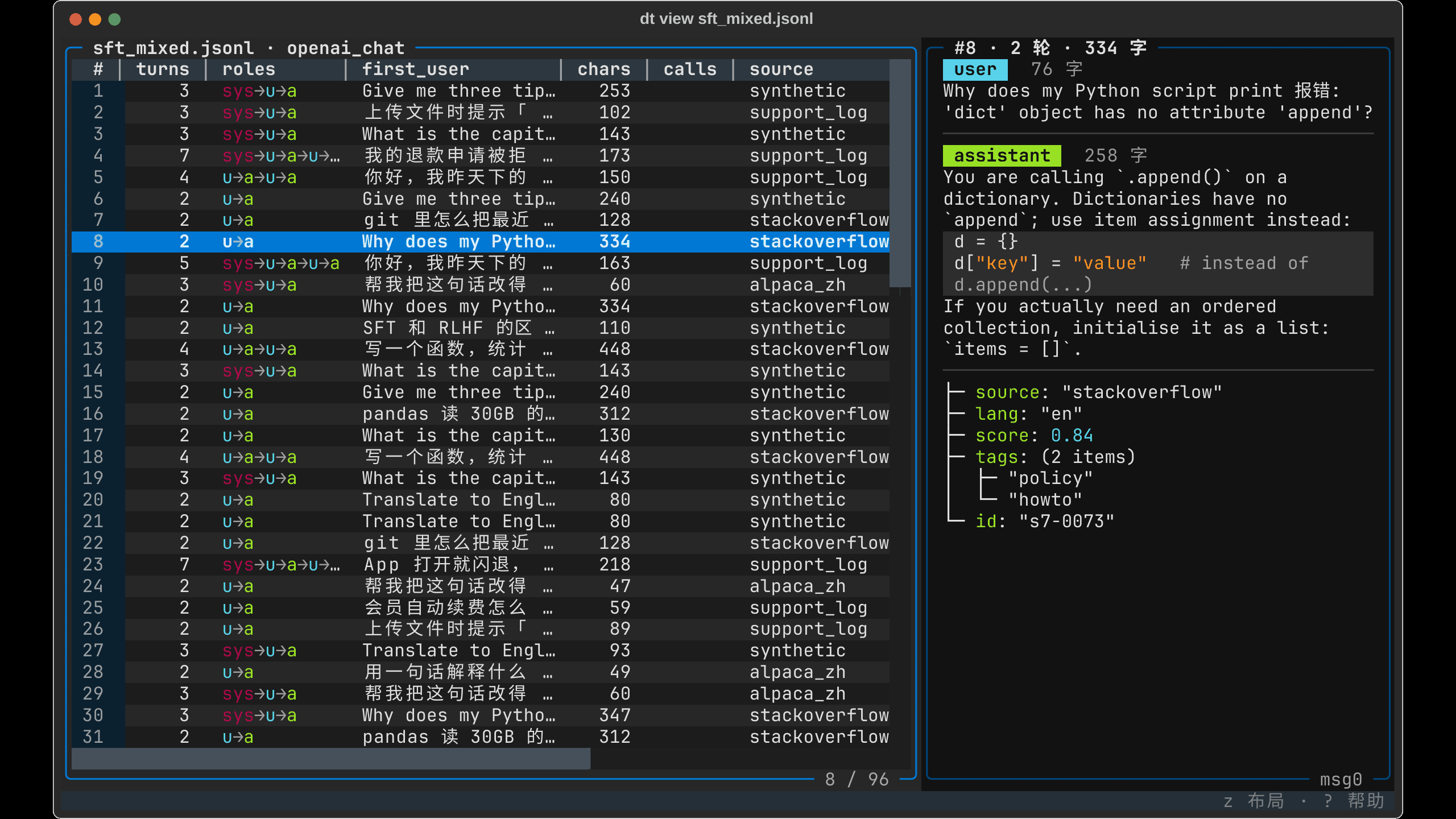
dt view <file> opens a master-detail browser. The table summarizes each sample (derived columns turns/roles/first_user/chars/calls plus your metadata); the detail pane renders the current row by format. JSONL, CSV and Parquet all open, and files with hundreds of thousands of lines open instantly.
 |
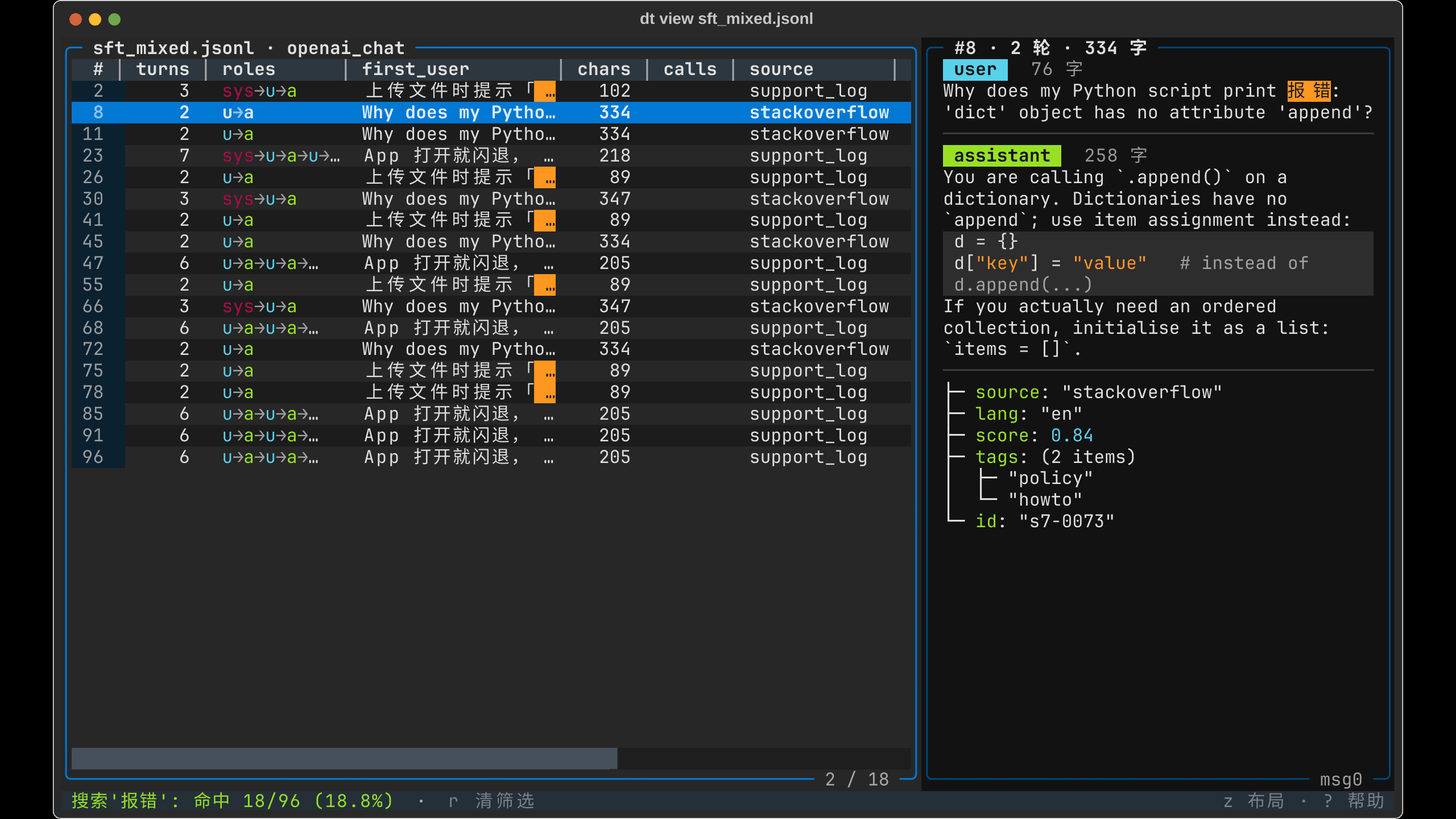 |
| Main screen: pick a row, detail renders by role with code highlighting | / full-file search: every value of every record (assistant replies included), hits in yellow |
 |
 |
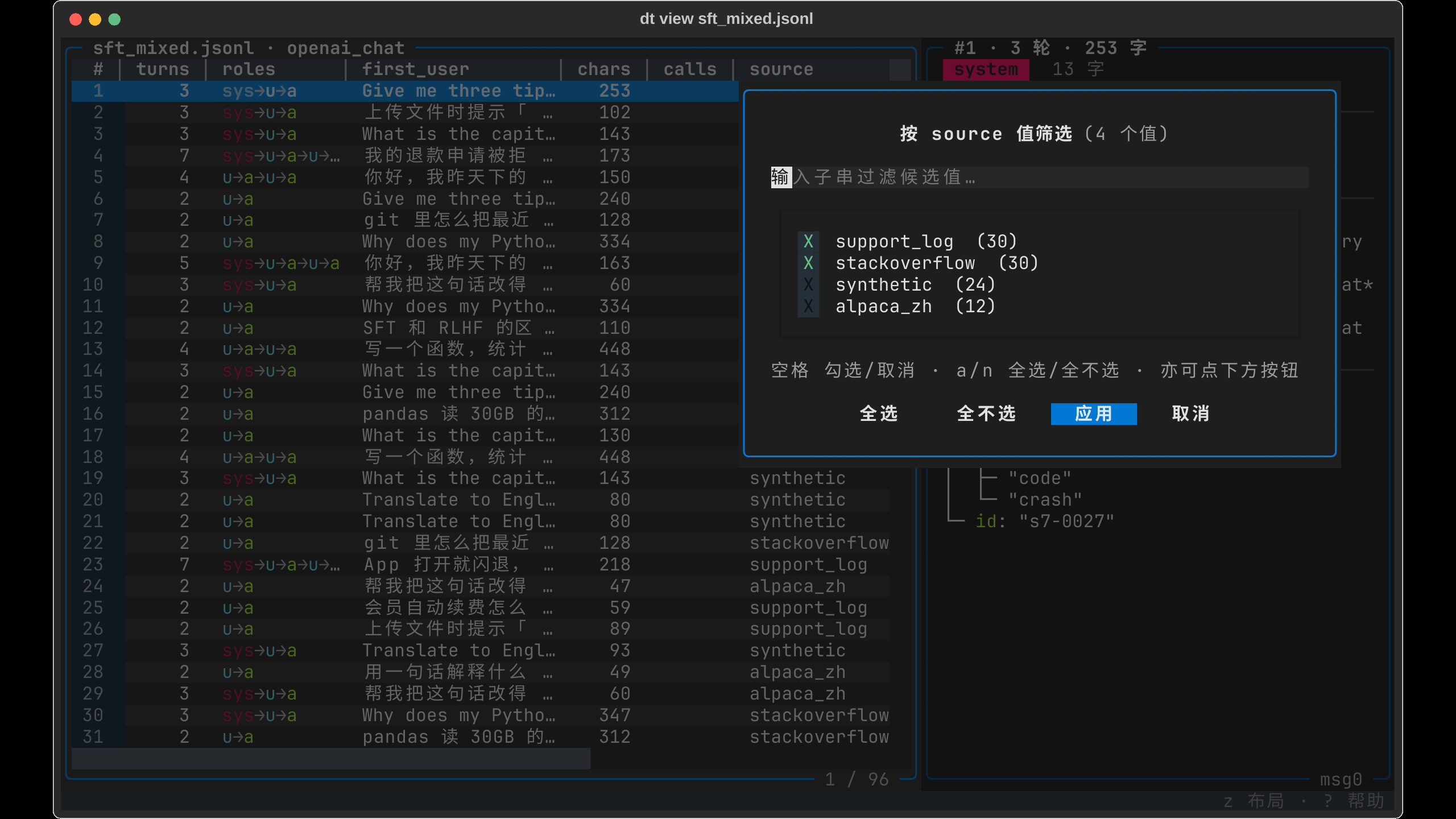
F value picker: Excel AutoFilter style, unique values + counts, keep what you tick |
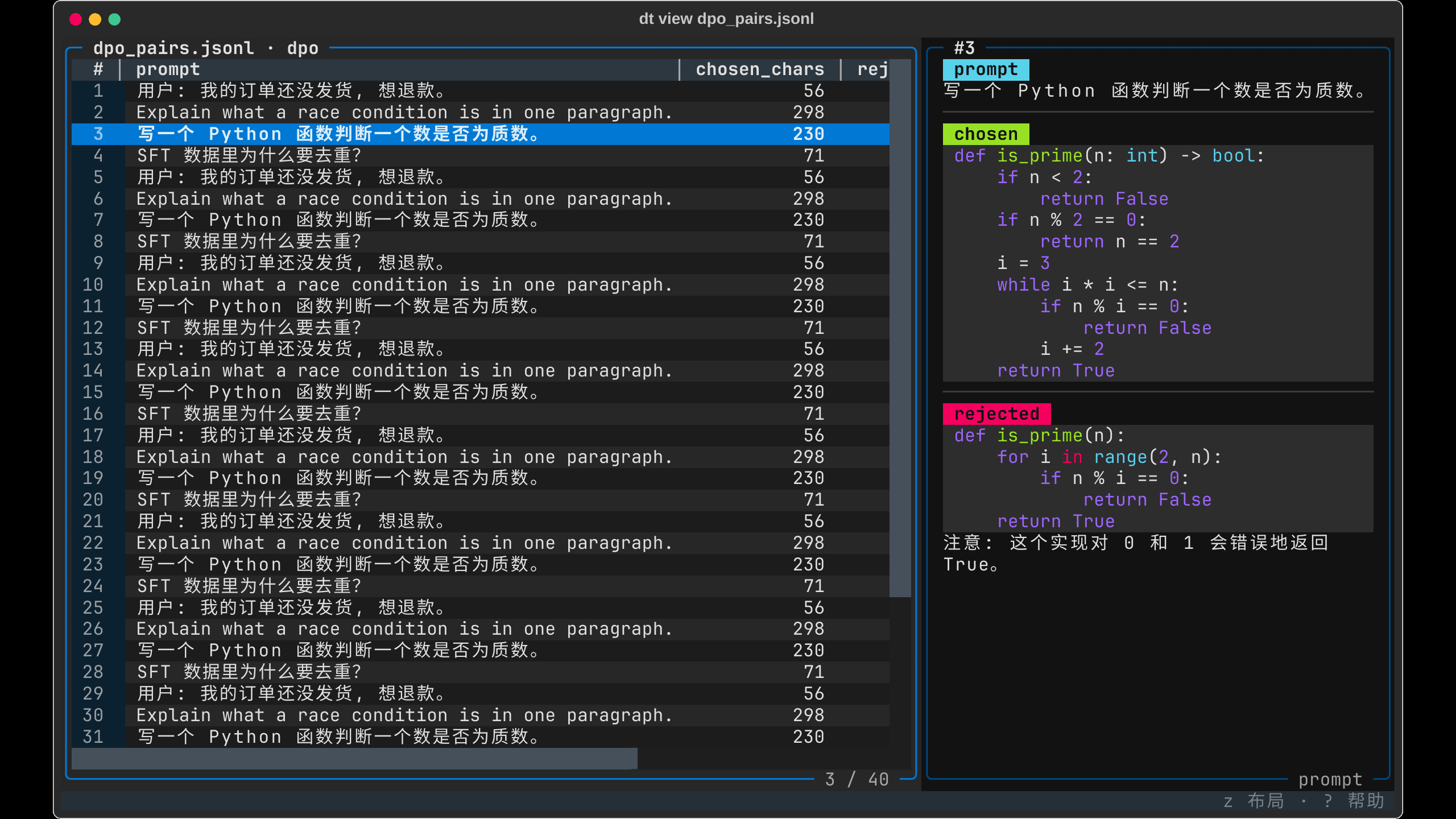
dpo comparison: chosen / rejected in different colors, format auto-detected |
dt view data.jsonl                          # open, press ? for keys
dt view app.jsonl -100 -f                   # follow the last 100 lines (log mode)
dt view data.jsonl -w "turns(x)>=6" -s error   # start filtered + searched
dt sample data.jsonl 500 | dt view -        # pipe: inspect sampled / processed output
| Keys | What they do |
|---|---|
/ f F s |
Full-file search · expression filter (turns(x)>=6 and x.source=='alpaca', the same Python as dt filter) · column value picker · sort. They stack; r clears all |
Enter n/N * |
Zoom into the sample · jump field by field · jump only between search hits |
w C P |
Export the filtered subset to a file (lineage written automatically) · copy a dt view command that reproduces the current view · copy the same conditions as dt filter … | dt sort … to process them |
| |
Run a shell pipe (dt filter - … | dt sort - …, jq works too) over the whole file and browse its output right there; r returns to the file |
y / drag + Ctrl+c |
Copy the whole sample as JSON / copy any text you drag-select in the detail pane (works over SSH and inside tmux) |
| double-click a header | Rename the column; shows at once, q then asks to save it into the file (with lineage) or discard |
Full key list, filter syntax, large-file and follow-mode details: docs/view.md.
How it compares to other terminal viewers
VisiData and tabiew are general table tools, jless and fx are JSON tree viewers, csvlens only reads CSV. None of them has the concept of "this row is a training sample": messages shows up as {3} or a string, and reading a conversation means expanding it level by level, one record at a time. dt view goes the other way: detect the format first, then draw the screen, so one screen is one complete sample.
| dt view | VisiData 3.4 | tabiew 0.15 | jless 0.9 / fx 39 | csvlens 0.15 | |
|---|---|---|---|---|---|
| Positioning | LLM training-data browser | general table Swiss army knife | general table (Polars) | JSON tree viewer | minimal CSV viewer |
| Chat / dpo / alpaca / tool_calls rendered by format | chat turns colored by role, code highlighted, tool-call arguments formatted with bad JSON flagged | no, nested fields show as {3}, expand with ( |
no, nested fields show as strings | generic tree, one record at a time | no JSONL support |
| Mouse | click a header to filter, drag column widths, drag the split, drag-select text to copy, multi-click to select word / line / block, wheel | click a cell, wheel | none (mouse events discarded) | click a row, wheel | none |
| Peak RSS opening a 155 MB / 910k-line JSONL | 91 MB (windowed, does not grow with the file) | 550 MB | 565 MB | 824 MB / 2.3 GB | not supported |
| Search scope | every value of every record (assistant replies included), parallel full-file scan | regex in current or all columns | fuzzy search, SQL | regex within the tree | row regex |
| After filtering | w exports the subset with lineage, C copies a reproducible command |
export | export | none | none |
Follow a growing JSONL (-f) |
yes | no | no | no | no |
| Where they are stronger | — | pivot, frequency tables, joins, plots, dozens of formats | SQL queries, single Rust binary | deep JSON folding, jq paths | zero dependencies, instant start |
When not to use dt view: for joins, pivots or per-column plots use VisiData; to run SQL over a table use tabiew; to inspect the structure of a single JSON document use jless. dt view only wins at "this is a batch of training samples and I need to scan, find, filter and export", which is exactly what you do with training data every day.
Memory is peak RSS after opening the file on the same Linux machine (2026-09). Other rows were checked against each tool's README and source; versions as in the header.
The CLI: a Swiss army knife for training data
Every data command follows one contract: FILE may be - (NDJSON from stdin), a directory, or a quoted glob; without -o data goes to stdout while progress and summaries go to stderr. Conditions, derived fields, sort keys, group keys and join keys are Python expressions with the current row as x.
# primitives
dt filter  data.jsonl "x.score > 0.5 and 'wiki' in x.meta.source"
dt filter  data.jsonl "turns(x) >= 6 and 'get_weather' in calls(x)"    # row helpers: turns/roles/first_user/chars/calls/search
dt select  data.jsonl "id,text,n=len(x.messages),src=x.meta.source"     # project / rename / derive
dt map     data.jsonl "x.text = x.text.strip(); del x.debug"            # edit in place
dt explode data.jsonl --field messages --index-as turn                  # one row per list element
dt sort    data.jsonl --by "len(x.messages)" --desc
dt group   data.jsonl --by "roles(x)" --top 10                         # {"key","count","pct"}, ten largest groups
dt group   data.jsonl --by x.label --agg "avg=mean(len(r.text) for r in g)"
dt describe data.jsonl "turns(x)" "chars(x)" "x.score"                  # quantiles + histogram per expression
dt join    data.jsonl meta.jsonl --on x.id --prefix m_                  # left join, right side in memory
dt join    train.jsonl test.jsonl --on "first_user(x)" --anti           # drop rows that overlap the test set
dt dedupe  data.jsonl --key=messages[0].content -i                      # exact dedupe, in place
dt clean   data.jsonl --drop-empty=text --min-len=messages.#:2 -o clean.jsonl
dt split   data.jsonl --ratio=0.9 --seed=42                             # train/test files
dt concat  data.jsonl -o data.parquet                                   # one file in = format conversion
dt filter  shards/ "x.lang == 'zh'" -o zh.jsonl                         # a directory or 'shards/*.jsonl' reads every file
dt stats   data.jsonl --schema                                          # look before you write expressions

# pipes
dt filter d.jsonl "x.score>0.5" | dt select - "id,n=len(x.messages)" | dt sort - --by x.n --desc | dt head - 5
cat big.jsonl.gz | dt filter - "x.lang=='zh'" | dt transform - --preset=openai_chat | dt view -
dt group d.jsonl --by x.label | dt sort - --by x.count --desc

# and the rest
dt sample data.jsonl 1000 --by=meta.source      # stratified sampling
dt token-stats data.jsonl --model=gpt-4         # token distribution per role
dt validate data.jsonl --preset=openai_chat     # schema check, --filter to keep valid rows
dt diff a.jsonl b.jsonl --key=id                # what changed between two versions
dt export data.jsonl -f llama-factory           # data + config for LLaMA-Factory / ms-swift / Axolotl
dt run pipeline.yaml                            # reproducible pipeline, steps = CLI commands
Rows whose expression fails (missing field, None > 0.5) don't abort the run: filter drops them, select sets the item to null, map keeps the row, and stderr prints one summary at the end. --strict turns the first failure into exit code 1. A bare field name without x. is rejected at compile time instead of silently matching nothing. In a terminal, data commands preview the first 50 rows as a table with the same columns as dt view; piped, they emit NDJSON.
Command reference: docs/cli.md · expressions and field paths: docs/expressions.md · pipelines: docs/pipeline.md.
Python API
The same operations as a chainable class; x.field attribute access works on nested dicts and lists.
from dtflow import DataTransformer, load_stream

(DataTransformer.load("data.jsonl")
    .filter(lambda x: x.score > 0.8)
    .transform(preset="openai_chat", user_field="q", assistant_field="a")
    .dedupe("messages[0].content")
    .save("train.jsonl"))

(load_stream("huge.jsonl")                 # constant memory for files that don't fit
    .filter(lambda x: x["score"] > 0.5)
    .save("filtered.parquet"))
Presets (openai_chat, alpaca, sharegpt, dpo_pair), schema validation, token counting with tiktoken or HuggingFace tokenizers, converters for LLaMA-Factory / ms-swift / Axolotl / HuggingFace datasets / OpenAI Batch, lineage tracking: docs/python-api.md.
Agent skill
dt install-skill                         # Claude Code (default)
dt install-skill --target codex          # Codex
After installing, /dtflow in Claude Code or $dtflow in Codex gives the agent the full reference. The CLI itself is designed to be driven by an agent: dt schema prints the command tree as JSON, dt <cmd> --help carries examples, --dry-run previews every side-effecting command with exit code 10, and errors are structured JSON on stderr when stdout is not a terminal.
Documentation
- Quickstart
- CLI reference
dt view- Expressions and field paths (includes the 0.9 migration table)
- Pipelines
- Python API
- Changelog
Design
dtflow is built on a few decisions that everything else follows from.
- The unit is a training sample, not a row. A sample is a conversation, a preference pair or an instruction; formats are detected, not declared. That one piece of knowledge lives in a single place, the row helpers
turns(x)/roles(x)/calls(x)/search(x, …), and the viewer's columns, the CLI's filters and the pipeline's steps all read from it. - One language. Conditions, keys and derived fields are Python with the current row as
x. There is no DSL to learn and no second dialect: the viewer compiles the same string asdt filter, so what you typed while browsing is what you paste into a script. - Looking and processing are one loop. Every viewer state translates into a command (
Creproduces the view,Preproduces it asdt filter … | dt sort …), and every command's output can be viewed again (dt … | dt view -, or|inside the viewer). Exports carry lineage, so a file can always say where it came from. - The Unix contract, kept strictly. stdout is data, stderr is messages, exit codes mean things,
-is stdin, no-omeans stdout, output format follows the extension. That is what lets 30 small commands compose, and what lets an agent drive them:dt schema, structured JSON errors,--dry-run. - Stream unless the operation cannot.
filter/select/map/clean/dedupe/transformnever load the file; the viewer parses one window and scans the rest in parallel. Onlysort,shuffle,group --aggand the right side ofjoinmaterialize, and the docs say so. - No silent wrong answers. A bare field name, a bad regex or an unknown helper is a compile-time error, not an empty result with exit code 0. Rows that fail at runtime are counted and summarized;
--strictturns the first one into a failure. - Functions over class hierarchies.
dt.to(lambda x: {...})instead ofclass MyFormatter(BaseFormatter). Presets are conveniences, not the core abstraction.
License
MIT
1 maintainer

Metadata
1 maintainer
Release files for dtflow 0.10.4
For a detailed explanation of source distributions (sdists) and built distributions (wheels), please see the package formats documentation.
Source distribution (sdist)
| File | Size | Uploaded | |
|---|---|---|---|
| dtflow-0.10.4.tar.gz | 448.8 kB | Details |
Built distribution (wheel)
| File | Interpreter | ABI | Platform | Reset |
|---|---|---|---|---|
| dtflow-0.10.4-py3-none-any.whl | Python 3 | none | any | Details |
Total release size: 777.4 kB
Release files / dtflow-0.10.4.tar.gz
| Download URL | dtflow-0.10.4.tar.gz |
|---|---|
| Size | 448.8 kB |
| Tags | Source |
|
SHA-256 checksum How to use checksums |
e27fa34150f88cd4cd2cad314a10d430152f1478c11479fdd8b706be607dee06
|
|
BLAKE2b-256 checksum How to use checksums |
5bab54ace71c85584258229f72da51b73daa9165046ca8579d5fbdf1a08e762b
|
| Upload date | |
|
Uploaded using Trusted Publishing? What is trusted publishing? |
Yes |
| Uploaded via |
twine/7.0.0 CPython/3.13.14
|
Provenance
Provenance describes where a file came from. On PyPI, provenance is shared via attestations, which provide a verifiable record of the build or publishing details. View details, limitations and caveats.


PyPI Publish Attestation
PyPI verified that this artifact, at this checksum, originated from the publisher listed below.
Signed by GitHub Actions, verified by PyPI on Oct 2, 2026.
Transparency logRelease files / dtflow-0.10.4-py3-none-any.whl
| Download URL | dtflow-0.10.4-py3-none-any.whl |
|---|---|
| Size | 328.7 kB |
| Tags | Python 3 |
|
SHA-256 checksum How to use checksums |
72a125c1569891d26ba1fd5253facd613b20d53bbfee0140c3640466c822bd17
|
|
BLAKE2b-256 checksum How to use checksums |
254923afb99daa4a560d646b6a18a95a18af1b516151c8bdfac25f4b70d790bc
|
| Upload date | |
|
Uploaded using Trusted Publishing? What is trusted publishing? |
Yes |
| Uploaded via |
twine/7.0.0 CPython/3.13.14
|
Provenance
Provenance describes where a file came from. On PyPI, provenance is shared via attestations, which provide a verifiable record of the build or publishing details. View details, limitations and caveats.
PyPI Publish Attestation
PyPI verified that this artifact, at this checksum, originated from the publisher listed below.
Signed by GitHub Actions, verified by PyPI on Oct 2, 2026.
Transparency log













