
ductus
Gauge which parts of a text read as machine-written, and say why — with every finding anchored to the exact characters that carry it.
from ductus import gauge

report = gauge(open("draft.md").read())
report.document.label  # 'mixed-signals'
report.segments[3].lean  # +0.62  (-1 human … +1 machine)
report.segments[3].signals[0].note
# "a colon introducing a three-part parallel enumeration -- a textbook assistant construction"
pip install ductus
ductus gauge draft.md                                  # a readable diagnosis
ductus gauge draft.md --format html --out report.html  # shaded, hover for the reason
ductus gauge draft.md --format json                    # for a program
In palaeography the ductus is the characteristic manner and sequence of strokes by which a scribe's hand is recognised. This package looks for the equivalent in prose.
There is no percentage in this package, and that is the point
Every detector on the market emits a number like "87% AI". That number reads as a calibrated probability, is not one, and is how people get falsely accused. What you get here instead is three things you can argue with: a lean in [-1, +1], an evidence strength, and a coarse label. Behind each of them is a list of signals, each with a direction, a weight, the detector that produced it, a plain-language reason, and the exact span it came from.
Four things are true and belong in any report you make from this:
- Heavily-edited human writing and model-assisted writing look the same. Re-reading a hard message ten times sands off exactly the irregularity that marks it as human.
- Detectors over-flag non-native English writers — 61.3% false positives across seven commercial detectors on non-native TOEFL essays, against near-zero on native-speaker controls [1].
- Register contamination is real: people who read model output all day start writing like it, unassisted.
- No detector survives a motivated adversary, and that is a proven result rather than a gap in current tooling [2].
So this package describes text. It does not make claims about people, and it should not be used to.
What it looks at
Four detectors ship, all deterministic, all free, none needing a model or a key.
| Detector | Finds | Example |
|---|---|---|
tells |
Catalogue phrases models overuse, tiered by confidence | "delve", "it's important to note", "In conclusion," |
forensic |
Mechanical traces of how the text was produced | a hard line break mid-sentence, mixed straight-and-curly apostrophes, trailing whitespace, em-dash density |
rhetoric |
Sentence shapes a phrase list cannot see | "not X but Y", a colon introducing a three-part parallel enumeration, concession-then-pivot |
rhythm |
Burstiness — how much sentence length varies | metronomic paragraphs |
Note that several of these argue for a human. A detector that can only ever accuse is not a measuring instrument. In practice the mechanical signals are often the most decisive thing in a file, in either direction.
The deterministic pass finds phrases, artifacts and a few shapes. It cannot find prose that is machine-written and bland — for that a model has to read it, which is what the shipped agent skills are for.
How it fits together
flowchart TD
  TXT["<b>text</b>"] --> SEG["<b>segmenter=</b><br/>paragraph · sentence · document"]
  SEG -->|"Spans — offsets + quote/prefix/suffix"| DET["<b>detectors=</b><br/>tells · forensic · rhetoric · rhythm"]
  DET -->|"Signals — direction · weight · reason · span"| AGG["<b>aggregate=</b><br/>lean · strength · label"]
  JUD["an agent's reading<br/><code>--judgments</code>"] -.->|"more Signals"| AGG
  AGG --> REP["<b>Report</b>"]
  REP --> MD["<b>to_markdown()</b><br/>a diagnosis to read"]
  REP --> HTML["<b>to_html()</b><br/>a page to hover"]
  REP --> JSON["<b>to_json()</b><br/>a structure to build on"]

  classDef seam fill:#fdf0dc,stroke:#d89a3f,color:#1a1a18;
  classDef out fill:#e9f1fa,stroke:#6f9ecb,color:#1a1a18;
  classDef plain fill:#f5f5f1,stroke:#b8b8ac,color:#1a1a18;
  class SEG,DET,AGG seam;
  class MD,HTML,JSON out;
  class TXT,REP,JUD plain;
The three amber boxes are the seams — each is one keyword argument. Everything below Report is a renderer, and renderers are pure functions of it: nothing in the analysis knows or cares which one you call, and adding a fourth changes nothing upstream.
Renderings
One analysis, three outputs. Pick by who is reading.
| Renderer | CLI | Output | Reach for it when |
|---|---|---|---|
to_markdown(report) |
ductus gauge draft.md |
A synopsis, a table of flagged segments, then a Why section quoting each signal and its reason | A terminal, a PR comment, a document, an agent that needs to reason about the result in prose |
to_html(report, text=…) |
--format html --out report.html |
One self-contained file — no build step, no CDN, no network | You want to see where the evidence is, and read why without losing your place |
to_json(report) |
--format json |
The full structure: every span, signal, weight and reason | A frontend, a pipeline, a calibration run, anything that is not a person |
The HTML rendering
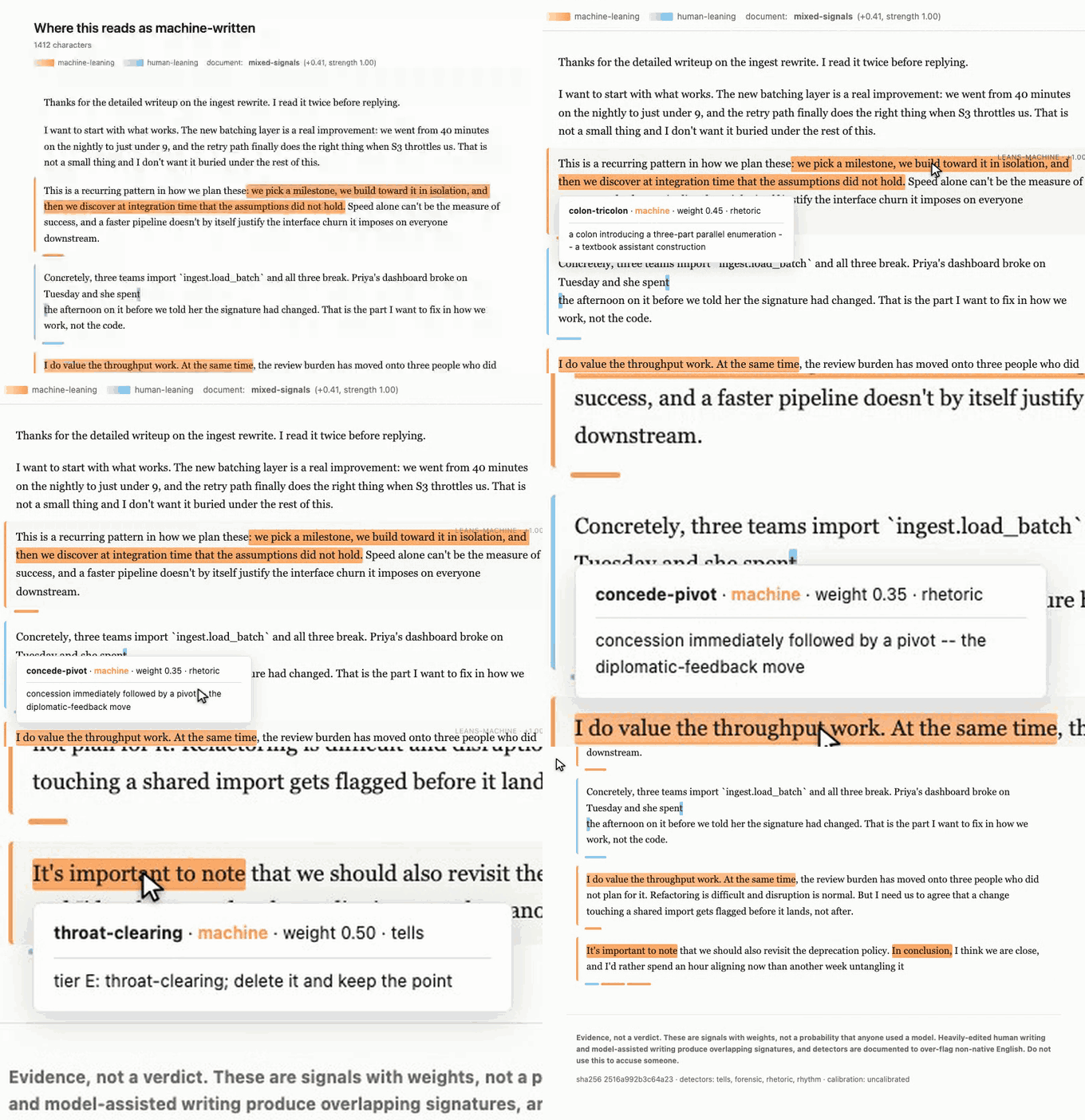
Hover (or keyboard-focus) any highlight and the reason appears beside it — which detector fired, which direction it argues, and what it weighs. Paragraphs carry a left border and a lean badge; the bar under each one is its evidence, one segment per signal.
Two deliberate choices, both from the annotation-systems research in misc/docs/research/:
- Hue encodes score, and only score. A perceptually-uniform ramp, warm for machine-leaning and cool for human-leaning, with lightness re-clamped per theme so it works in light and dark mode. Overlap is shown structurally, in the lane under the paragraph, never by blending colours — stacking translucent fills is what makes overlapping highlights unreadable.
- The reason is anchored to the highlight, not parked in a corner, so the eye does not have to leave the text to find out why. Below 640px it falls back to a bottom sheet.
The GIF above was recorded with walkthru driving a real browser — the script is misc/demo/make_gif.py, and it is the whole pipeline: measure where the highlights are, build a demo document whose camera zooms to them, play it against a recording page, render the capture to a GIF.
Agent skills
The primary surface. Two skills and a subagent ship inside the package and install with one command:
ductus install-skills --write # links them into ~/.claude/skills
ductus— what may and may not be claimed from a text, and which task is which.ductus-gauge— the full reading: the deterministic scan, then a judgment pass with rubrics for the nine machine-leaning and six human-leaning shapes that regular expressions miss, then the write-up.ductus-reader(subagent) — does the whole reading in its own context and returns a finished diagnosis.
An agent's own reading folds back in beside the deterministic signals, anchored by quote:
ductus gauge draft.md --judgments judgments.json --format html --out report.html
A quote that no longer occurs is dropped rather than mis-anchored, so re-running after an edit is safe.
Seams
Three, each one keyword argument, each defaulting to something that genuinely works:
gauge(text, segmenter="sentence")  # or "paragraph", "document", or a callable
gauge(
    text, detectors=["forensic", "rhetoric"]
)  # or your own (text, span) -> Iterator[Signal]
gauge(text, aggregate=my_calibrated_scorer)  # replace the scoring model wholesale
A detector is a plain function (text, span) -> Iterator[Signal]. There is no base class and nothing to register. Adding Fast-DetectGPT, Binoculars or a vendor API means writing one more function of that shape — see the roadmap.
For long documents, iter_segments is the streaming core and gauge is the batch facade over it.
Spans survive editing
Every Span carries character offsets and the W3C Web Annotation redundant selectors (quote, prefix, suffix), because plain offsets do not survive an edit to the text. That is what lets a viewer re-find a finding after the document changed, and what a future edit-and-re-score UI is built on.
Relationship to deslop
ductus is the read side: where does this text read as machine-written, and why. acquaint's deslop is the write side: make my draft not read that way, in my voice, calibrated to this reader. They share this package's tells catalogue — acquaint imports it — and compose naturally: gauge, deslop the flagged spans, gauge again.
They are separate packages because they have different inputs. deslop needs a model of the reader; ductus must work on a stranger's text with nothing but the text.
Install
pip install ductus              # the core: pyyaml and cw, nothing else
pip install "ductus[local]"     # + model-based detectors, offline, no API key
pip install "ductus[api]"       # + vendor detector adapters
References
[3] Sanderson R, Ciccarese P, Young B. Web Annotation Data Model. W3C Recommendation, 2017.
[4] Tolstykh I, et al. LLMTrace: A Corpus for Classification and Fine-Grained Localization of AI-Written Text. arXiv:2509.21269. — the ground-truth fixture in tests/fixtures/ is a slice of this, Apache-2.0.
1 maintainer

Metadata
1 maintainer
Release files for ductus 0.0.4
For a detailed explanation of source distributions (sdists) and built distributions (wheels), please see the package formats documentation.
Source distribution (sdist)
| File | Size | Uploaded | |
|---|---|---|---|
| ductus-0.0.4.tar.gz | 45.8 kB | Details |
Built distribution (wheel)
| File | Interpreter | ABI | Platform | Reset |
|---|---|---|---|---|
| ductus-0.0.4-py3-none-any.whl | Python 3 | none | any | Details |
Total release size: 87.0 kB
Release files / ductus-0.0.4.tar.gz
| Download URL | ductus-0.0.4.tar.gz |
|---|---|
| Size | 45.8 kB |
| Tags | Source |
|
SHA-256 checksum How to use checksums |
23ddb164a06b3236a2e70465bb10212052fed730f22f7070a063d5a23183f122
|
|
BLAKE2b-256 checksum How to use checksums |
b5104e3960695e3688a90ab17632b6903dc5578f0bedae5efea36e53f121c265
|
| Upload date | |
|
Uploaded using Trusted Publishing? What is trusted publishing? |
No |
| Uploaded via |
uv/0.12.15 {"installer":{"name":"uv","version":"0.12.15","subcommand":["publish"]},"python":null,"implementation":{"name":null,"version":null},"distro":{"name":"Ubuntu","version":"24.04","id":"noble","libc":null},"system":{"name":null,"release":null},"cpu":null,"openssl_version":null,"setuptools_version":null,"rustc_version":null,"ci":true}
|
Release files / ductus-0.0.4-py3-none-any.whl
| Download URL | ductus-0.0.4-py3-none-any.whl |
|---|---|
| Size | 41.2 kB |
| Tags | Python 3 |
|
SHA-256 checksum How to use checksums |
8b9459f0e8e4f9bca262afeb625ac62b5b0de34c53991e0b52cd6c402dd04b66
|
|
BLAKE2b-256 checksum How to use checksums |
e6b612389371b3585fbb3f04bbee53aa53c3e0861c4ceba92d8516f8387e789d
|
| Upload date | |
|
Uploaded using Trusted Publishing? What is trusted publishing? |
No |
| Uploaded via |
uv/0.12.15 {"installer":{"name":"uv","version":"0.12.15","subcommand":["publish"]},"python":null,"implementation":{"name":null,"version":null},"distro":{"name":"Ubuntu","version":"24.04","id":"noble","libc":null},"system":{"name":null,"release":null},"cpu":null,"openssl_version":null,"setuptools_version":null,"rustc_version":null,"ci":true}
|














