

trash-panda
Run models bigger than your GPU: stream weights layer by layer across GPU, RAM and disk.
Documentation · Quick start · Guides · API Guide · Design · Roadmap · Changelog · PyPI





Status: early (Phase 1). The API may change. The package name is temporary
Documentation: yla382.github.io/trashpanda
Why
Loading a big checkpoint the usual way needs two full copies in RAM, and a model that does not fit in VRAM simply fails. trash-panda builds the model without allocating weights (meta device), reads the checkpoint tensor by tensor, and keeps each block of the model wherever it fits best:
| Tier | Where the block waits | Cost per forward pass |
|---|---|---|
gpu |
on the GPU, in compact form (for example fp8) | only the expansion to bf16 |
ram |
in system RAM, in compact form | a transfer over PCIe |
disk |
in the checkpoint file | a file read |
Only one block at a time is expanded to the compute dtype, so peak VRAM is roughly one block plus your activations, whatever the model size.
It works with any floating-point checkpoint: fp32, fp16 and bf16 are streamed as they are (no quantization needed), and fp8 (with or without scale tensors) is kept compact so more fits.
Install
Install PyTorch first (the build that matches your GPU, see https://pytorch.org), then:
pip install dumpsterpanda
The package is imported as trash_panda. For the command line (trash-panda plan and trash-panda info), install the
extra: pip install "dumpsterpanda[cli]". To try the latest development version straight from GitHub instead:
pip install git+https://github.com/yla382/trashpanda.git
Why is it called dumpsterpanda on PyPI? 🦝😢
The project is called trash-panda, but the name trashpanda
was already taken on PyPI, and PyPI wouldn't let trash-panda sit that close to it either. So the raccoon moved
one dumpster over. The import is still trash_panda.
Quick start
One model. stage() builds it, plans where each block lives, loads it, and gives its memory back when the block ends:
import torch
from trash_panda import stage

def build():
    with torch.device("meta"):                  # the structure only: no weights are allocated
        return MyModel(config).eval()

with stage(build, "model.safetensors") as (model, p, handle):
    print(p)                                    # where each block lives
    out = model(x)
                                                # here the model's RAM and VRAM are free again
The planner decides from the checkpoint's sizes and the memory that is free. Steer it with arguments such as
resident_blocks=12, max_vram="9GB" or min_free_ram="4GB".
Several models, one after another. A Coordinator shares one pinned pool among them and can prepare the next model
while the current one runs:
from trash_panda import Coordinator, Step

co = Coordinator(
    Step("text", build_text, "text.safetensors"),
    Step("unet", build_unet, "unet.safetensors", resident_blocks=12),
    Step("vae", build_vae, "vae.safetensors", skip_prefixes=("encoder.",)),
)
with co:
    with co.stage("text", ram_preload=False) as (text, p, handle):    # its RAM tier is not read early
        cond = encode(text, ...)
    with co.stage("unet") as (unet, p, handle):
        latents = denoise(unet, cond, ...)
    with co.stage("vae") as (vae, p, handle):
        image = decode(vae, latents)
Command line
Look at a checkpoint without loading it. plan shows where each block would live on this machine, and info shows what is
in the file:
trash-panda plan model.safetensors
trash-panda info model.safetensors
For a small example checkpoint (16 blocks, 424.5 MB), with the limits set low on purpose so that all three tiers are
used (--max-vram 400MB --headroom-vram 50MB --max-ram 150MB --min-free-ram 0), plan prints this (the hardware
lines and the warnings are left out):
example.safetensors: 16 blocks, 424.5 MB
┌─────────────┬─────────┬────────┬──────────────┬─────────────┬──────────────┐
│ Group       │       N │ Blocks │          GPU │         RAM │         Disk │
├─────────────┼─────────┼────────┼──────────────┼─────────────┼──────────────┤
│ blocks.<N>. │ 0 to 15 │     16 │ 9 (226.5 MB) │ 3 (75.5 MB) │ 4 (100.7 MB) │
└─────────────┴─────────┴────────┴──────────────┴─────────────┴──────────────┘
┌──────┬──────────┬───────────────────────────────────┬──────────┐
│      │ Budget   │ What it holds                     │     Size │
├──────┼──────────┼───────────────────────────────────┼──────────┤
│ GPU  │ 350.0 MB │ 9 blocks kept on the GPU          │ 226.5 MB │
│      │          │ Input and output layers           │  21.8 MB │
│      │          │ Workspace for streaming blocks in │  83.1 MB │
│      │          │ Unused                            │  18.7 MB │
├──────┼──────────┼───────────────────────────────────┼──────────┤
│ RAM  │ 82.9 MB  │ 3 blocks                          │  75.5 MB │
│      │          │ Unused                            │   7.4 MB │
├──────┼──────────┼───────────────────────────────────┼──────────┤
│ Disk │ none     │ 4 blocks that did not fit in RAM  │ 100.7 MB │
└──────┴──────────┴───────────────────────────────────┴──────────┘
GPU budget: 400.0 MB allowed by --max-vram, less 50.0 MB kept for activations
RAM budget: 150.0 MB allowed by --max-ram, less 67.1 MB kept for the system and copy buffers
Trace viewer
To see what a run really did, switch recording on and open the recording afterwards. With TRASH_PANDA_TRACE=1 set, a
trace file is written when the stage() or Coordinator block ends, into TRASH_PANDA_TRACE_DIR (by default
~/.cache/trash_panda/traces):
trash-panda trace            # open the newest recording in the browser
trash-panda trace --list     # list the recordings
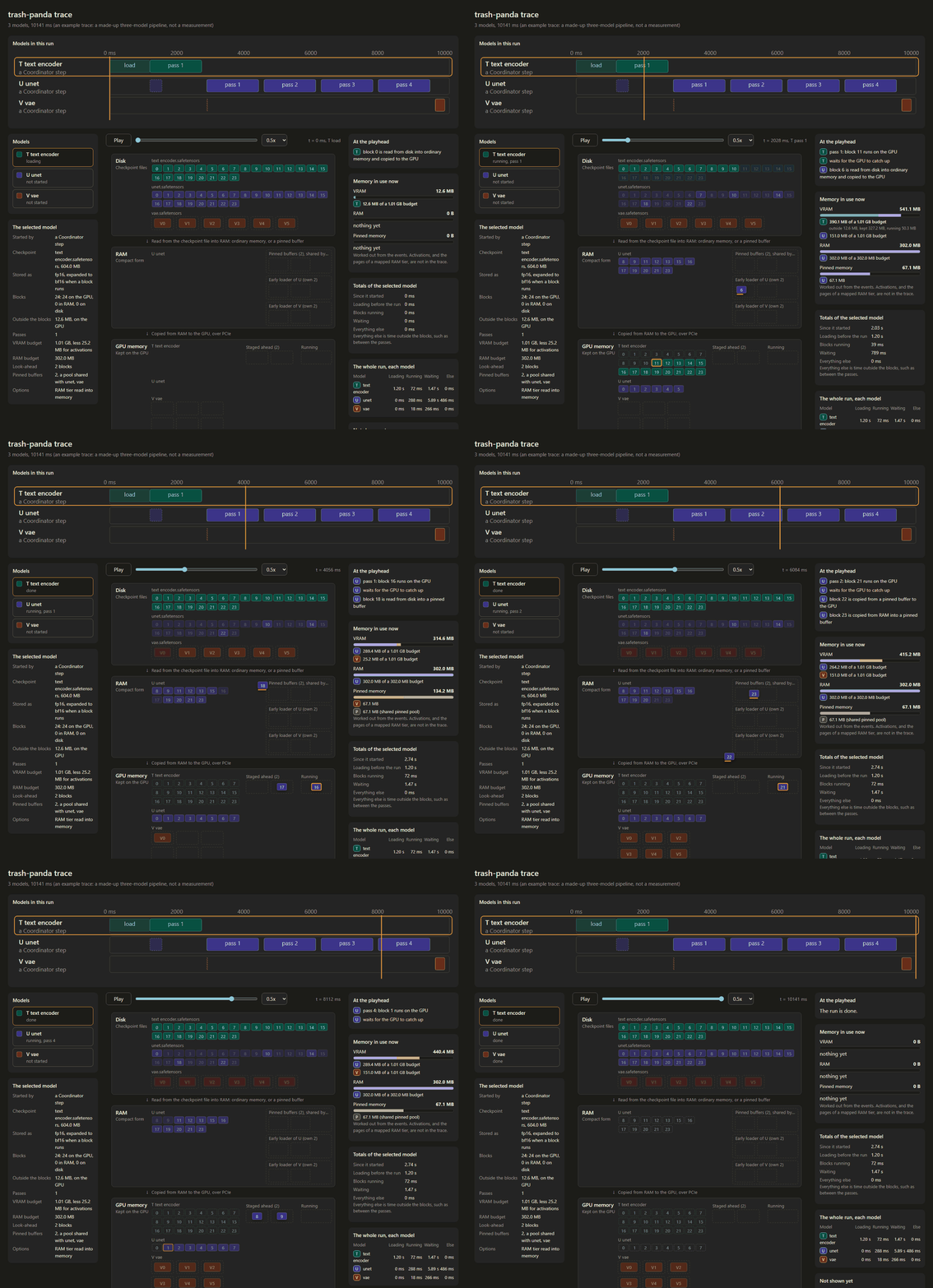
The recording above is an example trace (made-up data, not a measurement).
Documentation
- Quick start: from install to a first run
- Guides: running a stage, running a pipeline, storage dtype and the command line
- API reference: every public function and class, with its
parameters and defaults, and the settings with their
TRASH_PANDA_*environment variables - Design: how it works, in detail, and what we measured
- Known issues, limitations and the roadmap
- CHANGELOG.md
Benchmarks
Measurements on one machine, and a script to reproduce them with SDXL, are in BENCHMARK.md and examples/. They are single runs on a Windows desktop whose free memory changes from run to run, so they are indicative only, and they do not show that trash-panda is faster than the other tools.
Development
pip install pytest psutil
pytest
Tests run on the CPU with a tiny fake model. The documentation is built with MkDocs (pip install -r docs/requirements.txt,
then mkdocs serve).
License
AGPL-3.0-only. See LICENSE.
1 maintainer

Metadata
1 maintainer
Release files for dumpsterpanda 0.2.3
For a detailed explanation of source distributions (sdists) and built distributions (wheels), please see the package formats documentation.
Source distribution (sdist)
| File | Size | Uploaded | Provenance | Actions |
|---|---|---|---|---|
| dumpsterpanda-0.2.3.tar.gz | 119.9 kB | With provenance | Details for dumpsterpanda-0.2.3.tar.gz |
Built distribution (wheel)
| File | Interpreter | ABI | Platform | Actions Reset |
|---|---|---|---|---|
| dumpsterpanda-0.2.3-py3-none-any.whl | Python 3 | none | any | Details for dumpsterpanda-0.2.3-py3-none-any.whl |
Total release size: 258.0 kB
Release files / dumpsterpanda-0.2.3.tar.gz
| Download URL | dumpsterpanda-0.2.3.tar.gz |
|---|---|
| Size | 119.9 kB |
| Tags | Source |
|
SHA-256 checksum How to use checksums |
bef4ccc6844481facfcfa1db3870f8137fec1408a8eaeba30c0905df4d00e45a
|
|
BLAKE2b-256 checksum How to use checksums |
241f2e96e0eb9f8f183c7ae6cf94bacef46bc468e3b2598c6fc285770db6c95f
|
| Upload date | |
|
Uploaded using Trusted Publishing? What is trusted publishing? |
Yes |
| Uploaded via |
twine/7.0.0 CPython/3.13.16
|
Provenance
Provenance describes where a file came from. On PyPI, provenance is shared via attestations, which provide a verifiable record of the build or publishing details. View details, limitations and caveats.


PyPI Publish Attestation
PyPI verified that this artifact, at this checksum, originated from the publisher listed below.
Signed by GitHub Actions, verified by PyPI on Nov 19, 2026.
Transparency logRelease files / dumpsterpanda-0.2.3-py3-none-any.whl
| Download URL | dumpsterpanda-0.2.3-py3-none-any.whl |
|---|---|
| Size | 138.1 kB |
| Tags | Python 3 |
|
SHA-256 checksum How to use checksums |
98af35d279c9858e9c3c3efaaf8616f222afa86a6c8c6459bea0a4112feca778
|
|
BLAKE2b-256 checksum How to use checksums |
62b2a7c9e18679dbe210ff32d617cbb5752e11f84ecea36f88d3e244c1fc56f2
|
| Upload date | |
|
Uploaded using Trusted Publishing? What is trusted publishing? |
Yes |
| Uploaded via |
twine/7.0.0 CPython/3.13.16
|
Provenance
Provenance describes where a file came from. On PyPI, provenance is shared via attestations, which provide a verifiable record of the build or publishing details. View details, limitations and caveats.
PyPI Publish Attestation
PyPI verified that this artifact, at this checksum, originated from the publisher listed below.
Signed by GitHub Actions, verified by PyPI on Nov 19, 2026.
Transparency logSecurity for dumpsterpanda 0.2.3
Provenance
Provenance describes where a file came from. On PyPI, provenance is shared via attestations, which provide a verifiable record of the build or publishing details. View details, limitations and caveats.
Full provenance
Both files in this release have been uploaded with provenance metadata.
Attestation for dumpsterpanda-0.2.3.tar.gz
PyPI Publish Attestation
PyPI verified that this artifact, at this checksum, originated from the publisher listed below.
Signed by GitHub Actions, verified by PyPI on Nov 19, 2026.
Transparency logA note on package security
PyPI is a repository for distributing packages, not a service for auditing them. While third-party security researchers and our staff do their best to detect and remove malicious packages, PyPI cannot guarantee the quality, security or suitability of any given package.
To learn more about protecting yourself from malicious actors, visit our package security documentation.














